
Piano telefon Bluetooth dengan ESP32
Jadikan telefonmu piano 8 kekunci: tekan satu kekunci dan buzzer pasif pada ESP32 memainkan not itu, tanpa internet atau Wi-Fi. Panduan langkah demi langkah bagi templat Bluetooth Piano telefon dalam aplikasi, dengan buzzer dan dua wayar jumper. Pergi ke Bengkelku › Peranti › Tambah peranti › Bluetooth, pilih Piano telefon dan muat naik kod dengan Dapatkan kod. Butang Sediakan sebagai panel Bluetooth di halaman ini juga membuka panduan persediaan dengan templat ini.
Video
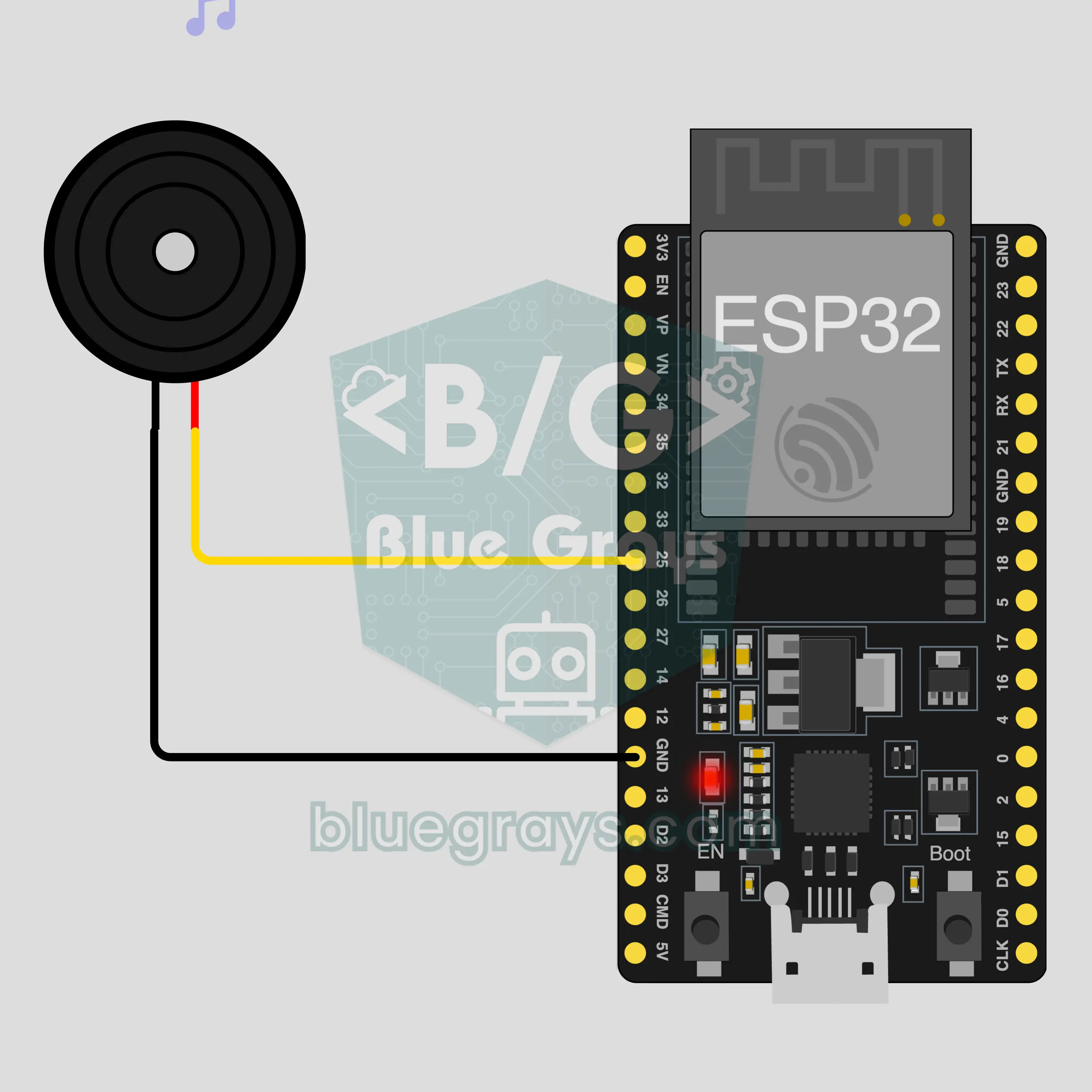
Gambar Rajah Litar
Kod Sumber
1// ┌───────────────────────────┐
2// │ BlueGrays · bluegrays.com │
3// │ Bluetooth · ESP32         │
4// │ BG-Piyano                 │
5// └───────────────────────────┘
6// Phone piano
7// Arduino IDE board: ESP32 Dev Module
8// the BLE library comes with the ESP32 board package, nothing extra to install
9
10#include <BLEDevice.h>
11#include <BLEServer.h>
12#include <BLE2902.h>
13
14const char BLE_NAME[] = "BG-Piyano";  // the board advertises with this name, the app finds it in the list by it
15
16// Pins: change them here if you wired differently
17const int BUZZER_PIN = 25;  // use a passive buzzer (an active one only makes a single tone)
18
19void btWrite(const char *text);
20void onValue(const char *key, const char *value);
21void sendAll();
22void onLinkLost();
23
24// ── The app sends "key=value" lines; on "?" the board sends all its values ──
25char line[65];
26uint8_t lineLen = 0;
27unsigned long lastRxMs = 0;
28
29bool is(const char *a, const char *b) { return strcmp(a, b) == 0; }
30bool isOn(const char *v) { return v[0] == '1'; }
31
32void sendText(const char *key, const char *value) {
33  char out[72];
34  snprintf(out, sizeof(out), "%s=%s\n", key, value);
35  btWrite(out);
36}
37
38void sendInt(const char *key, long value) {
39  char text[12];
40  snprintf(text, sizeof(text), "%ld", value);
41  sendText(key, text);
42}
43
44void sendFloat(const char *key, float value) {
45  char text[16];
46  dtostrf(value, 1, 1, text);
47  sendText(key, text);
48}
49
50void handleLine(char *text) {
51  char *eq = strchr(text, '=');
52  if (eq == nullptr) {
53    if (text[strlen(text) - 1] == '?') {
54      btWrite("@v=1.0\n");  // the "@v" line tells the app the code version
55      sendAll();
56    }
57    return;
58  }
59  *eq = '\0';
60  onValue(text, eq + 1);
61}
62
63void feed(char c) {
64  lastRxMs = millis();
65  if (c == '\n' || c == '\r') {
66    if (lineLen == 0) return;
67    line[lineLen] = '\0';
68    lineLen = 0;
69    handleLine(line);
70  } else if (lineLen < sizeof(line) - 1) {
71    line[lineLen++] = c;
72  }
73}
74
75// ── Bluetooth (Nordic UART) ──
76#define UART_SERVICE "6E400001-B5A3-F393-E0A9-E50E24DCCA9E"
77#define UART_RX "6E400002-B5A3-F393-E0A9-E50E24DCCA9E"
78#define UART_TX "6E400003-B5A3-F393-E0A9-E50E24DCCA9E"
79
80BLECharacteristic *txChar = nullptr;
81volatile bool linked = false;
82volatile bool linkLost = false;
83// incoming bytes move from the Bluetooth task to loop() through a small ring buffer
84const int RX_SIZE = 256;
85volatile uint8_t rxBuf[RX_SIZE];
86volatile int rxHead = 0, rxTail = 0;
87
88class ServerEvents : public BLEServerCallbacks {
89  void onConnect(BLEServer *server) override { linked = true; }
90  void onDisconnect(BLEServer *server) override { linked = false; linkLost = true; }
91};
92
93class RxEvents : public BLECharacteristicCallbacks {
94  void onWrite(BLECharacteristic *c) override {
95    auto v = c->getValue();
96    for (size_t i = 0; i < v.length(); i++) {
97      int next = (rxHead + 1) % RX_SIZE;
98      if (next == rxTail) break;
99      rxBuf[rxHead] = (uint8_t)v[i];
100      rxHead = next;
101    }
102  }
103};
104
105// lines go out in 20-byte packets (works with every phone)
106void btWrite(const char *text) {
107  if (!linked || txChar == nullptr) return;
108  size_t n = strlen(text);
109  for (size_t i = 0; i < n; i += 20) {
110    size_t len = n - i < 20 ? n - i : 20;
111    txChar->setValue((uint8_t *)text + i, len);
112    txChar->notify();
113    delay(4);
114  }
115}
116
117void btBegin() {
118  BLEDevice::init(BLE_NAME);
119  BLEServer *server = BLEDevice::createServer();
120  server->setCallbacks(new ServerEvents());
121  BLEService *uart = server->createService(UART_SERVICE);
122  txChar = uart->createCharacteristic(UART_TX, BLECharacteristic::PROPERTY_NOTIFY);
123  txChar->addDescriptor(new BLE2902());
124  BLECharacteristic *rx = uart->createCharacteristic(UART_RX, BLECharacteristic::PROPERTY_WRITE | BLECharacteristic::PROPERTY_WRITE_NR);
125  rx->setCallbacks(new RxEvents());
126  uart->start();
127  BLEAdvertisementData adv;
128  adv.setFlags(0x06);
129  adv.setCompleteServices(BLEUUID(UART_SERVICE));
130  BLEAdvertisementData scan;
131  scan.setName(BLE_NAME);
132  BLEAdvertising *advertising = BLEDevice::getAdvertising();
133  advertising->setAdvertisementData(adv);
134  advertising->setScanResponseData(scan);
135  BLEDevice::startAdvertising();
136}
137
138void btPoll() {
139  while (rxTail != rxHead) {
140    char c = (char)rxBuf[rxTail];
141    rxTail = (rxTail + 1) % RX_SIZE;
142    feed(c);
143  }
144  if (linkLost) {
145    linkLost = false;
146    onLinkLost();
147    delay(100);
148    BLEDevice::startAdvertising();
149  }
150}
151
152// ── ESP32 ──
153void onValue(const char *key, const char *value) {
154  if (is(key, "nota")) {  // "nota=Hz" plays the note, "nota=0" stops it
155    int hz = atoi(value);
156    if (hz > 0) tone(BUZZER_PIN, hz);
157    else noTone(BUZZER_PIN);
158  }
159}
160
161void sendAll() {
162  sendInt("nota", 0);
163}
164
165void onLinkLost() {
166  noTone(BUZZER_PIN);  // Connection lost: the sound stops
167}
168
169void setup() {
170  Serial.begin(115200);
171  pinMode(BUZZER_PIN, OUTPUT);
172  btBegin();
173  Serial.print(F("BlueGrays Bluetooth: "));
174  Serial.println(BLE_NAME);
175}
176
177void loop() {
178  btPoll();
179}
180Soalan Lazim
Adakah ia berfungsi dengan iPhone?
Ya. Bluetooth Low Energy (BLE) terbina dalam ESP32 berkomunikasi dengan iPhone dan Android. iPhone tidak dapat bersambung ke modul Bluetooth klasik seperti HC-05 dan HC-06, dan projek ini tidak memerlukannya. Jangan cuba menggandingkan papan dalam tetapan Bluetooth telefonmu; papan BLE mungkin tidak muncul di situ, dan itu perkara biasa. Aplikasi BlueGrays yang membuat sambungan.
Apakah beza antara buzzer aktif dan pasif, dan yang mana satu saya perlukan?
Kamu memerlukan buzzer pasif. Buzzer pasif berfungsi seperti pembesar suara kecil: ia memainkan apa sahaja frekuensi yang kamu hantar. Buzzer aktif mempunyai litarnya sendiri di dalam dan menghasilkan bunyi tetap yang sama setiap kali menerima kuasa, jadi kekunci tidak dapat dibezakan. Projek ini memberitahumu yang mana satu kamu ada: jika kekunci memainkan not berbeza, ia pasif; jika setiap kekunci memberikan bunyi dengung yang sama, ia aktif. Apabila membeli, cari perkataan passive dalam nama produk.
Bolehkah saya menekan dua kekunci serentak dan memainkan kord?
Tidak. Buzzer hanya boleh memainkan satu frekuensi pada satu masa, dan arahan tone pada papan menghasilkan satu not sahaja. Jika kamu menekan dua kekunci serentak, not tidak bertindih; papan hanya memainkan not yang tiba terakhir. Mainkan melodi satu not demi satu not. Butang Main dalam skrin penuh dalam panel membesarkan kekunci, dan di situ kamu juga boleh meluncurkan jari merentasi kekunci untuk meluncur dari not ke not.
Bolehkah saya menambah not lain atau lebih banyak kekunci?
Lapan kekunci dalam panel adalah tetap: C rendah hingga C tinggi, tanpa kres atau mendatar, dan kekunci tidak boleh ditambah daripada aplikasi. Bahagian papan pula fleksibel: kod memainkan sebarang nombor positif daripada telefon sebagai frekuensi dan menjadi senyap apabila menerima 0. Jadi kamu boleh mengubah bunyi dalam kod; contohnya, darabkan frekuensi yang masuk dengan dua dan seluruh piano naik satu oktaf.