
ESP32 RGB LED Control
Unlimited color generation with a single RGB LED instead of 3 separate LEDs. As in Arduino, we make a rainbow transition by setting the R/G/B values with analogWrite(). Color theory (such as red+green=yellow) is seen practically.

Video
Gambar Rajah Litar
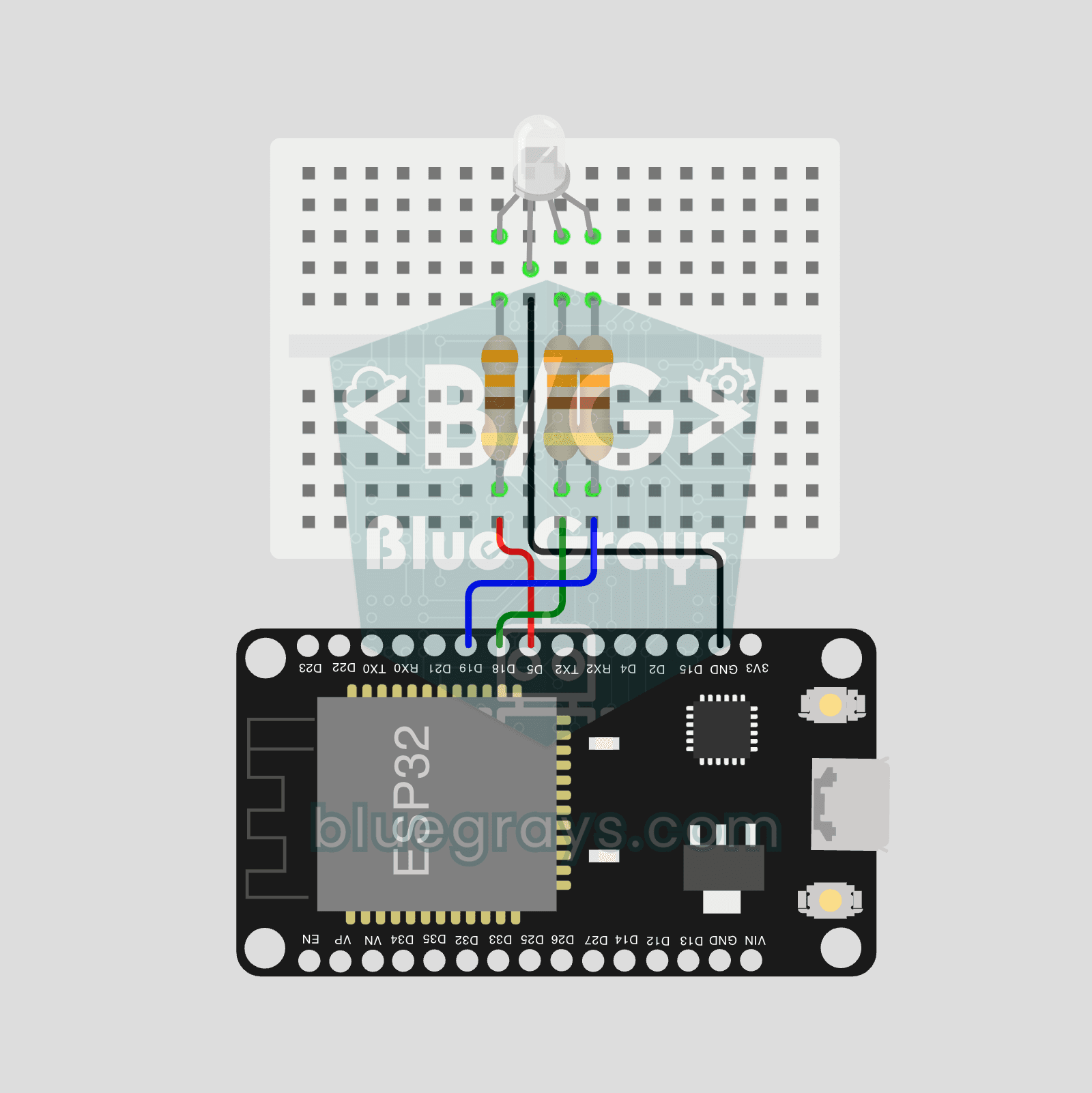
Kod Sumber
1// ─────────────────────────────────────────
2//   BlueGrays · bluegrays.com
3//   ESP32 RGB LED Control
4// ─────────────────────────────────────────
5// PWM from analogWrite() drives the R, G and B legs of a common cathode
6// RGB LED to show 7 colors in turn, 0.8 s each.
7//
8// Pins:
9//   GPIO 5  -> R leg
10//   GPIO 18 -> G leg
11//   GPIO 19 -> B leg
12//   GND     -> Common cathode (longest leg)
13//   Each of R, G, B with a 330 ohm resistor
14
15const int RED = 5;
16const int GREEN = 18;
17const int BLUE = 19;
18
19void setup() {
20  pinMode(RED, OUTPUT);
21  pinMode(GREEN, OUTPUT);
22  pinMode(BLUE, OUTPUT);
23}
24
25// Set the color, each channel 0-255
26void setColor(int r, int g, int b) {
27  analogWrite(RED, r);
28  analogWrite(GREEN, g);
29  analogWrite(BLUE, b);
30}
31
32void loop() {
33  setColor(255, 0, 0);   delay(800); // Red
34  setColor(0, 255, 0);   delay(800); // Green
35  setColor(0, 0, 255);   delay(800); // Blue
36  setColor(255, 255, 0); delay(800); // Yellow
37  setColor(0, 255, 255); delay(800); // Cyan
38  setColor(255, 0, 255); delay(800); // Magenta
39  setColor(255, 255, 255); delay(800); // White
40}
41
Soalan Lazim
Why does mixing red and green make yellow?
Light colors mix additively: red + green = yellow, green + blue = cyan, red + blue = magenta; all three together produce white. Intermediate colors are obtained by adjusting the ratios using PWM.
I'm using a common-anode RGB LED—what's the difference?
The common pin is connected to 3.3 V, and the values are inverted: 0 is full brightness, and 255 is off. In the code, simply use `analogWrite(pin, 255 - value)`.
The colors look off—why?
Each color has a different forward voltage and brightness; at 3.3 V, blue and green may appear dimmer than red. You can adjust the balance by slightly increasing the resistance of the red LED or by applying a coefficient in the software.
Can I choose the color on my phone?
Yes, on the ESP32, you can add a color picker to a web page, convert the selected value to R, G, and B, and apply it to an LED. This is the basis for smart light projects.