
Kereta Bluetooth dengan ESP32 (L298N)
Pandu kereta dua roda melalui Bluetooth dengan joystick di telefonmu; tanpa internet, untuk iPhone dan Android. Panduan langkah demi langkah bagi templat Bluetooth Kawalan jauh kereta dalam aplikasi, dengan ESP32, L298N dan dua motor. Pergi ke Bengkelku › Peranti › Tambah peranti › Bluetooth, pilih Kawalan jauh kereta dan muat naik kod daripada Dapatkan kod. Butang Sediakan sebagai panel Bluetooth di halaman ini membuka panduan persediaan dengan templat ini.
Video
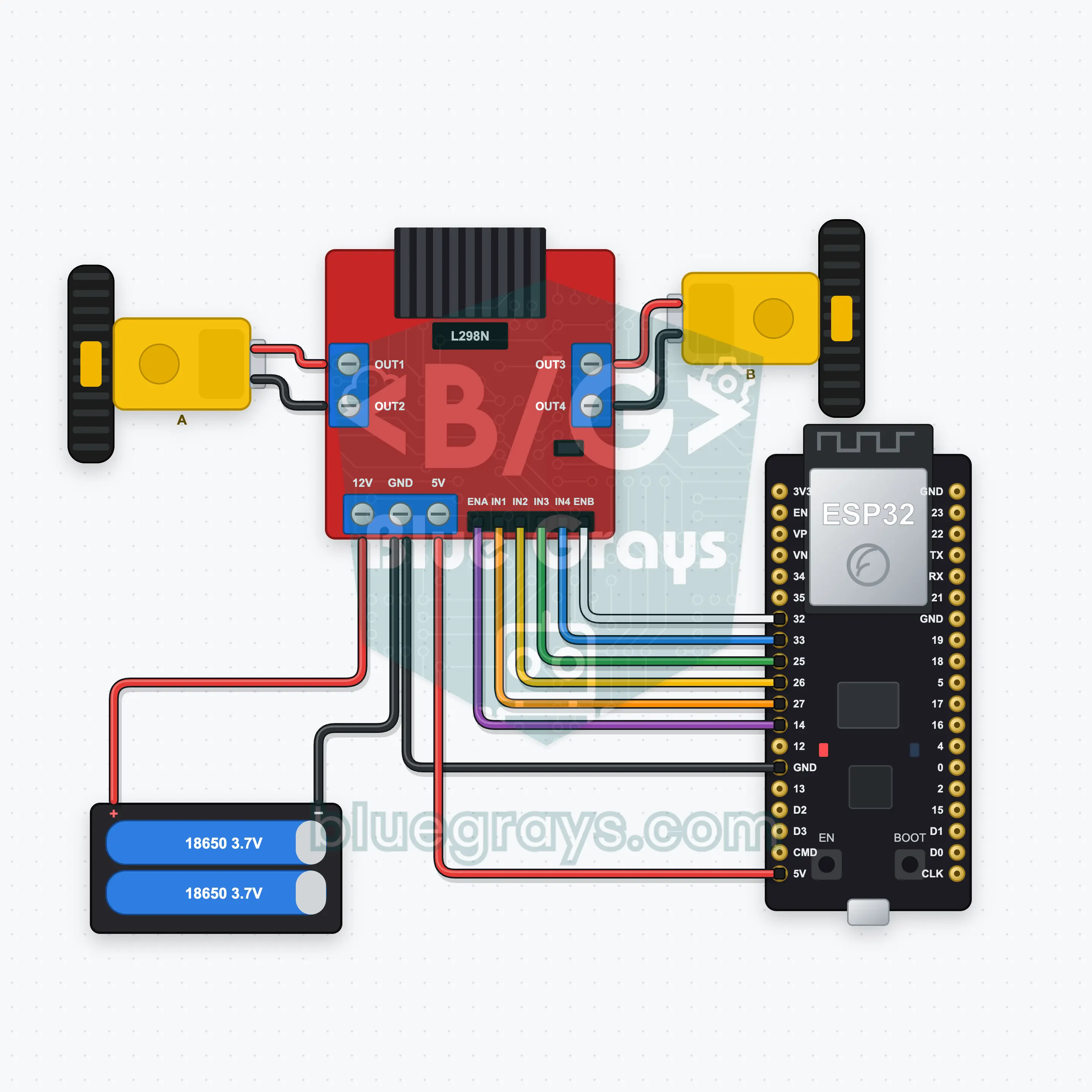
Gambar Rajah Litar
Kod Sumber
1// ┌───────────────────────────┐
2// │ BlueGrays · bluegrays.com │
3// │ Bluetooth · ESP32         │
4// │ BG-Araba                  │
5// └───────────────────────────┘
6// Car remote
7// Arduino IDE board: ESP32 Dev Module
8// the BLE library comes with the ESP32 board package, nothing extra to install
9
10#include <BLEDevice.h>
11#include <BLEServer.h>
12#include <BLE2902.h>
13
14const char BLE_NAME[] = "BG-Araba";  // the board advertises with this name, the app finds it in the list by it
15
16// Pins: change them here if you wired differently
17const int ENA = 14, IN1 = 27, IN2 = 26;  // Motor A (ENA, IN1, IN2) is the left wheel, motor B (ENB, IN3, IN4) the right one
18const int ENB = 32, IN3 = 25, IN4 = 33;
19const unsigned long COMMAND_TIMEOUT_MS = 500;  // Safety: the motors stop if no command arrives for 500 ms (the app repeats it while you drive)
20
21void btWrite(const char *text);
22void onValue(const char *key, const char *value);
23void sendAll();
24void onLinkLost();
25
26// ── The app sends "key=value" lines; on "?" the board sends all its values ──
27char line[65];
28uint8_t lineLen = 0;
29unsigned long lastRxMs = 0;
30
31bool is(const char *a, const char *b) { return strcmp(a, b) == 0; }
32bool isOn(const char *v) { return v[0] == '1'; }
33
34void sendText(const char *key, const char *value) {
35  char out[72];
36  snprintf(out, sizeof(out), "%s=%s\n", key, value);
37  btWrite(out);
38}
39
40void sendInt(const char *key, long value) {
41  char text[12];
42  snprintf(text, sizeof(text), "%ld", value);
43  sendText(key, text);
44}
45
46void sendFloat(const char *key, float value) {
47  char text[16];
48  dtostrf(value, 1, 1, text);
49  sendText(key, text);
50}
51
52void handleLine(char *text) {
53  char *eq = strchr(text, '=');
54  if (eq == nullptr) {
55    if (text[strlen(text) - 1] == '?') {
56      btWrite("@v=1.0\n");  // the "@v" line tells the app the code version
57      sendAll();
58    }
59    return;
60  }
61  *eq = '\0';
62  onValue(text, eq + 1);
63}
64
65void feed(char c) {
66  lastRxMs = millis();
67  if (c == '\n' || c == '\r') {
68    if (lineLen == 0) return;
69    line[lineLen] = '\0';
70    lineLen = 0;
71    handleLine(line);
72  } else if (lineLen < sizeof(line) - 1) {
73    line[lineLen++] = c;
74  }
75}
76
77// ── Bluetooth (Nordic UART) ──
78#define UART_SERVICE "6E400001-B5A3-F393-E0A9-E50E24DCCA9E"
79#define UART_RX "6E400002-B5A3-F393-E0A9-E50E24DCCA9E"
80#define UART_TX "6E400003-B5A3-F393-E0A9-E50E24DCCA9E"
81
82BLECharacteristic *txChar = nullptr;
83volatile bool linked = false;
84volatile bool linkLost = false;
85// incoming bytes move from the Bluetooth task to loop() through a small ring buffer
86const int RX_SIZE = 256;
87volatile uint8_t rxBuf[RX_SIZE];
88volatile int rxHead = 0, rxTail = 0;
89
90class ServerEvents : public BLEServerCallbacks {
91  void onConnect(BLEServer *server) override { linked = true; }
92  void onDisconnect(BLEServer *server) override { linked = false; linkLost = true; }
93};
94
95class RxEvents : public BLECharacteristicCallbacks {
96  void onWrite(BLECharacteristic *c) override {
97    auto v = c->getValue();
98    for (size_t i = 0; i < v.length(); i++) {
99      int next = (rxHead + 1) % RX_SIZE;
100      if (next == rxTail) break;
101      rxBuf[rxHead] = (uint8_t)v[i];
102      rxHead = next;
103    }
104  }
105};
106
107// lines go out in 20-byte packets (works with every phone)
108void btWrite(const char *text) {
109  if (!linked || txChar == nullptr) return;
110  size_t n = strlen(text);
111  for (size_t i = 0; i < n; i += 20) {
112    size_t len = n - i < 20 ? n - i : 20;
113    txChar->setValue((uint8_t *)text + i, len);
114    txChar->notify();
115    delay(4);
116  }
117}
118
119void btBegin() {
120  BLEDevice::init(BLE_NAME);
121  BLEServer *server = BLEDevice::createServer();
122  server->setCallbacks(new ServerEvents());
123  BLEService *uart = server->createService(UART_SERVICE);
124  txChar = uart->createCharacteristic(UART_TX, BLECharacteristic::PROPERTY_NOTIFY);
125  txChar->addDescriptor(new BLE2902());
126  BLECharacteristic *rx = uart->createCharacteristic(UART_RX, BLECharacteristic::PROPERTY_WRITE | BLECharacteristic::PROPERTY_WRITE_NR);
127  rx->setCallbacks(new RxEvents());
128  uart->start();
129  BLEAdvertisementData adv;
130  adv.setFlags(0x06);
131  adv.setCompleteServices(BLEUUID(UART_SERVICE));
132  BLEAdvertisementData scan;
133  scan.setName(BLE_NAME);
134  BLEAdvertising *advertising = BLEDevice::getAdvertising();
135  advertising->setAdvertisementData(adv);
136  advertising->setScanResponseData(scan);
137  BLEDevice::startAdvertising();
138}
139
140void btPoll() {
141  while (rxTail != rxHead) {
142    char c = (char)rxBuf[rxTail];
143    rxTail = (rxTail + 1) % RX_SIZE;
144    feed(c);
145  }
146  if (linkLost) {
147    linkLost = false;
148    onLinkLost();
149    delay(100);
150    BLEDevice::startAdvertising();
151  }
152}
153
154// ── ESP32 ──
155int speedLimit = 80;  // speed limit from the app (0–100 %)
156unsigned long lastCommandMs = 0;
157bool moving = false;
158
159// if the car drives backwards, swap that motor's two wires
160void motor(int en, int a, int b, int power) {
161  power = constrain(power, -100, 100);
162  digitalWrite(a, power > 0 ? HIGH : LOW);
163  digitalWrite(b, power < 0 ? HIGH : LOW);
164  analogWrite(en, abs(power) * speedLimit * 255L / 10000);
165}
166
167void drive(int left, int right) {
168  motor(ENA, IN1, IN2, left);
169  motor(ENB, IN3, IN4, right);
170  moving = left != 0 || right != 0;
171  lastCommandMs = millis();
172}
173
174void onValue(const char *key, const char *value) {
175  if (is(key, "joy")) {  // Joystick: y is forward/back, x turns; mixed into left and right wheel speeds
176    const char *comma = strchr(value, ',');
177    int x = atoi(value), y = comma ? atoi(comma + 1) : 0;
178    drive(constrain(y + x, -100, 100), constrain(y - x, -100, 100));
179  } else if (is(key, "yon")) {
180    if (is(value, "ileri")) drive(100, 100);
181    else if (is(value, "geri")) drive(-100, -100);
182    else if (is(value, "sol")) drive(-70, 70);
183    else if (is(value, "sag")) drive(70, -70);
184    else drive(0, 0);
185  } else if (is(key, "hiz")) {
186    speedLimit = constrain(atoi(value), 0, 100);
187  }
188}
189
190void sendAll() {
191  sendInt("hiz", speedLimit);
192}
193
194void onLinkLost() {
195  drive(0, 0);  // Connection lost: the motors stop
196}
197
198void setup() {
199  Serial.begin(115200);
200  int pins[] = { ENA, IN1, IN2, ENB, IN3, IN4 };
201  for (int pin : pins) pinMode(pin, OUTPUT);
202  drive(0, 0);
203  btBegin();
204  Serial.print(F("BlueGrays Bluetooth: "));
205  Serial.println(BLE_NAME);
206}
207
208void loop() {
209  btPoll();
210  if (moving && millis() - lastCommandMs > COMMAND_TIMEOUT_MS) drive(0, 0);
211}
212Soalan Lazim
Adakah ia berfungsi dengan iPhone? Apakah bezanya dengan HC-05?
Ya, ia berfungsi pada iPhone dan Android. Modul Bluetooth klasik seperti HC-05 dan HC-06 tidak dapat bersambung ke iPhone, jadi projek ini menggunakan Bluetooth Low Energy terbina dalam ESP32 dan tidak memerlukan modul tambahan. Jangan cuba menggandingkan papan dalam tetapan Bluetooth telefonmu; hanya aplikasi BlueGrays yang membuat sambungan.
Kereta bergerak ke belakang atau satu roda berpusing ke arah yang salah.
Tukar dua wayar motor yang berpusing ke arah yang salah pada terminal skru L298N (motor kiri OUT1/OUT2, motor kanan OUT3/OUT4); komen dalam kod juga menyatakan perkara yang sama. Jika kereta berpusing di tempat apabila kamu menekan ke hadapan, hanya satu motor yang terbalik. Jika kedua-duanya berpusing ke arah yang betul tetapi kiri membelok ke kanan, tukar motor kiri dan kanan.
Bagaimanakah saya membekalkan kuasa kepada ESP32? Bolehkah USB dan bateri disambungkan pada masa yang sama?
Bateri 2× 18650 (7.4 V) disambungkan ke input 12V L298N, dan output 5V L298N membekalkan pin VIN ESP32; untuk itu, jumper pengatur 5V pada L298N mesti kekal terpasang. Dengan cara ini, kereta berjalan tanpa kabel. Jika USB dipasang semasa kamu memuat naik, matikan bateri atau cabut wayar 5V supaya dua bekalan itu tidak bertembung. GND L298N dan GND ESP32 mesti sentiasa bersambung.
Berapakah jaraknya? Apakah yang dilakukan oleh kereta jika sambungan terputus?
Bluetooth Low Energy biasanya mencapai 10 hingga 30 meter di kawasan terbuka; dinding dan orang di tengah laluan memendekkannya. Jika sambungan terputus, papan serta-merta menghentikan motor dan mula beriklan semula, jadi kamu boleh bersambung semula daripada aplikasi. Kereta juga berhenti jika papan tidak menerima arahan selama 500 ms, jadi ia tidak pernah terlepas lari di luar jarak.