
Teroka Projek Arduino
Ratusan projek dari pemula hingga mahir: gambar rajah litar, kod dan video. Mulakan di tahap mana pun kamu berada.
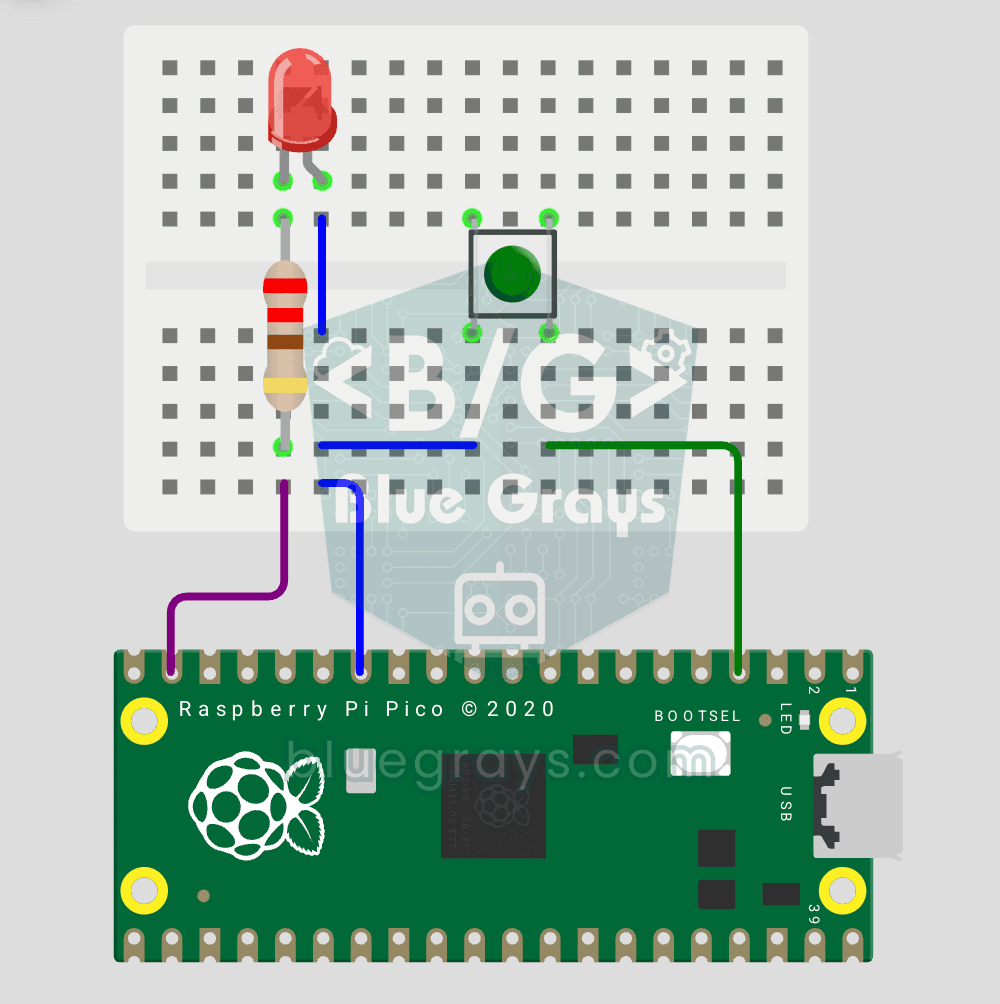
Raspberry Pi Pico Button Controlled LED (Push)
First input project with Pico — button read! LED lights while button is pressed, off when released. This is the big step after LED animations: signal input from the world to Pico. Learn Pin.IN (input mode), Pin.PULL_UP (internal pull-up resistor — standard for buttons), button.value() reading. GP14 LED, GP2 button (internal PULL_UP). Pressed = LOW (0), released = HIGH (1) — reverse logic seems confusing at first but is industry standard.
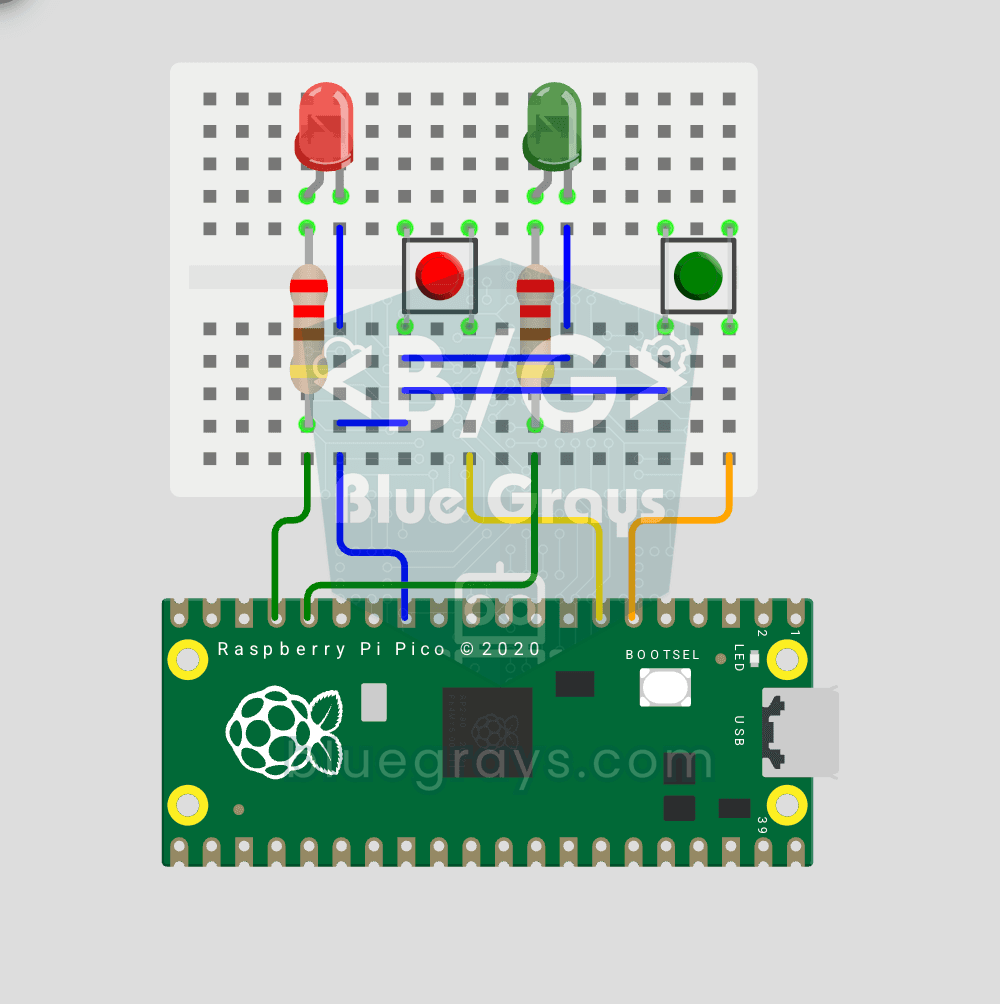
Raspberry Pi Pico: Independent Control of 2 LEDs Using 2 Buttons
2 buttons, 2 LEDs, completely independent of each other! Each button controls its own LED: press BTN1 and the red LED lights up, press BTN2 and the green one does. Press both at once and both LEDs light up (parallel operation). You'll learn to manage several Pin objects together, the ternary operator, Python's compact if-else (1 if x else 0), and a GPIO map (GP12/13 LED outputs, GP4/5 button inputs).
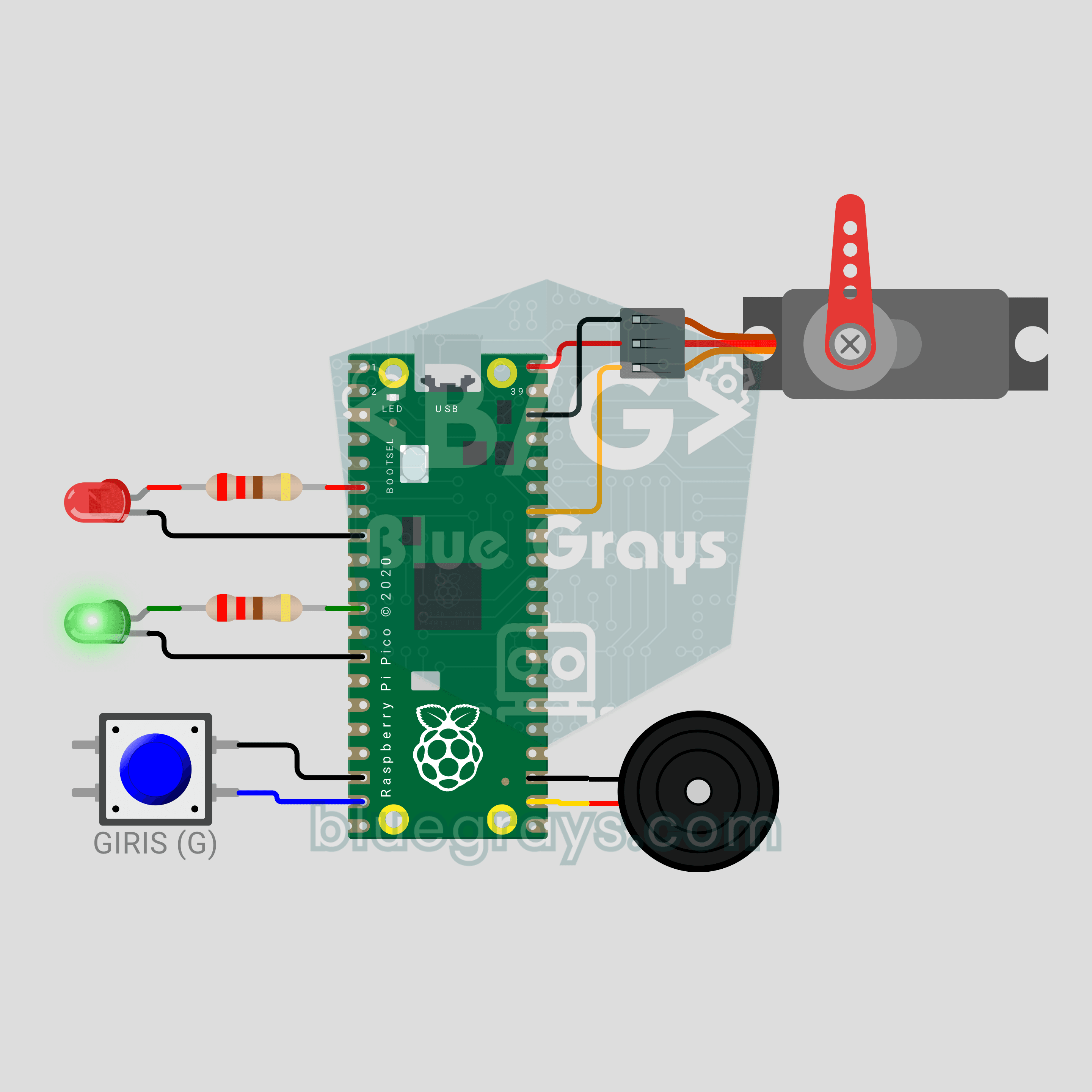
Raspberry Pi Pico Parking Barrier (SG90 Servo + 2 LEDs + Button + Buzzer)
A small model of the boom barrier at a car park entrance! Press the button and the Raspberry Pi Pico raises the arm smoothly with an SG90 servo as the green LED comes on. It stays open for 3 seconds, then lowers slowly with a flashing red LED and warning beeps from the buzzer. Press again while it is lowering and the arm rises at once for safety. Servo control, a state machine and non-blocking timing in one project.
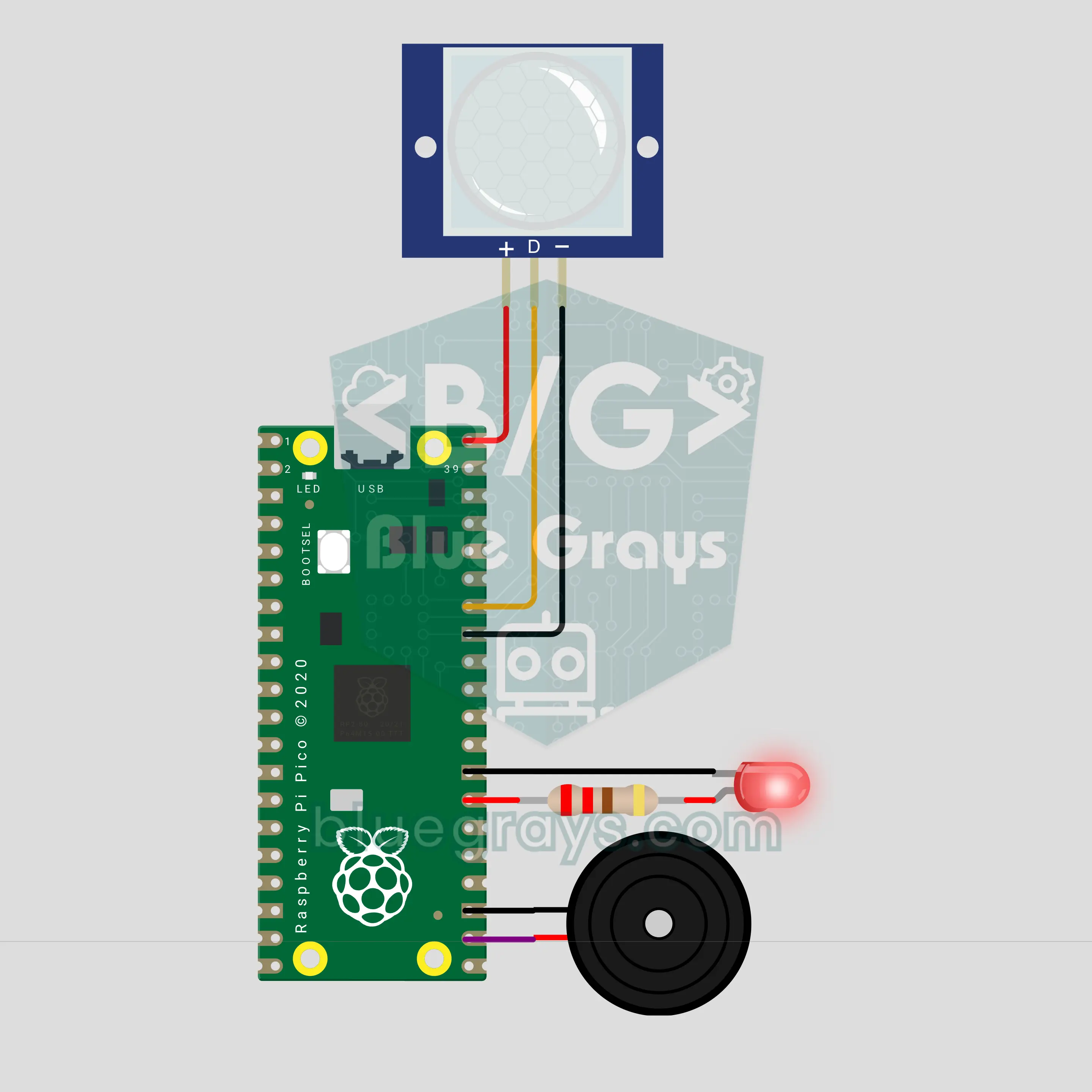
Raspberry Pi Pico PIR Motion Alarm (PIR Sensor + Buzzer + LED)
Walk in once and you get a warning, walk in again and the siren goes off! We are building a two-stage motion alarm with a Raspberry Pi Pico and a PIR motion sensor. It arms itself after a countdown. The first motion plays a ding-dong warning on the buzzer; a second motion within 15 seconds sounds the siren and strobes the LED. Afterwards it re-arms on its own and logs every event with a timestamp.
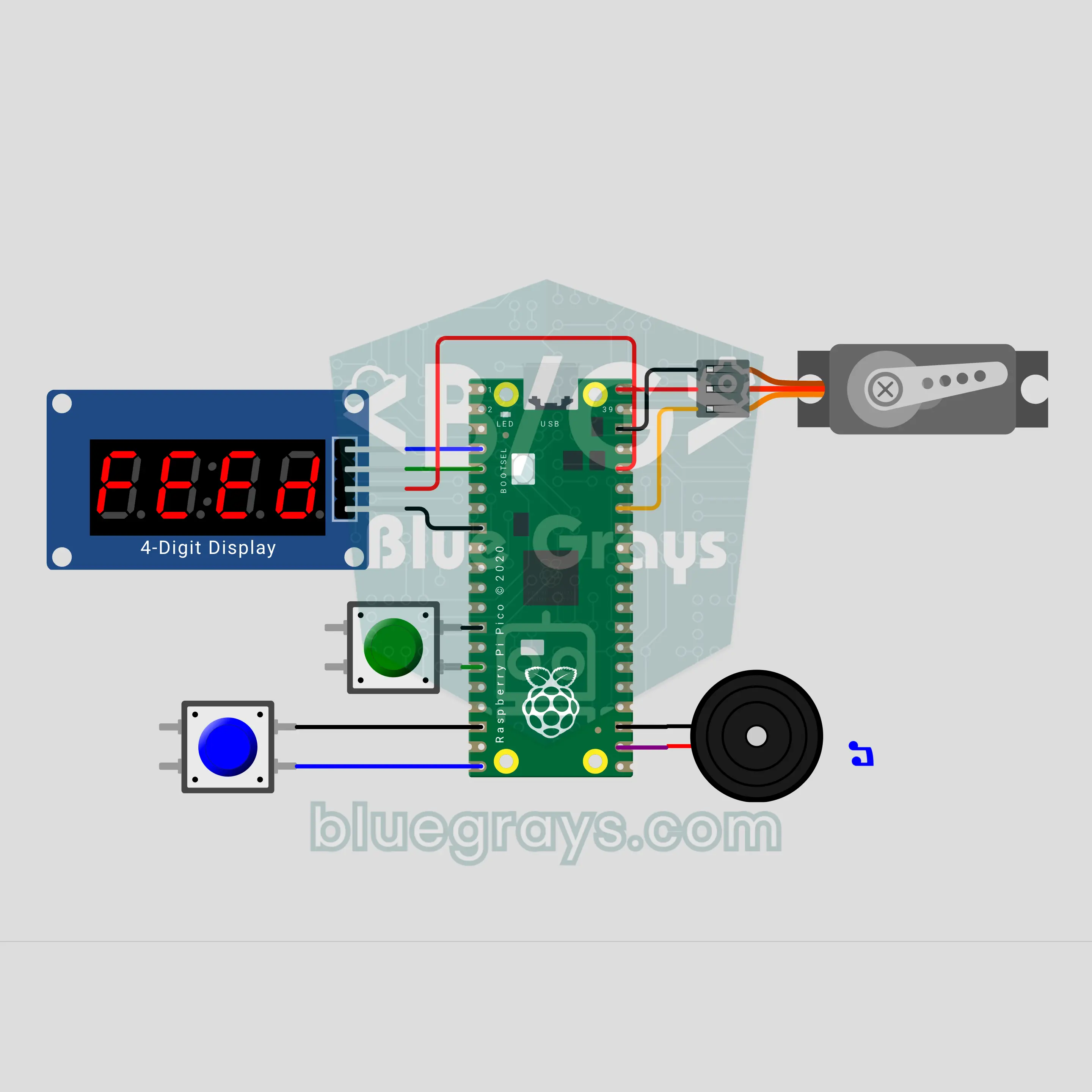
Raspberry Pi Pico Automatic Pet Feeder (SG90 Servo + TM1637 + Buzzer)
Going on holiday? Your fish, cat or bird won't go hungry! The Raspberry Pi Pico counts down to the next meal on a TM1637 display; when time is up, the buzzer plays a short tune and the SG90 servo opens and closes the hopper lid once per portion. Pick an interval of 4, 6, 8, 12 or 24 hours, and a double-feed guard stops accidental overfeeding. Settings are saved, so after a power cut the countdown carries on.
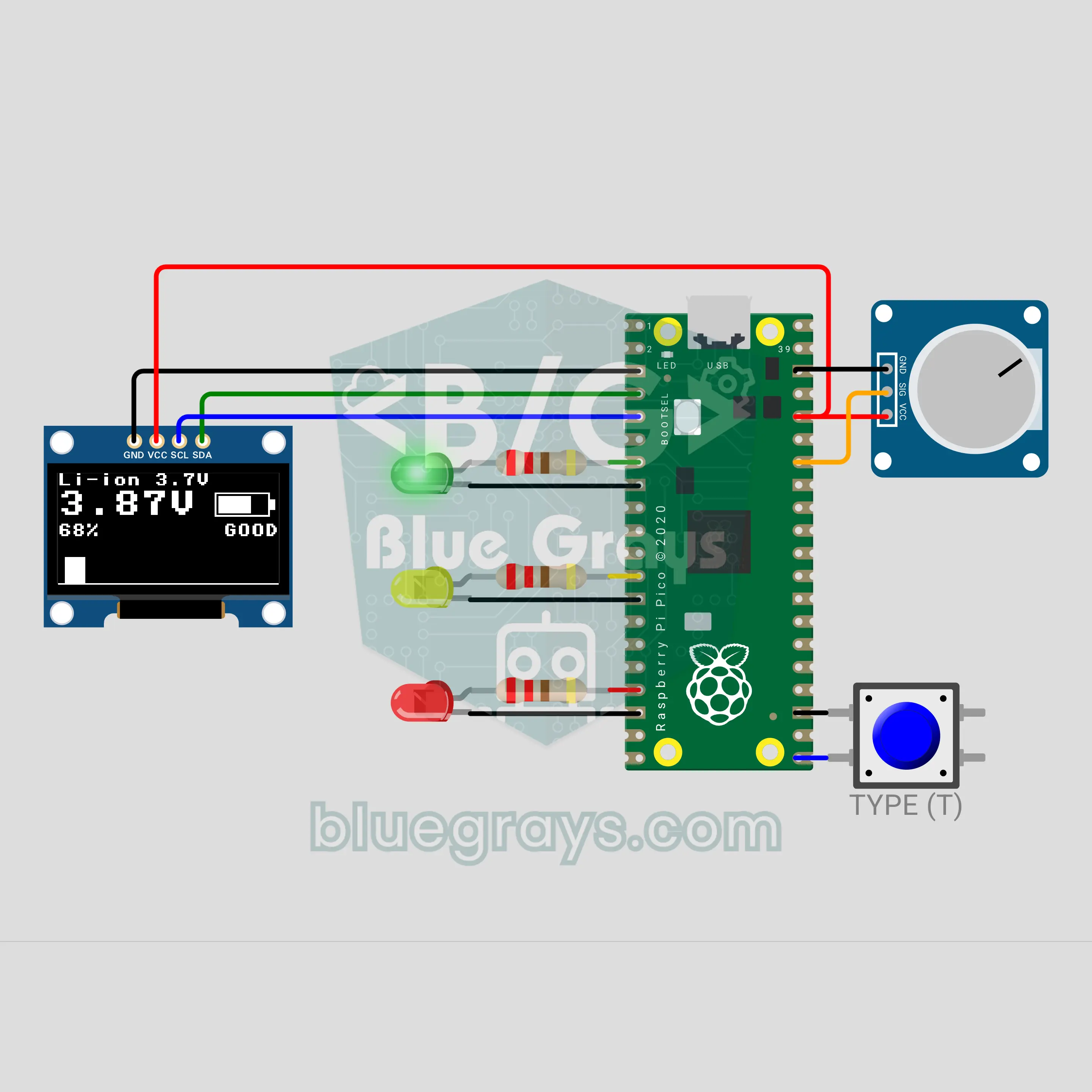
Raspberry Pi Pico Battery Tester (Voltage Divider + OLED + 3 LEDs)
Which batteries in the drawer are still good? The moment you touch a battery to the two probes, the Raspberry Pi Pico shows the voltage, the charge percent and a filling battery icon on an OLED display, and a green, yellow or red LED gives the verdict. A button switches between AA, NiMH, Li-ion and 9 V. A voltage divider brings even 9 V down to a level the Pico can safely measure, and averaging 32 readings keeps the value steady.
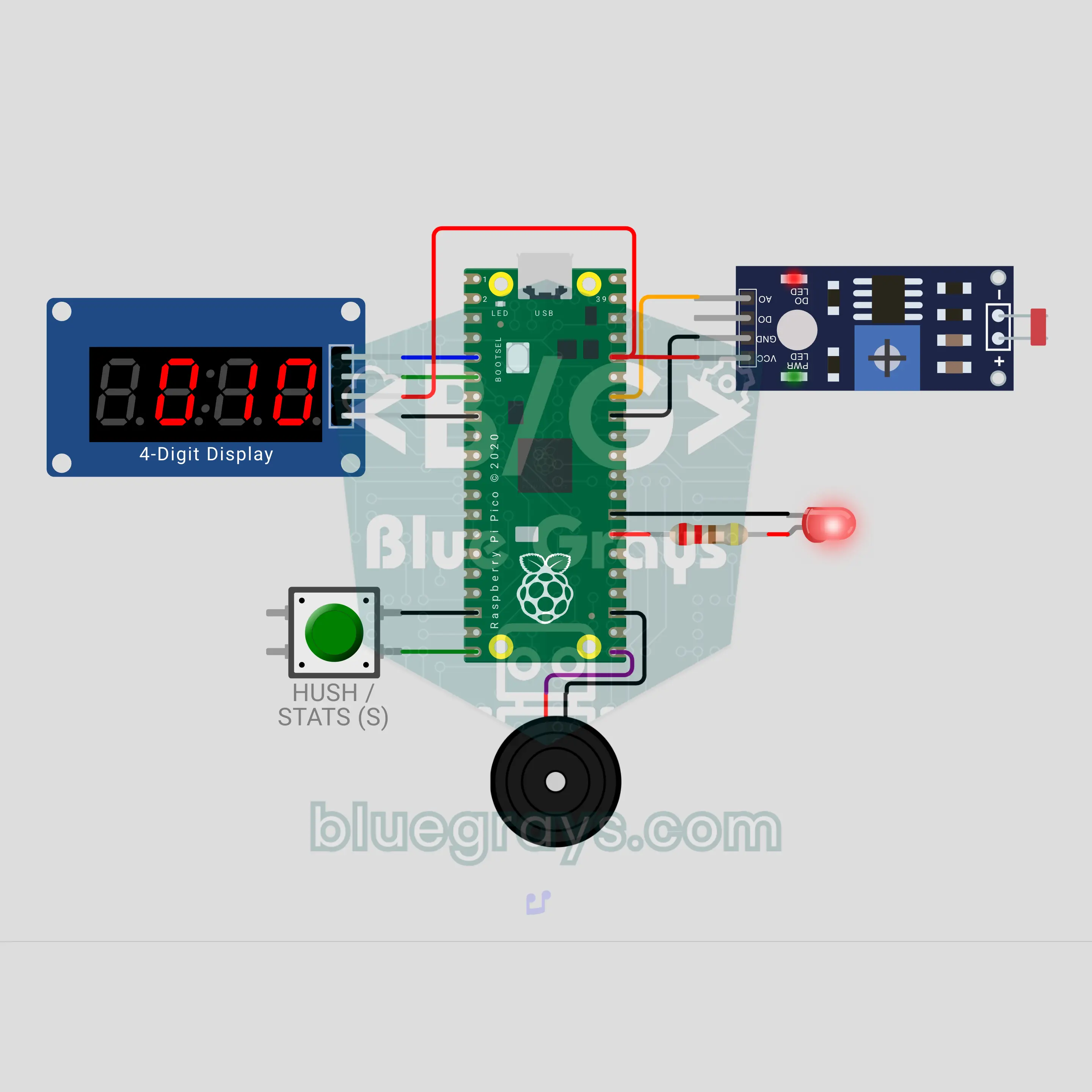
Raspberry Pi Pico Fridge Door Left Open Alarm (LDR + TM1637 + Buzzer)
Who left the fridge door open? The Raspberry Pi Pico sees the inner lamp through an LDR and counts on a TM1637 display how many seconds the door has been open. At 20 seconds it gives a gentle double beep, at 40 seconds an insistent siren with a red LED; the button mutes the alarm for 60 seconds. The number of openings, the total and the longest open time are saved, so a power cut does not erase them.
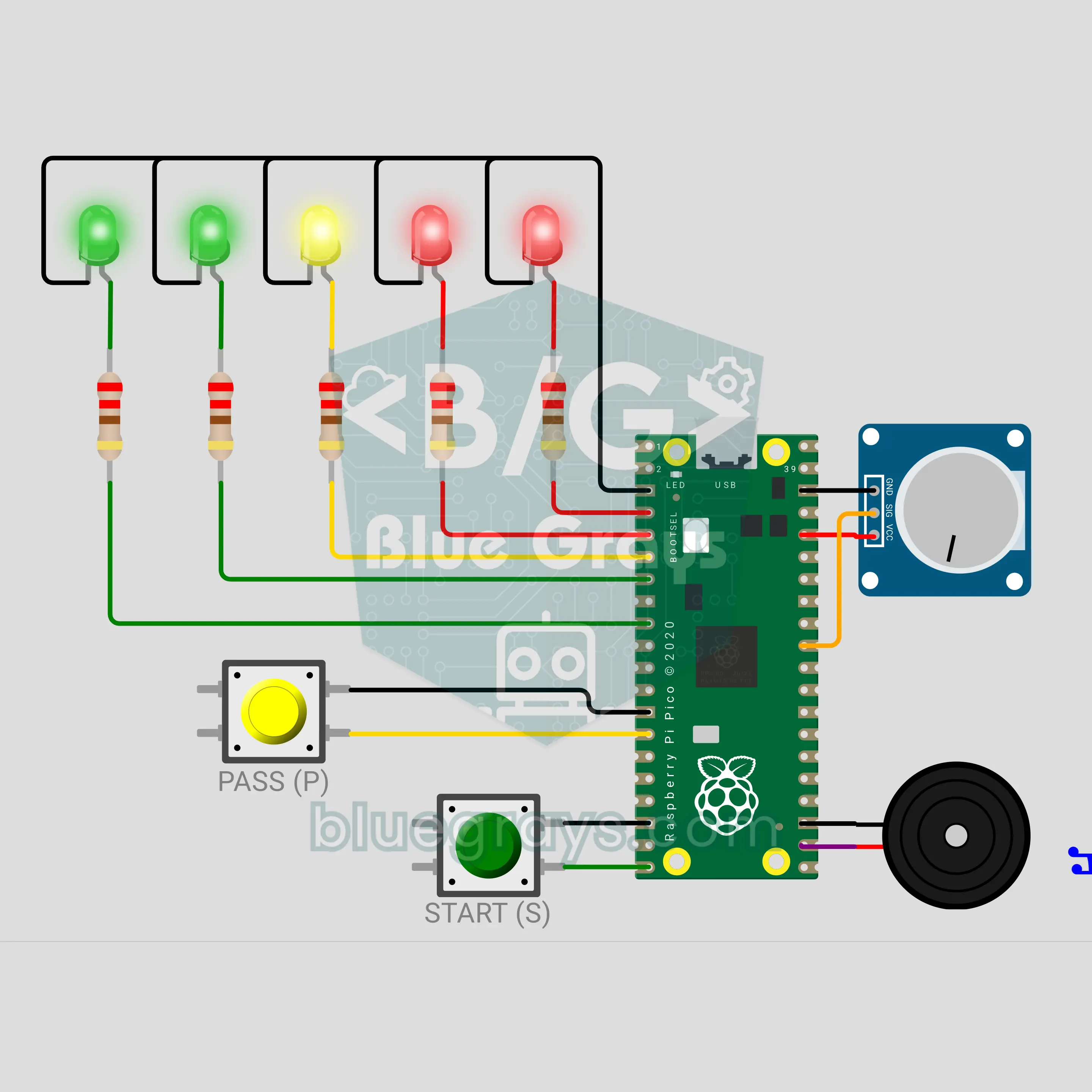
Raspberry Pi Pico Hot Potato Party Game (5 LEDs + Potentiometer + 2 Buttons + Buzzer)
A party game that goes from hand to hand: press START, a secret fuse begins and the device gets passed around to a ticking sound. The tick-tock keeps speeding up and a 5-LED heat bar fills from green to red; when time runs out the buzzer booms and whoever is holding it loses. A potentiometer picks a short, medium or long round, and the PASS button is pressed at every hand-off. Hold it longer than 6 seconds and you get a penalty: the fuse loses 2 seconds.
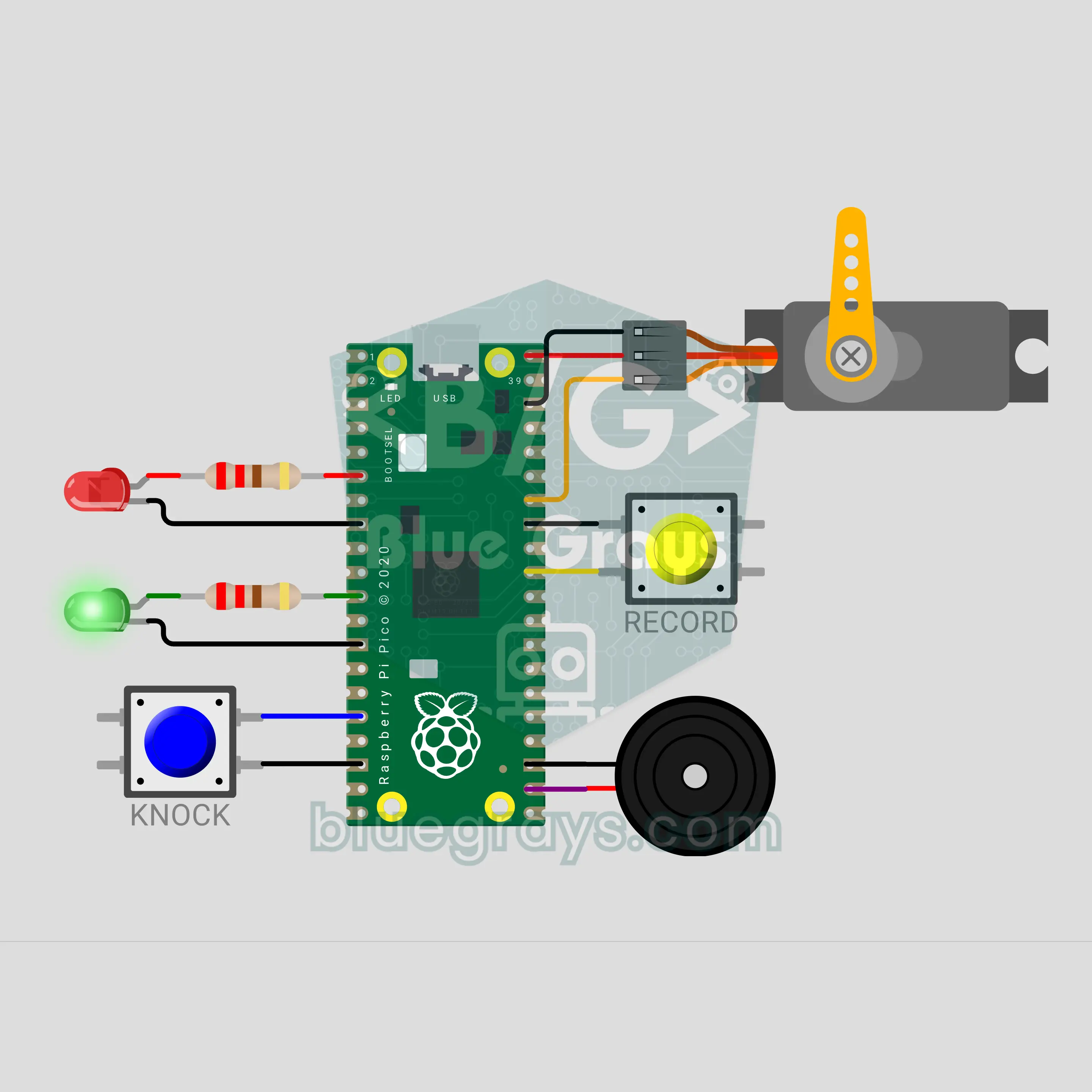
Raspberry Pi Pico Secret Knock Lock (SG90 Servo + 2 Buttons + 2 LEDs + Buzzer)
The password is a rhythm, not a number: knock the right pattern on the lid and the latch lifts! The Raspberry Pi Pico times every knock, scales each gap to the longest one and compares the result with the saved rhythm, so knocking fast or slow makes no difference. When it matches, an SG90 servo lifts the latch, a green LED lights up and a buzzer plays a "ta-da"; 3 wrong tries in a row make the lock wait 10 seconds. While it is open, hold RECORD to save your own rhythm.
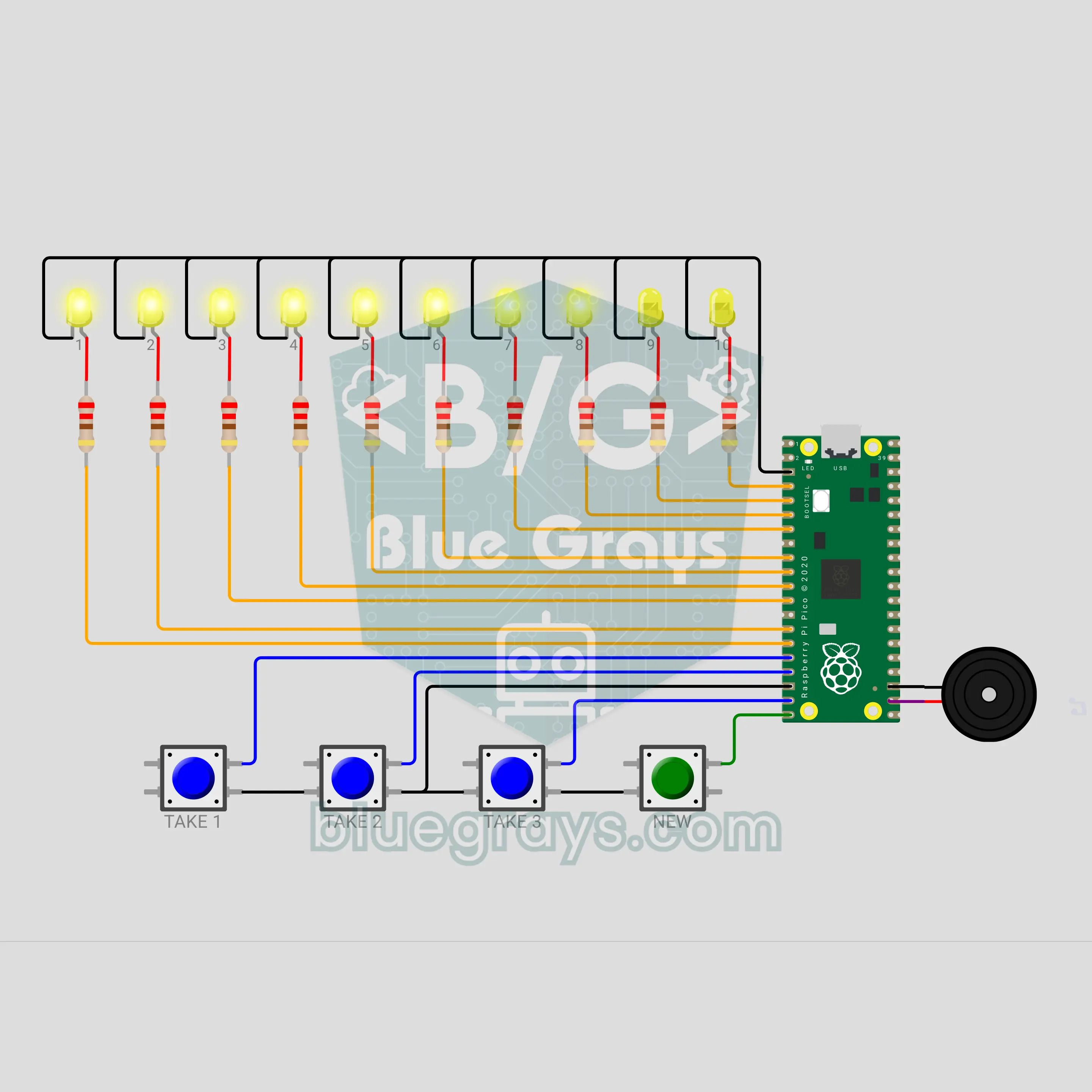
Raspberry Pi Pico Nim Game: Can You Beat the Pico? (10 LEDs + 4 Buttons + Buzzer)
Whoever takes the last stick loses: can you beat the Pico? The matchstick game Nim lights up with a Raspberry Pi Pico. 10 yellow LEDs are 10 sticks; you take turns removing 1, 2 or 3, 4 buttons pick your move and a buzzer voices every turn. The Pico uses a mod 4 trick to always leave you 1, 5 or 9 sticks: if you start, the right first move wins, but if the Pico starts it never loses.
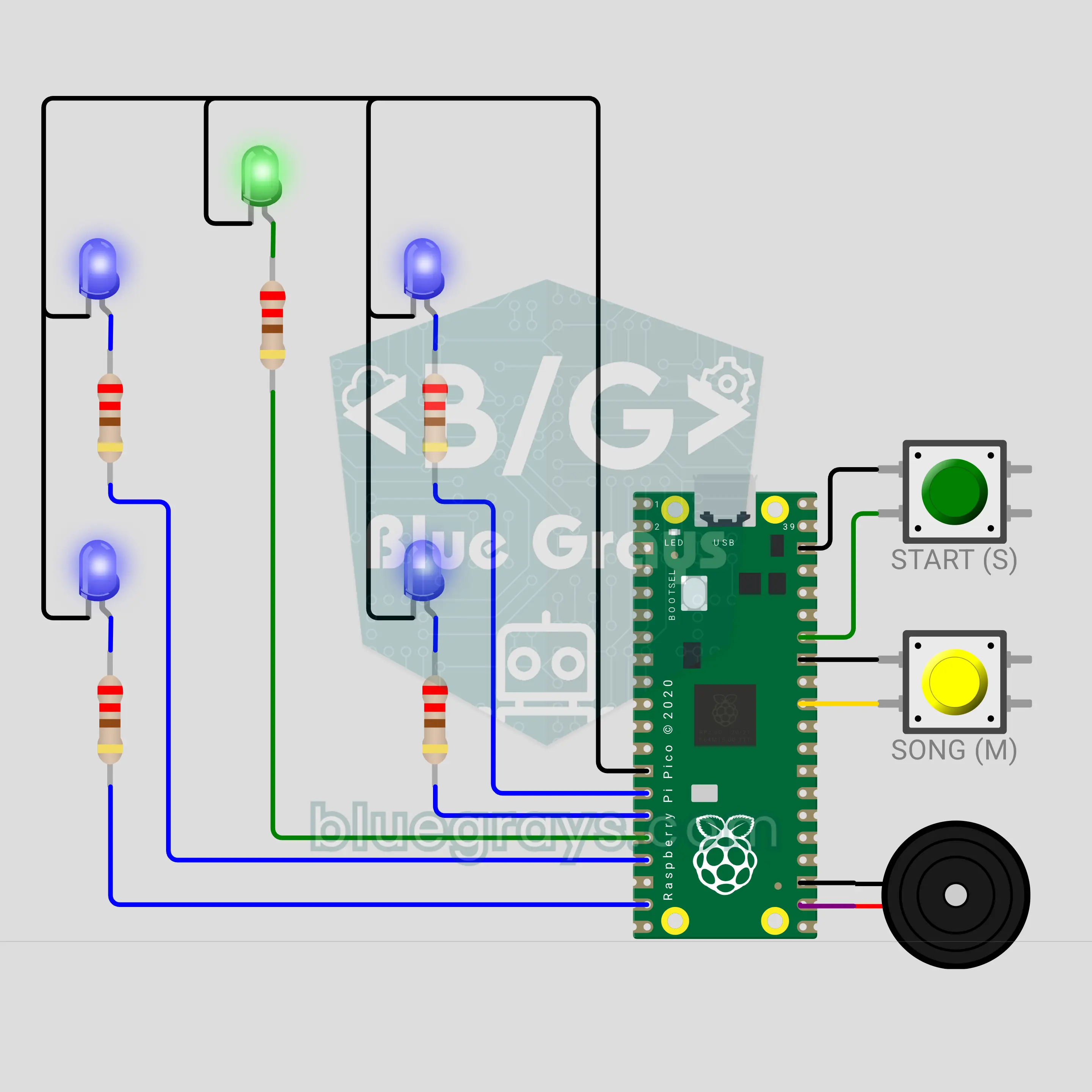
Raspberry Pi Pico Toothbrush Timer (5 LEDs + 2 Buttons + Buzzer)
A bathroom timer that turns brushing into a musical game! The Raspberry Pi Pico splits the 2 minutes dentists generally recommend into 30 seconds for each of the four zones of the mouth. Of the 4 blue LEDs laid out like a mouth, the blinking one shows where to brush now; a buzzer plays a song, rings a "ding" at every zone change, and at the end a green star lights up with a fanfare. The START button pauses, and stopping too early gets a "not done yet".
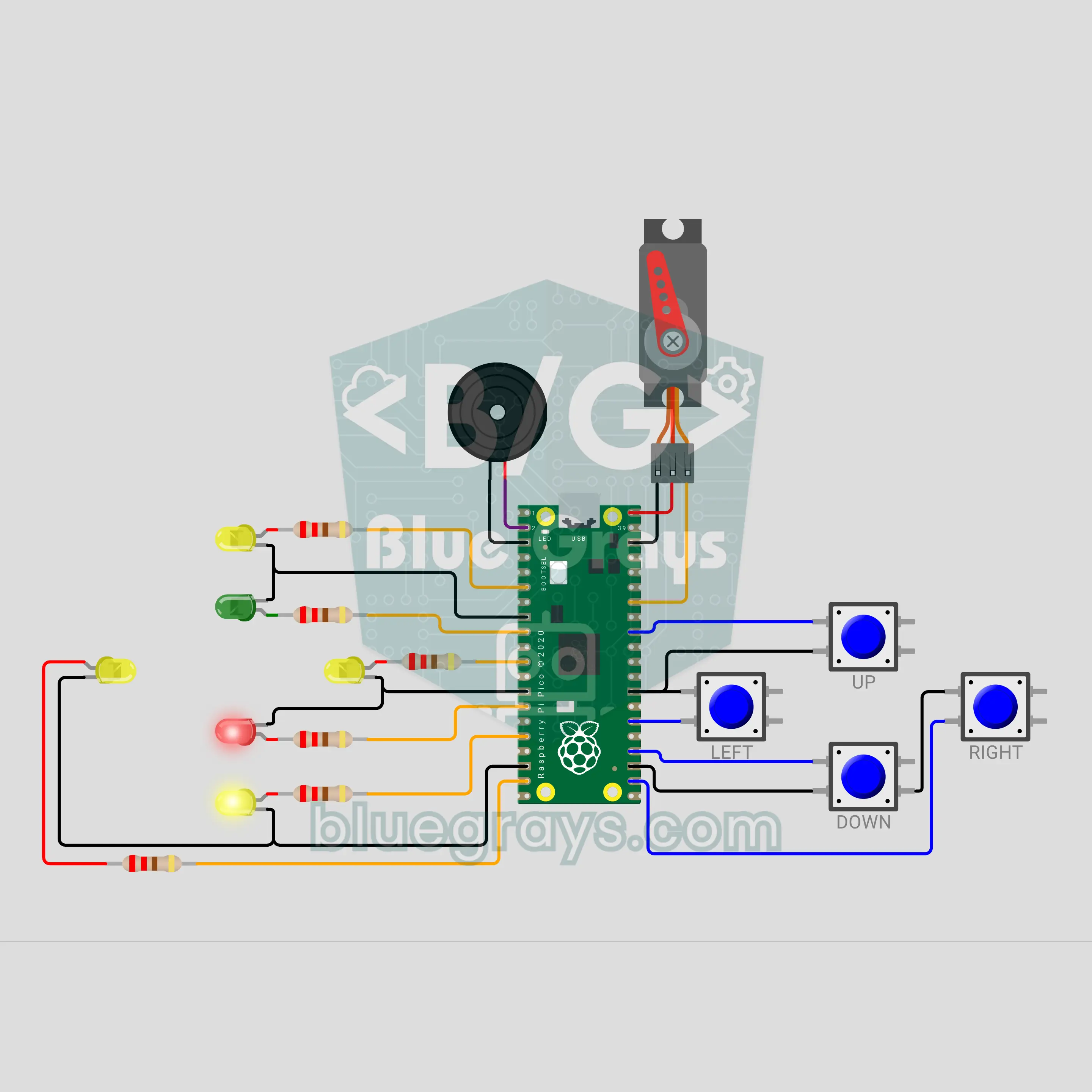
Raspberry Pi Pico Reverse Corner Brain Game (6 LEDs + 4 Buttons + Servo + Buzzer)
Green means press the same way, red means the opposite way, and a "boom" means don't press at all! A 20-second focus and reflex game on the Raspberry Pi Pico: one of 4 yellow LEDs in a plus shape shows the direction, the green or red LED in the middle shows the rule, and you answer with 4 buttons. The answer time shrinks with every hit and traps test your finger. The score climbs on a servo needle dial, from TURTLE to LIGHTNING.