
Video
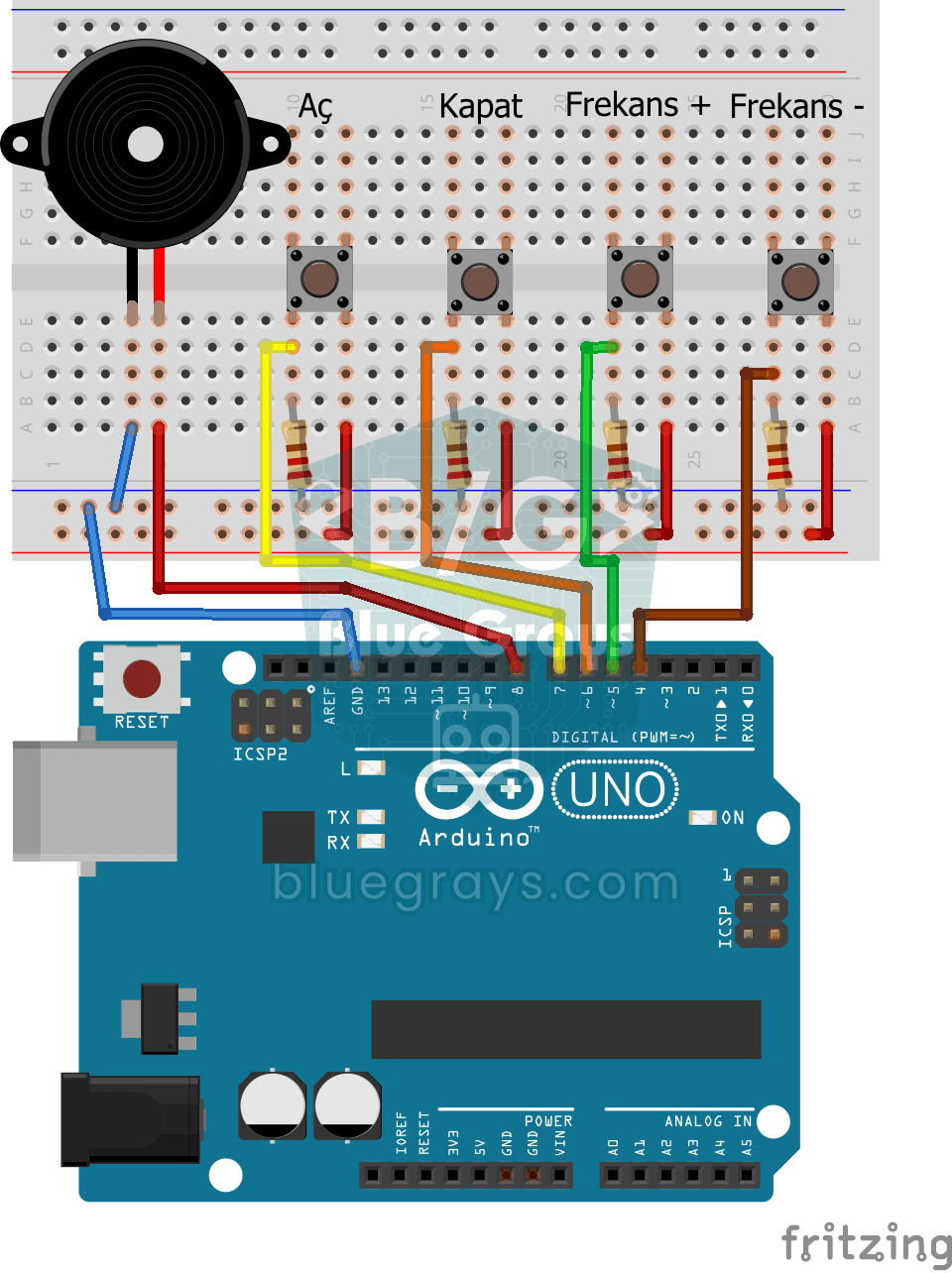
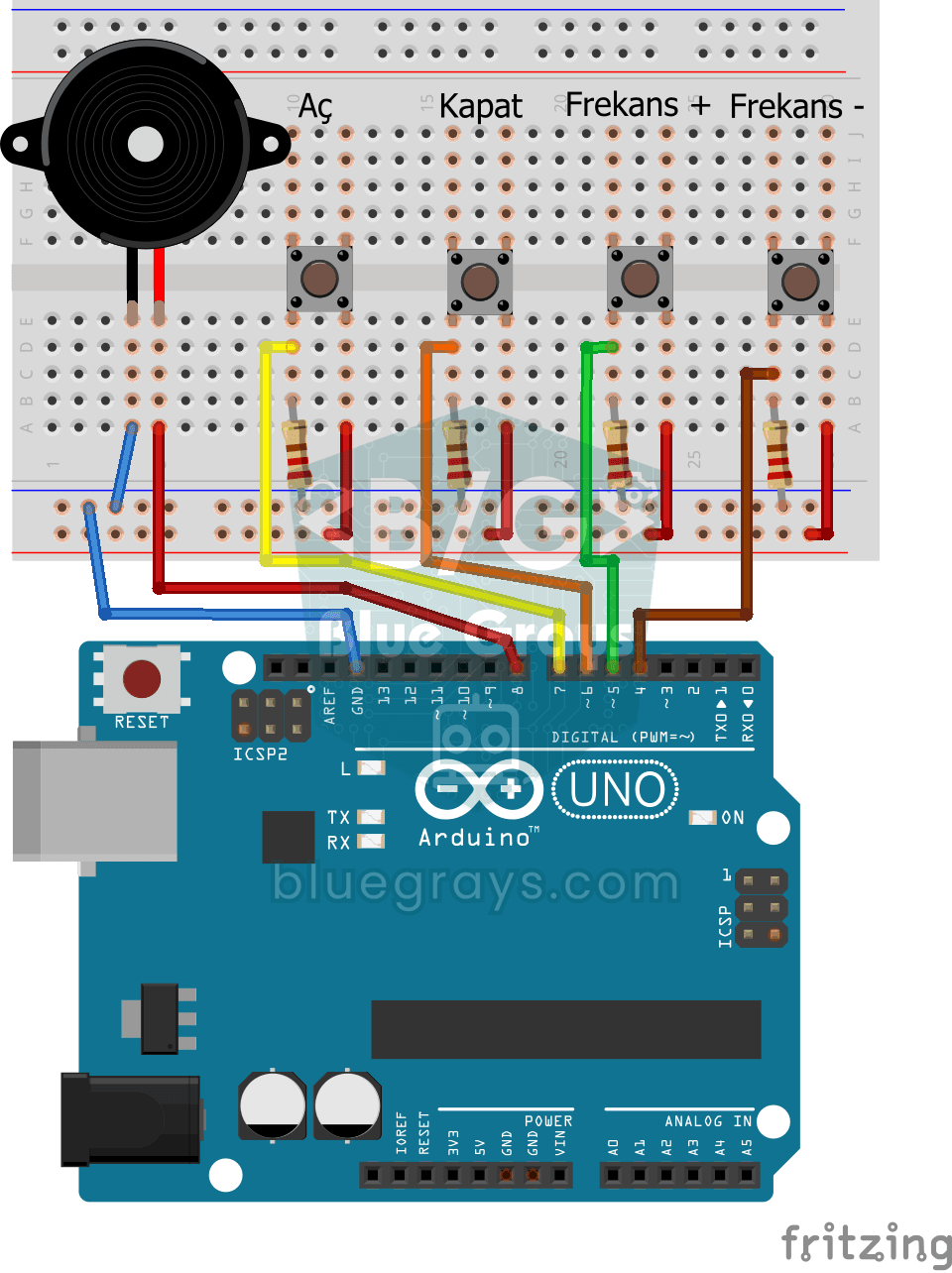
Elektr sxemasi
Manba kodi
1// ─────────────────────────────────────────
2//   BlueGrays · bluegrays.com
3//   Frequency Setting with Buzzer
4// ─────────────────────────────────────────
5// Four buttons control the buzzer: On, Off, Frequency + and Frequency -.
6// Pressing On makes the buzzer play at the current frequency. The + and -
7// buttons change it by 50 Hz per press (starting at 300 Hz); the frequency
8// stays within 50-5000 Hz.
9//
10// Pins:
11//   D8 -> Buzzer + (other leg to GND)
12//   D7 -> On button
13//   D6 -> Off button
14//   D5 -> Frequency + button
15//   D4 -> Frequency - button
16//   Other leg to 5V, pin to GND via 220 ohm
17
18int buzzerPin = 8;     // Buzzer output pin
19int btnOn = 7;         // On button
20int btnOff = 6;        // Off button
21int btnIncrease = 5;   // Frequency + button
22int btnDecrease = 4;   // Frequency - button
23int frequency = 300;   // Start frequency (Hz)
24int state = 0;         // 1 = 1 = sound on, 0 = off
25
26void setup() {
27  // Buttons as inputs, with external pull-downs
28  pinMode(btnOn, INPUT);
29  pinMode(btnOff, INPUT);
30  pinMode(btnIncrease, INPUT);
31  pinMode(btnDecrease, INPUT);
32}
33
34void loop() {
35  if (digitalRead(btnOn)) {          // On: start the sound
36    state = 1;
37  }
38
39  if (digitalRead(btnOff)) {         // Off: stop the sound
40    state = 0;
41  }
42
43  if (digitalRead(btnIncrease)) {    // Raise the frequency by 50 Hz
44    frequency = frequency + 50;
45    delay(100);                      // Step slowly while held
46  }
47
48  if (digitalRead(btnDecrease)) {    // Lower the frequency by 50 Hz
49    frequency = frequency - 50;
50    delay(100);
51  }
52
53  frequency = constrain(frequency, 50, 5000);   // Keep it within 50-5000 Hz
54
55  // Play or silence the buzzer by state
56  if (state == 1) {
57    tone(buzzerPin, frequency);
58  } else {
59    noTone(buzzerPin);
60  }
61}
62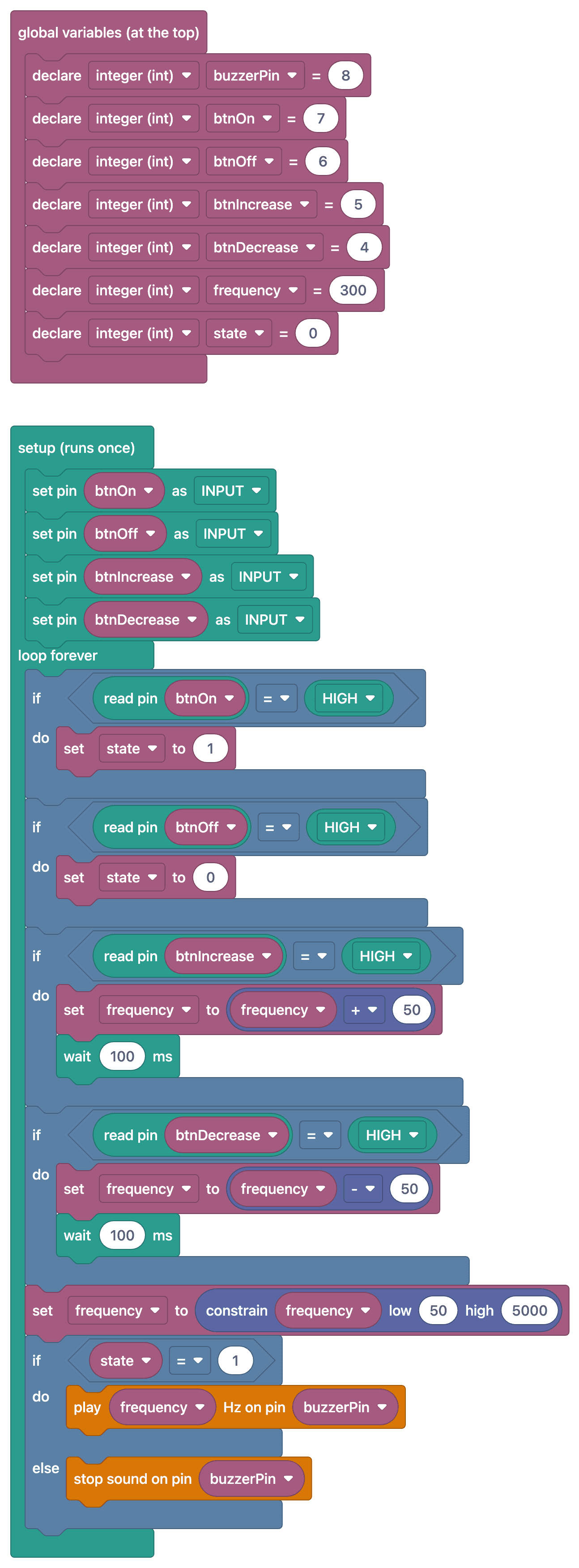
Ko‘p so‘raladigan savollar
Nega tugmalar uchun 220 Ω li rezistorlar ishlatiladi?
Bu kod tugmalarni INPUT rejimida, tashqi pull-down rezistorlar bilan o‘qiydi. Har bir rezistor tegishli kirishni GND-ga ulaydi, shunda tugma qo‘yib yuborilganda LOW o‘qiladi. Ro‘yxatdagi 220 Ω li rezistor shu vazifada ishlatilsa, 5 V bilan ta’minlangan sxemada tugma bosilganda undan taxminan 23 mA tok o‘tadi; 10 kΩ ishlatish bu tokni taxminan 0,5 mA gacha kamaytiradi. Rezistor qiymati o‘zgartirilsa, detallar ro‘yxatini ham yangilash kerak.
Chastotani qaysi oraliqda sozlash kerak?
Inson qulog‘i taxminan 20 Hz dan 20 kHz gacha chastotalarni eshitadi, ammo kichik buzzerlar eng yaxshi ovozni 500–5000 Hz oralig‘ida chiqaradi. Oshirish/kamaytirish qadamini 50–100 Hz qilib belgilasang, o‘zgarish quloqqa aniq eshitiladi.
Tugmani bosib tursam, chastota juda tez o‘zgaryapti. Qanday sekinlashtiraman?
Chastota har siklda o‘zgartirilsa, tugmani bosib turganingda u juda tez oshib ketadi. Yo har bir bosishda bir marta o‘zgartir (front aniqlash, edge detection), yoki har o‘zgarishdan keyin qisqa kutish qo‘sh.
Chastota chegaradan chiqib ketmasligi uchun nima qilay?
Kod buni allaqachon qiladi: `frequency = constrain(frequency, 50, 5000);` qatori qiymatni 50 bilan 5000 Hz orasida ushlab turadi. Oraliqni o‘zgartirish uchun shu ikki sonni o‘zgartir; masalan, quyi chegarani 100 qilsang, juda past, g‘o‘ng‘illagan ovozlardan uzoqlashasan.