
Video
Elektr sxemasi
Manba kodi
1// ─────────────────────────────────────────
2//   BlueGrays · bluegrays.com
3//   DS1302 RTC Clock Module Setup
4// ─────────────────────────────────────────
5// If the RTC's time is invalid (new module, flat battery) it writes the
6// compile date and time to the DS1302 once, then prints the date and time
7// to the Serial Monitor every second. The module's battery keeps the time
8// with the power off; later starts do not set it again.
9//
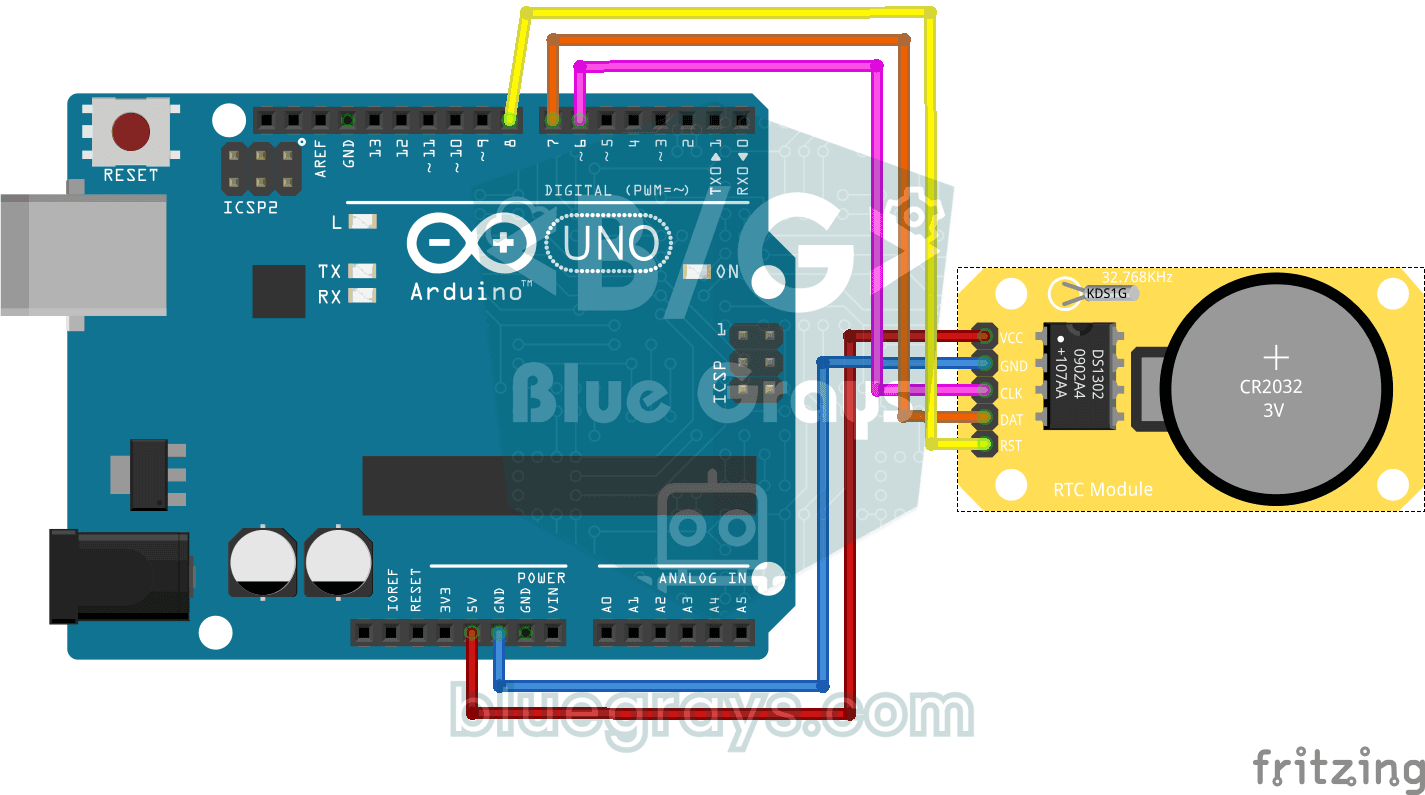
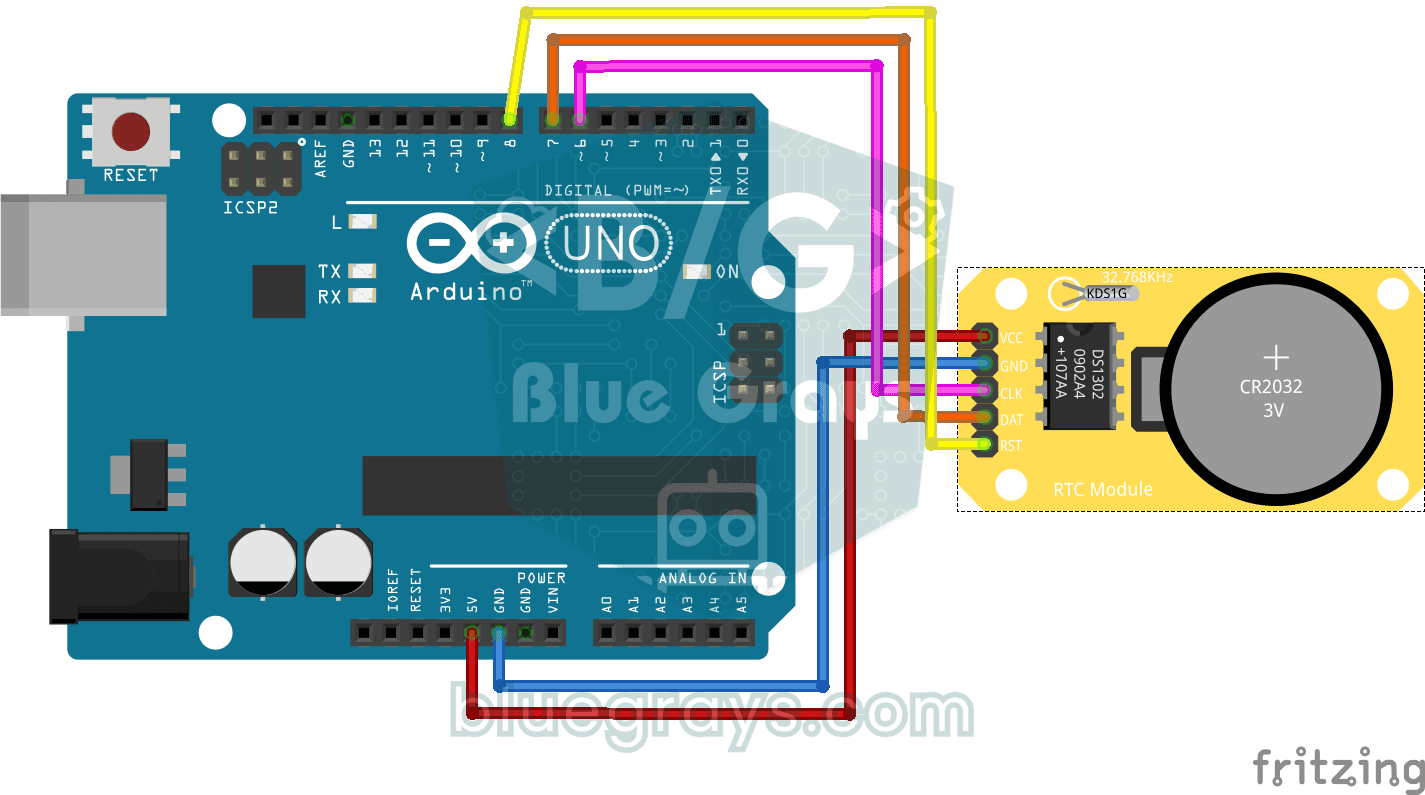
10// Pins:
11//   D6 -> RTC CLK
12//   D7 -> RTC DAT
13//   D8 -> RTC RST
14//   RTC VCC to 5V, GND to GND
15
16#include <virtuabotixRTC.h>   // DS1302 library
17
18// Pins: CLK, DAT, RST
19virtuabotixRTC myRTC(6, 7, 8);
20
21void setup() {
22  Serial.begin(9600);   // Serial at 9600 baud
23
24  // Read the RTC first. A year below 2024 or a month outside 1-12 means the time was never set;
25  // write the compile time. If it is valid leave it, so uploading again or power cycling the
26  // Arduino keeps the time.
27  myRTC.updateTime();
28  if (myRTC.year < 2024 || myRTC.month < 1 || myRTC.month > 12) {
29    setFromCompileTime();
30  }
31}
32
33// Writes the compile time (__DATE__ "Oct 28 2026", __TIME__ "13:42:15") to the RTC. Uploading takes
34// a few seconds, so the clock starts that far behind.
35void setFromCompileTime() {
36  const char *date = __DATE__;
37  const char *time = __TIME__;
38  const char *months = "JanFebMarAprMayJunJulAugSepOctNovDec";
39  char monthName[4] = {date[0], date[1], date[2], '\0'};
40
41  int month = (strstr(months, monthName) - months) / 3 + 1;   // "Oct" -> 10
42  int day = atoi(date + 4);
43  int year = atoi(date + 7);
44  int hour = atoi(time);
45  int minute = atoi(time + 3);
46  int second = atoi(time + 6);
47
48  // Day of the week (Sakamoto's method), 0 = Sunday
49  int offsets[] = {0, 3, 2, 5, 0, 3, 5, 1, 4, 6, 2, 4};
50  int y = year - (month < 3);
51  int weekday = (y + y / 4 - y / 100 + y / 400 + offsets[month - 1] + day) % 7;
52  if (weekday == 0) {
53    weekday = 7;   // Monday = 1 ... Sunday = 7
54  }
55
56  // Order: s, min, h, weekday, day, month, year
57  myRTC.setDS1302Time(second, minute, hour, weekday, day, month, year);
58}
59
60void loop() {
61  // Read the current time from the RTC module
62  myRTC.updateTime();
63
64  // Print the time (day/month/year h:m:s)
65  Serial.print("Current Date/Time: ");
66  Serial.print(myRTC.dayofmonth);
67  Serial.print("/");
68  Serial.print(myRTC.month);
69  Serial.print("/");
70  Serial.print(myRTC.year);
71  Serial.print("  ");
72  Serial.print(myRTC.hours);
73  Serial.print(":");
74  Serial.print(myRTC.minutes);
75  Serial.print(":");
76  Serial.println(myRTC.seconds);
77
78  delay(1000);   // Wait 1 s
79}
80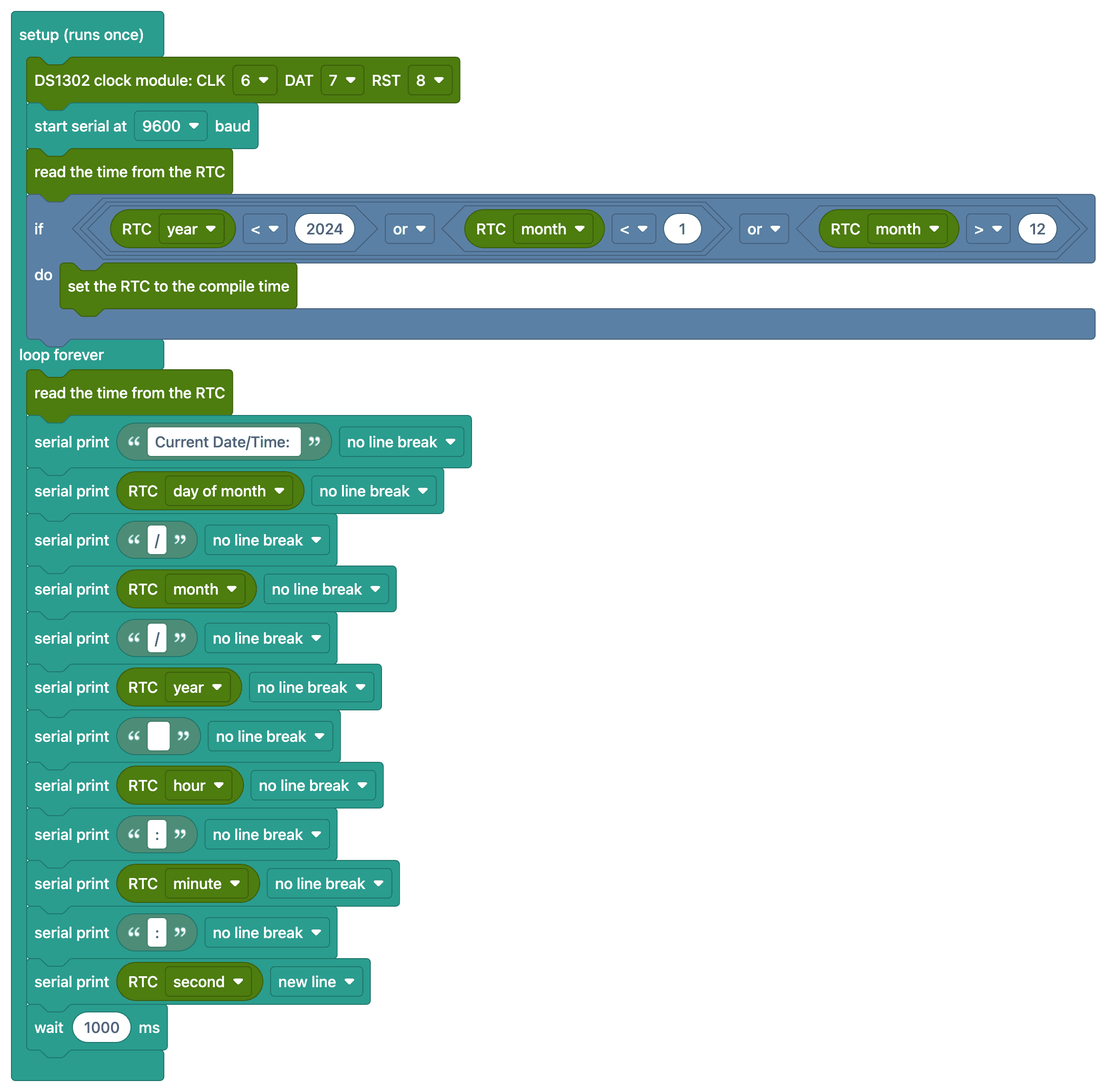
Ko‘p so‘raladigan savollar
What does the RTC module do?
The real-time clock (RTC) module maintains the time and date even when the Arduino is turned off, thanks to its built-in battery. Since the Arduino’s millis() counter resets every time the Arduino is powered on, the RTC is required for accurate time information.
Is it enough to set the time just once?
Yes. The code first reads the time from the module; if it was never set, it writes the date and time when you compiled the code once. If the time is valid it leaves it alone, so uploading again or turning the Arduino off and on doesn't break the clock. You don't need to comment out any line by hand.
The clock is running slow—is that normal?
The DS1302 is crystal-based and may deviate by a few seconds per day. For a more accurate clock, the temperature-compensated DS3231 module is recommended (approximately ±1 minute per year).
What happens when the battery in the module runs out?
The clock runs as long as the Arduino is powered; if the power is cut off and the battery is dead, the clock resets and must be set again. The CR2032 battery typically lasts a few years.