
ESP32 Bluetooth LCD-ga matn
Telefoningda xabar yoz, u Bluetooth orqali 16x2 LCD da paydo bo‘ladi, internet ham, Wi-Fi ham kerak emas. Bu loyiha ilovadagi LCD-ga matn Bluetooth shabloni uchun ESP32 va I2C LCD bilan qadamma-qadam qo‘llanma. Ustaxonam › Qurilmalar › Qurilma qo‘shish › Bluetooth bo‘limiga o‘t, «LCD-ga matn»ni tanla va kodni Kodni olish orqali yukla. Bu sahifadagi Bluetooth paneli sifatida o‘rnatish tugmasi ham sozlash ustasini shu shablon bilan ochadi.
Video
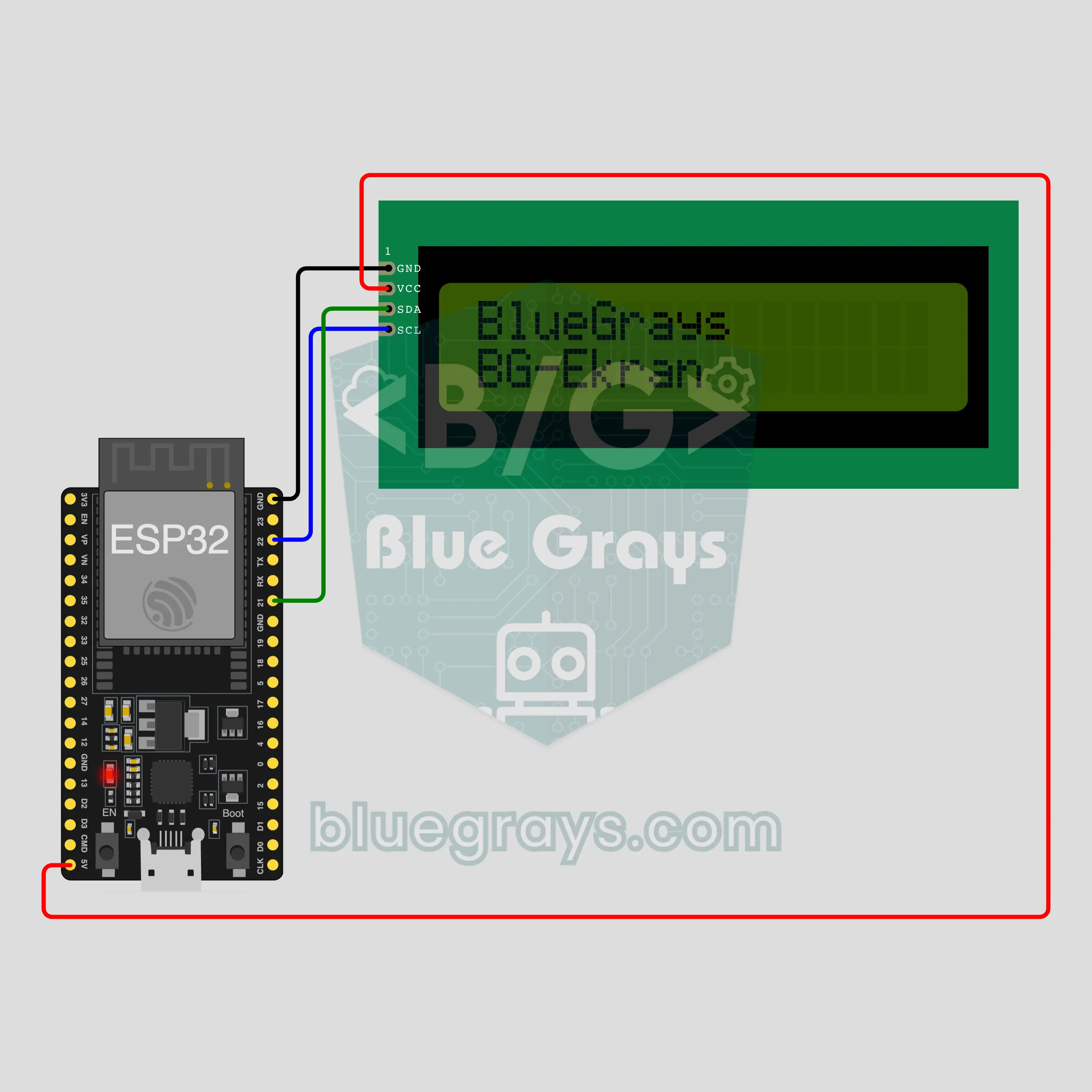
Elektr sxemasi
Manba kodi
1// ┌───────────────────────────┐
2// │ BlueGrays · bluegrays.com │
3// │ Bluetooth · ESP32         │
4// │ BG-Ekran                  │
5// └───────────────────────────┘
6// Text on an LCD
7// Arduino IDE board: ESP32 Dev Module
8// the BLE library comes with the ESP32 board package, nothing extra to install
9
10#include <BLEDevice.h>
11#include <BLEServer.h>
12#include <BLE2902.h>
13#include <Wire.h>
14#include <LiquidCrystal_I2C.h>  // Library Manager: 'LiquidCrystal I2C' (Frank de Brabander)
15
16const char BLE_NAME[] = "BG-Ekran";  // the board advertises with this name, the app finds it in the list by it
17
18// Pins: change them here if you wired differently
19const int SDA_PIN = 21, SCL_PIN = 22;
20const int LCD_COLS = 16, LCD_ROWS = 2;  // LCD size: columns × rows
21const uint8_t LCD_ADDRESS = 0x27;  // most I2C LCD backpacks use 0x27; try 0x3F if the screen stays blank
22
23void btWrite(const char *text);
24void onValue(const char *key, const char *value);
25void sendAll();
26void onLinkLost();
27
28// ── The app sends "key=value" lines; on "?" the board sends all its values ──
29char line[65];
30uint8_t lineLen = 0;
31unsigned long lastRxMs = 0;
32
33bool is(const char *a, const char *b) { return strcmp(a, b) == 0; }
34bool isOn(const char *v) { return v[0] == '1'; }
35
36void sendText(const char *key, const char *value) {
37  char out[72];
38  snprintf(out, sizeof(out), "%s=%s\n", key, value);
39  btWrite(out);
40}
41
42void sendInt(const char *key, long value) {
43  char text[12];
44  snprintf(text, sizeof(text), "%ld", value);
45  sendText(key, text);
46}
47
48void sendFloat(const char *key, float value) {
49  char text[16];
50  dtostrf(value, 1, 1, text);
51  sendText(key, text);
52}
53
54void handleLine(char *text) {
55  char *eq = strchr(text, '=');
56  if (eq == nullptr) {
57    if (text[strlen(text) - 1] == '?') {
58      btWrite("@v=1.0\n");  // the "@v" line tells the app the code version
59      sendAll();
60    }
61    return;
62  }
63  *eq = '\0';
64  onValue(text, eq + 1);
65}
66
67void feed(char c) {
68  lastRxMs = millis();
69  if (c == '\n' || c == '\r') {
70    if (lineLen == 0) return;
71    line[lineLen] = '\0';
72    lineLen = 0;
73    handleLine(line);
74  } else if (lineLen < sizeof(line) - 1) {
75    line[lineLen++] = c;
76  }
77}
78
79// ── Bluetooth (Nordic UART) ──
80#define UART_SERVICE "6E400001-B5A3-F393-E0A9-E50E24DCCA9E"
81#define UART_RX "6E400002-B5A3-F393-E0A9-E50E24DCCA9E"
82#define UART_TX "6E400003-B5A3-F393-E0A9-E50E24DCCA9E"
83
84BLECharacteristic *txChar = nullptr;
85volatile bool linked = false;
86volatile bool linkLost = false;
87// incoming bytes move from the Bluetooth task to loop() through a small ring buffer
88const int RX_SIZE = 256;
89volatile uint8_t rxBuf[RX_SIZE];
90volatile int rxHead = 0, rxTail = 0;
91
92class ServerEvents : public BLEServerCallbacks {
93  void onConnect(BLEServer *server) override { linked = true; }
94  void onDisconnect(BLEServer *server) override { linked = false; linkLost = true; }
95};
96
97class RxEvents : public BLECharacteristicCallbacks {
98  void onWrite(BLECharacteristic *c) override {
99    auto v = c->getValue();
100    for (size_t i = 0; i < v.length(); i++) {
101      int next = (rxHead + 1) % RX_SIZE;
102      if (next == rxTail) break;
103      rxBuf[rxHead] = (uint8_t)v[i];
104      rxHead = next;
105    }
106  }
107};
108
109// lines go out in 20-byte packets (works with every phone)
110void btWrite(const char *text) {
111  if (!linked || txChar == nullptr) return;
112  size_t n = strlen(text);
113  for (size_t i = 0; i < n; i += 20) {
114    size_t len = n - i < 20 ? n - i : 20;
115    txChar->setValue((uint8_t *)text + i, len);
116    txChar->notify();
117    delay(4);
118  }
119}
120
121void btBegin() {
122  BLEDevice::init(BLE_NAME);
123  BLEServer *server = BLEDevice::createServer();
124  server->setCallbacks(new ServerEvents());
125  BLEService *uart = server->createService(UART_SERVICE);
126  txChar = uart->createCharacteristic(UART_TX, BLECharacteristic::PROPERTY_NOTIFY);
127  txChar->addDescriptor(new BLE2902());
128  BLECharacteristic *rx = uart->createCharacteristic(UART_RX, BLECharacteristic::PROPERTY_WRITE | BLECharacteristic::PROPERTY_WRITE_NR);
129  rx->setCallbacks(new RxEvents());
130  uart->start();
131  BLEAdvertisementData adv;
132  adv.setFlags(0x06);
133  adv.setCompleteServices(BLEUUID(UART_SERVICE));
134  BLEAdvertisementData scan;
135  scan.setName(BLE_NAME);
136  BLEAdvertising *advertising = BLEDevice::getAdvertising();
137  advertising->setAdvertisementData(adv);
138  advertising->setScanResponseData(scan);
139  BLEDevice::startAdvertising();
140}
141
142void btPoll() {
143  while (rxTail != rxHead) {
144    char c = (char)rxBuf[rxTail];
145    rxTail = (rxTail + 1) % RX_SIZE;
146    feed(c);
147  }
148  if (linkLost) {
149    linkLost = false;
150    onLinkLost();
151    delay(100);
152    BLEDevice::startAdvertising();
153  }
154}
155
156// ── ESP32 ──
157// if you only see boxes, turn the blue trimmer on the back (contrast)
158LiquidCrystal_I2C lcd(LCD_ADDRESS, LCD_COLS, LCD_ROWS);
159char rows[LCD_ROWS][LCD_COLS + 1];
160bool lightOn = true;
161
162// the LCD only knows basic Latin letters: accented ones are simplified (é → e), others become ?
163const char FOLD[] = "AAAAAAACEEEEIIIIDNOOOOOxOUUUUYPsaaaaaaaceeeeiiiidnooooo/ouuuuypyAaAaAaCcCcCcCcDdDdEeEeEeEeEeGgGgGgGgHhHhIiIiIiIiIiJjJjKkkLlLlLlLlLlNnNnNnnNnOoOoOoOoRrRrRrSsSsSsSsTtTtTtUuUuUuUuUuUuWwYyYZzZzZzs";
164
165void toAscii(const char *in, char *out, size_t size) {
166  size_t n = 0;
167  const unsigned char *p = (const unsigned char *)in;
168  while (*p && n + 1 < size) {
169    unsigned char c = *p;
170    if (c < 0x80) { out[n++] = c >= 32 ? c : ' '; p++; continue; }
171    int len = c >= 0xF0 ? 4 : c >= 0xE0 ? 3 : c >= 0xC0 ? 2 : 1;
172    unsigned int code = (len == 2 && p[1]) ? ((c & 0x1F) << 6) | (p[1] & 0x3F) : 0;
173    out[n++] = (code >= 0xC0 && code <= 0x17F) ? FOLD[code - 0xC0] : '?';
174    for (int k = 0; k < len && *p; k++) p++;
175  }
176  out[n] = '\0';
177}
178
179void showRows() {
180  for (int r = 0; r < LCD_ROWS; r++) {
181    lcd.setCursor(0, r);
182    bool ended = false;
183    for (int c = 0; c < LCD_COLS; c++) {
184      if (rows[r][c] == '\0') ended = true;
185      lcd.write(ended ? ' ' : rows[r][c]);
186    }
187  }
188}
189
190// "yazi=" flows the text over the rows, "satir1=" … replaces a single row
191void setText(const char *text) {
192  char flat[LCD_COLS * LCD_ROWS + 1];
193  toAscii(text, flat, sizeof(flat));
194  int len = strlen(flat);
195  for (int r = 0; r < LCD_ROWS; r++) {
196    int start = r * LCD_COLS;
197    int n = len > start ? min(LCD_COLS, len - start) : 0;
198    memcpy(rows[r], flat + start, n);
199    rows[r][n] = '\0';
200  }
201}
202
203void onValue(const char *key, const char *value) {
204  if (is(key, "yazi")) {
205    setText(value);
206    showRows();
207  } else if (strncmp(key, "satir", 5) == 0) {
208    int r = atoi(key + 5) - 1;
209    if (r < 0 || r >= LCD_ROWS) return;
210    toAscii(value, rows[r], LCD_COLS + 1);
211    showRows();
212  } else if (is(key, "isik")) {
213    lightOn = isOn(value);
214    if (lightOn) lcd.backlight(); else lcd.noBacklight();
215  }
216}
217
218void sendAll() {
219  char flat[LCD_COLS * LCD_ROWS + 1];
220  snprintf(flat, sizeof(flat), rows[1][0] ? "%-16s%s" : "%s", rows[0], rows[1]);
221  if (flat[0]) sendText("yazi", flat);
222  sendInt("isik", lightOn);
223}
224
225void onLinkLost() {
226}
227
228void setup() {
229  Serial.begin(115200);
230  Wire.begin(SDA_PIN, SCL_PIN);
231  lcd.init();
232  lcd.backlight();
233  setText("BlueGrays");
234  strncpy(rows[1], BLE_NAME, LCD_COLS);
235  rows[1][LCD_COLS] = '\0';
236  showRows();
237  btBegin();
238  Serial.print(F("BlueGrays Bluetooth: "));
239  Serial.println(BLE_NAME);
240}
241
242void loop() {
243  btPoll();
244}
245Ko‘p so‘raladigan savollar
iPhone bilan ishlaydimi?
Ha. ESP32-ning o‘rnatilgan Bluetooth Low Energy (BLE) moduli iPhone bilan ham, Android bilan ham ishlaydi. iPhone HC-05 va HC-06 kabi klassik Bluetooth modullariga ulana olmaydi, bu loyihaga esa ular kerak emas. Platani telefoningning Bluetooth sozlamalarida bog‘lashga urinma; BLE platalar u yerda ko‘rinmasligi mumkin, bu normal holat. Ulanishni BlueGrays ilovasi o‘rnatadi.
U é, ü yoki ñ kabi diakritik belgili harflarni ko‘rsata oladimi?
Diakritik belgili ko‘rinishda emas. Matn displeyga borishidan oldin kod diakritik belgili lotin harflarini oddiylariga aylantiradi: é e ga, ü u ga, ñ n ga, ç c ga aylanadi. café deb yozsang, displey cafe ni ko‘rsatadi, shunda matn o‘qiladigan bo‘lib qoladi. O‘zbekcha o‘ va g‘ dagi ‘ belgisi jadvalda bo‘lmasa, so‘roq belgisi bo‘lib chiqishi mumkin, shuning uchun uning o‘rniga oddiy apostrof (o', g') yoz. Almashtirish jadvalida yo‘q belgilar (emoji, kirill yoki yapon belgilari, ° va € kabi belgilar) so‘roq belgisi bo‘lib chiqadi. Paneldagi LCD ko‘rinishi matning yuborishdan oldin qanday ko‘rinishini ko‘rsatadi.
20x4 LCD ishlatsam bo‘ladimi?
Ha. Sozlash ustasida va kod ekranida «LCD turi» tanlovi bor: 16x2 yoki 20x4. 20x4 ni tanlasang, ilova kodni shu o‘lcham uchun tayyorlaydi. Ulanish bir xil: o‘sha pinlarga to‘rtta sim. 16x2 uchun olgan kodingda ustun va qator sonlarini qo‘lda o‘zgartirma, chunki kodning boshqa qismlari ham o‘lchamga bog‘liq. To‘g‘ri yo‘l ilovada LCD turini o‘zgartirib, kodni qaytadan olish. Bu qo‘llanma 16x2 displey bilan yasalgan.
Nechta belgi sig‘adi, uzun matn suriladimi?
16x2 displeyga 32 ta belgi sig‘adi: 16 tadan ikki qator. Paneldagi matn maydoni bundan ko‘pini qabul qilmaydi. Birinchi 16 ta belgi yuqori qatorga, qolgani pastki qatorga tushadi; kod so‘zlarga qaramaydi, shuning uchun qator oxirida so‘z ikkiga bo‘linib qolishi mumkin. Matn surilmaydi, o‘z joyida turadi. So‘zni pastki qatorga tushirish uchun oldiga bo‘sh joylar qo‘sh; LCD ko‘rinishi bo‘linishni yuborishdan oldin ko‘rsatadi. Yangi matn eskisining o‘rnini egallaydi.