
ESP32 Bluetooth RGB LED lenta (WS2812B)
Lentangning rangi, yorqinligi va effektini telefoningdan o‘zgartir: ESP32 telefoningga o‘rnatilgan Bluetooth orqali ulanadi, WS2812B lentasiga esa atigi 3 ta sim kerak. Bu loyiha ilovadagi RGB LED lenta Bluetooth shabloni uchun qadamma-qadam qo‘llanma. Ustaxonam › Qurilmalar › Qurilma qo‘shish › Bluetooth bo‘limiga o‘t, «RGB LED lenta»ni tanla, kodni Kodni olish orqali yukla. Sahifadagi Bluetooth paneli sifatida o‘rnatish tugmasi sozlash ustasini shu shablon bilan ochadi.
Video
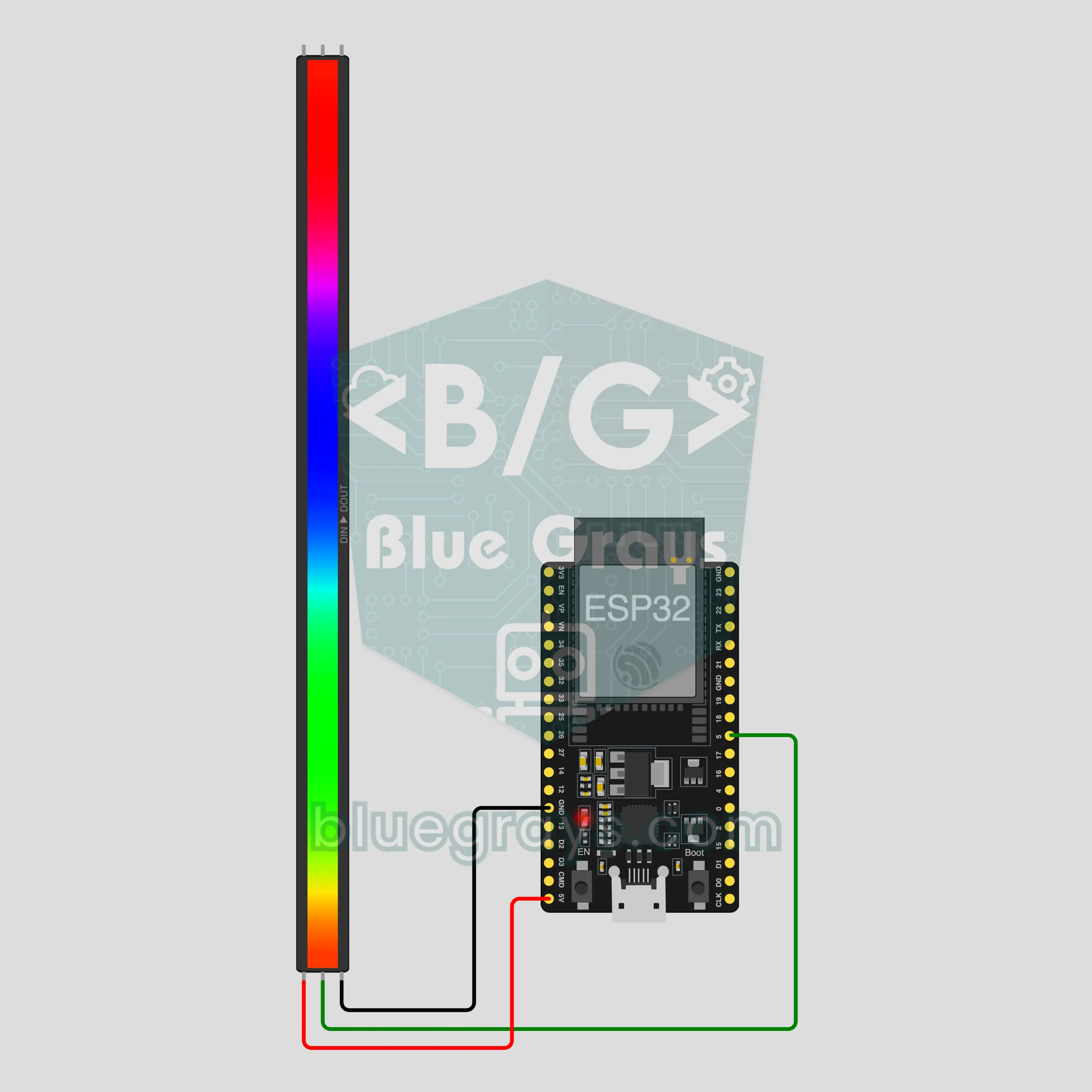
Elektr sxemasi
Manba kodi
1// ┌───────────────────────────┐
2// │ BlueGrays · bluegrays.com │
3// │ Bluetooth · ESP32         │
4// │ BG-Isik                   │
5// └───────────────────────────┘
6// RGB LED strip
7// Arduino IDE board: ESP32 Dev Module
8// the BLE library comes with the ESP32 board package, nothing extra to install
9
10#include <BLEDevice.h>
11#include <BLEServer.h>
12#include <BLE2902.h>
13#include <Adafruit_NeoPixel.h>  // Library Manager: 'Adafruit NeoPixel'
14
15const char BLE_NAME[] = "BG-Isik";  // the board advertises with this name, the app finds it in the list by it
16
17// Pins: change them here if you wired differently
18const int STRIP_PIN = 5;
19const int LED_COUNT = 30;  // number of LEDs on your strip
20
21void btWrite(const char *text);
22void onValue(const char *key, const char *value);
23void sendAll();
24void onLinkLost();
25
26// ── The app sends "key=value" lines; on "?" the board sends all its values ──
27char line[65];
28uint8_t lineLen = 0;
29unsigned long lastRxMs = 0;
30
31bool is(const char *a, const char *b) { return strcmp(a, b) == 0; }
32bool isOn(const char *v) { return v[0] == '1'; }
33
34void sendText(const char *key, const char *value) {
35  char out[72];
36  snprintf(out, sizeof(out), "%s=%s\n", key, value);
37  btWrite(out);
38}
39
40void sendInt(const char *key, long value) {
41  char text[12];
42  snprintf(text, sizeof(text), "%ld", value);
43  sendText(key, text);
44}
45
46void sendFloat(const char *key, float value) {
47  char text[16];
48  dtostrf(value, 1, 1, text);
49  sendText(key, text);
50}
51
52void handleLine(char *text) {
53  char *eq = strchr(text, '=');
54  if (eq == nullptr) {
55    if (text[strlen(text) - 1] == '?') {
56      btWrite("@v=1.0\n");  // the "@v" line tells the app the code version
57      sendAll();
58    }
59    return;
60  }
61  *eq = '\0';
62  onValue(text, eq + 1);
63}
64
65void feed(char c) {
66  lastRxMs = millis();
67  if (c == '\n' || c == '\r') {
68    if (lineLen == 0) return;
69    line[lineLen] = '\0';
70    lineLen = 0;
71    handleLine(line);
72  } else if (lineLen < sizeof(line) - 1) {
73    line[lineLen++] = c;
74  }
75}
76
77// ── Bluetooth (Nordic UART) ──
78#define UART_SERVICE "6E400001-B5A3-F393-E0A9-E50E24DCCA9E"
79#define UART_RX "6E400002-B5A3-F393-E0A9-E50E24DCCA9E"
80#define UART_TX "6E400003-B5A3-F393-E0A9-E50E24DCCA9E"
81
82BLECharacteristic *txChar = nullptr;
83volatile bool linked = false;
84volatile bool linkLost = false;
85// incoming bytes move from the Bluetooth task to loop() through a small ring buffer
86const int RX_SIZE = 256;
87volatile uint8_t rxBuf[RX_SIZE];
88volatile int rxHead = 0, rxTail = 0;
89
90class ServerEvents : public BLEServerCallbacks {
91  void onConnect(BLEServer *server) override { linked = true; }
92  void onDisconnect(BLEServer *server) override { linked = false; linkLost = true; }
93};
94
95class RxEvents : public BLECharacteristicCallbacks {
96  void onWrite(BLECharacteristic *c) override {
97    auto v = c->getValue();
98    for (size_t i = 0; i < v.length(); i++) {
99      int next = (rxHead + 1) % RX_SIZE;
100      if (next == rxTail) break;
101      rxBuf[rxHead] = (uint8_t)v[i];
102      rxHead = next;
103    }
104  }
105};
106
107// lines go out in 20-byte packets (works with every phone)
108void btWrite(const char *text) {
109  if (!linked || txChar == nullptr) return;
110  size_t n = strlen(text);
111  for (size_t i = 0; i < n; i += 20) {
112    size_t len = n - i < 20 ? n - i : 20;
113    txChar->setValue((uint8_t *)text + i, len);
114    txChar->notify();
115    delay(4);
116  }
117}
118
119void btBegin() {
120  BLEDevice::init(BLE_NAME);
121  BLEServer *server = BLEDevice::createServer();
122  server->setCallbacks(new ServerEvents());
123  BLEService *uart = server->createService(UART_SERVICE);
124  txChar = uart->createCharacteristic(UART_TX, BLECharacteristic::PROPERTY_NOTIFY);
125  txChar->addDescriptor(new BLE2902());
126  BLECharacteristic *rx = uart->createCharacteristic(UART_RX, BLECharacteristic::PROPERTY_WRITE | BLECharacteristic::PROPERTY_WRITE_NR);
127  rx->setCallbacks(new RxEvents());
128  uart->start();
129  BLEAdvertisementData adv;
130  adv.setFlags(0x06);
131  adv.setCompleteServices(BLEUUID(UART_SERVICE));
132  BLEAdvertisementData scan;
133  scan.setName(BLE_NAME);
134  BLEAdvertising *advertising = BLEDevice::getAdvertising();
135  advertising->setAdvertisementData(adv);
136  advertising->setScanResponseData(scan);
137  BLEDevice::startAdvertising();
138}
139
140void btPoll() {
141  while (rxTail != rxHead) {
142    char c = (char)rxBuf[rxTail];
143    rxTail = (rxTail + 1) % RX_SIZE;
144    feed(c);
145  }
146  if (linkLost) {
147    linkLost = false;
148    onLinkLost();
149    delay(100);
150    BLEDevice::startAdvertising();
151  }
152}
153
154// ── ESP32 ──
155Adafruit_NeoPixel strip(LED_COUNT, STRIP_PIN, NEO_GRB + NEO_KHZ800);
156bool stripOn = false;
157uint8_t cr = 255, cg = 255, cb = 255;
158int brightness = 70;
159char effect[16] = "sabit";
160uint16_t hue = 0;
161unsigned long lastFrameMs = 0;
162
163uint8_t level() { return map(brightness, 0, 100, 0, 255); }
164
165// gamma correction: colors look on the LEDs like they do on screen
166void fillColor(uint32_t color, uint8_t bright) {
167  strip.setBrightness(bright);
168  strip.fill(strip.gamma32(color));
169  strip.show();
170}
171
172void paint() {
173  if (!stripOn) { strip.clear(); strip.show(); return; }
174  fillColor(strip.Color(cr, cg, cb), level());
175}
176
177void onValue(const char *key, const char *value) {
178  if (is(key, "acik")) {
179    stripOn = isOn(value);
180  } else if (is(key, "renk") && value[0] == '#' && strlen(value) == 7) {
181    long c = strtol(value + 1, nullptr, 16);
182    cr = c >> 16; cg = (c >> 8) & 0xFF; cb = c & 0xFF;
183  } else if (is(key, "parlaklik")) {
184    brightness = constrain(atoi(value), 0, 100);
185  } else if (is(key, "efekt")) {
186    strncpy(effect, value, sizeof(effect) - 1);
187  }
188  paint();
189}
190
191void sendAll() {
192  char hex[8];
193  snprintf(hex, sizeof(hex), "#%02X%02X%02X", cr, cg, cb);
194  sendInt("acik", stripOn);
195  sendText("renk", hex);
196  sendInt("parlaklik", brightness);
197  sendText("efekt", effect);
198}
199
200void onLinkLost() {
201}
202
203void setup() {
204  Serial.begin(115200);
205  strip.begin();
206  paint();
207  btBegin();
208  Serial.print(F("BlueGrays Bluetooth: "));
209  Serial.println(BLE_NAME);
210}
211
212void loop() {
213  btPoll();
214  if (stripOn && !is(effect, "sabit")) {
215    // the effect pauses for a moment while a command arrives (interrupts are off while the strip updates)
216    if (millis() - lastRxMs > 150 && millis() - lastFrameMs >= 30) {
217      lastFrameMs = millis();
218      if (is(effect, "gokkusagi")) {  // a rainbow flows along the strip
219        hue += 512;
220        strip.setBrightness(level());
221        for (int i = 0; i < LED_COUNT; i++) strip.setPixelColor(i, strip.gamma32(strip.ColorHSV(hue + i * 65536L / LED_COUNT)));
222        strip.show();
223      } else if (is(effect, "nefes")) {  // slowly fades out and in
224        float wave = (sin(millis() / 600.0) + 1.0) / 2.0;
225        fillColor(strip.Color(cr, cg, cb), level() * (0.15 + 0.85 * wave));
226      } else if (is(effect, "yanip_sonme")) {  // blinks every half second
227        fillColor(strip.Color(cr, cg, cb), (millis() / 500) % 2 ? level() : 0);
228      } else if (is(effect, "renk_dongusu")) {  // whole strip one color, smooth hue shift
229        hue += 128;
230        fillColor(strip.ColorHSV(hue), level());
231      }
232    }
233  }
234}
235Ko‘p so‘raladigan savollar
iPhone bilan ishlaydimi?
Ha. Loyiha ESP32-ning o‘rnatilgan Bluetooth Low Energy (BLE) modulidan foydalanadi, u iPhone-da ham, Android-da ham ishlaydi. iPhone HC-05 yoki HC-06 kabi klassik Bluetooth modullariga ulana olmaydi, shuning uchun bu yerda qo‘shimcha modul yo‘q. Platani telefoningning Bluetooth sozlamalarida bog‘lashga urinma; ulanishni faqat BlueGrays ilovasi o‘rnatadi.
Nechta LED ulashim mumkin va qanday quvvat manbai kerak?
Har bir LED to‘liq oq rangda 60 mA gacha tortadi, shuning uchun 30 ta LED taxminan 1,8 A qiladi. Kompyuterning USB porti buni bera olmaydi, shuning uchun USB orqali tezkor sinovda yorqinlikni 20 atrofida tut. Kundalik foydalanish uchun lentani alohida 5 V 2 A adapterdan quvvatlantir va uning GND-sini ESP32-ning GND-siga ula. Uzunroq lenta uchun koddagi LED_COUNT ni o‘zgartir va adapterni har bir LED uchun 60 mA hisobidan tanla. Lenta kirishidagi 1000 µF kondensator va ma’lumot liniyasiga ketma-ket ulangan 330 Ω rezistor lentani himoya qiladi.
Nega ranglar ekrandagidan farq qiladi?
LED yorqinligi qiymat bilan to‘g‘ri chiziq bo‘yicha oshadi, lekin ko‘zing yorug‘likni bunday ko‘rmaydi; tuzatishsiz ranglar xira va oqish ko‘rinadi. Shuning uchun kod har bir rangni gamma32 bilan tuzatadi. To‘q va pastel tuslar ekrandagiga yaqinlashadi, lekin hech qachon aynan bir xil bo‘lmaydi. Juda past yorqinlikda ranglar siljiydi, sariq va to‘q sariq kabi aralash tuslar so‘nadi; taxminan 40 dan yuqorida farq kamayadi.
Elektr o‘chgandan keyin lenta nima qiladi?
Plata har doim lentani o‘chiq holda ishga tushiradi: rang oqqa, yorqinlik 70 ga, effekt «Doimiy» ga qaytadi, chunki qiymatlar platada saqlanmaydi. Ilova qayta ulanganda panel plata yuborgan joriy qiymatlarni ko‘rsatadi, shuning uchun «Yorug‘lik» kalitini yoqish kifoya. Faqat telefon uzilsa, lenta avvalgidek yonib turaveradi.