
ESP32 Bluetooth servo qulf
SG90 servoni kichik zulfin sifatida telefoningdan Bluetooth orqali boshqar: qulfla, och yoki burchakni sozla, internet va Wi-Fi kerak emas. Bu loyiha ilovadagi Servo qulf Bluetooth shabloni uchun ESP32, servo va 3 ta sim bilan qadamma-qadam qo‘llanma. Ustaxonam › Qurilmalar › Qurilma qo‘shish › Bluetooth bo‘limiga o‘t, «Servo qulf»ni tanla, kodni Kodni olish orqali yukla. Sahifadagi Bluetooth paneli sifatida o‘rnatish tugmasi sozlash ustasini shu shablon bilan ochadi.
Video
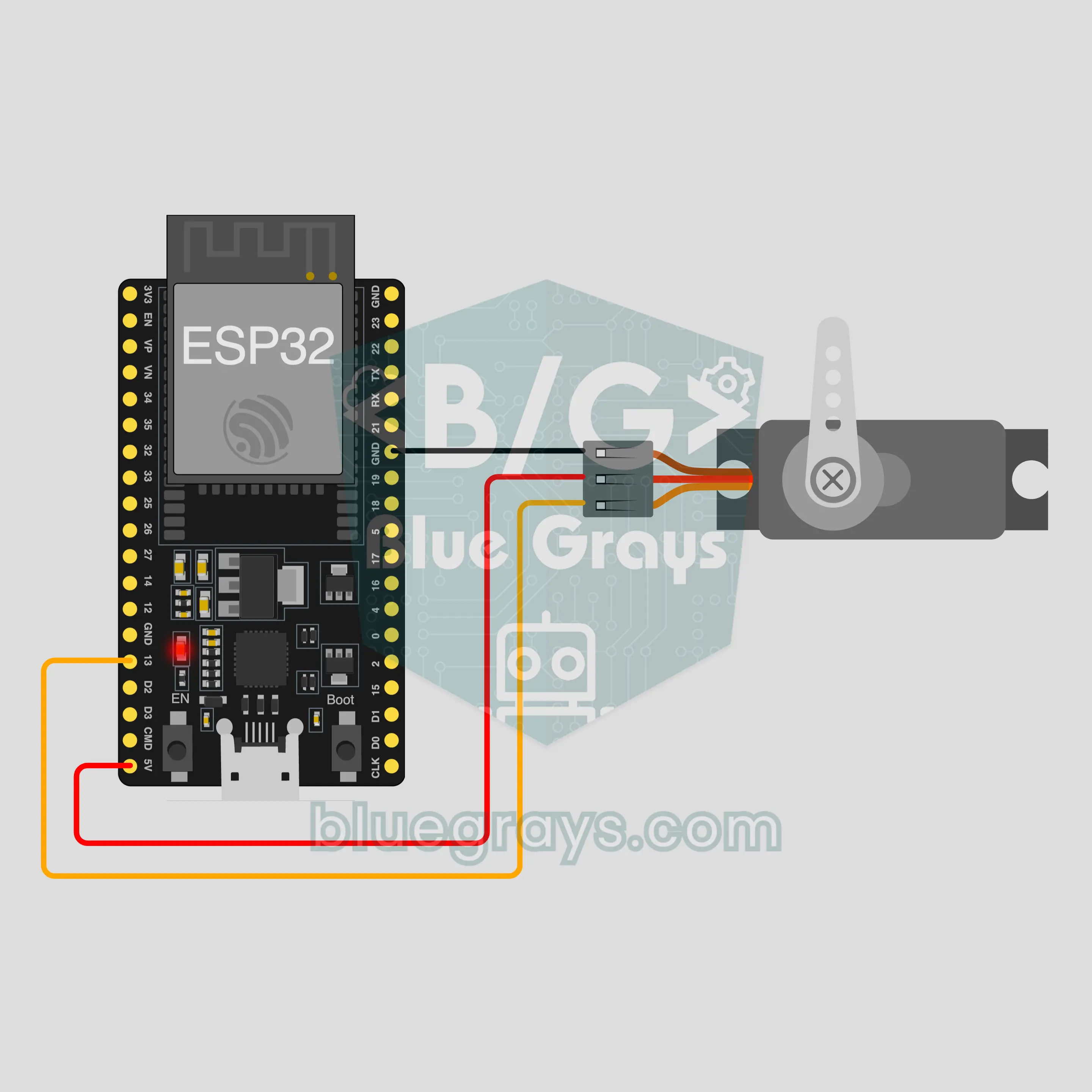
Elektr sxemasi
Manba kodi
1// ┌───────────────────────────┐
2// │ BlueGrays · bluegrays.com │
3// │ Bluetooth · ESP32         │
4// │ BG-Kilit                  │
5// └───────────────────────────┘
6// Servo lock
7// Arduino IDE board: ESP32 Dev Module
8// the BLE library comes with the ESP32 board package, nothing extra to install
9
10#include <BLEDevice.h>
11#include <BLEServer.h>
12#include <BLE2902.h>
13#include <ESP32Servo.h>  // Library Manager: 'ESP32Servo'
14
15const char BLE_NAME[] = "BG-Kilit";  // the board advertises with this name, the app finds it in the list by it
16
17// Pins: change them here if you wired differently
18const int SERVO_PIN = 13;
19const int LOCKED_ANGLE = 90, OPEN_ANGLE = 0;  // servo angles for locked and open
20const bool LOCK_ON_DISCONNECT = true;  // If the connection drops the lock closes (set false to leave it as it is)
21
22void btWrite(const char *text);
23void onValue(const char *key, const char *value);
24void sendAll();
25void onLinkLost();
26
27// ── The app sends "key=value" lines; on "?" the board sends all its values ──
28char line[65];
29uint8_t lineLen = 0;
30unsigned long lastRxMs = 0;
31
32bool is(const char *a, const char *b) { return strcmp(a, b) == 0; }
33bool isOn(const char *v) { return v[0] == '1'; }
34
35void sendText(const char *key, const char *value) {
36  char out[72];
37  snprintf(out, sizeof(out), "%s=%s\n", key, value);
38  btWrite(out);
39}
40
41void sendInt(const char *key, long value) {
42  char text[12];
43  snprintf(text, sizeof(text), "%ld", value);
44  sendText(key, text);
45}
46
47void sendFloat(const char *key, float value) {
48  char text[16];
49  dtostrf(value, 1, 1, text);
50  sendText(key, text);
51}
52
53void handleLine(char *text) {
54  char *eq = strchr(text, '=');
55  if (eq == nullptr) {
56    if (text[strlen(text) - 1] == '?') {
57      btWrite("@v=1.0\n");  // the "@v" line tells the app the code version
58      sendAll();
59    }
60    return;
61  }
62  *eq = '\0';
63  onValue(text, eq + 1);
64}
65
66void feed(char c) {
67  lastRxMs = millis();
68  if (c == '\n' || c == '\r') {
69    if (lineLen == 0) return;
70    line[lineLen] = '\0';
71    lineLen = 0;
72    handleLine(line);
73  } else if (lineLen < sizeof(line) - 1) {
74    line[lineLen++] = c;
75  }
76}
77
78// ── Bluetooth (Nordic UART) ──
79#define UART_SERVICE "6E400001-B5A3-F393-E0A9-E50E24DCCA9E"
80#define UART_RX "6E400002-B5A3-F393-E0A9-E50E24DCCA9E"
81#define UART_TX "6E400003-B5A3-F393-E0A9-E50E24DCCA9E"
82
83BLECharacteristic *txChar = nullptr;
84volatile bool linked = false;
85volatile bool linkLost = false;
86// incoming bytes move from the Bluetooth task to loop() through a small ring buffer
87const int RX_SIZE = 256;
88volatile uint8_t rxBuf[RX_SIZE];
89volatile int rxHead = 0, rxTail = 0;
90
91class ServerEvents : public BLEServerCallbacks {
92  void onConnect(BLEServer *server) override { linked = true; }
93  void onDisconnect(BLEServer *server) override { linked = false; linkLost = true; }
94};
95
96class RxEvents : public BLECharacteristicCallbacks {
97  void onWrite(BLECharacteristic *c) override {
98    auto v = c->getValue();
99    for (size_t i = 0; i < v.length(); i++) {
100      int next = (rxHead + 1) % RX_SIZE;
101      if (next == rxTail) break;
102      rxBuf[rxHead] = (uint8_t)v[i];
103      rxHead = next;
104    }
105  }
106};
107
108// lines go out in 20-byte packets (works with every phone)
109void btWrite(const char *text) {
110  if (!linked || txChar == nullptr) return;
111  size_t n = strlen(text);
112  for (size_t i = 0; i < n; i += 20) {
113    size_t len = n - i < 20 ? n - i : 20;
114    txChar->setValue((uint8_t *)text + i, len);
115    txChar->notify();
116    delay(4);
117  }
118}
119
120void btBegin() {
121  BLEDevice::init(BLE_NAME);
122  BLEServer *server = BLEDevice::createServer();
123  server->setCallbacks(new ServerEvents());
124  BLEService *uart = server->createService(UART_SERVICE);
125  txChar = uart->createCharacteristic(UART_TX, BLECharacteristic::PROPERTY_NOTIFY);
126  txChar->addDescriptor(new BLE2902());
127  BLECharacteristic *rx = uart->createCharacteristic(UART_RX, BLECharacteristic::PROPERTY_WRITE | BLECharacteristic::PROPERTY_WRITE_NR);
128  rx->setCallbacks(new RxEvents());
129  uart->start();
130  BLEAdvertisementData adv;
131  adv.setFlags(0x06);
132  adv.setCompleteServices(BLEUUID(UART_SERVICE));
133  BLEAdvertisementData scan;
134  scan.setName(BLE_NAME);
135  BLEAdvertising *advertising = BLEDevice::getAdvertising();
136  advertising->setAdvertisementData(adv);
137  advertising->setScanResponseData(scan);
138  BLEDevice::startAdvertising();
139}
140
141void btPoll() {
142  while (rxTail != rxHead) {
143    char c = (char)rxBuf[rxTail];
144    rxTail = (rxTail + 1) % RX_SIZE;
145    feed(c);
146  }
147  if (linkLost) {
148    linkLost = false;
149    onLinkLost();
150    delay(100);
151    BLEDevice::startAdvertising();
152  }
153}
154
155// ── ESP32 ──
156Servo servo;
157bool locked = true;
158int angle = LOCKED_ANGLE;
159
160void moveTo(int a) {
161  angle = constrain(a, 0, 180);
162  servo.write(angle);
163}
164
165void onValue(const char *key, const char *value) {
166  if (is(key, "kilit")) {
167    locked = isOn(value);
168    moveTo(locked ? LOCKED_ANGLE : OPEN_ANGLE);
169    sendInt("aci", angle);
170  } else if (is(key, "aci")) {
171    moveTo(atoi(value));
172    if (locked != (angle == LOCKED_ANGLE)) {
173      locked = !locked;
174      sendInt("kilit", locked);
175    }
176  }
177}
178
179void sendAll() {
180  sendInt("kilit", locked);
181  sendInt("aci", angle);
182}
183
184void onLinkLost() {
185  if (LOCK_ON_DISCONNECT && !locked) {
186    locked = true;
187    moveTo(LOCKED_ANGLE);
188  }
189}
190
191void setup() {
192  Serial.begin(115200);
193  servo.setPeriodHertz(50);
194  servo.attach(SERVO_PIN, 500, 2500);
195  moveTo(LOCKED_ANGLE);
196  btBegin();
197  Serial.print(F("BlueGrays Bluetooth: "));
198  Serial.println(BLE_NAME);
199}
200
201void loop() {
202  btPoll();
203}
204Ko‘p so‘raladigan savollar
iPhone bilan ishlaydimi?
Ha. ESP32-ning o‘rnatilgan Bluetooth Low Energy (BLE) moduli iPhone bilan ham, Android bilan ham ishlaydi. iPhone HC-05 va HC-06 kabi klassik Bluetooth modullariga ulana olmaydi, bu loyihaga esa ular kerak emas. Platani telefoningning Bluetooth sozlamalarida bog‘lashga urinma; BLE platalar u yerda ko‘rinmasligi mumkin, bu normal holat. Ulanishni BlueGrays ilovasi o‘rnatadi.
Nega ulanish uzilganda u o‘zi qulflanadi?
Bu ataylab qilingan. Koddagi LOCK_ON_DISCONNECT sozlamasi true bo‘lgani uchun telefon masofadan chiqqanda yoki ilova yopilganda plata zulfinni qulflangan burchakka (90 gradus) qaytaradi, shunda qulf tasodifan ochiq qolmaydi. Plata yoqilganda ham qulflangan holda ishga tushadi. Ochiq qolishini istasang, bu qiymatni false qil va kodni qayta yukla. Zulfinni «Qulf» kaliti o‘rniga «Servo burchagi» surgichi bilan ochgan bo‘lsang ham shu himoya ishlaydi: plata 90 dan boshqa har qanday burchakni ochiq deb hisoblaydi.
U bilan haqiqiy eshik yoki seyfni qulflasam bo‘ladimi?
Yo‘q, bu o‘quv loyihasi. SG90 plastik tishli g‘ildirakli kichik havaskor servo; kuch bilan bursang, uning yelkasi buriladi, quvvat uzilgach esa unda ushlab turish kuchi qolmaydi. Buning ustiga, bu koddagi Bluetooth ulanishida parol yo‘q: yaqindagi boshqa telefon ham plataga ulanib, buyruq yubora oladi. Uni quti, tortma yoki maket eshik zulfinida sinab ko‘r; haqiqiy eshik yoki qimmatbaho narsalarni unga ishonib topshirma.
Qulf kaliti va burchak surgichining farqi nima?
«Qulf» kaliti zulfinni kodda yozilgan ikki holatga o‘tkazadi: 90 gradusda qulflangan, 0 da ochiq. Har bir o‘zgarishda plata yangi burchakni panelga xabar qiladi, shuning uchun surgich o‘sha qiymatga sakraydi. «Servo burchagi» surgichi esa yelkani 0 dan 180 gradusgacha istalgan joyga buradi; zulfining aslida qayerda yopilishini topish uchun qulay. Topgan qiymatlaringni kodning LOCKED_ANGLE va OPEN_ANGLE qatorlariga yoz. Surgichni 90 dan boshqa istalgan burchakka sursang, plata qulfni ochiq deb hisoblaydi va paneldagi «Qulf» kaliti ham buni ko‘rsatadi; aynan 90 ga qaytsa, yana qulflangan deb ko‘rsatadi.