
ESP32 Bluetooth telefon pianinosi
Telefoningni 8 klavishli pianinoga aylantir: klavishni bos, ESP32 dagi passiv buzzer o‘sha notani chaladi, internet kerak emas. Bu ilovadagi Telefon pianinosi Bluetooth shabloni uchun buzzer va ikkita sim bilan qadamma-qadam qo‘llanma. Ustaxonam › Qurilmalar › Qurilma qo‘shish › Bluetooth bo‘limiga o‘t, «Telefon pianinosi»ni tanla, kodni Kodni olish orqali yukla. Sahifadagi Bluetooth paneli sifatida o‘rnatish tugmasi ham sozlash ustasini shu shablon bilan ochadi.
Video
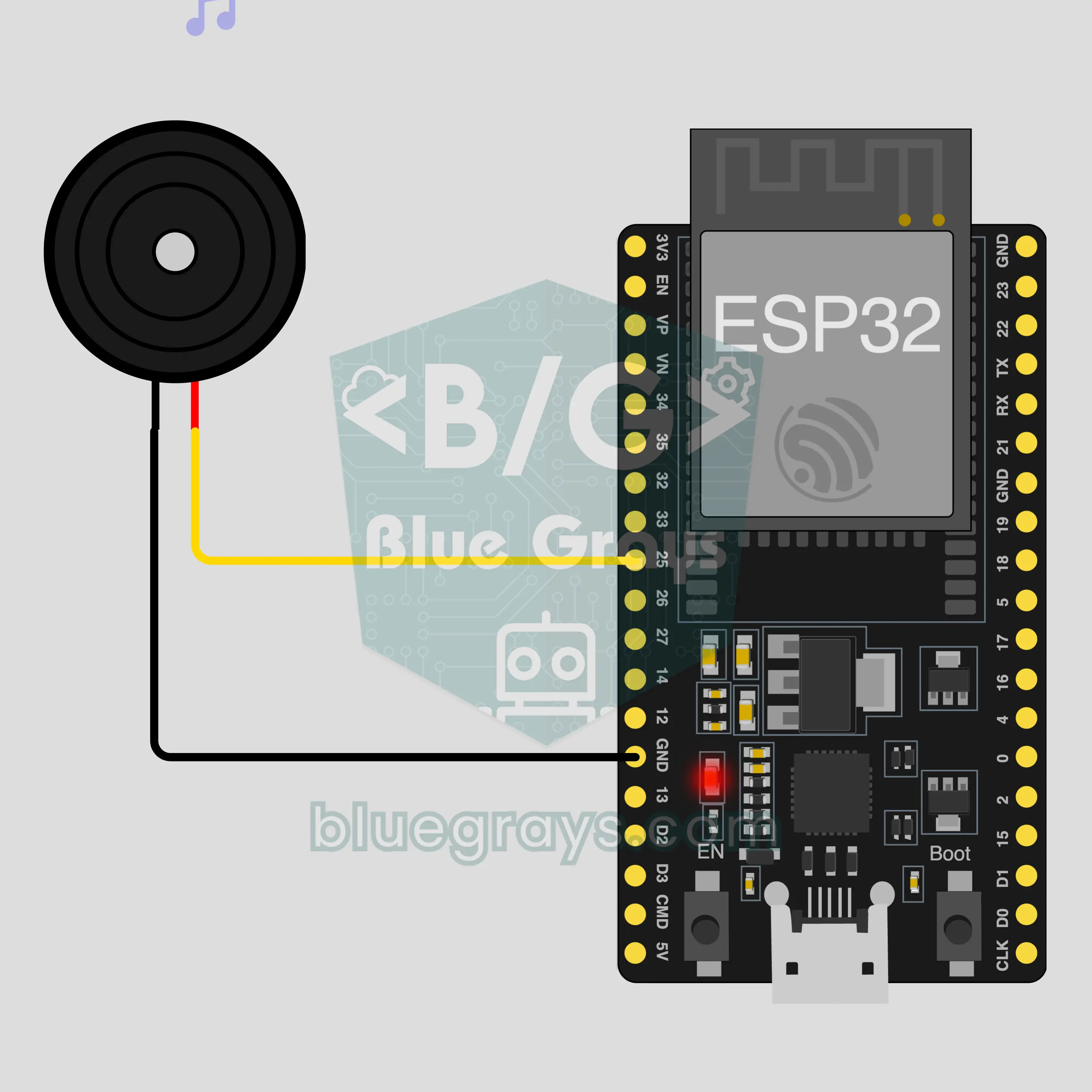
Elektr sxemasi
Manba kodi
1// ┌───────────────────────────┐
2// │ BlueGrays · bluegrays.com │
3// │ Bluetooth · ESP32         │
4// │ BG-Piyano                 │
5// └───────────────────────────┘
6// Phone piano
7// Arduino IDE board: ESP32 Dev Module
8// the BLE library comes with the ESP32 board package, nothing extra to install
9
10#include <BLEDevice.h>
11#include <BLEServer.h>
12#include <BLE2902.h>
13
14const char BLE_NAME[] = "BG-Piyano";  // the board advertises with this name, the app finds it in the list by it
15
16// Pins: change them here if you wired differently
17const int BUZZER_PIN = 25;  // use a passive buzzer (an active one only makes a single tone)
18
19void btWrite(const char *text);
20void onValue(const char *key, const char *value);
21void sendAll();
22void onLinkLost();
23
24// ── The app sends "key=value" lines; on "?" the board sends all its values ──
25char line[65];
26uint8_t lineLen = 0;
27unsigned long lastRxMs = 0;
28
29bool is(const char *a, const char *b) { return strcmp(a, b) == 0; }
30bool isOn(const char *v) { return v[0] == '1'; }
31
32void sendText(const char *key, const char *value) {
33  char out[72];
34  snprintf(out, sizeof(out), "%s=%s\n", key, value);
35  btWrite(out);
36}
37
38void sendInt(const char *key, long value) {
39  char text[12];
40  snprintf(text, sizeof(text), "%ld", value);
41  sendText(key, text);
42}
43
44void sendFloat(const char *key, float value) {
45  char text[16];
46  dtostrf(value, 1, 1, text);
47  sendText(key, text);
48}
49
50void handleLine(char *text) {
51  char *eq = strchr(text, '=');
52  if (eq == nullptr) {
53    if (text[strlen(text) - 1] == '?') {
54      btWrite("@v=1.0\n");  // the "@v" line tells the app the code version
55      sendAll();
56    }
57    return;
58  }
59  *eq = '\0';
60  onValue(text, eq + 1);
61}
62
63void feed(char c) {
64  lastRxMs = millis();
65  if (c == '\n' || c == '\r') {
66    if (lineLen == 0) return;
67    line[lineLen] = '\0';
68    lineLen = 0;
69    handleLine(line);
70  } else if (lineLen < sizeof(line) - 1) {
71    line[lineLen++] = c;
72  }
73}
74
75// ── Bluetooth (Nordic UART) ──
76#define UART_SERVICE "6E400001-B5A3-F393-E0A9-E50E24DCCA9E"
77#define UART_RX "6E400002-B5A3-F393-E0A9-E50E24DCCA9E"
78#define UART_TX "6E400003-B5A3-F393-E0A9-E50E24DCCA9E"
79
80BLECharacteristic *txChar = nullptr;
81volatile bool linked = false;
82volatile bool linkLost = false;
83// incoming bytes move from the Bluetooth task to loop() through a small ring buffer
84const int RX_SIZE = 256;
85volatile uint8_t rxBuf[RX_SIZE];
86volatile int rxHead = 0, rxTail = 0;
87
88class ServerEvents : public BLEServerCallbacks {
89  void onConnect(BLEServer *server) override { linked = true; }
90  void onDisconnect(BLEServer *server) override { linked = false; linkLost = true; }
91};
92
93class RxEvents : public BLECharacteristicCallbacks {
94  void onWrite(BLECharacteristic *c) override {
95    auto v = c->getValue();
96    for (size_t i = 0; i < v.length(); i++) {
97      int next = (rxHead + 1) % RX_SIZE;
98      if (next == rxTail) break;
99      rxBuf[rxHead] = (uint8_t)v[i];
100      rxHead = next;
101    }
102  }
103};
104
105// lines go out in 20-byte packets (works with every phone)
106void btWrite(const char *text) {
107  if (!linked || txChar == nullptr) return;
108  size_t n = strlen(text);
109  for (size_t i = 0; i < n; i += 20) {
110    size_t len = n - i < 20 ? n - i : 20;
111    txChar->setValue((uint8_t *)text + i, len);
112    txChar->notify();
113    delay(4);
114  }
115}
116
117void btBegin() {
118  BLEDevice::init(BLE_NAME);
119  BLEServer *server = BLEDevice::createServer();
120  server->setCallbacks(new ServerEvents());
121  BLEService *uart = server->createService(UART_SERVICE);
122  txChar = uart->createCharacteristic(UART_TX, BLECharacteristic::PROPERTY_NOTIFY);
123  txChar->addDescriptor(new BLE2902());
124  BLECharacteristic *rx = uart->createCharacteristic(UART_RX, BLECharacteristic::PROPERTY_WRITE | BLECharacteristic::PROPERTY_WRITE_NR);
125  rx->setCallbacks(new RxEvents());
126  uart->start();
127  BLEAdvertisementData adv;
128  adv.setFlags(0x06);
129  adv.setCompleteServices(BLEUUID(UART_SERVICE));
130  BLEAdvertisementData scan;
131  scan.setName(BLE_NAME);
132  BLEAdvertising *advertising = BLEDevice::getAdvertising();
133  advertising->setAdvertisementData(adv);
134  advertising->setScanResponseData(scan);
135  BLEDevice::startAdvertising();
136}
137
138void btPoll() {
139  while (rxTail != rxHead) {
140    char c = (char)rxBuf[rxTail];
141    rxTail = (rxTail + 1) % RX_SIZE;
142    feed(c);
143  }
144  if (linkLost) {
145    linkLost = false;
146    onLinkLost();
147    delay(100);
148    BLEDevice::startAdvertising();
149  }
150}
151
152// ── ESP32 ──
153void onValue(const char *key, const char *value) {
154  if (is(key, "nota")) {  // "nota=Hz" plays the note, "nota=0" stops it
155    int hz = atoi(value);
156    if (hz > 0) tone(BUZZER_PIN, hz);
157    else noTone(BUZZER_PIN);
158  }
159}
160
161void sendAll() {
162  sendInt("nota", 0);
163}
164
165void onLinkLost() {
166  noTone(BUZZER_PIN);  // Connection lost: the sound stops
167}
168
169void setup() {
170  Serial.begin(115200);
171  pinMode(BUZZER_PIN, OUTPUT);
172  btBegin();
173  Serial.print(F("BlueGrays Bluetooth: "));
174  Serial.println(BLE_NAME);
175}
176
177void loop() {
178  btPoll();
179}
180Ko‘p so‘raladigan savollar
iPhone bilan ishlaydimi?
Ha. ESP32-ning o‘rnatilgan Bluetooth Low Energy (BLE) moduli iPhone bilan ham, Android bilan ham ishlaydi. iPhone HC-05 va HC-06 kabi klassik Bluetooth modullariga ulana olmaydi, bu loyihaga esa ular kerak emas. Platani telefoningning Bluetooth sozlamalarida bog‘lashga urinma; BLE platalar u yerda ko‘rinmasligi mumkin, bu normal holat. Ulanishni BlueGrays ilovasi o‘rnatadi.
Aktiv va passiv buzzerning farqi nima, menga qaysi biri kerak?
Senga passiv buzzer kerak. Passiv buzzer kichkina karnay kabi ishlaydi: unga qanday chastota yuborsang, shuni chaladi. Aktiv buzzerning ichida o‘z sxemasi bor va quvvat olganda har doim bir xil ovoz chiqaradi, shuning uchun klavishlarni farqlab bo‘lmaydi. Bu loyiha qaysi biri senda ekanini ko‘rsatadi: klavishlar turli notalarni chalsa, u passiv, har bir klavish bir xil g‘o‘ng‘illash bersa, aktiv. Sotib olayotganda mahsulot nomida passive (passiv) so‘ziga qara.
Ikki klavishni birga bosib akkord chalsam bo‘ladimi?
Yo‘q. Buzzer bir vaqtda faqat bitta chastotani chala oladi, platadagi tone buyrug‘i ham bitta nota chiqaradi. Ikki klavishni birga bossang, notalar ustma-ust tushmaydi; plata faqat oxirgi kelgan notani chaladi. Kuylarni bittalab nota bilan chal. Paneldagi «To‘liq ekranda chal» tugmasi klavishlarni kattalashtiradi, u yerda barmog‘ingni klavishlar ustida sirpantirib, notadan notaga silliq o‘tishing ham mumkin.
Boshqa notalar yoki ko‘proq klavish qo‘shsam bo‘ladimi?
Paneldagi sakkizta klavish o‘zgarmas: past «do» dan yuqori «do» gacha, diyez va bemollarsiz, ilovadan klavish qo‘shib bo‘lmaydi. Plata tomoni esa moslashuvchan: kod telefondan kelgan har qanday musbat sonni chastota sifatida chaladi va 0 olganda jim bo‘ladi. Demak, ovozni kodda o‘zgartirishing mumkin; masalan, kelgan chastotani ikkiga ko‘paytirsang, butun pianino bir oktava yuqoriga ko‘chadi.