
Raspberry Pi Pico LED gulxan (8x8 NeoPixel matritsa + potensiometr + buzzer)
Kuydirmaydigan va isitmaydigan, lekin baribir chirsillaydigan gulxan! Raspberry Pi Pico 8x8 NeoPixel matritsada har kadrda qayta hisoblanadigan haqiqiyga o‘xshash alanga chizadi: tagida uchqunlar chiqadi, issiqlik ko‘tarilgan sari soviydi, rang qizildan oqqacha o‘zgaradi. Potensiometr alanga balandligini sozlaydi, tugma Fire, Gas, Magic va Amethyst mavzulari orasida almashtiradi, buzzer esa yonayotgan o‘tinning chirsillashini qo‘shadi. Protsedurali animatsiya, ADC, PWM va MicroPython birga.
Video
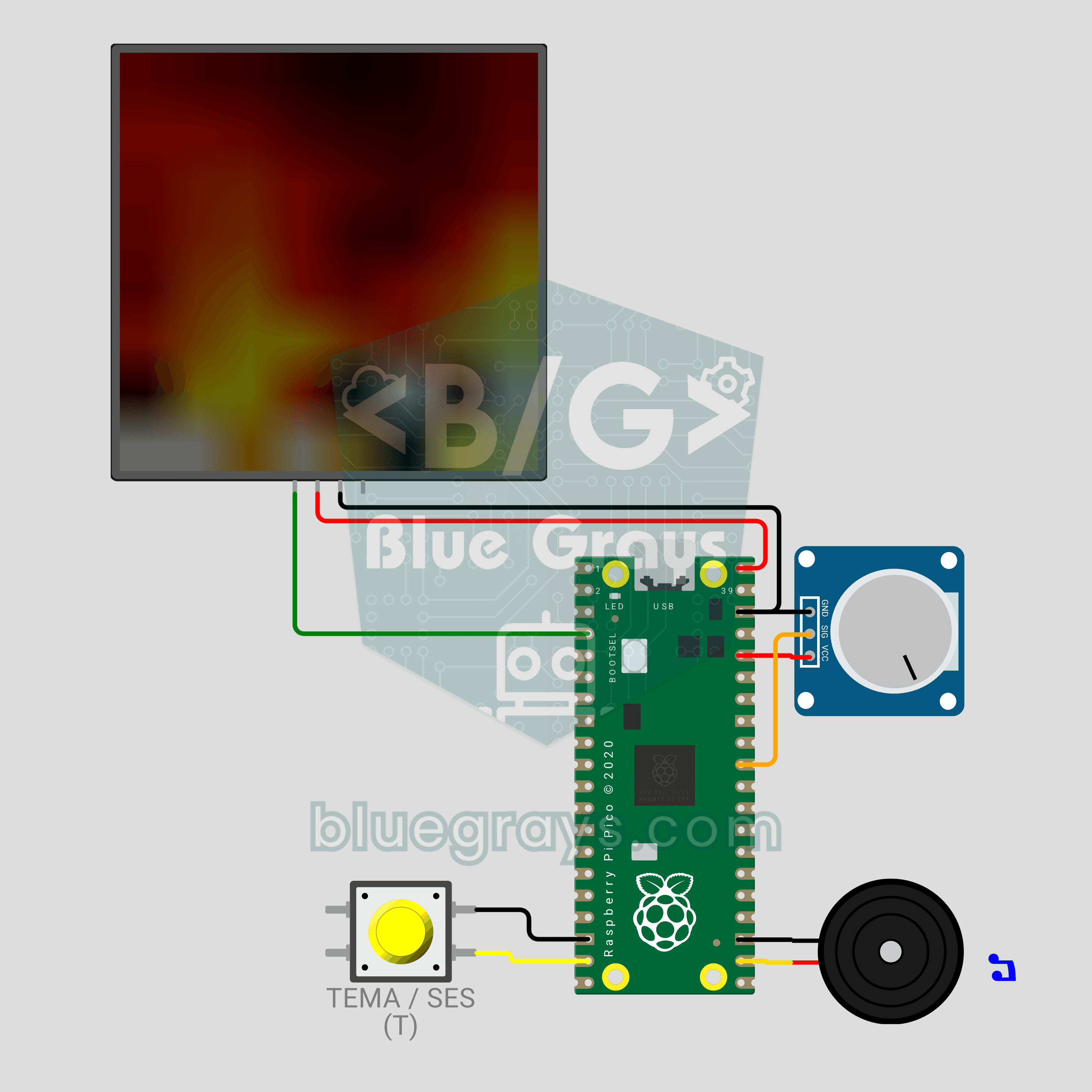
Elektr sxemasi
Manba kodi
1# ─────────────────────────────────────────
2#   BlueGrays · bluegrays.com
3#   Raspberry Pi Pico LED Campfire (8x8 NeoPixel Matrix + Potentiometer + Buzzer)
4# ─────────────────────────────────────────
5# Realistic fire animation on an 8x8 NeoPixel matrix. The potentiometer
6# sets the flame height, a short button press changes the theme (Fire,
7# Gas, Magic, Amethyst) and a long press toggles the crackle sound.
8#
9# Pins:
10#   GP2  -> matrix DIN (VDD -> VBUS, VSS -> GND)
11#   GP26 -> Potentiometer wiper (ADC0)
12#   GP14 -> Button (other leg to GND)
13#   GP17 -> Buzzer (+)
14
15from machine import Pin, PWM, ADC
16from neopixel import NeoPixel
17import time
18import random
19
20# ============ SETTINGS ============
21W = 8                  # Columns
22H = 8                  # Rows
23SERPENTINE = False     # True for zigzag-wired panels
24BRIGHTNESS = 0.4       # Wokwi draws colors as-is, 0.4 shows the flame clearly
25                       # 0.15-0.2 recommended on USB 2.0 (500 mA), use external 5V for brighter
26FRAME_MS = 35          # Frame time (~28 FPS)
27LONG_PRESS_MS = 900    # Hold time to toggle sound
28
29# ============ HARDWARE ============
30matrix = NeoPixel(Pin(2), W * H)
31pot = ADC(26)                           # ADC0
32button = Pin(14, Pin.IN, Pin.PULL_UP)
33buzzer = PWM(Pin(17))
34buzzer.duty_u16(0)
35
36# ============ STATE ============
37# heat[x][y]: column x, y = 0 is the bottom row; 0 = cold, 255 = hottest
38heat = [[0] * H for _ in range(W)]
39theme = 0
40THEME_NAMES = ["Fire", "Gas", "Magic", "Amethyst"]
41sound_on = True
42
43
44# ============ COLOR PALETTE ============
45def heat_color(t):
46    # Map heat (0-255) to a color by theme: black -> deep -> bright -> white
47    t192 = (t * 191) // 255
48    ramp = (t192 & 0x3F) << 2      # 0-252 ramp per band
49    if t192 & 0x80:
50        r, g, b = 255, 255, ramp   # Hottest: yellow -> white
51    elif t192 & 0x40:
52        r, g, b = 255, ramp, 0     # Middle: red -> yellow
53    else:
54        r, g, b = ramp, 0, 0       # Cool: black -> red
55    if theme == 1:
56        r, b = b, r                # Gas: blue flame
57    elif theme == 2:
58        r, g = g, r                # Magic: green flame
59    elif theme == 3:
60        b = max(b, r * 3 // 4)     # Amethyst: purple flame
61        g = g // 2
62    return (int(r * BRIGHTNESS), int(g * BRIGHTNESS), int(b * BRIGHTNESS))
63
64
65def pixel_index(x, row):
66    # row 0 = top row
67    if SERPENTINE and row % 2 == 1:
68        return row * W + (W - 1 - x)
69    return row * W + x
70
71
72# ============ FIRE SIMULATION ============
73def fire_step(intensity):
74    # intensity 0-1: flame height. High = less cooling + more sparks
75    cooling = int(115 - 55 * intensity)    # 115 (short) -> 60 (tall)
76    sparking = int(70 + 150 * intensity)   # 70 -> 220 (probability)
77    max_cool = (cooling * 10) // H + 2
78
79    for x in range(W):
80        col = heat[x]
81        # Every cell cools a little
82        for y in range(H):
83            c = col[y] - random.getrandbits(8) % max_cool
84            col[y] = c if c > 0 else 0
85        # Heat drifts up and diffuses
86        for y in range(H - 1, 1, -1):
87            col[y] = (col[y - 1] + col[y - 2] + col[y - 2]) // 3
88        # Random sparks at the base
89        if random.getrandbits(8) < sparking:
90            y = random.getrandbits(1)
91            col[y] = min(255, col[y] + 160 + random.getrandbits(6))
92
93    # 4) Light blending with neighbor columns: the flame waves more naturally
94    for y in range(2, H):
95        row_vals = [heat[x][y] for x in range(W)]
96        for x in range(W):
97            left = row_vals[x - 1] if x > 0 else row_vals[x]
98            right = row_vals[x + 1] if x < W - 1 else row_vals[x]
99            heat[x][y] = (row_vals[x] * 2 + left + right) // 4
100
101
102def render():
103    for x in range(W):
104        for y in range(H):
105            matrix[pixel_index(x, H - 1 - y)] = heat_color(heat[x][y])
106    matrix.write()
107
108
109# ============ CRACKLE SOUND ============
110def crackle(intensity):
111    # Random very short "ticks" = crackling wood
112    if not sound_on:
113        return
114    if random.getrandbits(8) < int(10 + 50 * intensity):
115        buzzer.freq(1500 + random.getrandbits(12))   # 1500-5595 Hz
116        buzzer.duty_u16(6000)
117        time.sleep_ms(2 + random.getrandbits(2))
118        buzzer.duty_u16(0)
119
120
121def beep(freq, ms):
122    buzzer.freq(freq)
123    buzzer.duty_u16(20000)
124    time.sleep_ms(ms)
125    buzzer.duty_u16(0)
126
127
128# ============ BUTTON ============
129btn_state = 1
130btn_raw = 1
131btn_changed = time.ticks_ms()
132press_start = 0
133long_done = False
134
135
136def handle_button():
137    # Short press = theme, long press = sound on/off
138    global btn_state, btn_raw, btn_changed, press_start, long_done, theme, sound_on
139    now = time.ticks_ms()
140    raw = button.value()
141    if raw != btn_raw:
142        btn_raw = raw
143        btn_changed = now
144    if time.ticks_diff(now, btn_changed) > 25 and raw != btn_state:
145        btn_state = raw
146        if raw == 0:
147            press_start = now
148            long_done = False
149        elif not long_done:
150            theme = (theme + 1) % len(THEME_NAMES)
151            print("Theme:", THEME_NAMES[theme])
152            beep(1200, 30)
153    if btn_state == 0 and not long_done and time.ticks_diff(now, press_start) > LONG_PRESS_MS:
154        long_done = True
155        sound_on = not sound_on
156        print("Sound:", "ON" if sound_on else "OFF")
157        beep(1600 if sound_on else 500, 80)
158
159
160# ============ MAIN LOOP ============
161print("== BlueGrays · bluegrays.com ==")
162print("Pico 8x8 Campfire")
163print("Pot = flame height | Short press = theme | Long press = sound")
164
165smooth = pot.read_u16() / 65535
166while True:
167    start = time.ticks_ms()
168    handle_button()
169
170    # Smooth the pot value (jitter should not make the flame jump)
171    smooth += (pot.read_u16() / 65535 - smooth) * 0.2
172    fire_step(smooth)
173    render()
174    crackle(smooth)
175
176    # Constant frame rate
177    spent = time.ticks_diff(time.ticks_ms(), start)
178    if spent < FRAME_MS:
179        time.sleep_ms(FRAME_MS - spent)
180Ko‘p so‘raladigan savollar
Nega haqiqiy sxemada yorqinlikni pasaytirishim kerak?
Kodda `BRIGHTNESS = 0.4` ishlatilgan, chunki Wokwi ranglarni aynan yuborilganidek chizadi. Haqiqiy matritsa katta alangada taxminan 1 A olishi mumkin, USB 2.0 porti esa 500 mA beradi. USB-da uni 0.15–0.2 qilib qo‘y; yorqinroq bo‘lishi uchun matritsani 5V 2A adapterdan quvvatlantir va GND-larni ula.
Alanga balandligi va rangini qanday o‘zgartiraman?
Potensiometrni cho‘g‘ uchun chapga, matritsa tepasigacha yetadigan alanga uchun o‘ngga bur. Tugmani qisqa bosish Fire, Gas, Magic va Amethyst orasida almashtiradi. Wokwi-da potensiometrni bosib, strelka tugmalaridan foydalan, mavzuni o‘zgartirish uchun T ni bos.
Chirsillashni qanday o‘chiraman yoki siyraklashtiraman?
Tugmani taxminan bir soniya bosib tur: baland signal ovoz yoqilganini, past signal o‘chirilganini bildiradi. Chirsillash kamroq bo‘lishi uchun `crackle()` ichidagi `10 + 50 * intensity` dagi 10 va 50 ni kamaytir. Ovoz uchun passiv buzzer ishlat.
Biror kutubxona o‘rnatishim kerakmi?
Yo‘q. `neopixel`, `machine` va `random` modullari Pico uchun MicroPython bilan birga keladi. Pico-ga MicroPython yozib, kodni Thonny-da unga `main.py` nomi bilan saqla; shunda gulxan Pico har yoqilganda o‘zi boshlanadi.