
Arduino loyihalarini kashf qil
Boshlang‘ichdan yuqori darajagacha, sxemali, kodli va videoli yuzlab loyihalar. Qaysi darajada bo‘lsang, o‘sha yerdan boshla.
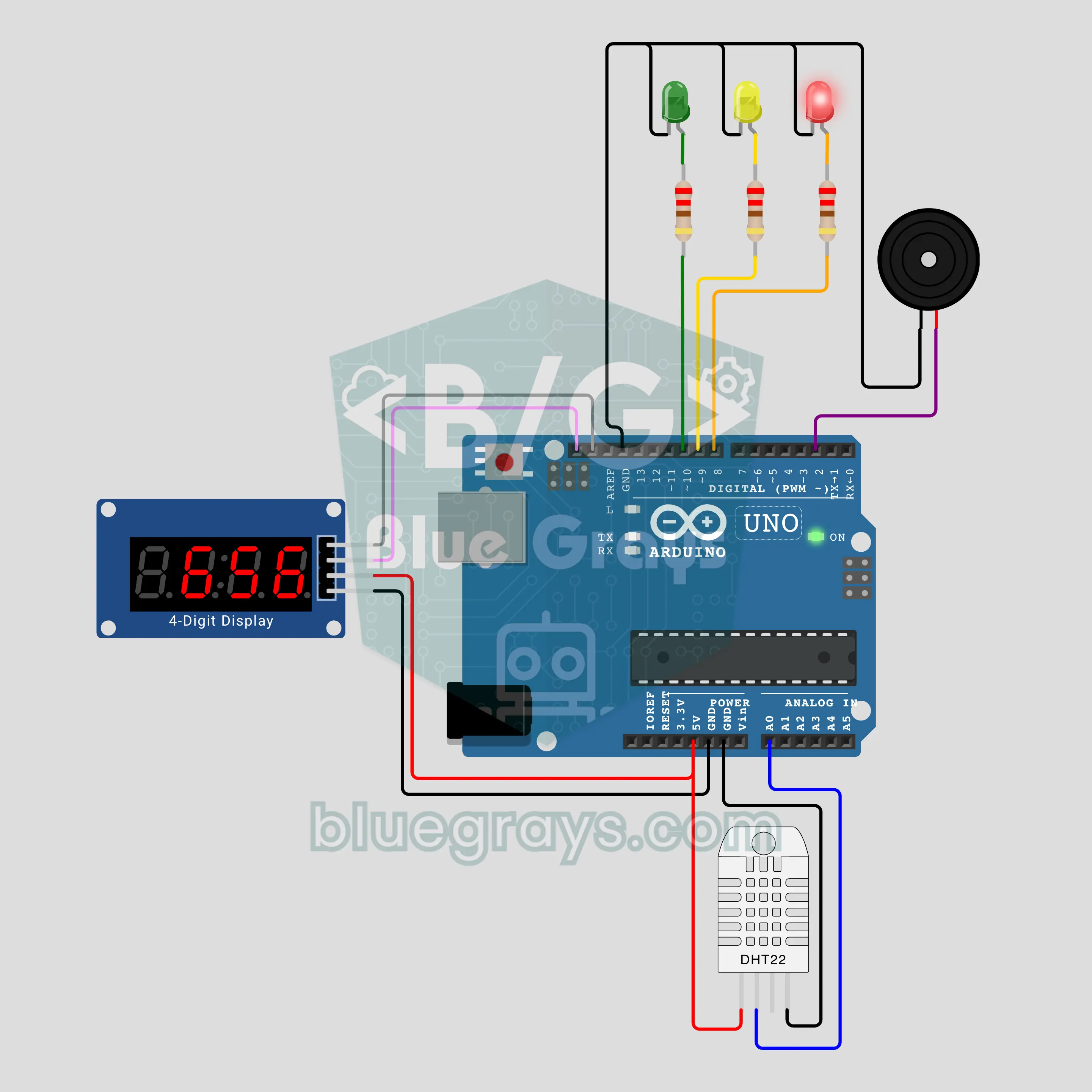
Arduino 5-Minute Shower: A Clock That Starts Itself with Steam (DHT22 + TM1637 + Buzzer)
End the "who has been in the shower for 20 minutes?" fight at home: a DHT22 notices the humidity rising with the steam and the clock starts by itself, nobody has to press a button. A TM1637 display shows minutes:seconds, and a green, yellow and red LED tell the time by colour. The buzzer sounds at minute 5, then gives a short reminder every minute. When the humidity drops, the timer stops and the final time stays on the display.
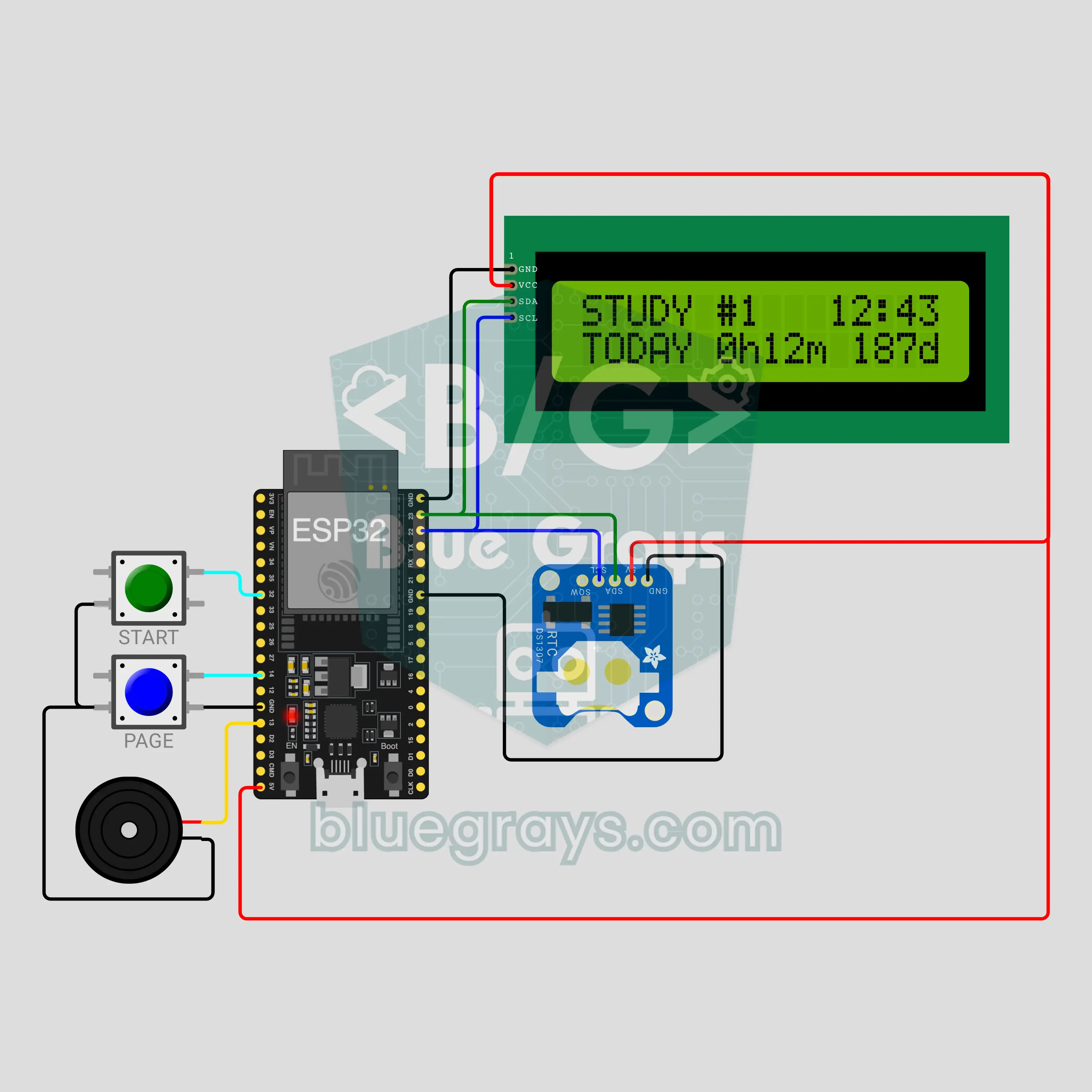
ESP32 Exam Countdown and Study Tracker (DS1307 + I2C LCD + 2 Buttons + Buzzer)
A desk counter for students facing a big exam: the I2C LCD shows the days left to the exam and today's study time. The START button starts and pauses a 25 minute session, a 5 minute break begins by itself when it ends, and the buzzer calls you back when the break is over. At midnight the DS1307 clock moves to a new day, the daily time resets and the countdown drops by one.
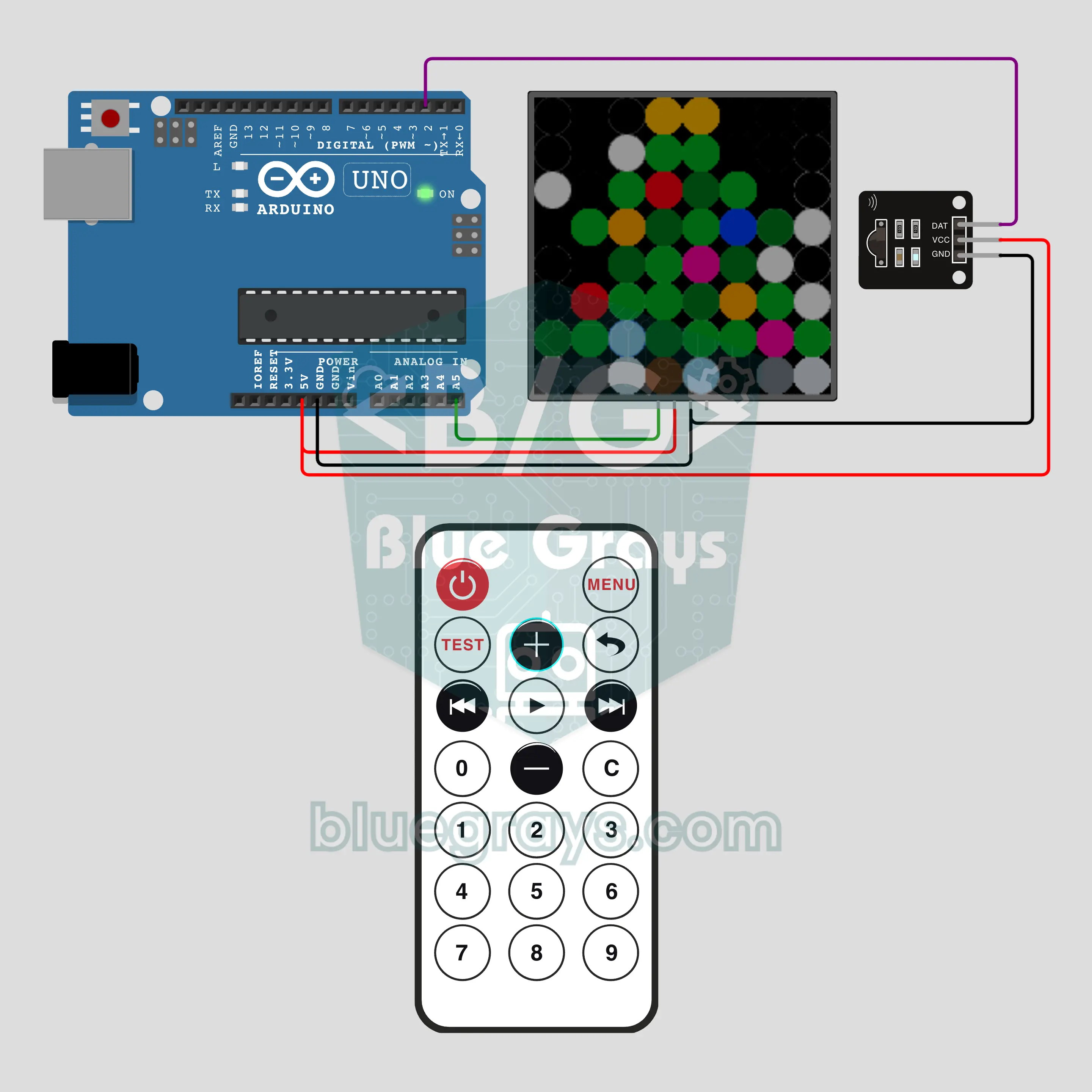
Arduino Remote-Controlled Christmas Tree: 8 Effects (IR Remote + 8x8 NeoPixel)
A pixel pine tree on an 8x8 NeoPixel matrix, with a trunk, layered branches, ornaments and a golden star. The remote's 1-8 keys pick 8 effects: twinkling ornaments, color wave, star sparkle, snowfall that piles up, a light chain, rainbow, a scrolling 2027 with fireworks and calm candlelight. +/- for brightness, OK on/off, 0 auto show. A desk decoration for tree-trimming week that you run from the couch.
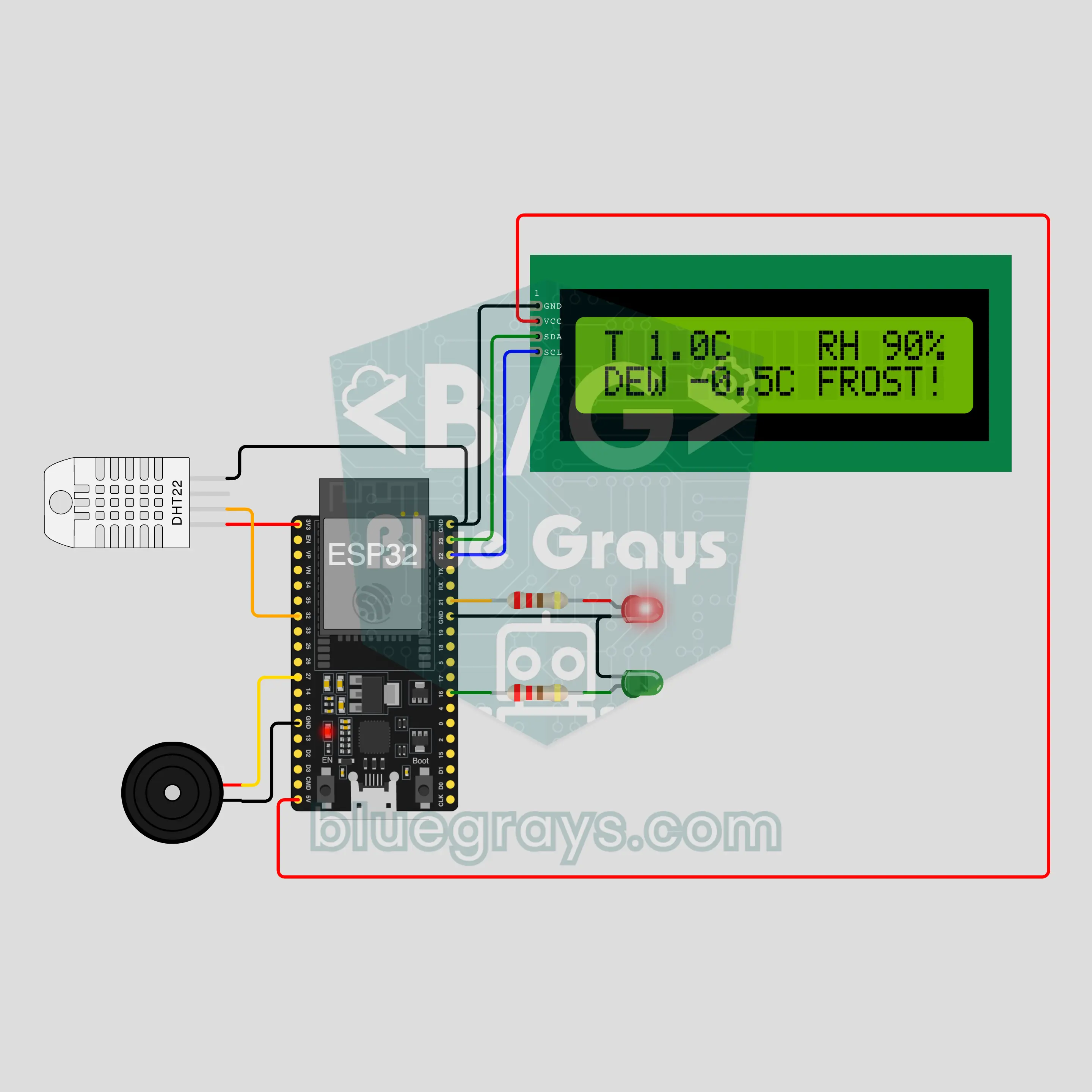
ESP32 Frost Alarm: Will the Windshield Freeze Tomorrow Morning? (DHT22 + I2C LCD + 2 LEDs + Buzzer)
No more scraping the car window at 7 am: the DHT22 measures outdoor temperature and humidity, the ESP32 works out the dew point and tells you whether the windshield will freeze tonight. The I2C LCD shows temperature, humidity and dew point; green LED means SAFE, blinking red RISK, steady red plus a buzzer alarm FROST. If the air cooled fast in the last hour, it warns you about the night too.
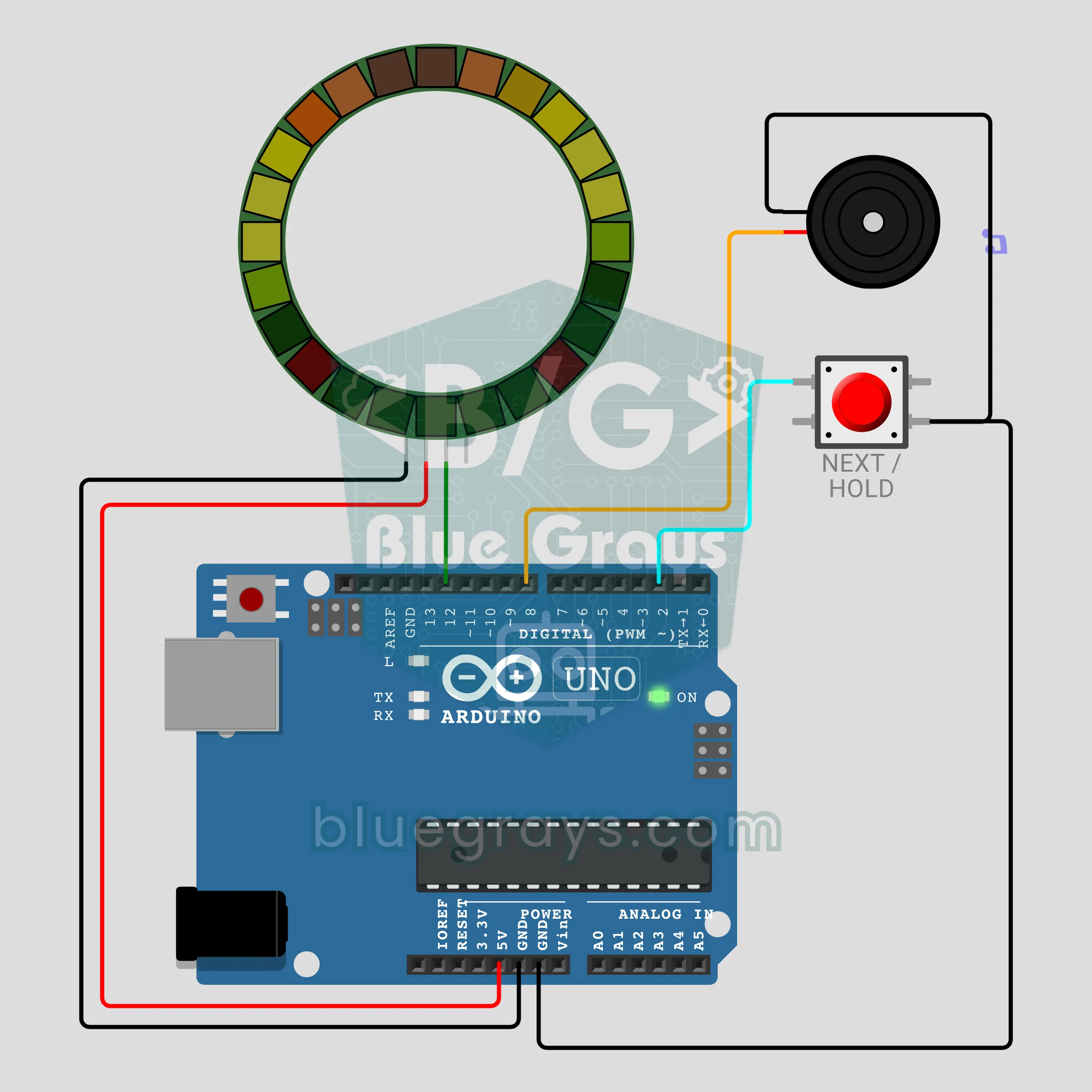
Arduino Musical Christmas Wreath: Lights Follow the Notes (24-LED Ring + Button + Buzzer)
A musical wreath for your front door: the 24-LED ring glows like green branches with red berries while the buzzer plays three public-domain Christmas tunes. Every note lights up in its own place and its own color on the ring, high notes glow wider and the whole wreath flashes gold on every beat. Each song has its own pattern. A short press skips to the next song, holding the button switches to silent light mode.
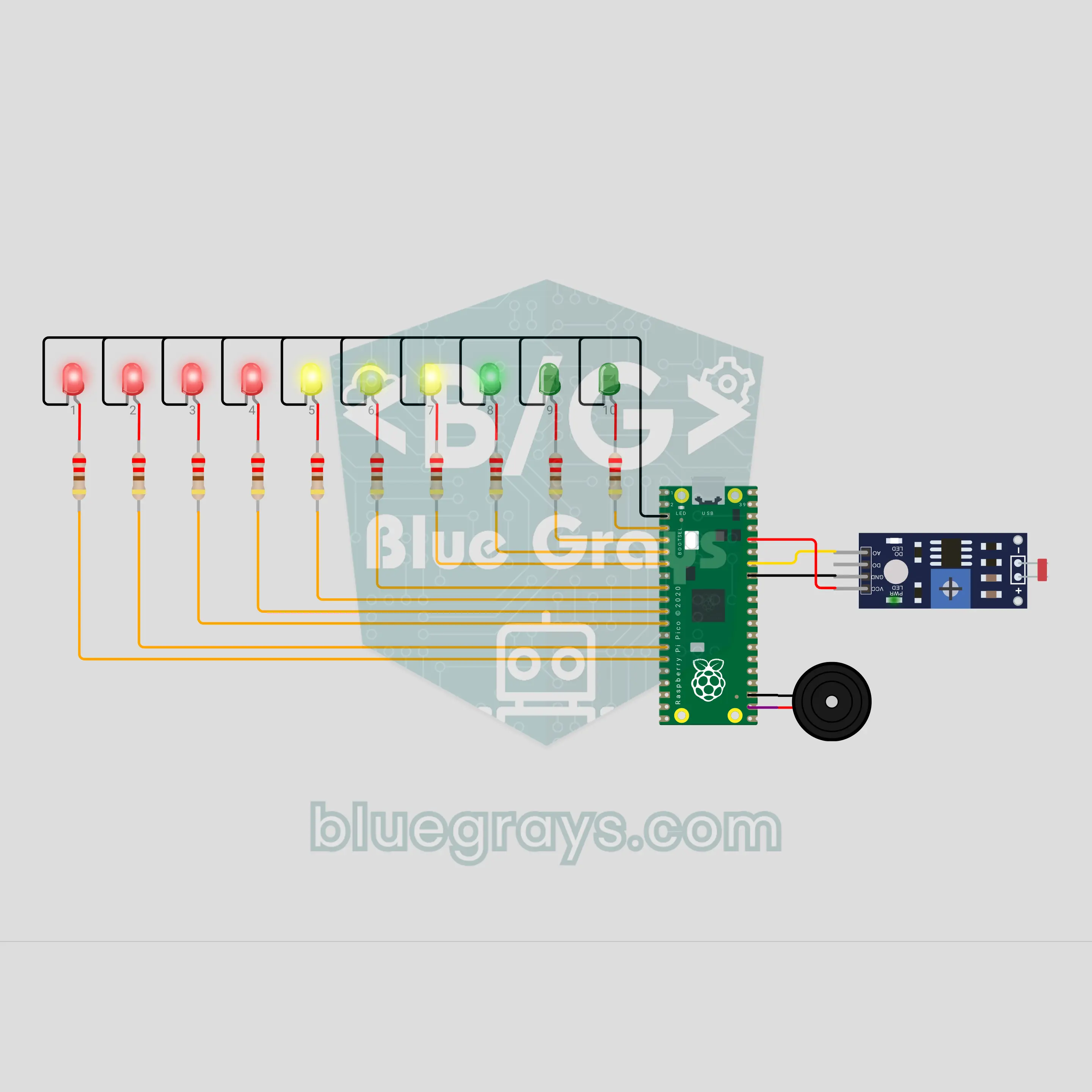
Pico Phone Jail Box: Put Your Phone Away While You Study (LDR + 10 LEDs)
Drop your phone in the box and let the circuit do the rest. The LDR on the floor of the box goes dark when the phone lies on it, and the count starts: one LED lights every 6 minutes, and 10 LEDs mark a full hour of study. Take the phone early and warning ticks start; if it is not back within 5 seconds, the "jail broken" sound plays and the count resets. Finish the hour and a light wave and a victory tune are waiting. One number in the code changes the time.
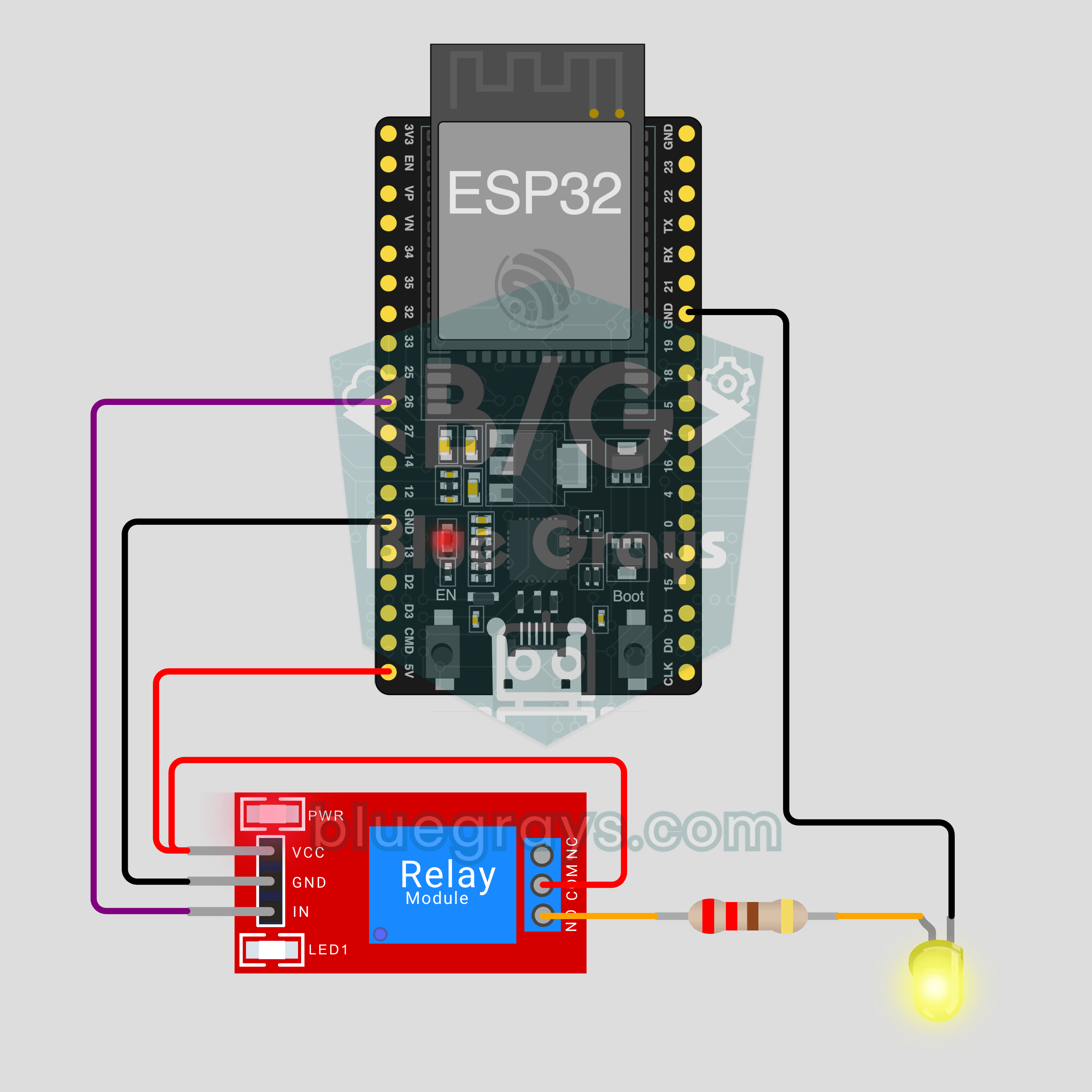
ESP32 IoT Lamp Switch (Relay)
Turn your lamp on and off from your phone, wherever you are. This project is the step-by-step guide to the Relay lamp IoT template in the app, built with an ESP32 and a relay module and tried with an LED first. Go to Workshop › Devices › Add a device and pick Relay lamp; Ohmi prepares the code with your own device key. The code on this page is an example: the key and Wi-Fi details are placeholders.
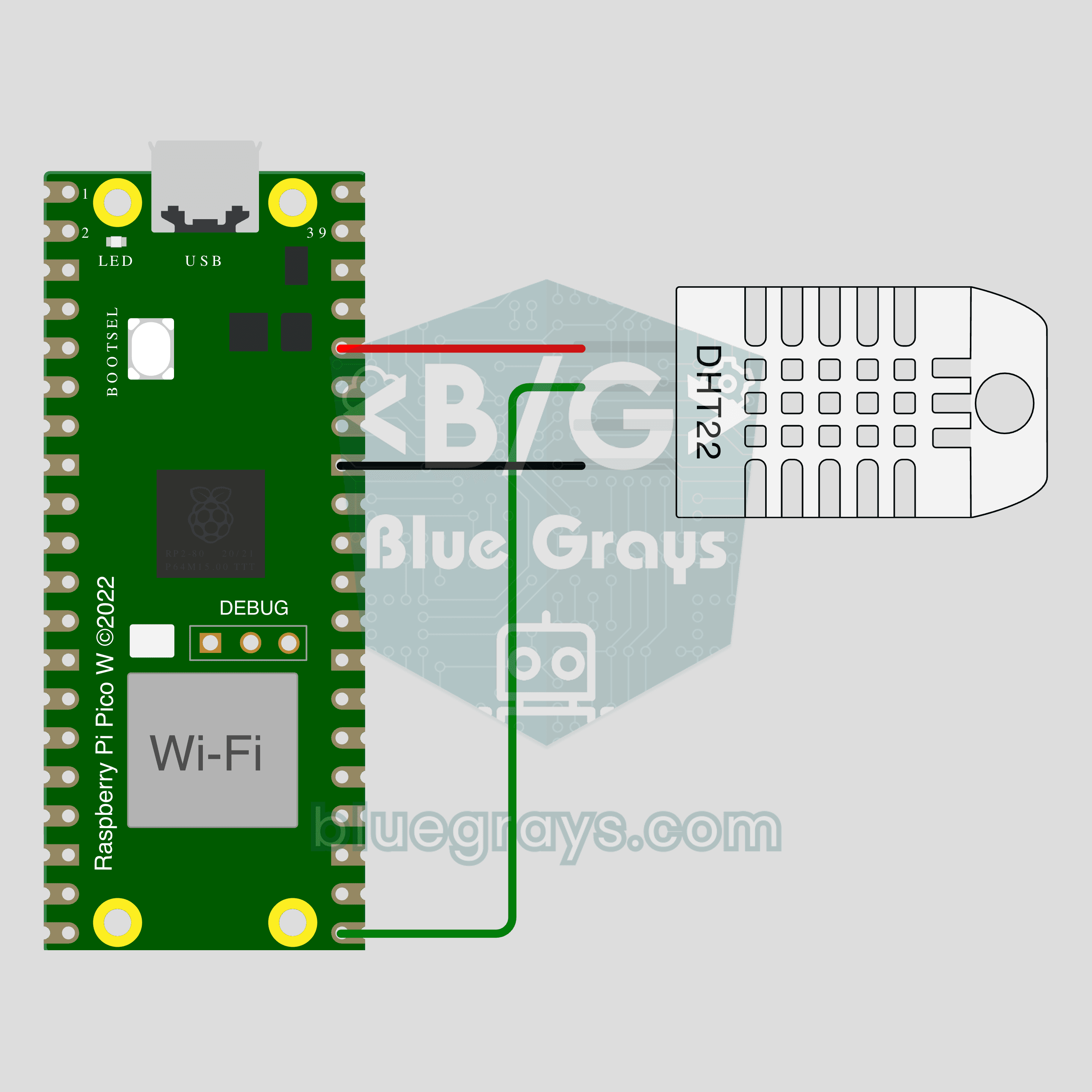
Pico W IoT Temperature and Humidity (DHT22)
Watch your room's temperature and humidity live on your phone wherever you are. This project is the step-by-step guide to the Temperature and humidity IoT template in the app, built with a Raspberry Pi Pico W and a DHT22. Go to Workshop › Devices › Add a device, pick Pico W as the board and Temperature and humidity as the template; Ohmi prepares the code with your own device key. The code on this page is an example: the key and Wi-Fi details are placeholders.
Pico W IoT Door Sensor (Reed Switch)
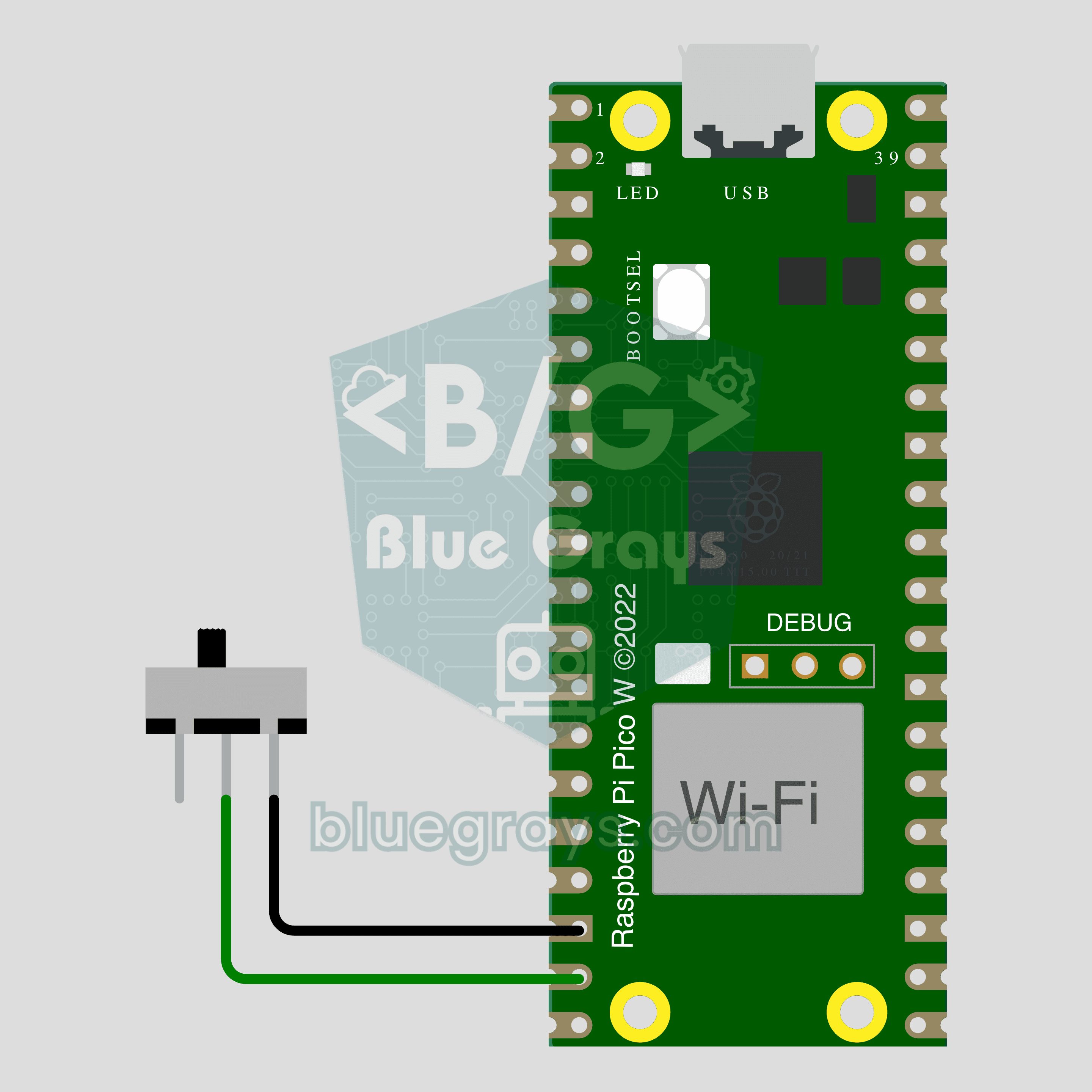
Did you leave the door or window open? Check on your phone wherever you are. This project is the step-by-step guide to the Door / window IoT template in the app, built with a Raspberry Pi Pico W, a reed switch and a small magnet using two wires. Go to Workshop › Devices › Add a device, pick Pico W as the board and Door / window as the template; Ohmi prepares the code with your own device key. The code on this page is an example: the key and Wi-Fi details are placeholders.
Pico W IoT Motion Counter (PIR)
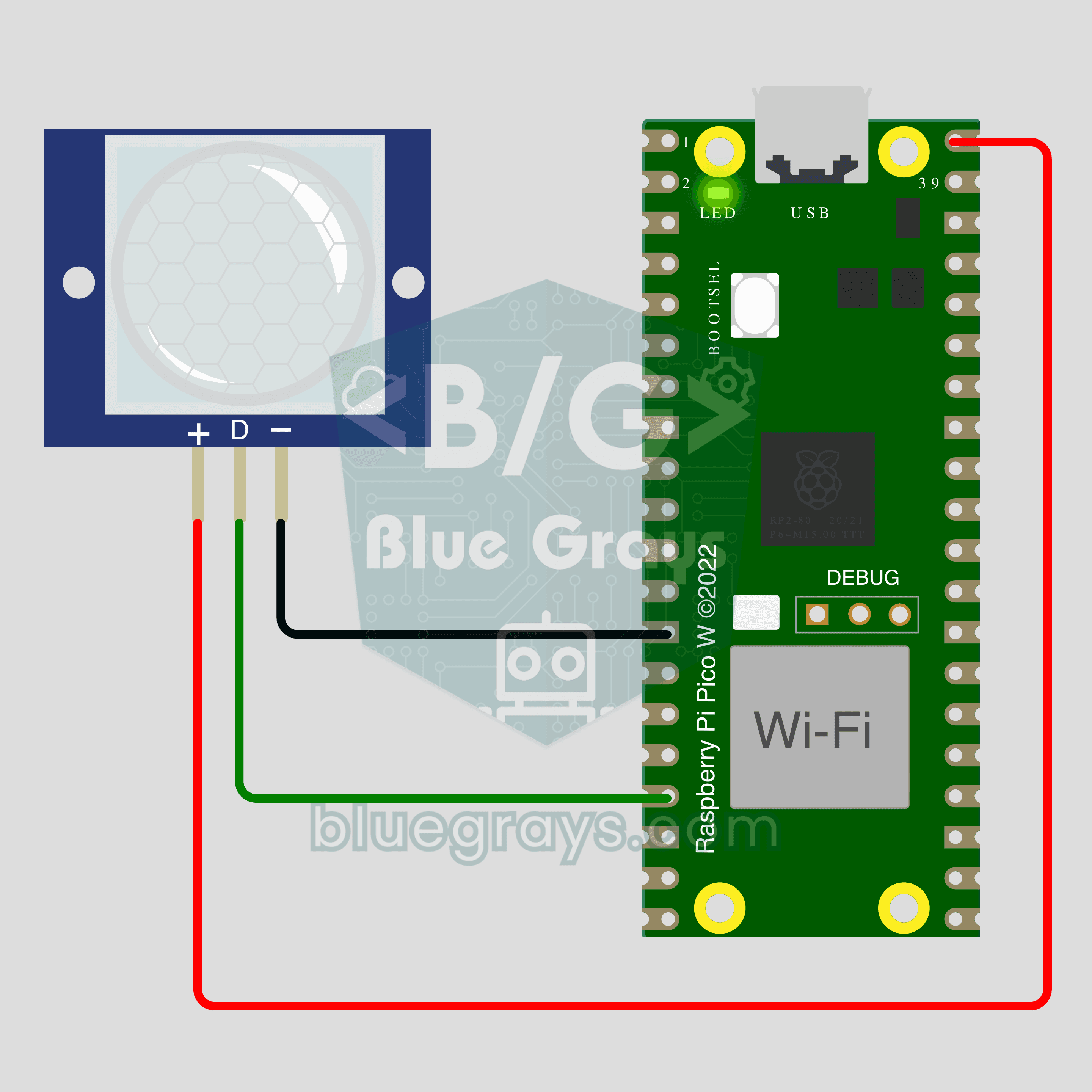
Count how many times someone walks through a door or hallway, and see the moment of motion live on your phone. This project is the step-by-step guide to the Motion detector IoT template in the app, built with a Raspberry Pi Pico W and a PIR motion sensor using just 3 wires. Go to Workshop › Devices › Add a device; Ohmi prepares the code with your own device key. The code on this page is an example: the key and Wi-Fi details are placeholders.
ESP32-CAM Wi-Fi Live Camera
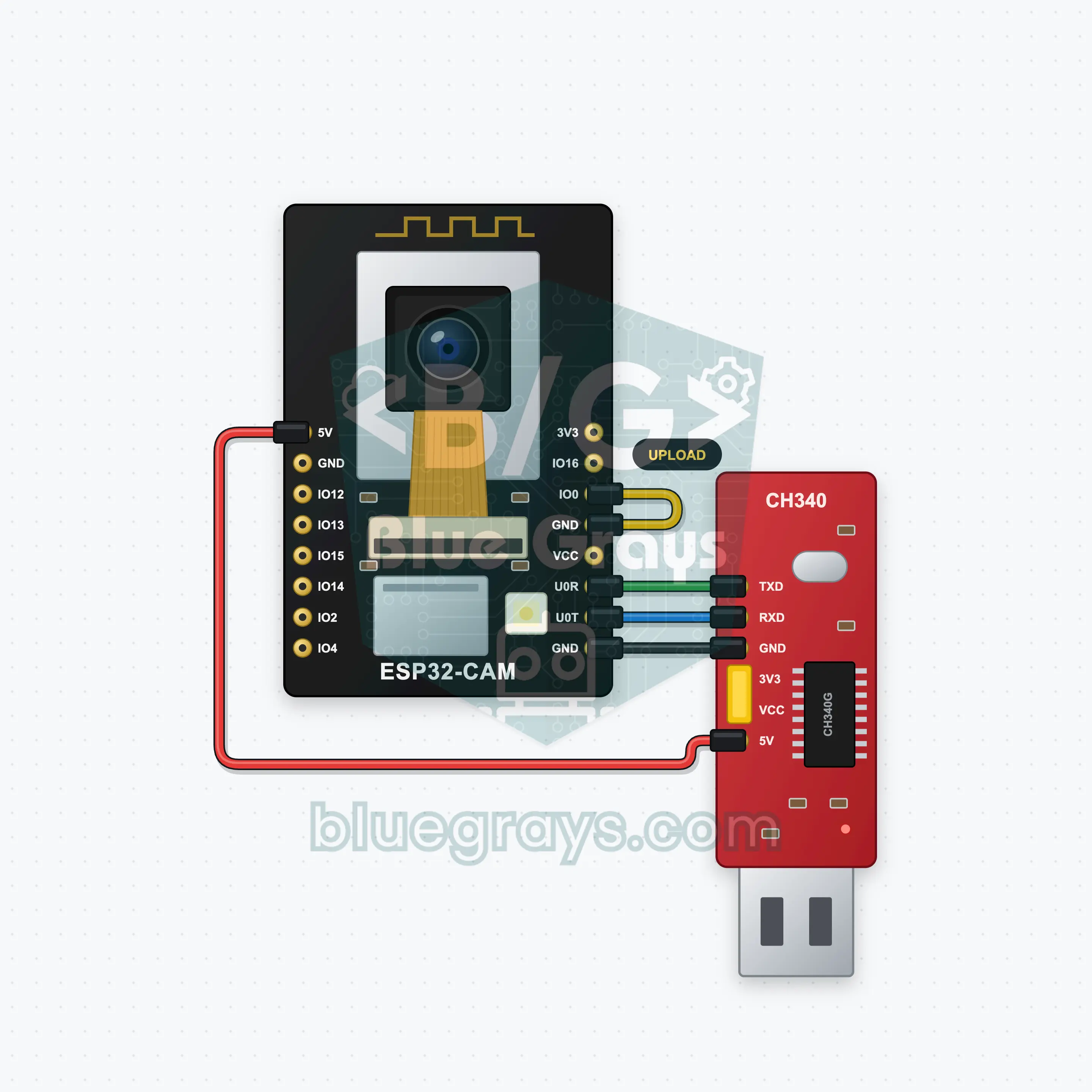
A live camera on your phone with a palm-sized board: the ESP32-CAM joins your home Wi-Fi and serves its own web page. Type the address from the Serial Monitor into your phone's browser and the live picture (MJPEG stream) appears. A button on the page turns the on-board flash LED on and off, and a list picks the resolution from 320x240 up to 1280x720. You upload the code with a CH340 USB-TTL adapter; one jumper between IO0 and GND while uploading is all it takes.
ESP32 Bluetooth LED and Relay
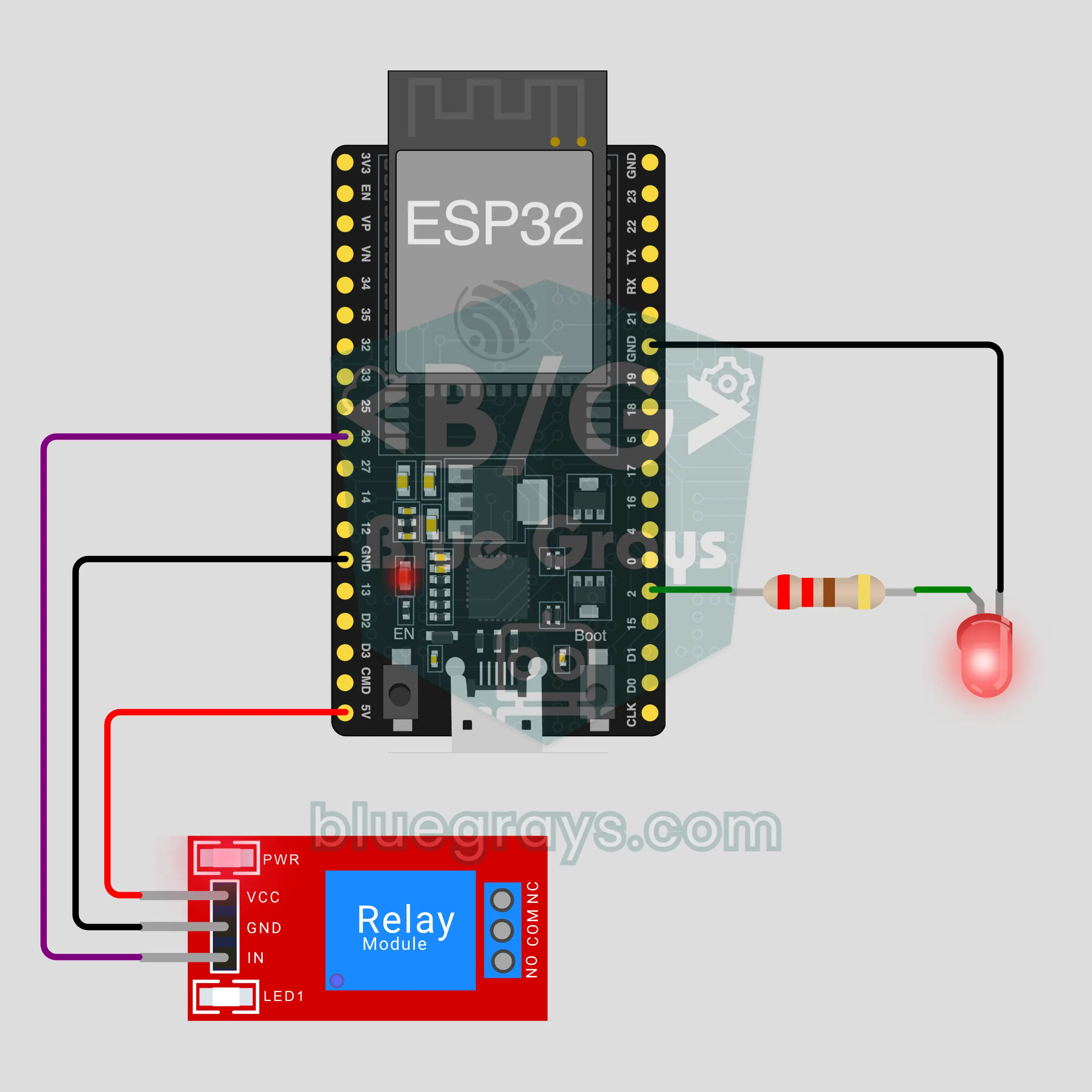
Switch an LED and a relay on and off from your phone over Bluetooth, no internet or Wi-Fi needed. This project is the step-by-step guide to the LED and relay Bluetooth template in the app, built with an ESP32 and a 5 V relay module. Go to Workshop › Devices › Add a device › Bluetooth, pick LED and relay and upload the code with Get the code. The Set up as a Bluetooth panel button on this page opens the wizard with this template too.