
Arduino loyihalarini kashf qil
Boshlang‘ichdan yuqori darajagacha, sxemali, kodli va videoli yuzlab loyihalar. Qaysi darajada bo‘lsang, o‘sha yerdan boshla.
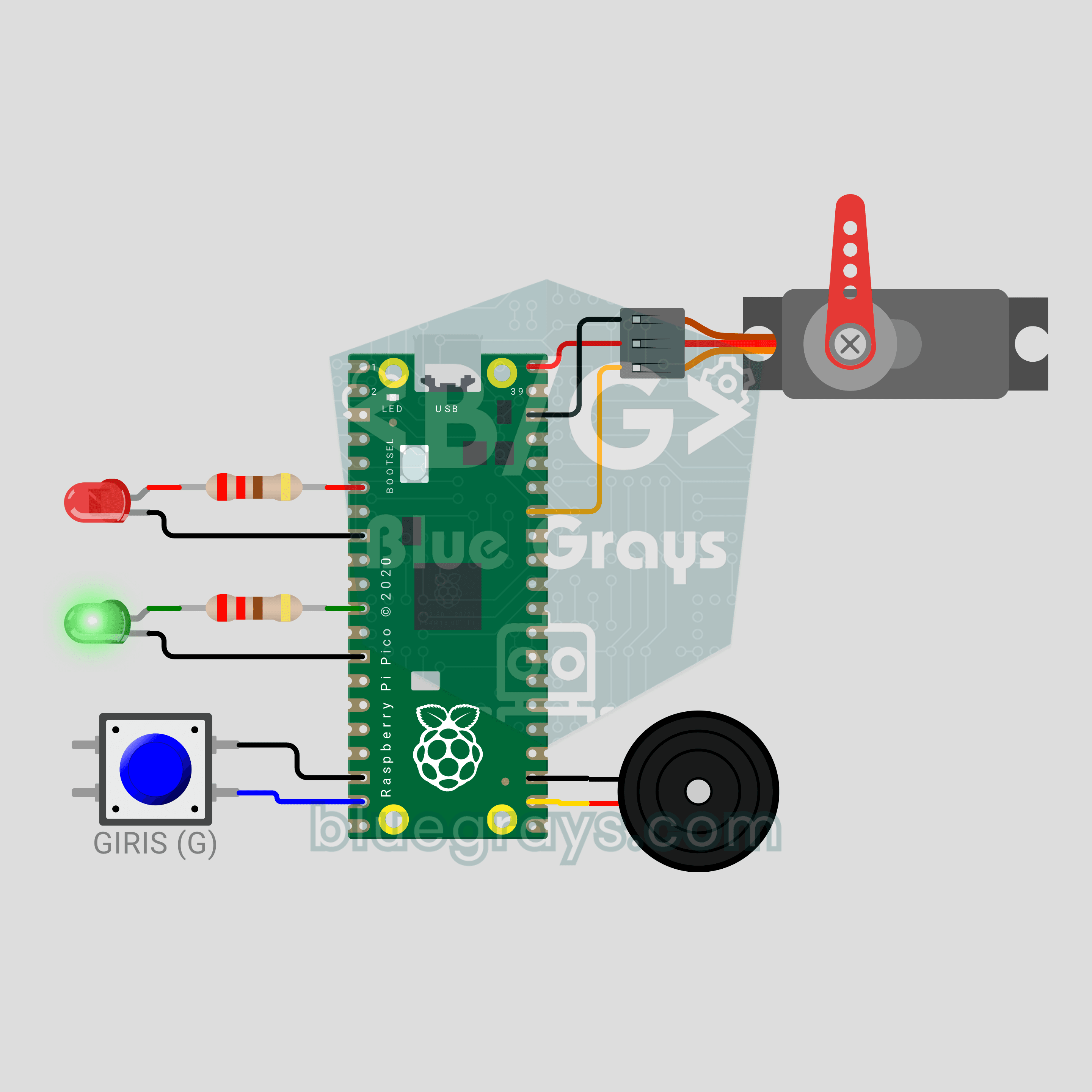
Raspberry Pi Pico Parking Barrier (SG90 Servo + 2 LEDs + Button + Buzzer)
A small model of the boom barrier at a car park entrance! Press the button and the Raspberry Pi Pico raises the arm smoothly with an SG90 servo as the green LED comes on. It stays open for 3 seconds, then lowers slowly with a flashing red LED and warning beeps from the buzzer. Press again while it is lowering and the arm rises at once for safety. Servo control, a state machine and non-blocking timing in one project.
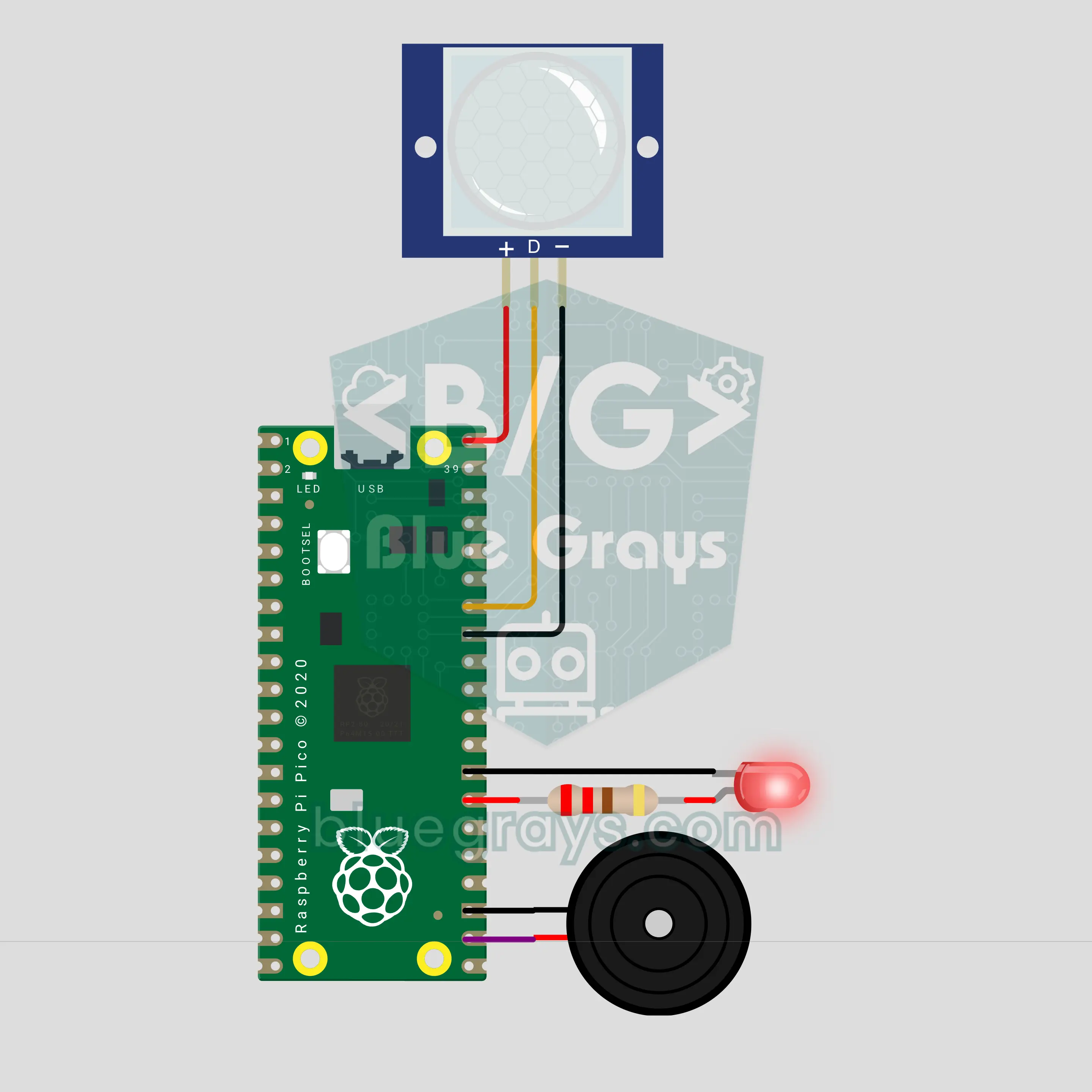
Raspberry Pi Pico PIR Motion Alarm (PIR Sensor + Buzzer + LED)
Walk in once and you get a warning, walk in again and the siren goes off! We are building a two-stage motion alarm with a Raspberry Pi Pico and a PIR motion sensor. It arms itself after a countdown. The first motion plays a ding-dong warning on the buzzer; a second motion within 15 seconds sounds the siren and strobes the LED. Afterwards it re-arms on its own and logs every event with a timestamp.
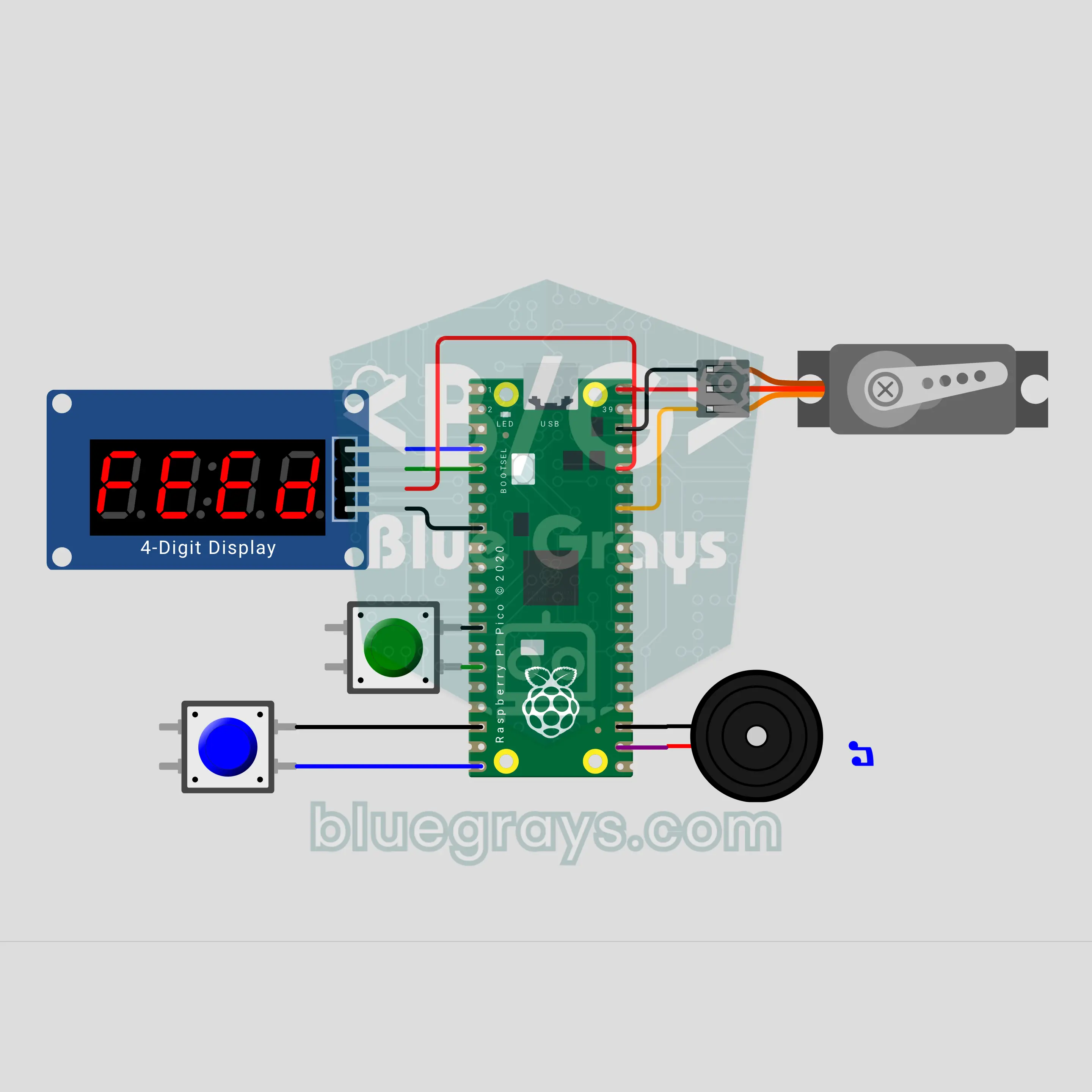
Raspberry Pi Pico Automatic Pet Feeder (SG90 Servo + TM1637 + Buzzer)
Going on holiday? Your fish, cat or bird won't go hungry! The Raspberry Pi Pico counts down to the next meal on a TM1637 display; when time is up, the buzzer plays a short tune and the SG90 servo opens and closes the hopper lid once per portion. Pick an interval of 4, 6, 8, 12 or 24 hours, and a double-feed guard stops accidental overfeeding. Settings are saved, so after a power cut the countdown carries on.
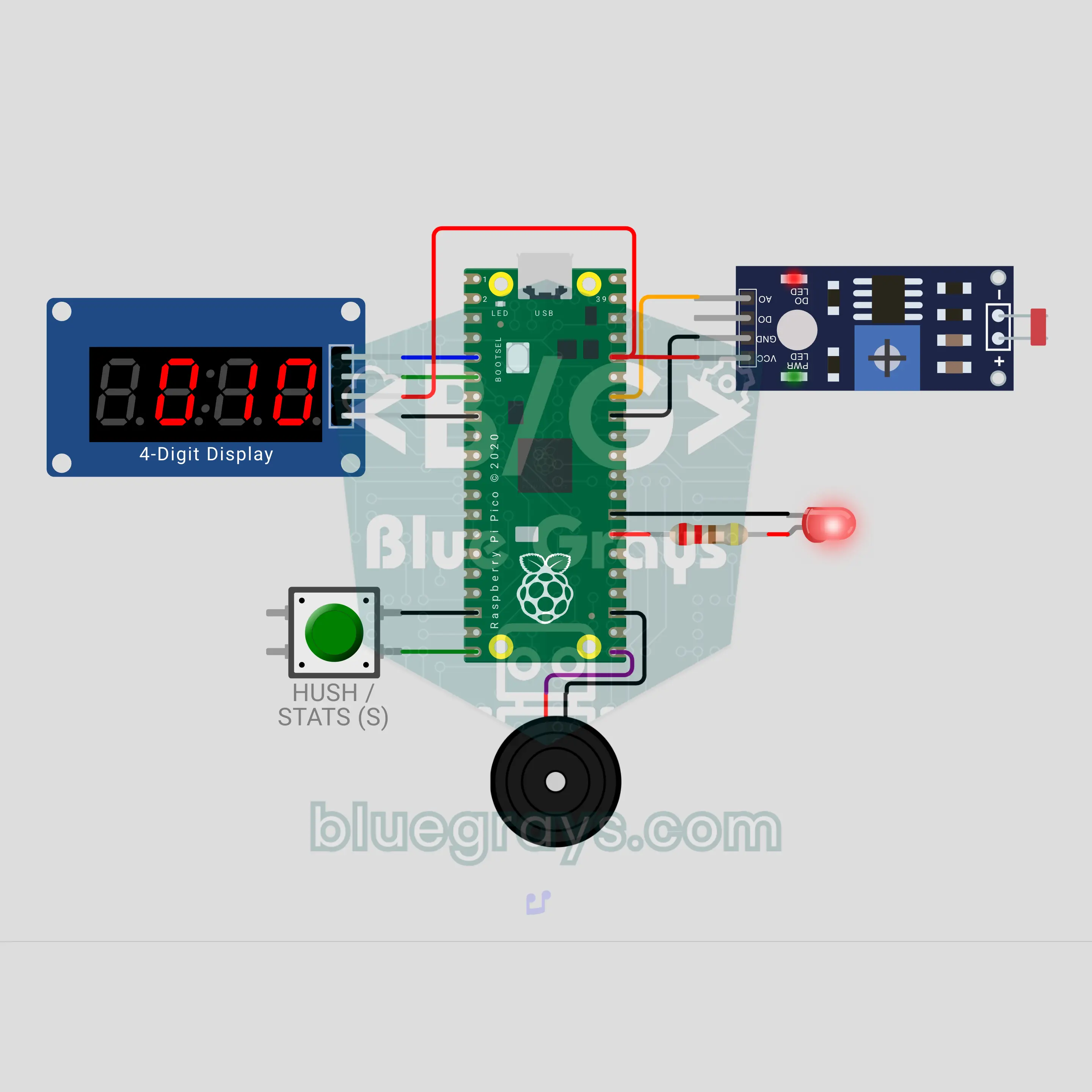
Raspberry Pi Pico Fridge Door Left Open Alarm (LDR + TM1637 + Buzzer)
Who left the fridge door open? The Raspberry Pi Pico sees the inner lamp through an LDR and counts on a TM1637 display how many seconds the door has been open. At 20 seconds it gives a gentle double beep, at 40 seconds an insistent siren with a red LED; the button mutes the alarm for 60 seconds. The number of openings, the total and the longest open time are saved, so a power cut does not erase them.
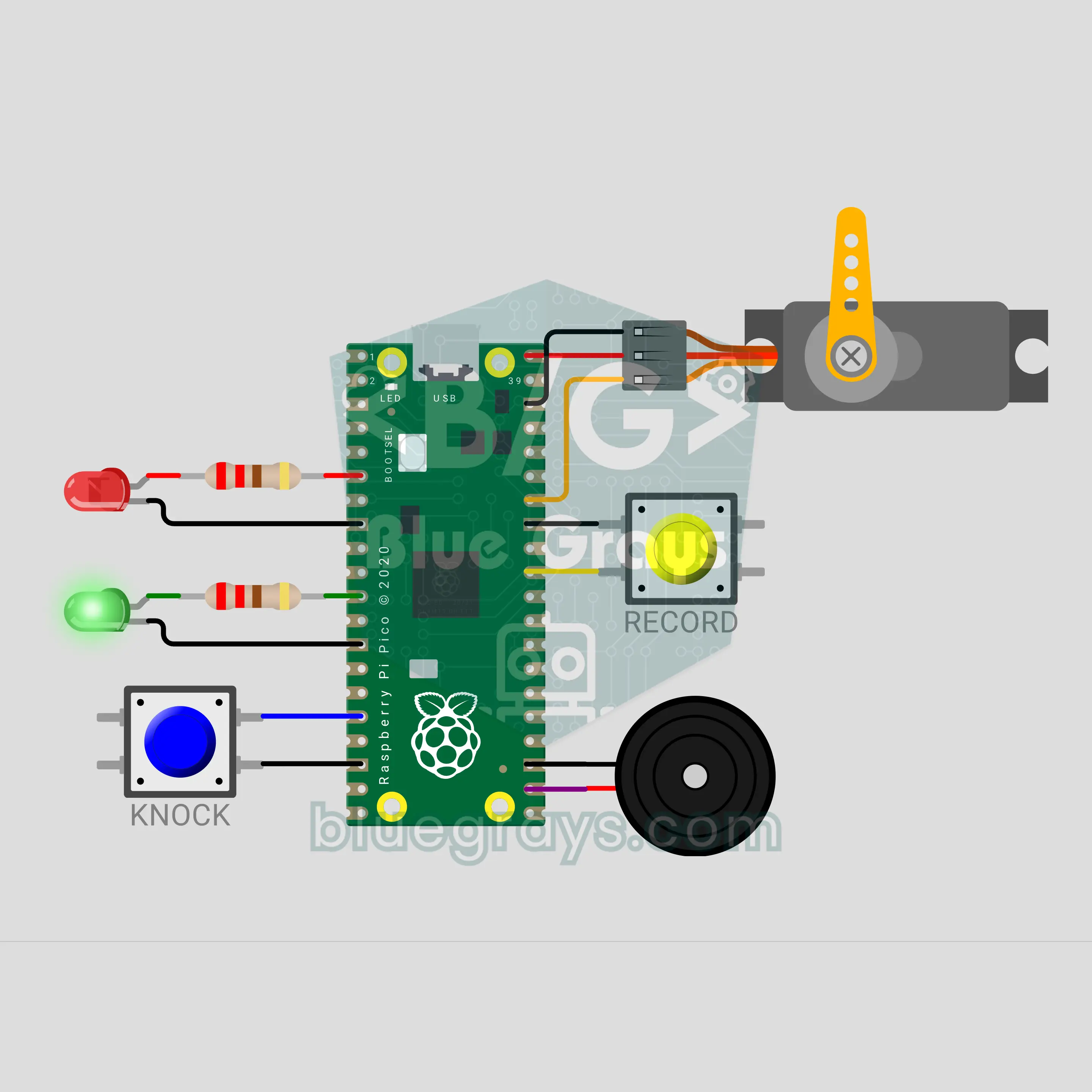
Raspberry Pi Pico Secret Knock Lock (SG90 Servo + 2 Buttons + 2 LEDs + Buzzer)
The password is a rhythm, not a number: knock the right pattern on the lid and the latch lifts! The Raspberry Pi Pico times every knock, scales each gap to the longest one and compares the result with the saved rhythm, so knocking fast or slow makes no difference. When it matches, an SG90 servo lifts the latch, a green LED lights up and a buzzer plays a "ta-da"; 3 wrong tries in a row make the lock wait 10 seconds. While it is open, hold RECORD to save your own rhythm.
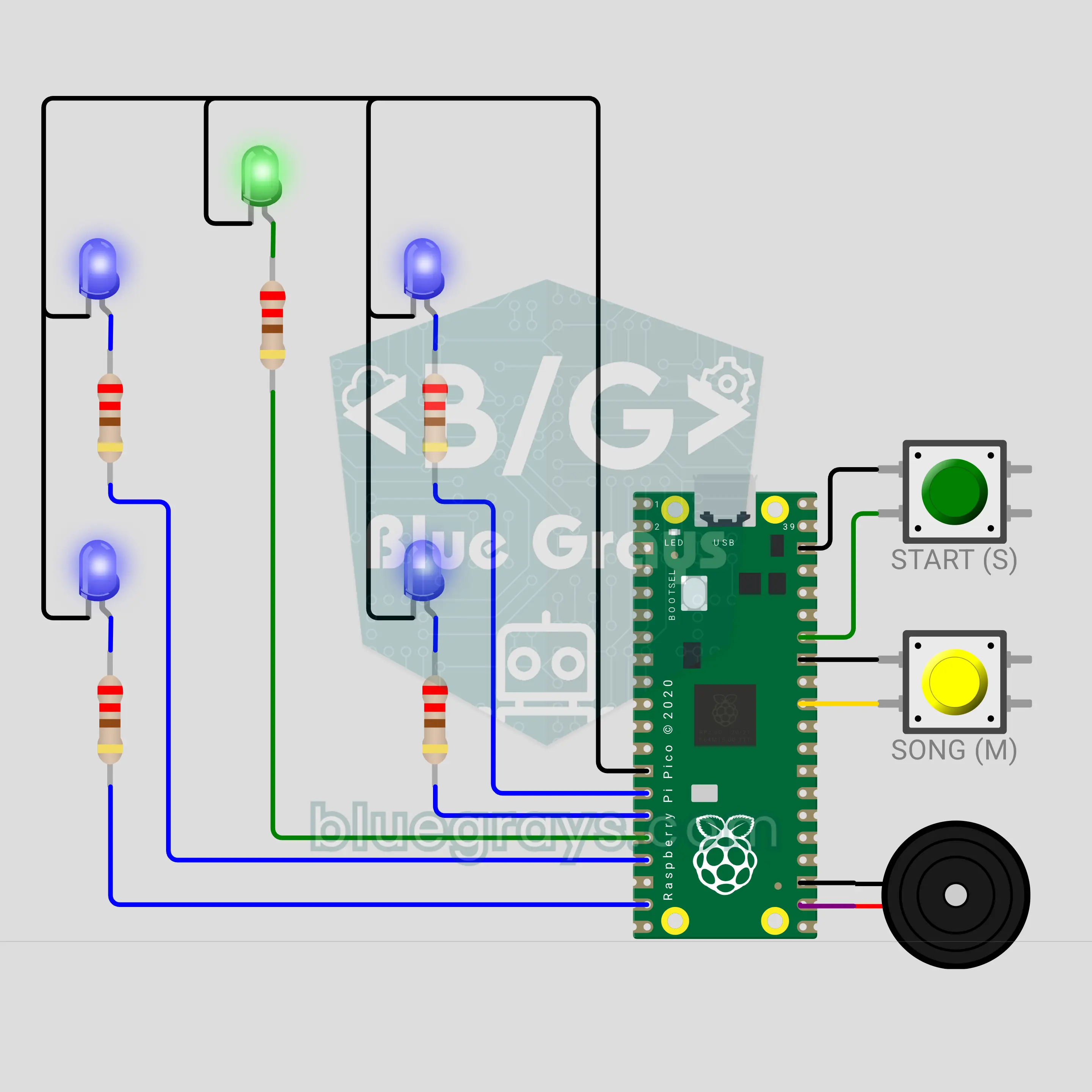
Raspberry Pi Pico Toothbrush Timer (5 LEDs + 2 Buttons + Buzzer)
A bathroom timer that turns brushing into a musical game! The Raspberry Pi Pico splits the 2 minutes dentists generally recommend into 30 seconds for each of the four zones of the mouth. Of the 4 blue LEDs laid out like a mouth, the blinking one shows where to brush now; a buzzer plays a song, rings a "ding" at every zone change, and at the end a green star lights up with a fanfare. The START button pauses, and stopping too early gets a "not done yet".
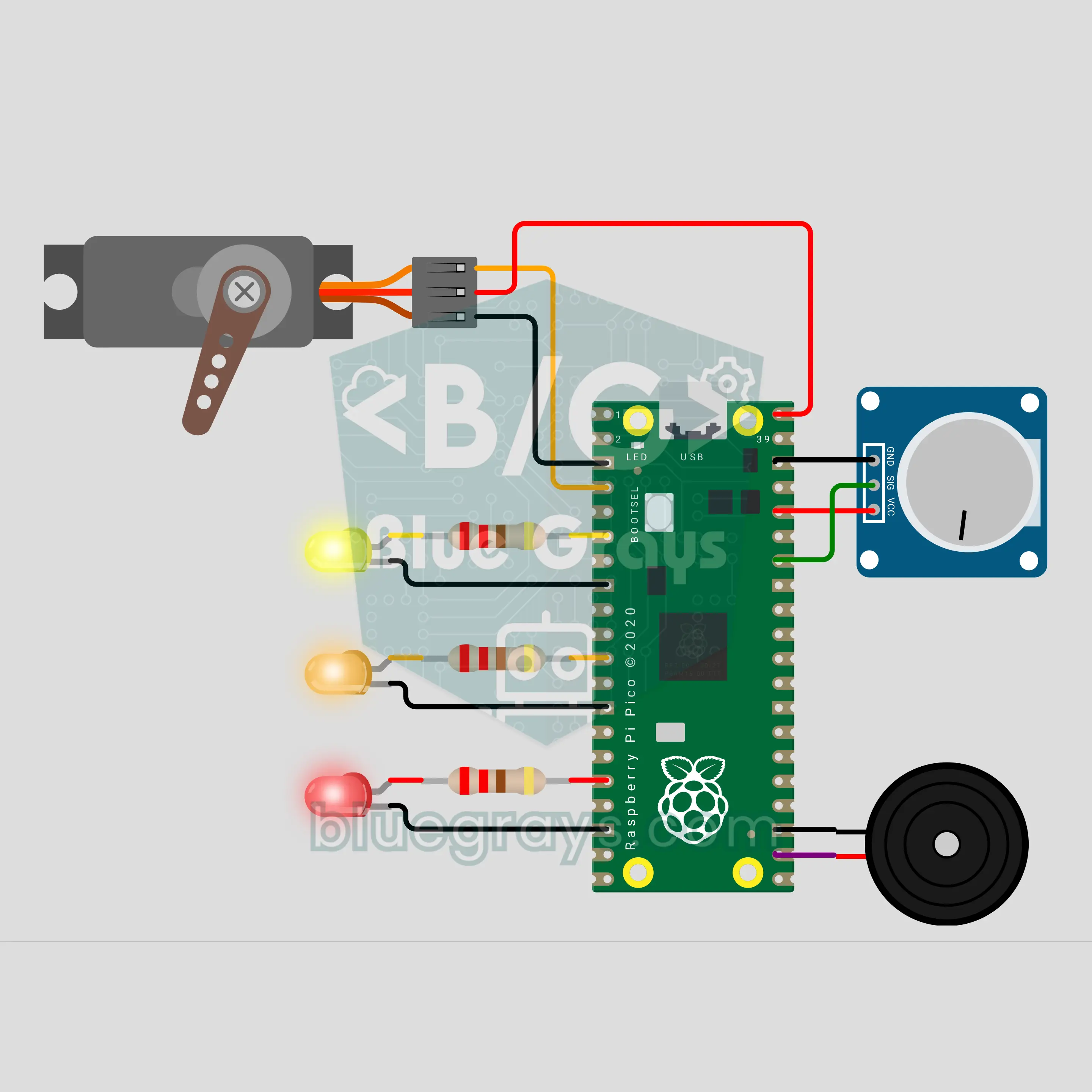
Raspberry Pi Pico W Tea Bag Dipper: Light, Medium, Strong (Servo + Pot + 3 LEDs + Buzzer)
No more bitter tea from a forgotten tea bag: with a Raspberry Pi Pico W, an SG90 servo lowers the bag into your cup, dips it now and then and lifts it out when the time is up. You pick the strength with a potentiometer: LIGHT 2 min, MEDIUM 3 min, STRONG 5 min. There is no button; turn the pot, let go for 2 seconds and brewing starts. 3 LEDs show the time left, and a buzzer plays our own "tea is ready" tune at the end.
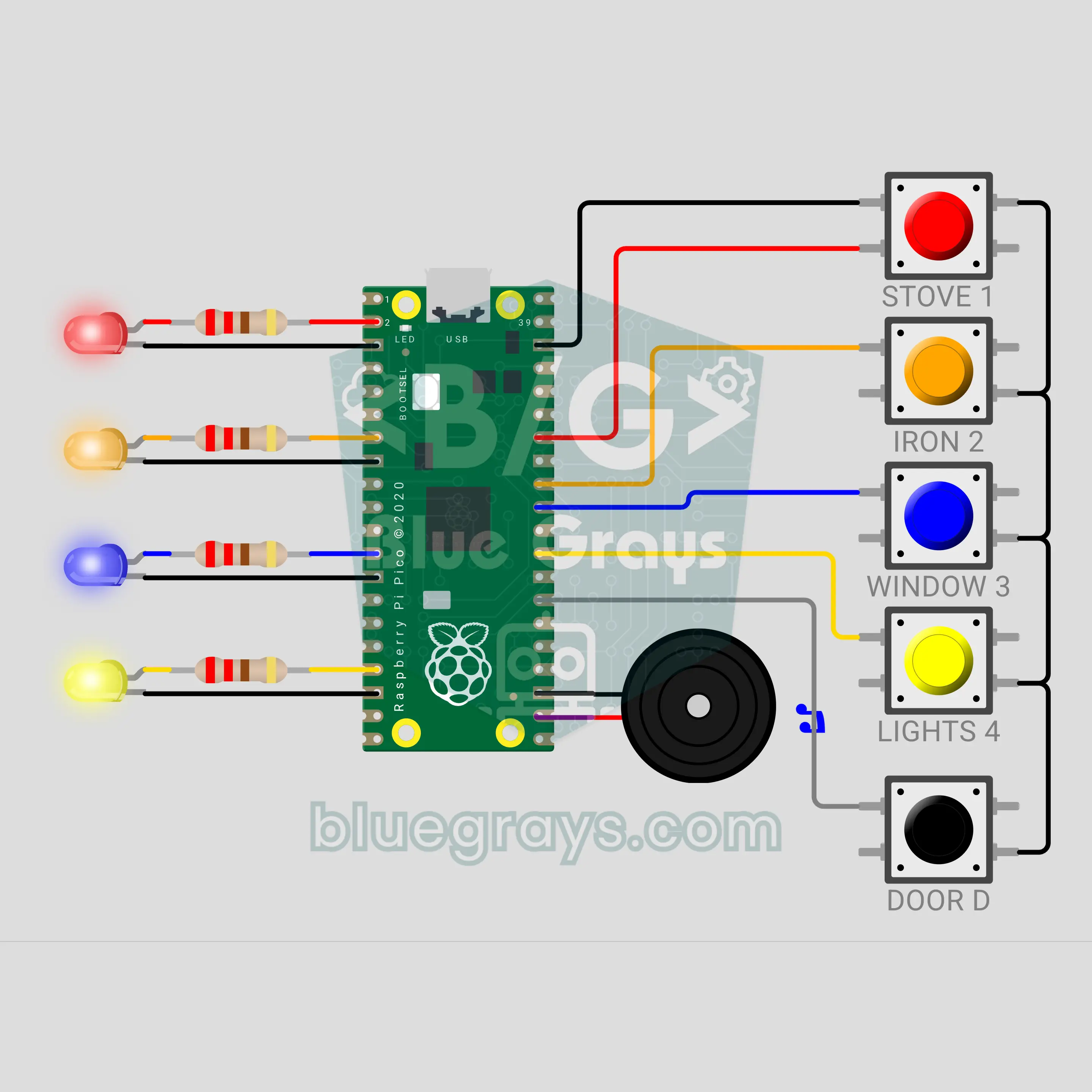
Raspberry Pi Pico W Leave-Home Check Panel: Did I Turn Off the Stove? (5 Buttons + 4 LEDs + Buzzer)
Stop wondering "did I turn off the stove?": a Raspberry Pi Pico W check panel that hangs next to your front door. There is a button and an LED for the stove, iron, window and lights; press each one as you check it and its LED stays on. If the door opens with an item unchecked, the buzzer sounds a siren and only the forgotten item's LED flashes fast. If all is done, a "have a nice trip" tune plays; checks reset after 10 minutes and once you have left.
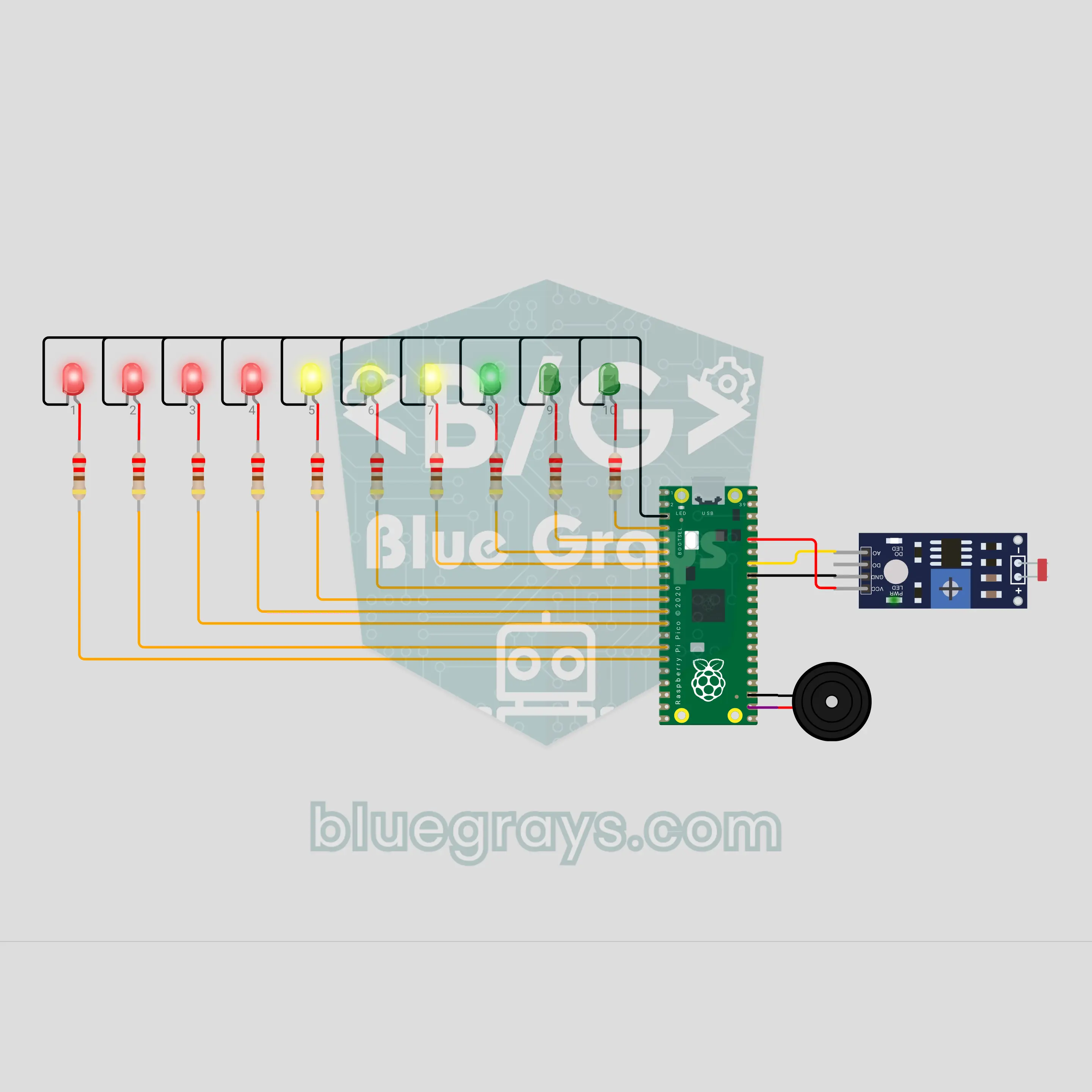
Pico Phone Jail Box: Put Your Phone Away While You Study (LDR + 10 LEDs)
Drop your phone in the box and let the circuit do the rest. The LDR on the floor of the box goes dark when the phone lies on it, and the count starts: one LED lights every 6 minutes, and 10 LEDs mark a full hour of study. Take the phone early and warning ticks start; if it is not back within 5 seconds, the "jail broken" sound plays and the count resets. Finish the hour and a light wave and a victory tune are waiting. One number in the code changes the time.
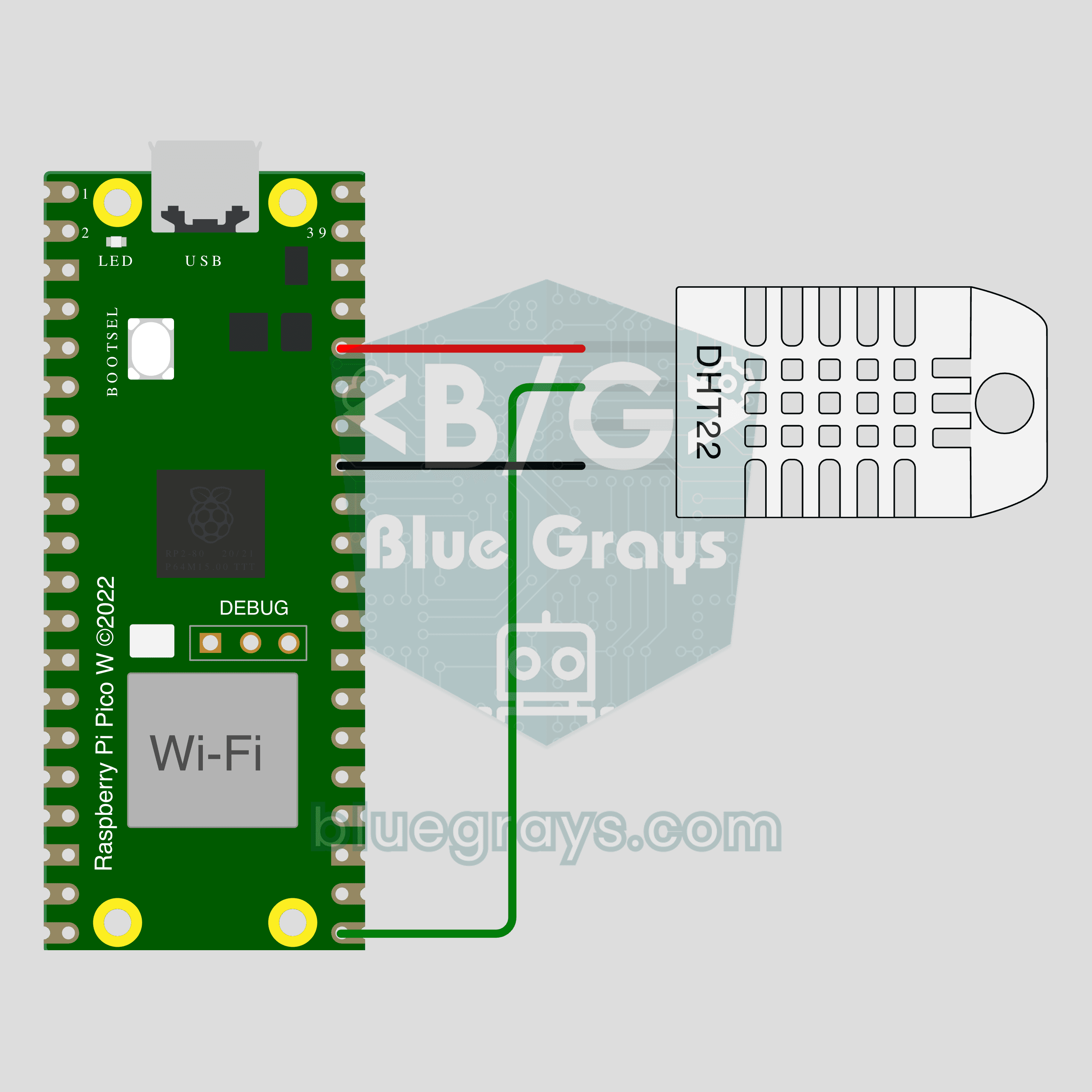
Pico W IoT Temperature and Humidity (DHT22)
Watch your room's temperature and humidity live on your phone wherever you are. This project is the step-by-step guide to the Temperature and humidity IoT template in the app, built with a Raspberry Pi Pico W and a DHT22. Go to Workshop › Devices › Add a device, pick Pico W as the board and Temperature and humidity as the template; Ohmi prepares the code with your own device key. The code on this page is an example: the key and Wi-Fi details are placeholders.
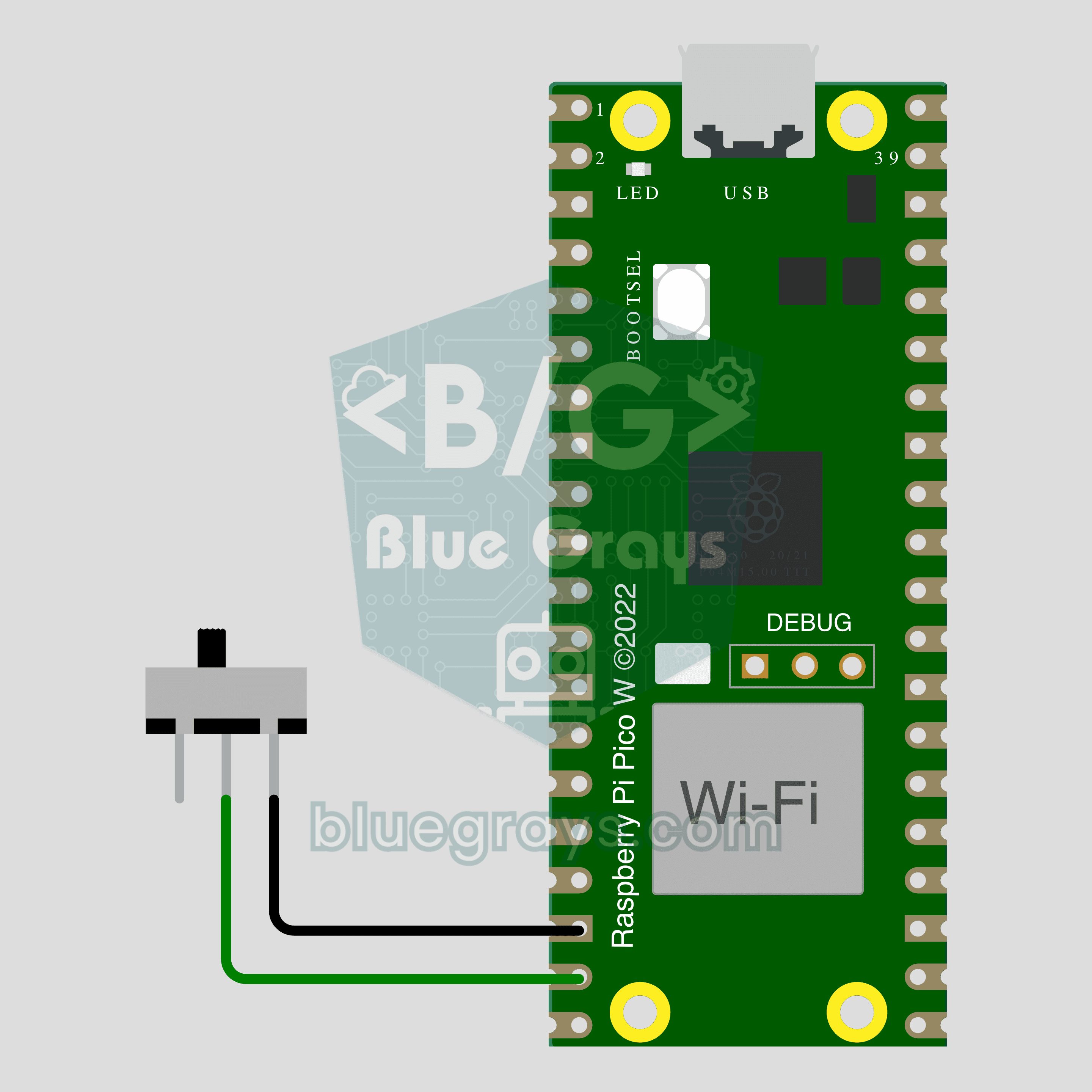
Pico W IoT Door Sensor (Reed Switch)
Did you leave the door or window open? Check on your phone wherever you are. This project is the step-by-step guide to the Door / window IoT template in the app, built with a Raspberry Pi Pico W, a reed switch and a small magnet using two wires. Go to Workshop › Devices › Add a device, pick Pico W as the board and Door / window as the template; Ohmi prepares the code with your own device key. The code on this page is an example: the key and Wi-Fi details are placeholders.
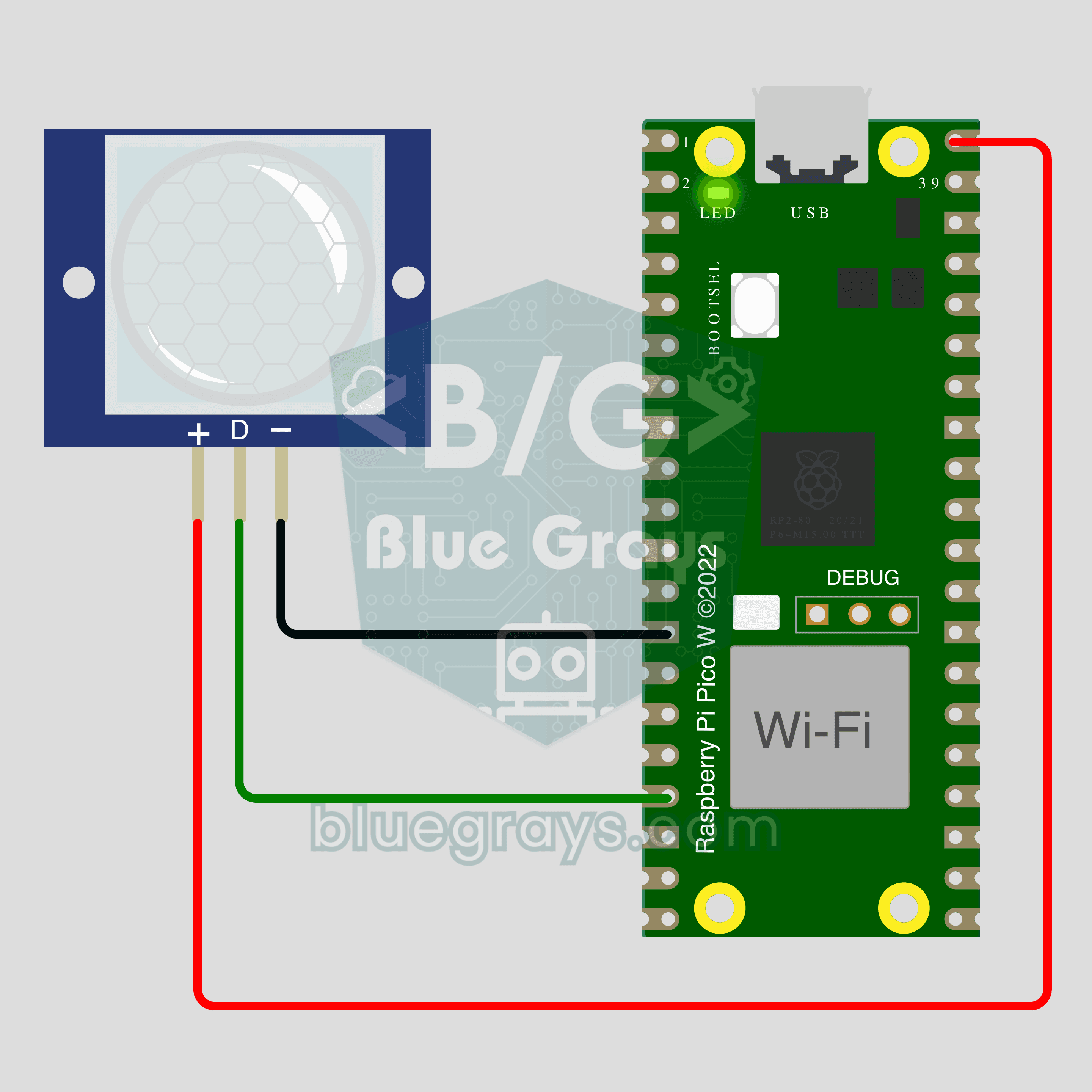
Pico W IoT Motion Counter (PIR)
Count how many times someone walks through a door or hallway, and see the moment of motion live on your phone. This project is the step-by-step guide to the Motion detector IoT template in the app, built with a Raspberry Pi Pico W and a PIR motion sensor using just 3 wires. Go to Workshop › Devices › Add a device; Ohmi prepares the code with your own device key. The code on this page is an example: the key and Wi-Fi details are placeholders.