
Raspberry Pi Pico Chasing LED (6 LEDs)
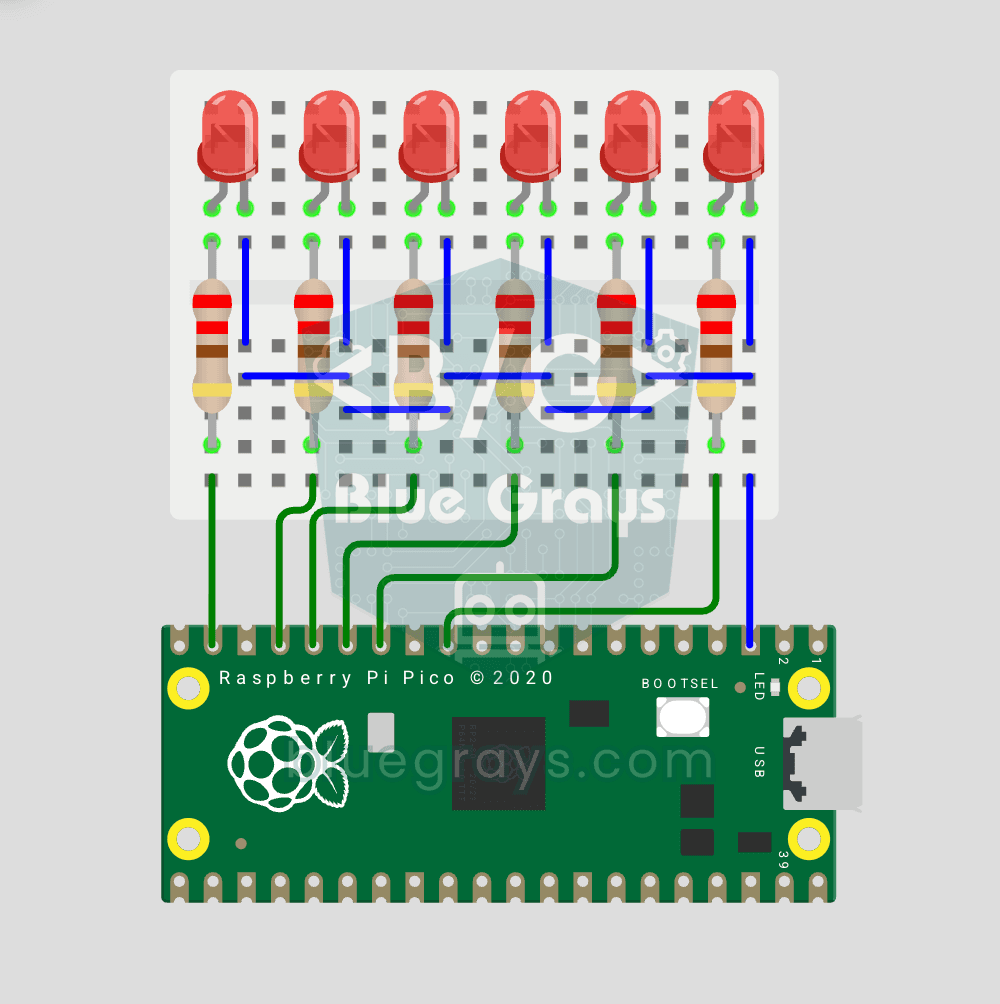
The classic "running LED" animation with the Pico, 6-LED version! Six LEDs light up one after another from left to right, as if the light were walking along the row. You'll learn Python lists (LED_PINS = [14, 13, 12, 11, 10, 9]), list comprehensions, controlling pins with a for loop and enumerate(). Six LEDs go on pins GP9-GP14, each with a 220Ω current-limiting resistor.
Video
Elektr sxemasi
Manba kodi
1# ─────────────────────────────────────────
2#   BlueGrays · bluegrays.com
3#   Raspberry Pi Pico Chasing LED (6 LEDs, GP14 → GP9)
4# ─────────────────────────────────────────
5# 6 LEDs light up one by one from GP14 to GP9 ("chasing light" animation).
6# The speed is set with WAIT_MS: 50 ms fast, 500 ms slow.
7#
8# Pins:
9#   GP14, GP13, GP12, GP11, GP10, GP9 -> 6 red LEDs (in order)
10#   Each LED with 220 ohm, cathodes to GND
11
12from machine import Pin
13from time import sleep_ms
14
15# ============ PIN / PIN ============
16LED_PINS = [14, 13, 12, 11, 10, 9]               # Lighting order
17leds = [Pin(p, Pin.OUT) for p in LED_PINS]       # All as outputs
18
19WAIT_MS = 120      # Delay between LEDs (ms)
20
21# ============ HELPER ============
22def all_off():
23    # Turn all LEDs off
24    for led in leds:
25        led.value(0)
26
27# ============ MAIN LOOP ============
28while True:
29    # Only one LED is on at each step
30    for led in leds:
31        all_off()
32        led.value(1)
33        sleep_ms(WAIT_MS)
34Ko‘p so‘raladigan savollar
What is a list comprehension?
[Pin(p, Pin.OUT) for p in LED_PINS] is a Python syntax that creates a list in a single line. Instead of defining the 6 LEDs one by one, it automatically creates Pin objects from the pin list.
How do I adjust the animation speed?
Change the WAIT_MS value. 50 ms produces a very fast walking effect, 150 ms a medium one, and 300 ms a slow one.
Can I reverse the walking direction?
Yes, replacing `for led in leds:` with `for led in reversed(leds):` in the main loop reverses the LED sequence. If you run both directions one after the other, you'll get the "Black Lightning" effect.
Why were pins GP9 through GP14 selected?
These pins are arranged in sequence on the board; this keeps the wires organized and makes it easier to set up on a breadboard. If you want, you can add other pins to the list.