
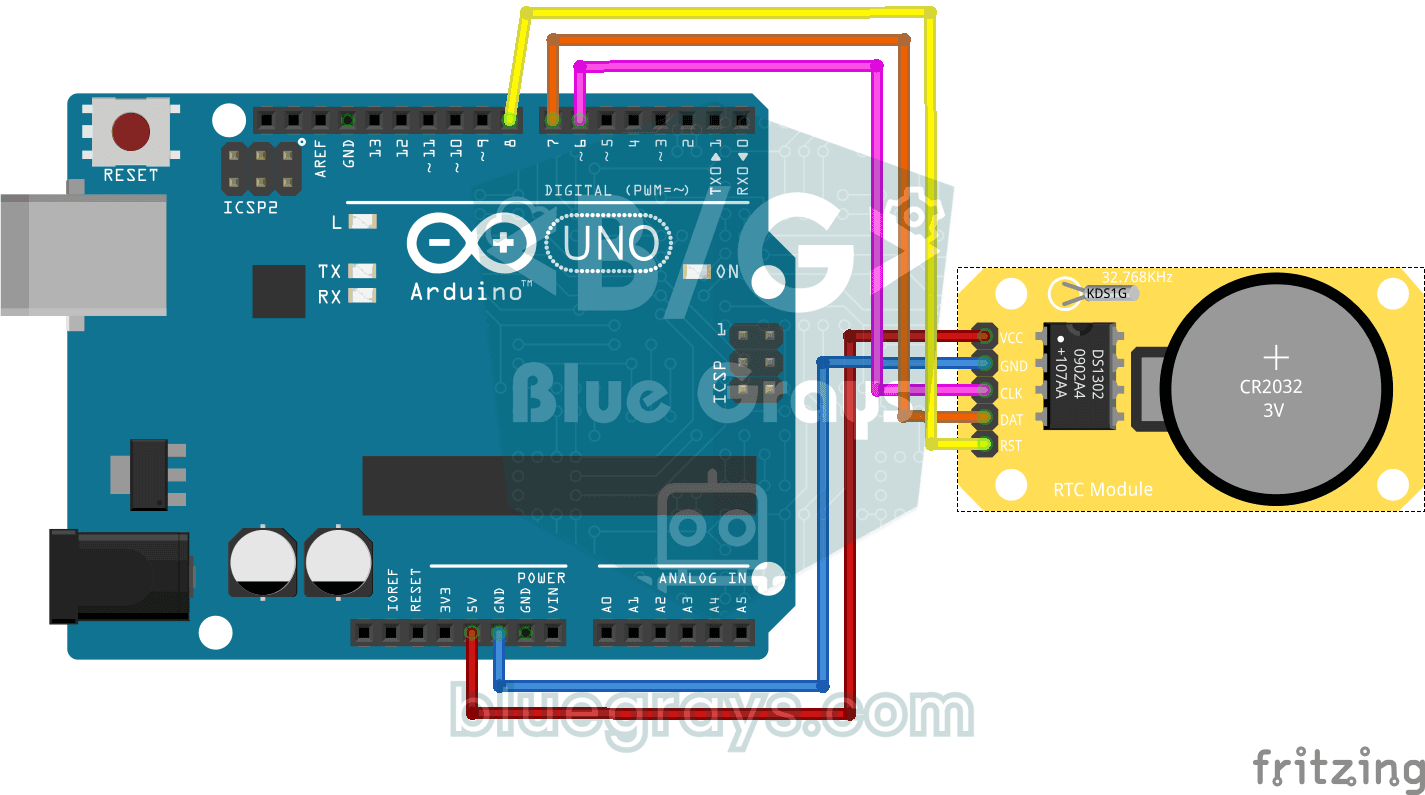
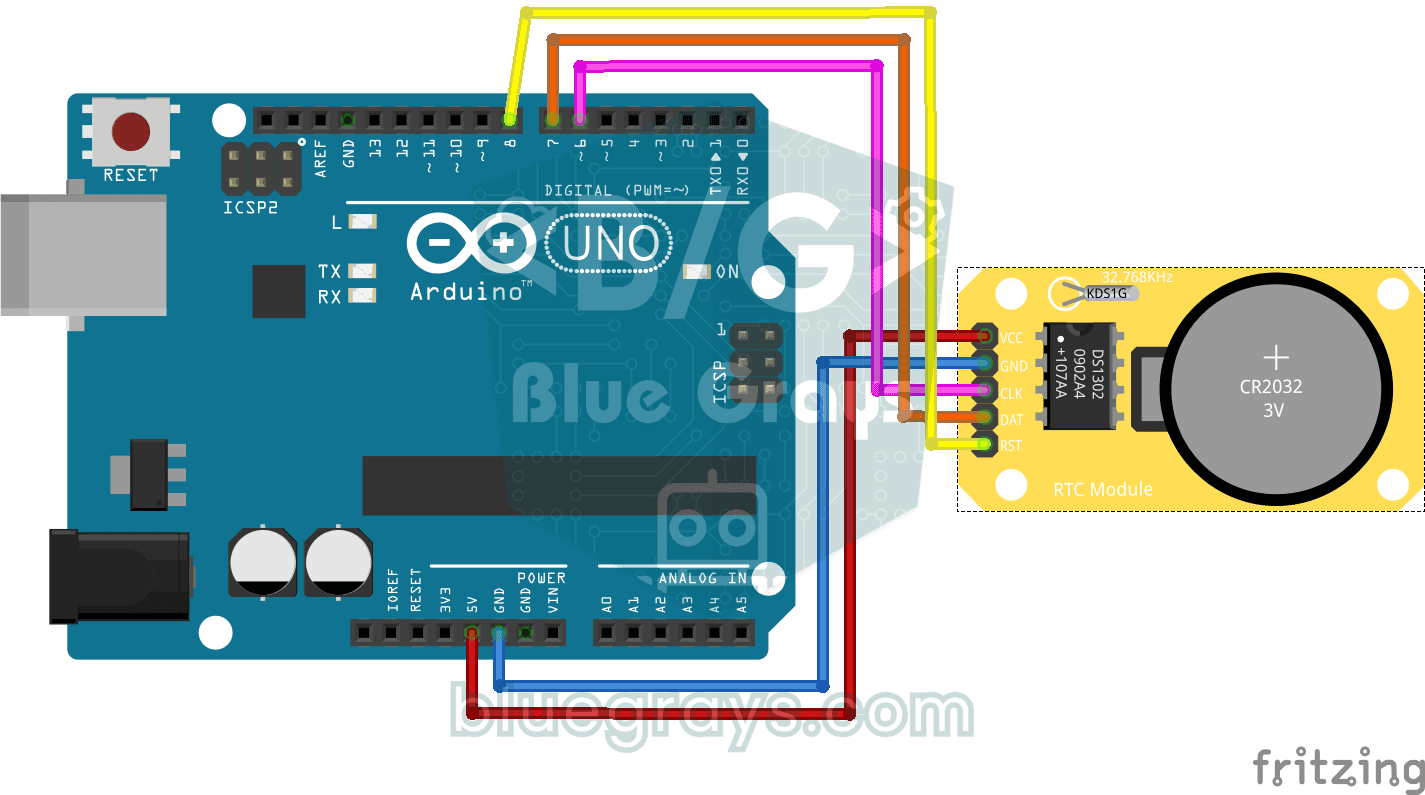
Bạn cho chạy một module đồng hồ nhỏ không bao giờ quên giờ, kể cả khi Arduino đã tắt. Module có viên pin tí hon riêng, và khi đồng hồ đã được đặt, ngày giờ được in lên màn hình máy tính mỗi giây. Báo thức, hẹn giờ và mọi dự án ghi nhật ký đều bắt đầu từ bước này.
Video
Sơ đồ mạch
Mã nguồn
C++ (Arduino IDE)
1// ─────────────────────────────────────────
2//   BlueGrays · bluegrays.com
3//   DS1302 RTC Clock Module Setup
4// ─────────────────────────────────────────
5// If the RTC's time is invalid (new module, flat battery) it writes the
6// compile date and time to the DS1302 once, then prints the date and time
7// to the Serial Monitor every second. The module's battery keeps the time
8// with the power off; later starts do not set it again.
9//
10// Pins:
11//   D6 -> RTC CLK
12//   D7 -> RTC DAT
13//   D8 -> RTC RST
14//   RTC VCC to 5V, GND to GND
15
16#include <virtuabotixRTC.h>   // DS1302 library
17
18// Pins: CLK, DAT, RST
19virtuabotixRTC myRTC(6, 7, 8);
20
21void setup() {
22  Serial.begin(9600);   // Serial at 9600 baud
23
24  // Read the RTC first. A year below 2024 or a month outside 1-12 means the time was never set;
25  // write the compile time. If it is valid leave it, so uploading again or power cycling the
26  // Arduino keeps the time.
27  myRTC.updateTime();
28  if (myRTC.year < 2024 || myRTC.month < 1 || myRTC.month > 12) {
29    setFromCompileTime();
30  }
31}
32
33// Writes the compile time (__DATE__ "Oct 28 2026", __TIME__ "13:42:15") to the RTC. Uploading takes
34// a few seconds, so the clock starts that far behind.
35void setFromCompileTime() {
36  const char *date = __DATE__;
37  const char *time = __TIME__;
38  const char *months = "JanFebMarAprMayJunJulAugSepOctNovDec";
39  char monthName[4] = {date[0], date[1], date[2], '\0'};
40
41  int month = (strstr(months, monthName) - months) / 3 + 1;   // "Oct" -> 10
42  int day = atoi(date + 4);
43  int year = atoi(date + 7);
44  int hour = atoi(time);
45  int minute = atoi(time + 3);
46  int second = atoi(time + 6);
47
48  // Day of the week (Sakamoto's method), 0 = Sunday
49  int offsets[] = {0, 3, 2, 5, 0, 3, 5, 1, 4, 6, 2, 4};
50  int y = year - (month < 3);
51  int weekday = (y + y / 4 - y / 100 + y / 400 + offsets[month - 1] + day) % 7;
52  if (weekday == 0) {
53    weekday = 7;   // Monday = 1 ... Sunday = 7
54  }
55
56  // Order: s, min, h, weekday, day, month, year
57  myRTC.setDS1302Time(second, minute, hour, weekday, day, month, year);
58}
59
60void loop() {
61  // Read the current time from the RTC module
62  myRTC.updateTime();
63
64  // Print the time (day/month/year h:m:s)
65  Serial.print("Current Date/Time: ");
66  Serial.print(myRTC.dayofmonth);
67  Serial.print("/");
68  Serial.print(myRTC.month);
69  Serial.print("/");
70  Serial.print(myRTC.year);
71  Serial.print("  ");
72  Serial.print(myRTC.hours);
73  Serial.print(":");
74  Serial.print(myRTC.minutes);
75  Serial.print(":");
76  Serial.println(myRTC.seconds);
77
78  delay(1000);   // Wait 1 s
79}
80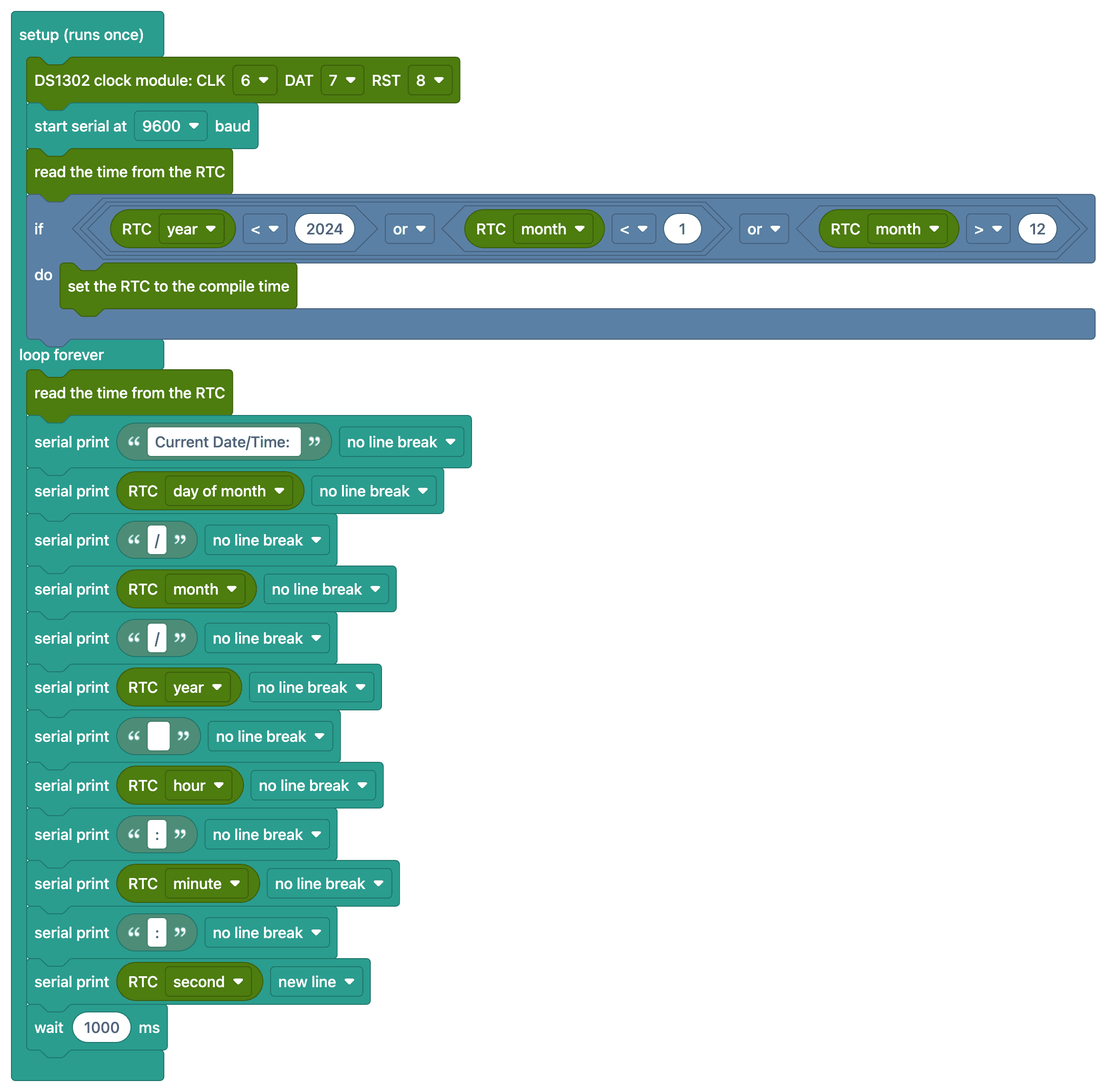
FAQ
Module RTC làm gì?
Module đồng hồ thời gian thực (RTC) giữ giờ và ngày ngay cả khi Arduino tắt, nhờ pin gắn sẵn. Vì bộ đếm millis() của Arduino về 0 mỗi lần cấp điện, cần có RTC để có thông tin giờ chính xác.
Đặt giờ một lần là đủ phải không?
Có. Code trước hết đọc giờ từ module; nếu chưa từng được đặt, code ghi ngày giờ lúc bạn biên dịch code một lần. Nếu giờ hợp lệ thì code để nguyên, nên nạp lại hay tắt bật Arduino cũng không làm hỏng đồng hồ. Bạn không cần tự tay chú thích bỏ dòng nào.
Đồng hồ chạy chậm, có bình thường không?
DS1302 dùng thạch anh và có thể lệch vài giây mỗi ngày. Để có đồng hồ chính xác hơn, nên dùng module DS3231 có bù nhiệt (khoảng ±1 phút mỗi năm).
Khi pin trong module hết thì sao?
Đồng hồ vẫn chạy khi Arduino còn điện; nếu mất điện mà pin đã hết, đồng hồ về mặc định và phải đặt lại. Pin CR2032 thường dùng được vài năm.