
Web server bất đồng bộ với ESP32 (hiển thị IP trên LCD)
Trong dự án này, chúng ta biến ESP32 thành một web server bất đồng bộ mà bạn có thể điều khiển từ điện thoại hoặc máy tính trong cùng mạng Wi-Fi. Nhờ thư viện ESPAsyncWebServer, server có thể xử lý nhiều yêu cầu cùng lúc (khác với WebServer.h cổ điển, vốn bị chặn ở từng yêu cầu một). Bạn có thể mở địa chỉ IP của ESP32 trong trình duyệt và nhấn các nút ON/OFF (đường dẫn /on và /off) để bật tắt LED nối với GPIO 5.

Video
Sơ đồ mạch
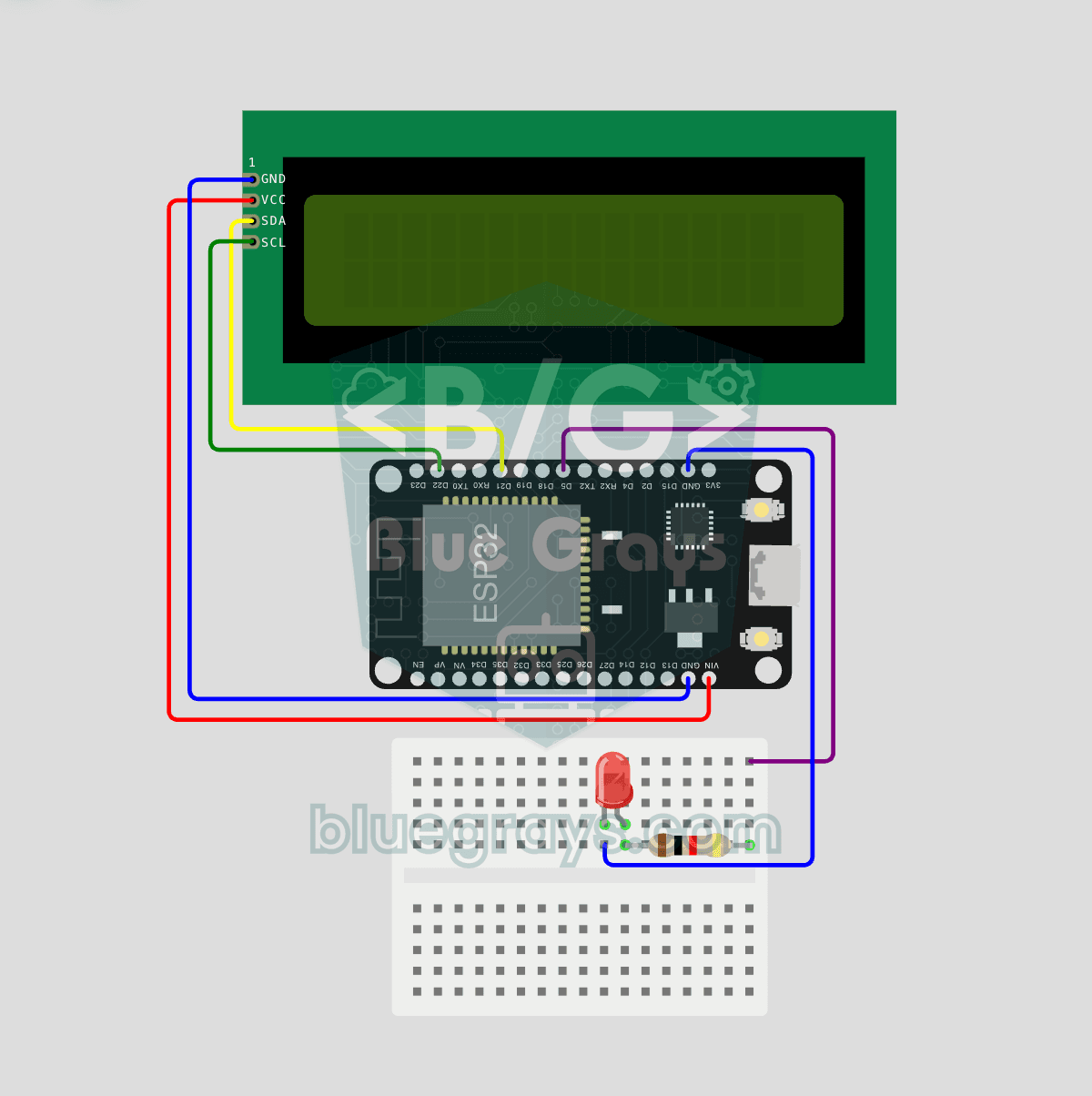
Mã nguồn
1// ─────────────────────────────────────────
2//   BlueGrays · bluegrays.com
3//   ESP32 Asynchronous Web Server (with IP Display on LCD)
4// ─────────────────────────────────────────
5// The ESP32 runs an asynchronous web server. Open its IP address from a
6// phone or computer on the same Wi-Fi and switch the LED with the ON/OFF
7// buttons. The I2C LCD shows the IP address on the top row and the LED
8// state on the bottom row.
9//
10// Pins:
11//   GPIO 5  -> LED (with a 220 ohm resistor, cathode to GND)
12//   GPIO 21 -> LCD SDA
13//   GPIO 22 -> LCD SCL
14//   LCD VCC -> VIN (5V), GND -> GND
15
16#include <Wire.h>
17#include <LiquidCrystal_I2C.h>
18#include <WiFi.h>
19#include <AsyncTCP.h>
20#include <ESPAsyncWebServer.h>
21
22// Wi-Fi credentials (Wokwi default). Use your own network on real hardware
23const char* WIFI_SSID = "Wokwi-GUEST";
24const char* WIFI_PASS = "";
25
26// Pin definitions
27#define LED_PIN 5
28
29bool ledState = false;                 // Is the LED on
30AsyncWebServer server(80);             // Web server on port 80
31LiquidCrystal_I2C lcd(0x27, 16, 2);    // Address 0x27, 16x2
32
33// Refreshes the LCD: IP and LED state
34void updateLcd() {
35  lcd.clear();
36  lcd.setCursor(0, 0);
37  // Skip "IP:" when the IP is over 13 chars
38  String ip = WiFi.localIP().toString();
39  if (ip.length() <= 13) lcd.print("IP:");
40  lcd.print(ip);
41  lcd.setCursor(0, 1);
42  lcd.print(ledState ? "LED: ON     " : "LED: OFF    ");
43}
44
45// HTML page, stored in flash (PROGMEM). processor() fills the %STATE% placeholder
46const char INDEX_HTML[] PROGMEM = R"rawliteral(
47<!DOCTYPE html>
48<html lang="en">
49<head>
50<meta charset="utf-8">
51<meta name="viewport" content="width=device-width,initial-scale=1">
52<title>BlueGrays LED Control</title>
53<style>
54body{font-family:Arial;text-align:center;padding:20px;background:#1a1a2e;color:#fff}
55h1{color:#4ea8de}
56.state{font-size:28px;margin:30px}
57button{padding:18px 40px;font-size:18px;margin:8px;border:none;border-radius:8px;cursor:pointer;color:#fff}
58.on{background:#2ecc71}.off{background:#e74c3c}
59</style>
60</head>
61<body>
62<h1>BlueGrays LED Control</h1>
63<div class="state">LED: %STATE%</div>
64<a href="/on"><button class="on">ON</button></a>
65<a href="/off"><button class="off">OFF</button></a>
66</body>
67</html>
68)rawliteral";
69
70// Replaces %STATE% in the page with the LED state
71String processor(const String& var) {
72  if (var == "STATE") return ledState ? "ON" : "OFF";
73  return String();
74}
75
76void setup() {
77  pinMode(LED_PIN, OUTPUT);
78  digitalWrite(LED_PIN, LOW);
79
80  // V1 default I2C: SDA=21 SCL=22
81  Wire.begin(21, 22);
82  lcd.init();
83  lcd.backlight();
84
85  // Splash screen, 3 s
86  lcd.setCursor(3, 0);
87  lcd.print("BlueGrays");
88  lcd.setCursor(2, 1);
89  lcd.print("WebServer v1");
90  delay(3000);
91  lcd.clear();
92
93  // Connect to Wi-Fi, wait until connected
94  lcd.setCursor(0, 0);
95  lcd.print("Connecting WiFi");
96  lcd.setCursor(0, 1);
97  lcd.print("Please wait...");
98
99  WiFi.mode(WIFI_STA);
100  WiFi.begin(WIFI_SSID, WIFI_PASS);
101  while (WiFi.status() != WL_CONNECTED) delay(500);
102
103  // Routes: "/" page, "/on" on, "/off" off
104  server.on("/", HTTP_GET, [](AsyncWebServerRequest *r) {
105    r->send_P(200, "text/html", INDEX_HTML, processor);
106  });
107
108  server.on("/on", HTTP_GET, [](AsyncWebServerRequest *r) {
109    ledState = true;
110    digitalWrite(LED_PIN, HIGH);
111    updateLcd();
112    r->redirect("/");
113  });
114
115  server.on("/off", HTTP_GET, [](AsyncWebServerRequest *r) {
116    ledState = false;
117    digitalWrite(LED_PIN, LOW);
118    updateLcd();
119    r->redirect("/");
120  });
121
122  // Start the server, show the IP on the LCD
123  server.begin();
124  updateLcd();
125}
126
127void loop() {
128  // The async server runs in the background
129  delay(100);
130}
131FAQ
Vì sao web server bất đồng bộ tốt hơn WebServer truyền thống?
WebServer cổ điển xử lý yêu cầu tuần tự và phải liên tục gọi `handleClient()` trong vòng lặp. ESPAsyncWebServer xử lý yêu cầu ở chế độ nền; nhiều trình duyệt có thể kết nối cùng lúc, và vòng lặp được rảnh cho các việc khác.
Cài đặt thư viện thế nào?
Bạn cần thư viện ESPAsyncWebServer và AsyncTCP. Bạn có thể tìm "ESPAsyncWebServer" (ESP32Async) trong Library Manager của Arduino IDE và cài đặt; AsyncTCP được cài kèm như một thư viện phụ thuộc.
Mình có truy cập trang từ bên ngoài qua internet được không?
Mặc định, chỉ truy cập được trong cùng mạng cục bộ. Muốn truy cập từ bên ngoài cần chuyển tiếp cổng (port forwarding), nhưng cách này có rủi ro bảo mật; thay vào đó, nên dùng Blynk, MQTT hoặc các giải pháp cloud.
Nhúng HTML bằng PROGMEM nghĩa là gì?
Trang HTML được lưu trong bộ nhớ flash dưới dạng văn bản bên trong code và không chiếm RAM. Nhờ vậy giao diện web được phục vụ mà không cần thiết lập hệ thống tệp riêng (LittleFS).