
LED và rơ-le Bluetooth với ESP32
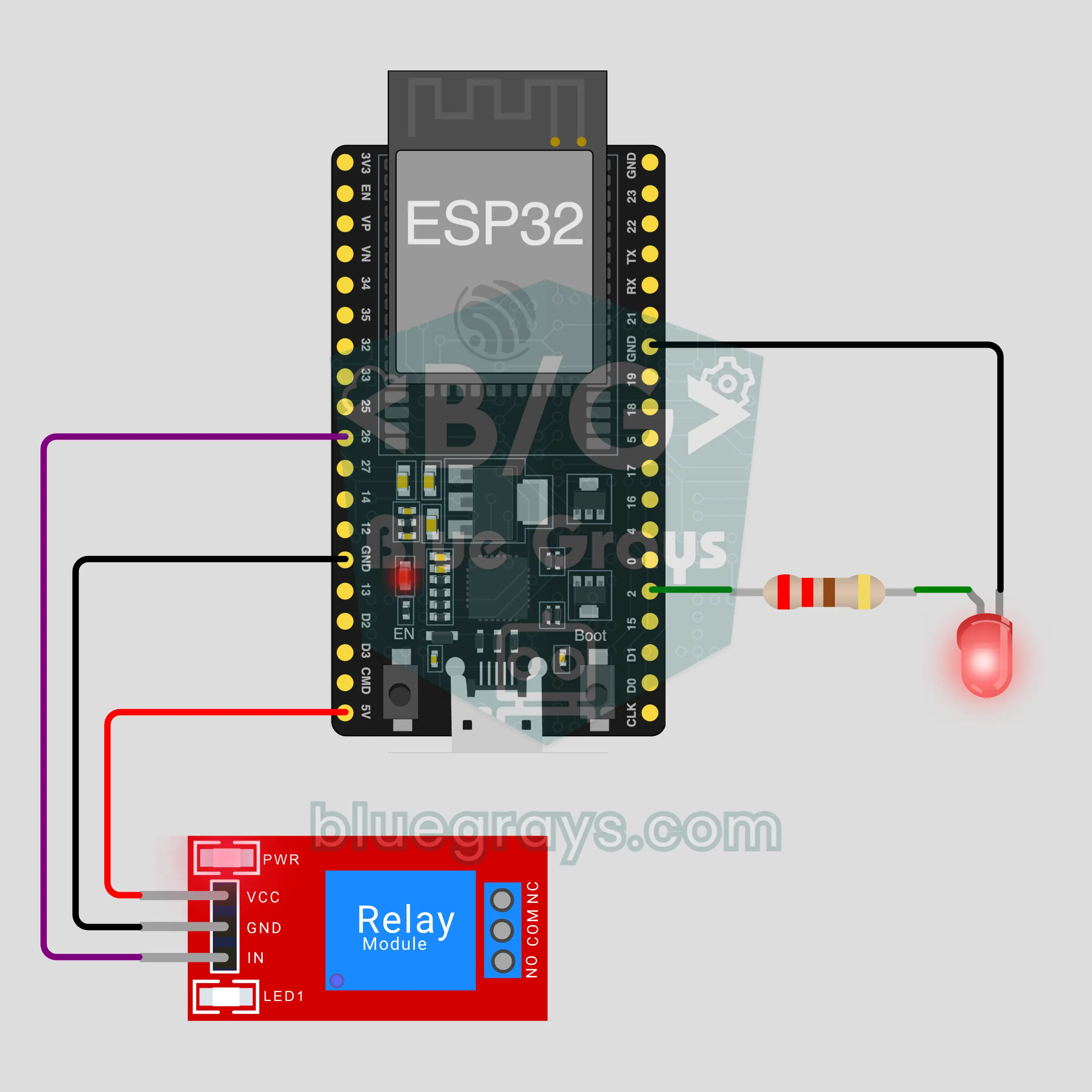
Bật tắt một LED và một rơ-le từ điện thoại qua Bluetooth, không cần internet hay Wi-Fi. Dự án này là hướng dẫn từng bước cho mẫu Bluetooth LED và rơ-le trong ứng dụng, làm với ESP32 và module rơ-le 5 V. Vào Xưởng › Thiết bị › Thêm thiết bị › Bluetooth, chọn LED và rơ-le và nạp code bằng Lấy code. Nút Cài đặt thành bảng điều khiển Bluetooth trên trang này cũng mở trình hướng dẫn với mẫu này.
Video
Sơ đồ mạch
Mã nguồn
1// ┌───────────────────────────┐
2// │ BlueGrays · bluegrays.com │
3// │ Bluetooth · ESP32         │
4// │ BG-Lamba                  │
5// └───────────────────────────┘
6// LED and relay
7// Arduino IDE board: ESP32 Dev Module
8// the BLE library comes with the ESP32 board package, nothing extra to install
9
10#include <BLEDevice.h>
11#include <BLEServer.h>
12#include <BLE2902.h>
13
14const char BLE_NAME[] = "BG-Lamba";  // the board advertises with this name, the app finds it in the list by it
15
16// Pins: change them here if you wired differently
17const int LED_PIN = 2;
18const int RELAY_PIN = 26;
19const bool RELAY_ACTIVE_LOW = true;  // most relay modules switch on LOW
20
21void btWrite(const char *text);
22void onValue(const char *key, const char *value);
23void sendAll();
24void onLinkLost();
25
26// ── The app sends "key=value" lines; on "?" the board sends all its values ──
27char line[65];
28uint8_t lineLen = 0;
29unsigned long lastRxMs = 0;
30
31bool is(const char *a, const char *b) { return strcmp(a, b) == 0; }
32bool isOn(const char *v) { return v[0] == '1'; }
33
34void sendText(const char *key, const char *value) {
35  char out[72];
36  snprintf(out, sizeof(out), "%s=%s\n", key, value);
37  btWrite(out);
38}
39
40void sendInt(const char *key, long value) {
41  char text[12];
42  snprintf(text, sizeof(text), "%ld", value);
43  sendText(key, text);
44}
45
46void sendFloat(const char *key, float value) {
47  char text[16];
48  dtostrf(value, 1, 1, text);
49  sendText(key, text);
50}
51
52void handleLine(char *text) {
53  char *eq = strchr(text, '=');
54  if (eq == nullptr) {
55    if (text[strlen(text) - 1] == '?') {
56      btWrite("@v=1.0\n");  // the "@v" line tells the app the code version
57      sendAll();
58    }
59    return;
60  }
61  *eq = '\0';
62  onValue(text, eq + 1);
63}
64
65void feed(char c) {
66  lastRxMs = millis();
67  if (c == '\n' || c == '\r') {
68    if (lineLen == 0) return;
69    line[lineLen] = '\0';
70    lineLen = 0;
71    handleLine(line);
72  } else if (lineLen < sizeof(line) - 1) {
73    line[lineLen++] = c;
74  }
75}
76
77// ── Bluetooth (Nordic UART) ──
78#define UART_SERVICE "6E400001-B5A3-F393-E0A9-E50E24DCCA9E"
79#define UART_RX "6E400002-B5A3-F393-E0A9-E50E24DCCA9E"
80#define UART_TX "6E400003-B5A3-F393-E0A9-E50E24DCCA9E"
81
82BLECharacteristic *txChar = nullptr;
83volatile bool linked = false;
84volatile bool linkLost = false;
85// incoming bytes move from the Bluetooth task to loop() through a small ring buffer
86const int RX_SIZE = 256;
87volatile uint8_t rxBuf[RX_SIZE];
88volatile int rxHead = 0, rxTail = 0;
89
90class ServerEvents : public BLEServerCallbacks {
91  void onConnect(BLEServer *server) override { linked = true; }
92  void onDisconnect(BLEServer *server) override { linked = false; linkLost = true; }
93};
94
95class RxEvents : public BLECharacteristicCallbacks {
96  void onWrite(BLECharacteristic *c) override {
97    auto v = c->getValue();
98    for (size_t i = 0; i < v.length(); i++) {
99      int next = (rxHead + 1) % RX_SIZE;
100      if (next == rxTail) break;
101      rxBuf[rxHead] = (uint8_t)v[i];
102      rxHead = next;
103    }
104  }
105};
106
107// lines go out in 20-byte packets (works with every phone)
108void btWrite(const char *text) {
109  if (!linked || txChar == nullptr) return;
110  size_t n = strlen(text);
111  for (size_t i = 0; i < n; i += 20) {
112    size_t len = n - i < 20 ? n - i : 20;
113    txChar->setValue((uint8_t *)text + i, len);
114    txChar->notify();
115    delay(4);
116  }
117}
118
119void btBegin() {
120  BLEDevice::init(BLE_NAME);
121  BLEServer *server = BLEDevice::createServer();
122  server->setCallbacks(new ServerEvents());
123  BLEService *uart = server->createService(UART_SERVICE);
124  txChar = uart->createCharacteristic(UART_TX, BLECharacteristic::PROPERTY_NOTIFY);
125  txChar->addDescriptor(new BLE2902());
126  BLECharacteristic *rx = uart->createCharacteristic(UART_RX, BLECharacteristic::PROPERTY_WRITE | BLECharacteristic::PROPERTY_WRITE_NR);
127  rx->setCallbacks(new RxEvents());
128  uart->start();
129  BLEAdvertisementData adv;
130  adv.setFlags(0x06);
131  adv.setCompleteServices(BLEUUID(UART_SERVICE));
132  BLEAdvertisementData scan;
133  scan.setName(BLE_NAME);
134  BLEAdvertising *advertising = BLEDevice::getAdvertising();
135  advertising->setAdvertisementData(adv);
136  advertising->setScanResponseData(scan);
137  BLEDevice::startAdvertising();
138}
139
140void btPoll() {
141  while (rxTail != rxHead) {
142    char c = (char)rxBuf[rxTail];
143    rxTail = (rxTail + 1) % RX_SIZE;
144    feed(c);
145  }
146  if (linkLost) {
147    linkLost = false;
148    onLinkLost();
149    delay(100);
150    BLEDevice::startAdvertising();
151  }
152}
153
154// ── ESP32 ──
155bool ledOn = false, relayOn = false;
156
157void setRelay(bool on) {
158  if (RELAY_ACTIVE_LOW) {
159    if (on) { pinMode(RELAY_PIN, OUTPUT); digitalWrite(RELAY_PIN, LOW); }
160    else { pinMode(RELAY_PIN, INPUT); }  // off releases the pin: a 3.3 V HIGH is not enough to turn a 5 V module off
161  } else {
162    pinMode(RELAY_PIN, OUTPUT); digitalWrite(RELAY_PIN, on ? HIGH : LOW);
163  }
164}
165
166void apply() {
167  digitalWrite(LED_PIN, ledOn ? HIGH : LOW);
168  setRelay(relayOn);
169}
170
171void onValue(const char *key, const char *value) {
172  if (is(key, "led")) ledOn = isOn(value);
173  else if (is(key, "role")) relayOn = isOn(value);
174  apply();
175}
176
177void sendAll() {
178  sendInt("led", ledOn);
179  sendInt("role", relayOn);
180}
181
182void onLinkLost() {
183}
184
185void setup() {
186  Serial.begin(115200);
187  pinMode(LED_PIN, OUTPUT);
188  apply();
189  btBegin();
190  Serial.print(F("BlueGrays Bluetooth: "));
191  Serial.println(BLE_NAME);
192}
193
194void loop() {
195  btPoll();
196}
197FAQ
Nó có chạy với iPhone không?
Có. Bluetooth Low Energy (BLE) tích hợp của ESP32 giao tiếp được với cả iPhone và Android. iPhone không kết nối được với các module Bluetooth cổ điển như HC-05 và HC-06, và dự án này cũng không cần đến chúng. Đừng cố ghép nối bo mạch trong cài đặt Bluetooth của điện thoại; bo mạch BLE có thể không hiện ở đó, điều này là bình thường. Ứng dụng BlueGrays sẽ tạo kết nối.
Mình có thể nối một bóng đèn thật vào rơ-le không?
Module rơ-le có thể đóng ngắt điện lưới, nhưng điện lưới có thể gây chết người. Trong dự án này, không có gì được nối vào các cực COM và NO của rơ-le; rơ-le cho thấy nó hoạt động bằng tiếng tách và LED trên module. Nếu muốn thử một tải, hãy bắt đầu với mạch điện áp thấp như pin hoặc adapter 12 V. Nếu chuyển sang điện lưới, hãy làm cùng người có kinh nghiệm, không để hở dây trần hay ốc vít và giữ trong giới hạn dòng điện in trên module.
Vì sao LED xanh dương trên bo mạch sáng cùng lúc với LED của mình?
Trên nhiều bo ESP32 DevKit, LED xanh dương tích hợp cũng được nối với GPIO2. LED của bạn nằm trên cùng chân đó, nên cả hai nhấp nháy cùng nhau; đây không phải là lỗi. Thậm chí còn tiện: nếu có dây bị lỏng, LED xanh dương vẫn cho thấy lệnh đã đến bo mạch. Nếu không muốn vậy, hãy chuyển LED của bạn sang chân khác (ví dụ GPIO4) và đổi LED_PIN trong code.
Mình có cần internet hay Wi-Fi không, và tầm hoạt động bao xa?
Không. Điện thoại của bạn kết nối thẳng với bo mạch qua Bluetooth, không qua router hay máy chủ nào. Trong nhà, tầm hoạt động thường khoảng 10 mét, và tường sẽ làm giảm khoảng cách đó. Bo mạch kết nối với một điện thoại mỗi lúc; khi điện thoại đó rời đi, bo mạch bắt đầu phát tín hiệu quảng bá lại và điện thoại khác có thể kết nối. Muốn điều khiển từ bên ngoài nhà, hãy chọn một dự án dùng bảng IoT qua Wi-Fi trong ứng dụng.