
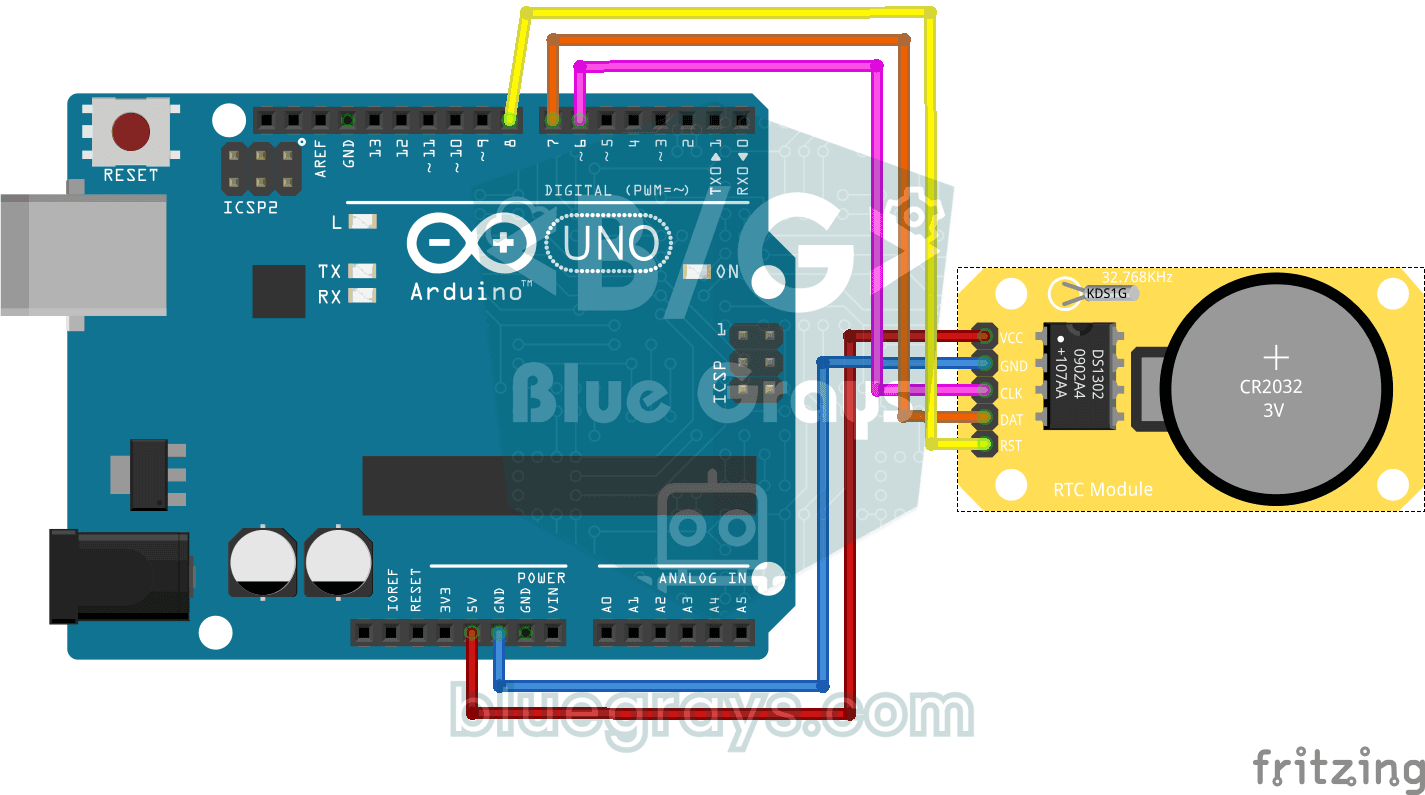
Arduino를 꺼도 시간을 잊지 않는 작은 시계 모듈을 작동시켜요. 모듈에는 작은 배터리가 따로 있어서, 한 번 시간을 맞춰 두면 날짜와 시간이 1초마다 컴퓨터 화면에 나와요. 알람, 타이머, 기록을 남기는 모든 프로젝트가 이 단계에서 시작해요.
동영상
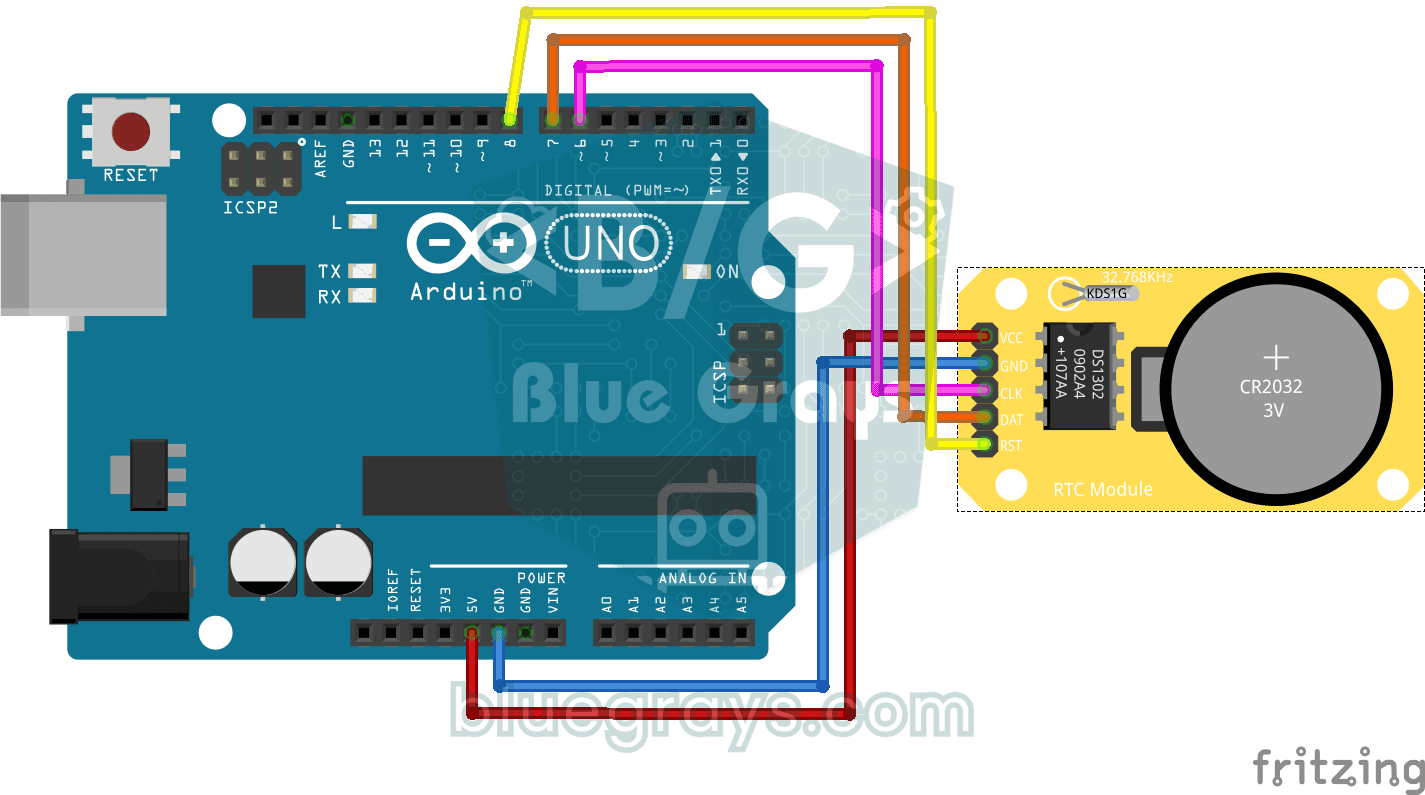
회로도
소스 코드
C++ (Arduino IDE)
1// ─────────────────────────────────────────
2//   BlueGrays · bluegrays.com
3//   DS1302 RTC Clock Module Setup
4// ─────────────────────────────────────────
5// If the RTC's time is invalid (new module, flat battery) it writes the
6// compile date and time to the DS1302 once, then prints the date and time
7// to the Serial Monitor every second. The module's battery keeps the time
8// with the power off; later starts do not set it again.
9//
10// Pins:
11//   D6 -> RTC CLK
12//   D7 -> RTC DAT
13//   D8 -> RTC RST
14//   RTC VCC to 5V, GND to GND
15
16#include <virtuabotixRTC.h>   // DS1302 library
17
18// Pins: CLK, DAT, RST
19virtuabotixRTC myRTC(6, 7, 8);
20
21void setup() {
22  Serial.begin(9600);   // Serial at 9600 baud
23
24  // Read the RTC first. A year below 2024 or a month outside 1-12 means the time was never set;
25  // write the compile time. If it is valid leave it, so uploading again or power cycling the
26  // Arduino keeps the time.
27  myRTC.updateTime();
28  if (myRTC.year < 2024 || myRTC.month < 1 || myRTC.month > 12) {
29    setFromCompileTime();
30  }
31}
32
33// Writes the compile time (__DATE__ "Oct 28 2026", __TIME__ "13:42:15") to the RTC. Uploading takes
34// a few seconds, so the clock starts that far behind.
35void setFromCompileTime() {
36  const char *date = __DATE__;
37  const char *time = __TIME__;
38  const char *months = "JanFebMarAprMayJunJulAugSepOctNovDec";
39  char monthName[4] = {date[0], date[1], date[2], '\0'};
40
41  int month = (strstr(months, monthName) - months) / 3 + 1;   // "Oct" -> 10
42  int day = atoi(date + 4);
43  int year = atoi(date + 7);
44  int hour = atoi(time);
45  int minute = atoi(time + 3);
46  int second = atoi(time + 6);
47
48  // Day of the week (Sakamoto's method), 0 = Sunday
49  int offsets[] = {0, 3, 2, 5, 0, 3, 5, 1, 4, 6, 2, 4};
50  int y = year - (month < 3);
51  int weekday = (y + y / 4 - y / 100 + y / 400 + offsets[month - 1] + day) % 7;
52  if (weekday == 0) {
53    weekday = 7;   // Monday = 1 ... Sunday = 7
54  }
55
56  // Order: s, min, h, weekday, day, month, year
57  myRTC.setDS1302Time(second, minute, hour, weekday, day, month, year);
58}
59
60void loop() {
61  // Read the current time from the RTC module
62  myRTC.updateTime();
63
64  // Print the time (day/month/year h:m:s)
65  Serial.print("Current Date/Time: ");
66  Serial.print(myRTC.dayofmonth);
67  Serial.print("/");
68  Serial.print(myRTC.month);
69  Serial.print("/");
70  Serial.print(myRTC.year);
71  Serial.print("  ");
72  Serial.print(myRTC.hours);
73  Serial.print(":");
74  Serial.print(myRTC.minutes);
75  Serial.print(":");
76  Serial.println(myRTC.seconds);
77
78  delay(1000);   // Wait 1 s
79}
80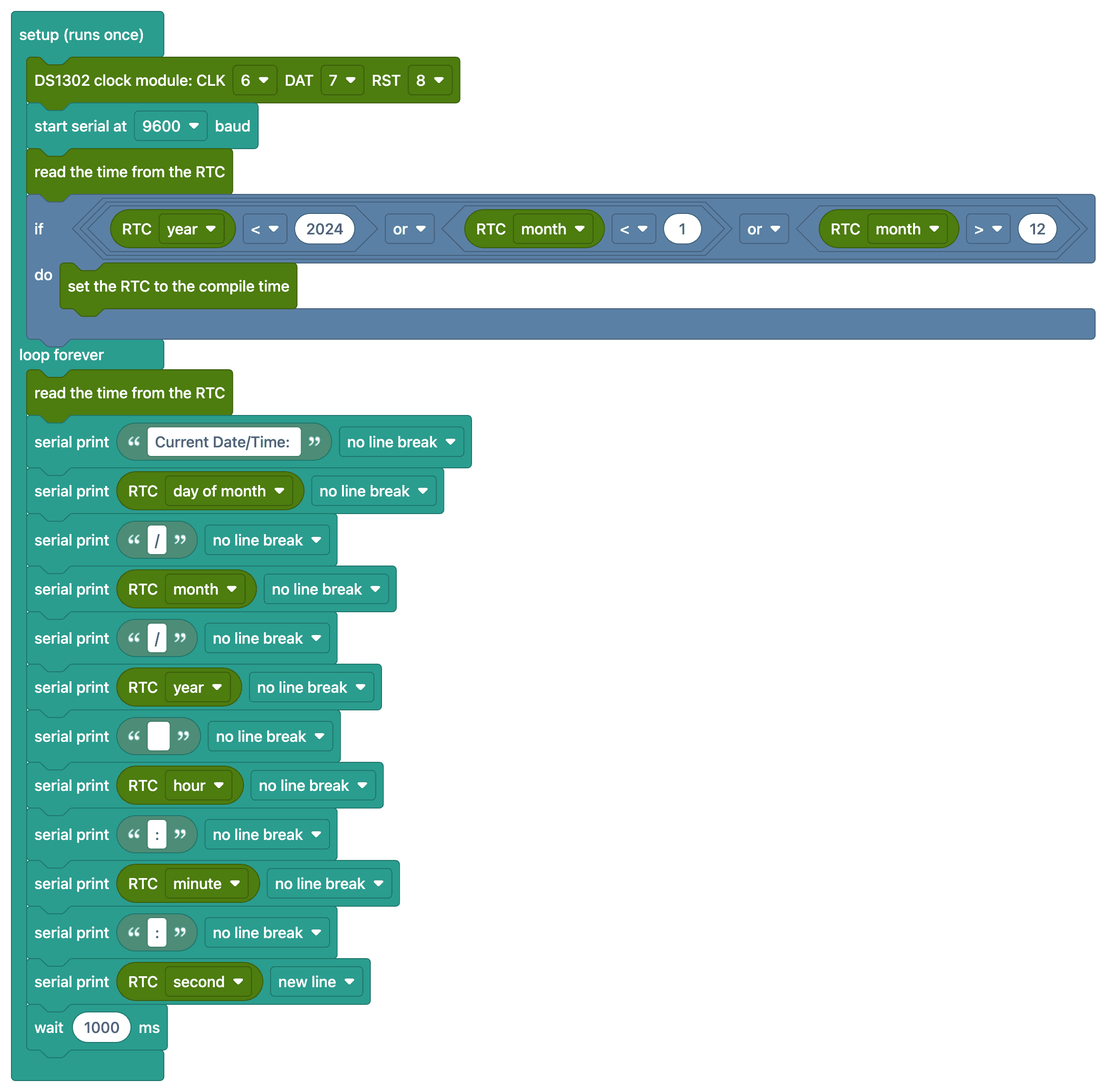
FAQ
RTC 모듈은 무슨 일을 해요?
실시간 시계(RTC) 모듈은 내장 배터리 덕분에 Arduino가 꺼져 있어도 시간과 날짜를 유지해요. Arduino의 millis() 카운터는 전원을 켤 때마다 0으로 돌아가므로, 정확한 시간 정보에는 RTC가 필요해요.
시간은 한 번만 맞추면 돼요?
네. 코드는 먼저 모듈에서 시간을 읽고, 한 번도 맞춘 적이 없으면 코드를 컴파일한 날짜와 시간을 한 번 써 넣어요. 시간이 올바르면 그대로 두기 때문에 다시 업로드하거나 Arduino를 껐다 켜도 시계가 흐트러지지 않아요. 어떤 줄도 직접 주석 처리할 필요가 없어요.
시계가 느려요. 정상이에요?
DS1302는 크리스털 기반이라 하루에 몇 초씩 틀릴 수 있어요. 더 정확한 시계가 필요하면 온도 보상 기능이 있는 DS3231 모듈을 추천해요(1년에 약 ±1분).
모듈의 배터리가 다 떨어지면 어떻게 돼요?
Arduino에 전원이 들어와 있는 동안에는 시계가 계속 돌아가요. 전원이 끊기고 배터리도 다 떨어지면 시계가 초기화되어 다시 맞춰야 해요. CR2032 배터리는 보통 몇 년 동안 써요.