
ESP32 Bluetooth 자동차 (L298N)
휴대폰의 조이스틱으로 두 바퀴 자동차를 Bluetooth로 몰아요. 인터넷이 필요 없고 iPhone과 Android에서 모두 돼요. 이 프로젝트는 앱의 자동차 리모컨 Bluetooth 템플릿을 단계별로 안내하는 가이드로, ESP32, L298N, 모터 2개로 만들어요. 내 작업실 › 내 기기 › 기기 추가 › Bluetooth로 가서 자동차 리모컨을 고르고 코드 받기에서 코드를 업로드하세요. 이 페이지의 Bluetooth 패널로 설정 버튼을 누르면 이 템플릿으로 마법사가 열려요.
동영상
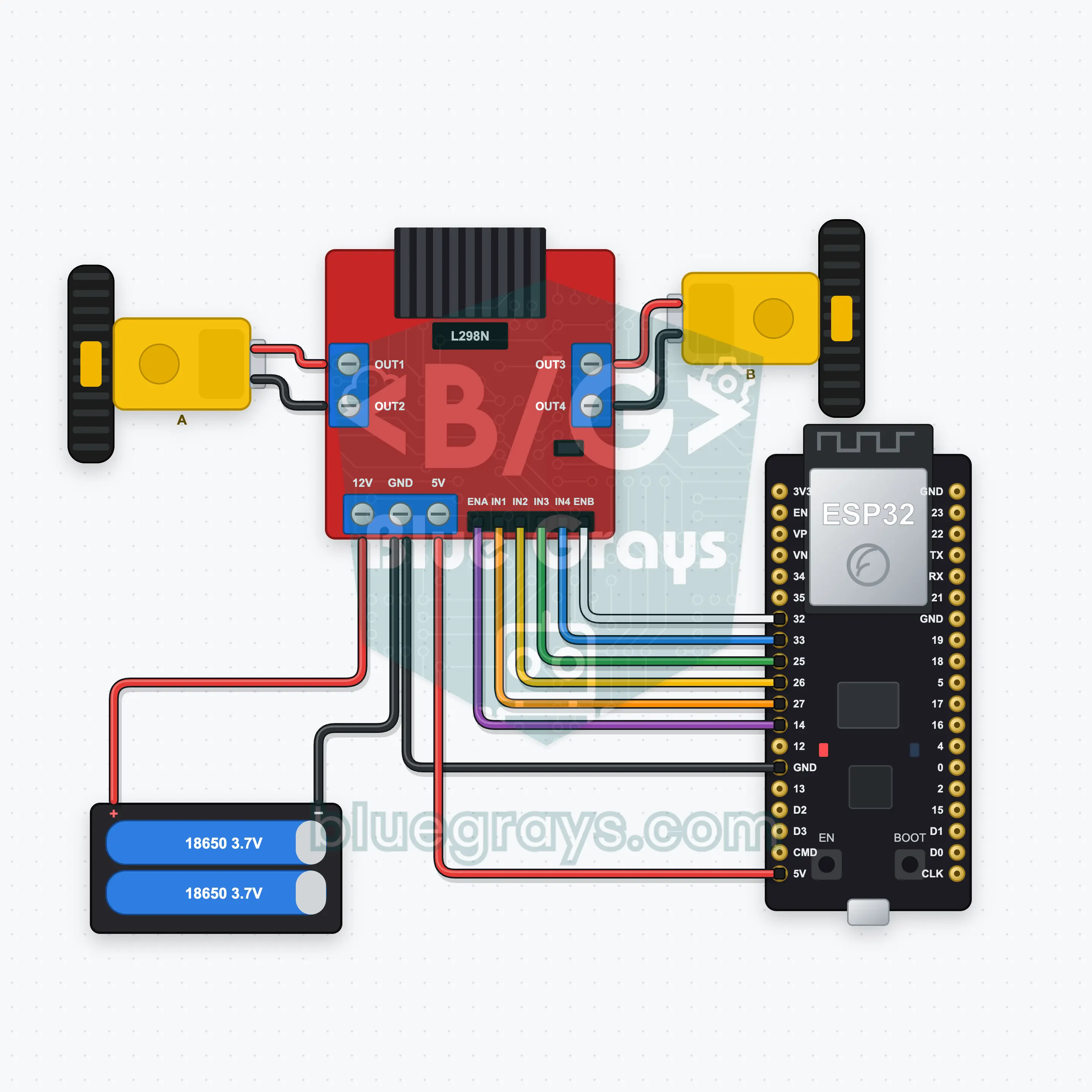
회로도
소스 코드
1// ┌───────────────────────────┐
2// │ BlueGrays · bluegrays.com │
3// │ Bluetooth · ESP32         │
4// │ BG-Araba                  │
5// └───────────────────────────┘
6// Car remote
7// Arduino IDE board: ESP32 Dev Module
8// the BLE library comes with the ESP32 board package, nothing extra to install
9
10#include <BLEDevice.h>
11#include <BLEServer.h>
12#include <BLE2902.h>
13
14const char BLE_NAME[] = "BG-Araba";  // the board advertises with this name, the app finds it in the list by it
15
16// Pins: change them here if you wired differently
17const int ENA = 14, IN1 = 27, IN2 = 26;  // Motor A (ENA, IN1, IN2) is the left wheel, motor B (ENB, IN3, IN4) the right one
18const int ENB = 32, IN3 = 25, IN4 = 33;
19const unsigned long COMMAND_TIMEOUT_MS = 500;  // Safety: the motors stop if no command arrives for 500 ms (the app repeats it while you drive)
20
21void btWrite(const char *text);
22void onValue(const char *key, const char *value);
23void sendAll();
24void onLinkLost();
25
26// ── The app sends "key=value" lines; on "?" the board sends all its values ──
27char line[65];
28uint8_t lineLen = 0;
29unsigned long lastRxMs = 0;
30
31bool is(const char *a, const char *b) { return strcmp(a, b) == 0; }
32bool isOn(const char *v) { return v[0] == '1'; }
33
34void sendText(const char *key, const char *value) {
35  char out[72];
36  snprintf(out, sizeof(out), "%s=%s\n", key, value);
37  btWrite(out);
38}
39
40void sendInt(const char *key, long value) {
41  char text[12];
42  snprintf(text, sizeof(text), "%ld", value);
43  sendText(key, text);
44}
45
46void sendFloat(const char *key, float value) {
47  char text[16];
48  dtostrf(value, 1, 1, text);
49  sendText(key, text);
50}
51
52void handleLine(char *text) {
53  char *eq = strchr(text, '=');
54  if (eq == nullptr) {
55    if (text[strlen(text) - 1] == '?') {
56      btWrite("@v=1.0\n");  // the "@v" line tells the app the code version
57      sendAll();
58    }
59    return;
60  }
61  *eq = '\0';
62  onValue(text, eq + 1);
63}
64
65void feed(char c) {
66  lastRxMs = millis();
67  if (c == '\n' || c == '\r') {
68    if (lineLen == 0) return;
69    line[lineLen] = '\0';
70    lineLen = 0;
71    handleLine(line);
72  } else if (lineLen < sizeof(line) - 1) {
73    line[lineLen++] = c;
74  }
75}
76
77// ── Bluetooth (Nordic UART) ──
78#define UART_SERVICE "6E400001-B5A3-F393-E0A9-E50E24DCCA9E"
79#define UART_RX "6E400002-B5A3-F393-E0A9-E50E24DCCA9E"
80#define UART_TX "6E400003-B5A3-F393-E0A9-E50E24DCCA9E"
81
82BLECharacteristic *txChar = nullptr;
83volatile bool linked = false;
84volatile bool linkLost = false;
85// incoming bytes move from the Bluetooth task to loop() through a small ring buffer
86const int RX_SIZE = 256;
87volatile uint8_t rxBuf[RX_SIZE];
88volatile int rxHead = 0, rxTail = 0;
89
90class ServerEvents : public BLEServerCallbacks {
91  void onConnect(BLEServer *server) override { linked = true; }
92  void onDisconnect(BLEServer *server) override { linked = false; linkLost = true; }
93};
94
95class RxEvents : public BLECharacteristicCallbacks {
96  void onWrite(BLECharacteristic *c) override {
97    auto v = c->getValue();
98    for (size_t i = 0; i < v.length(); i++) {
99      int next = (rxHead + 1) % RX_SIZE;
100      if (next == rxTail) break;
101      rxBuf[rxHead] = (uint8_t)v[i];
102      rxHead = next;
103    }
104  }
105};
106
107// lines go out in 20-byte packets (works with every phone)
108void btWrite(const char *text) {
109  if (!linked || txChar == nullptr) return;
110  size_t n = strlen(text);
111  for (size_t i = 0; i < n; i += 20) {
112    size_t len = n - i < 20 ? n - i : 20;
113    txChar->setValue((uint8_t *)text + i, len);
114    txChar->notify();
115    delay(4);
116  }
117}
118
119void btBegin() {
120  BLEDevice::init(BLE_NAME);
121  BLEServer *server = BLEDevice::createServer();
122  server->setCallbacks(new ServerEvents());
123  BLEService *uart = server->createService(UART_SERVICE);
124  txChar = uart->createCharacteristic(UART_TX, BLECharacteristic::PROPERTY_NOTIFY);
125  txChar->addDescriptor(new BLE2902());
126  BLECharacteristic *rx = uart->createCharacteristic(UART_RX, BLECharacteristic::PROPERTY_WRITE | BLECharacteristic::PROPERTY_WRITE_NR);
127  rx->setCallbacks(new RxEvents());
128  uart->start();
129  BLEAdvertisementData adv;
130  adv.setFlags(0x06);
131  adv.setCompleteServices(BLEUUID(UART_SERVICE));
132  BLEAdvertisementData scan;
133  scan.setName(BLE_NAME);
134  BLEAdvertising *advertising = BLEDevice::getAdvertising();
135  advertising->setAdvertisementData(adv);
136  advertising->setScanResponseData(scan);
137  BLEDevice::startAdvertising();
138}
139
140void btPoll() {
141  while (rxTail != rxHead) {
142    char c = (char)rxBuf[rxTail];
143    rxTail = (rxTail + 1) % RX_SIZE;
144    feed(c);
145  }
146  if (linkLost) {
147    linkLost = false;
148    onLinkLost();
149    delay(100);
150    BLEDevice::startAdvertising();
151  }
152}
153
154// ── ESP32 ──
155int speedLimit = 80;  // speed limit from the app (0–100 %)
156unsigned long lastCommandMs = 0;
157bool moving = false;
158
159// if the car drives backwards, swap that motor's two wires
160void motor(int en, int a, int b, int power) {
161  power = constrain(power, -100, 100);
162  digitalWrite(a, power > 0 ? HIGH : LOW);
163  digitalWrite(b, power < 0 ? HIGH : LOW);
164  analogWrite(en, abs(power) * speedLimit * 255L / 10000);
165}
166
167void drive(int left, int right) {
168  motor(ENA, IN1, IN2, left);
169  motor(ENB, IN3, IN4, right);
170  moving = left != 0 || right != 0;
171  lastCommandMs = millis();
172}
173
174void onValue(const char *key, const char *value) {
175  if (is(key, "joy")) {  // Joystick: y is forward/back, x turns; mixed into left and right wheel speeds
176    const char *comma = strchr(value, ',');
177    int x = atoi(value), y = comma ? atoi(comma + 1) : 0;
178    drive(constrain(y + x, -100, 100), constrain(y - x, -100, 100));
179  } else if (is(key, "yon")) {
180    if (is(value, "ileri")) drive(100, 100);
181    else if (is(value, "geri")) drive(-100, -100);
182    else if (is(value, "sol")) drive(-70, 70);
183    else if (is(value, "sag")) drive(70, -70);
184    else drive(0, 0);
185  } else if (is(key, "hiz")) {
186    speedLimit = constrain(atoi(value), 0, 100);
187  }
188}
189
190void sendAll() {
191  sendInt("hiz", speedLimit);
192}
193
194void onLinkLost() {
195  drive(0, 0);  // Connection lost: the motors stop
196}
197
198void setup() {
199  Serial.begin(115200);
200  int pins[] = { ENA, IN1, IN2, ENB, IN3, IN4 };
201  for (int pin : pins) pinMode(pin, OUTPUT);
202  drive(0, 0);
203  btBegin();
204  Serial.print(F("BlueGrays Bluetooth: "));
205  Serial.println(BLE_NAME);
206}
207
208void loop() {
209  btPoll();
210  if (moving && millis() - lastCommandMs > COMMAND_TIMEOUT_MS) drive(0, 0);
211}
212FAQ
iPhone에서도 돼요? HC-05와는 무엇이 달라요?
네, iPhone과 Android에서 모두 돼요. HC-05나 HC-06 같은 클래식 Bluetooth 모듈은 iPhone에 연결할 수 없어서, 이 프로젝트는 ESP32의 내장 Bluetooth Low Energy를 쓰고 추가 모듈이 필요 없어요. 휴대폰의 Bluetooth 설정에서 보드를 페어링하려고 하지 마세요. 연결은 BlueGrays 앱만 해요.
자동차가 뒤로 가거나 바퀴 하나가 반대로 돌아요.
반대로 도는 모터의 두 선을 L298N 나사 단자에서 서로 바꾸세요(왼쪽 모터 OUT1/OUT2, 오른쪽 모터 OUT3/OUT4). 코드의 주석에도 같은 내용이 있어요. 앞으로를 눌렀는데 자동차가 제자리에서 돌면 모터 하나만 반대예요. 둘 다 맞게 돌지만 왼쪽을 누르면 오른쪽으로 꺾이면, 왼쪽과 오른쪽 모터를 서로 바꾸세요.
ESP32 전원은 어떻게 줘요? USB와 배터리를 동시에 연결해도 돼요?
18650 배터리 2개(7.4 V)는 L298N의 12V 입력에 연결하고, L298N의 5V 출력이 ESP32의 VIN 핀에 전원을 줘요. 그러려면 L298N의 5V 레귤레이터 점퍼가 꽂혀 있어야 해요. 이렇게 하면 자동차가 케이블 없이 달려요. 업로드하는 동안 USB가 꽂혀 있으면 두 전원이 부딪히지 않도록 배터리를 끄거나 5V 선을 빼세요. L298N GND와 ESP32 GND는 언제나 연결되어 있어야 해요.
범위는 얼마나 돼요? 연결이 끊기면 자동차는 어떻게 돼요?
Bluetooth Low Energy는 트인 곳에서 보통 10~30미터까지 닿고, 사이에 벽이나 사람이 있으면 짧아져요. 연결이 끊기면 보드가 바로 모터를 멈추고 다시 광고 신호를 보내기 시작해서, 앱에서 다시 연결할 수 있어요. 보드가 500 ms 동안 명령을 받지 못해도 자동차가 멈추기 때문에, 범위 밖으로 달아나는 일이 없어요.