
ESP32 Bluetooth 주차 센서 (HC-SR04)
HC-SR04로 장애물까지 거리를 재서 휴대폰으로 보고, 가까워질수록 부저가 더 빨리 울려요. 인터넷이 필요 없어요. 앱의 주차 센서 Bluetooth 템플릿을 단계별로 안내하는 가이드로, ESP32로 만들어요. 내 작업실 › 내 기기 › 기기 추가 › Bluetooth로 가서 주차 센서를 고르고 코드 받기로 코드를 업로드하세요. 이 페이지의 Bluetooth 패널로 설정 버튼으로도 이 템플릿으로 마법사가 열려요.
동영상
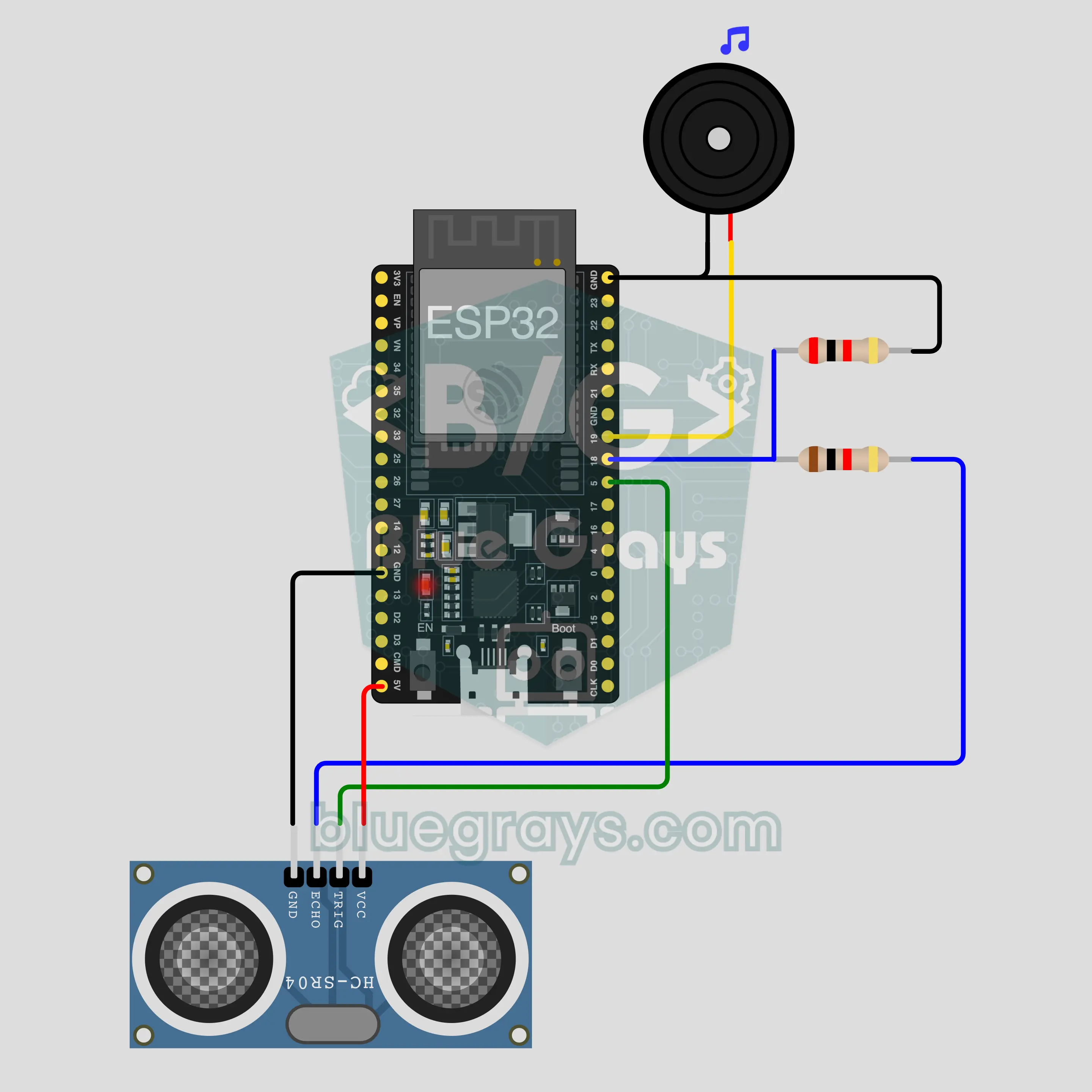
회로도
소스 코드
1// ┌───────────────────────────┐
2// │ BlueGrays · bluegrays.com │
3// │ Bluetooth · ESP32         │
4// │ BG-Park                   │
5// └───────────────────────────┘
6// Parking sensor
7// Arduino IDE board: ESP32 Dev Module
8// the BLE library comes with the ESP32 board package, nothing extra to install
9
10#include <BLEDevice.h>
11#include <BLEServer.h>
12#include <BLE2902.h>
13
14const char BLE_NAME[] = "BG-Park";  // the board advertises with this name, the app finds it in the list by it
15
16// Pins: change them here if you wired differently
17const int TRIG_PIN = 5, ECHO_PIN = 18;  // ECHO outputs 5 V: connect it through a 1k/2k divider
18const int BUZZER_PIN = 19;
19const int ALARM_FROM_CM = 100;  // Alarm: under 100 cm it beeps faster as the obstacle gets closer, continuous under 10 cm
20
21void btWrite(const char *text);
22void onValue(const char *key, const char *value);
23void sendAll();
24void onLinkLost();
25
26// ── The app sends "key=value" lines; on "?" the board sends all its values ──
27char line[65];
28uint8_t lineLen = 0;
29unsigned long lastRxMs = 0;
30
31bool is(const char *a, const char *b) { return strcmp(a, b) == 0; }
32bool isOn(const char *v) { return v[0] == '1'; }
33
34void sendText(const char *key, const char *value) {
35  char out[72];
36  snprintf(out, sizeof(out), "%s=%s\n", key, value);
37  btWrite(out);
38}
39
40void sendInt(const char *key, long value) {
41  char text[12];
42  snprintf(text, sizeof(text), "%ld", value);
43  sendText(key, text);
44}
45
46void sendFloat(const char *key, float value) {
47  char text[16];
48  dtostrf(value, 1, 1, text);
49  sendText(key, text);
50}
51
52void handleLine(char *text) {
53  char *eq = strchr(text, '=');
54  if (eq == nullptr) {
55    if (text[strlen(text) - 1] == '?') {
56      btWrite("@v=1.0\n");  // the "@v" line tells the app the code version
57      sendAll();
58    }
59    return;
60  }
61  *eq = '\0';
62  onValue(text, eq + 1);
63}
64
65void feed(char c) {
66  lastRxMs = millis();
67  if (c == '\n' || c == '\r') {
68    if (lineLen == 0) return;
69    line[lineLen] = '\0';
70    lineLen = 0;
71    handleLine(line);
72  } else if (lineLen < sizeof(line) - 1) {
73    line[lineLen++] = c;
74  }
75}
76
77// ── Bluetooth (Nordic UART) ──
78#define UART_SERVICE "6E400001-B5A3-F393-E0A9-E50E24DCCA9E"
79#define UART_RX "6E400002-B5A3-F393-E0A9-E50E24DCCA9E"
80#define UART_TX "6E400003-B5A3-F393-E0A9-E50E24DCCA9E"
81
82BLECharacteristic *txChar = nullptr;
83volatile bool linked = false;
84volatile bool linkLost = false;
85// incoming bytes move from the Bluetooth task to loop() through a small ring buffer
86const int RX_SIZE = 256;
87volatile uint8_t rxBuf[RX_SIZE];
88volatile int rxHead = 0, rxTail = 0;
89
90class ServerEvents : public BLEServerCallbacks {
91  void onConnect(BLEServer *server) override { linked = true; }
92  void onDisconnect(BLEServer *server) override { linked = false; linkLost = true; }
93};
94
95class RxEvents : public BLECharacteristicCallbacks {
96  void onWrite(BLECharacteristic *c) override {
97    auto v = c->getValue();
98    for (size_t i = 0; i < v.length(); i++) {
99      int next = (rxHead + 1) % RX_SIZE;
100      if (next == rxTail) break;
101      rxBuf[rxHead] = (uint8_t)v[i];
102      rxHead = next;
103    }
104  }
105};
106
107// lines go out in 20-byte packets (works with every phone)
108void btWrite(const char *text) {
109  if (!linked || txChar == nullptr) return;
110  size_t n = strlen(text);
111  for (size_t i = 0; i < n; i += 20) {
112    size_t len = n - i < 20 ? n - i : 20;
113    txChar->setValue((uint8_t *)text + i, len);
114    txChar->notify();
115    delay(4);
116  }
117}
118
119void btBegin() {
120  BLEDevice::init(BLE_NAME);
121  BLEServer *server = BLEDevice::createServer();
122  server->setCallbacks(new ServerEvents());
123  BLEService *uart = server->createService(UART_SERVICE);
124  txChar = uart->createCharacteristic(UART_TX, BLECharacteristic::PROPERTY_NOTIFY);
125  txChar->addDescriptor(new BLE2902());
126  BLECharacteristic *rx = uart->createCharacteristic(UART_RX, BLECharacteristic::PROPERTY_WRITE | BLECharacteristic::PROPERTY_WRITE_NR);
127  rx->setCallbacks(new RxEvents());
128  uart->start();
129  BLEAdvertisementData adv;
130  adv.setFlags(0x06);
131  adv.setCompleteServices(BLEUUID(UART_SERVICE));
132  BLEAdvertisementData scan;
133  scan.setName(BLE_NAME);
134  BLEAdvertising *advertising = BLEDevice::getAdvertising();
135  advertising->setAdvertisementData(adv);
136  advertising->setScanResponseData(scan);
137  BLEDevice::startAdvertising();
138}
139
140void btPoll() {
141  while (rxTail != rxHead) {
142    char c = (char)rxBuf[rxTail];
143    rxTail = (rxTail + 1) % RX_SIZE;
144    feed(c);
145  }
146  if (linkLost) {
147    linkLost = false;
148    onLinkLost();
149    delay(100);
150    BLEDevice::startAdvertising();
151  }
152}
153
154// ── ESP32 ──
155bool alarmOn = true;
156bool buzzing = false;
157int distanceCm = -1, sentCm = -100;
158unsigned long lastMeasureMs = 0, lastSentMs = 0, lastBeepMs = 0;
159
160int measureCm() {
161  digitalWrite(TRIG_PIN, LOW);
162  delayMicroseconds(2);
163  digitalWrite(TRIG_PIN, HIGH);
164  delayMicroseconds(10);
165  digitalWrite(TRIG_PIN, LOW);
166  unsigned long us = pulseIn(ECHO_PIN, HIGH, 25000UL);
167  if (us == 0) return 400;  // no echo: nothing within 4 m
168  return min(400UL, us / 58);
169}
170
171void buzz(bool on) {
172  if (on == buzzing) return;
173  buzzing = on;
174  if (on) tone(BUZZER_PIN, 2000);
175  else noTone(BUZZER_PIN);
176}
177
178void onValue(const char *key, const char *value) {
179  if (is(key, "alarm")) alarmOn = isOn(value);
180}
181
182void sendAll() {
183  if (distanceCm >= 0) sendInt("mesafe", distanceCm);
184  sendInt("alarm", alarmOn);
185}
186
187void onLinkLost() {
188}
189
190void setup() {
191  Serial.begin(115200);
192  pinMode(TRIG_PIN, OUTPUT);
193  pinMode(ECHO_PIN, INPUT);
194  pinMode(BUZZER_PIN, OUTPUT);
195  btBegin();
196  Serial.print(F("BlueGrays Bluetooth: "));
197  Serial.println(BLE_NAME);
198}
199
200void loop() {
201  btPoll();
202  if (millis() - lastMeasureMs >= 100) {
203    lastMeasureMs = millis();
204    distanceCm = measureCm();
205    if ((distanceCm != sentCm && millis() - lastSentMs >= 250) || millis() - lastSentMs >= 2000) {
206      sendInt("mesafe", distanceCm);
207      sentCm = distanceCm;
208      lastSentMs = millis();
209    }
210  }
211  if (!alarmOn || distanceCm < 0 || distanceCm > ALARM_FROM_CM) {
212    buzz(false);
213  } else if (distanceCm <= 10) {
214    buzz(true);
215  } else if (millis() - lastBeepMs >= (unsigned long)map(distanceCm, 10, ALARM_FROM_CM, 60, 600)) {
216    lastBeepMs = millis();
217    buzz(!buzzing);
218  }
219}
220FAQ
iPhone에서도 돼요?
네. ESP32의 내장 Bluetooth Low Energy(BLE)는 iPhone, Android와 모두 통신해요. iPhone은 HC-05나 HC-06 같은 클래식 Bluetooth 모듈에 연결할 수 없고, 이 프로젝트에는 그런 모듈이 필요 없어요. 휴대폰의 Bluetooth 설정에서 보드를 페어링하려고 하지 마세요. BLE 보드는 거기에 안 보일 수 있고, 그게 정상이에요. 연결은 BlueGrays 앱이 해요.
전압 분배기는 왜 필요해요? ECHO를 보드에 바로 연결하면 안 돼요?
HC-SR04는 5 V로 동작하고 ECHO 핀은 5 V 신호를 내보내요. ESP32 핀은 3.3 V로 동작하고 5 V를 견디지 못해요. 1 kΩ과 2 kΩ 저항이 그 신호를 나눠서 GPIO 18에 약 3.3 V가 닿게 해요. 바로 연결해도 회로가 작동하는 것처럼 보일 수 있지만 핀이 망가질 수 있으니 분배기를 빼지 마세요. TRIG에는 분배기가 필요 없어요. 거기서는 보드가 신호를 보내는 쪽이거든요. 2 kΩ 저항이 없으면 1 kΩ 저항 두 개를 이어서(직렬로) 연결하세요.
진짜 자동차에 달아도 돼요?
아니요, 이건 학습용, 모형용 프로젝트예요. 책상 위, 장난감 자동차, 차고 벽에 다가가 보는 정도에서는 제 역할을 해요. HC-SR04와 브레드보드는 비, 진흙, 진동을 견디도록 만들어지지 않았어요. 부드럽거나 기울어진 표면에서는 측정이 틀리고 Bluetooth 연결이 끊길 수 있어요. 실제 차량의 운전 안전을 위한 주차 시스템이 아니니 거기에 의지하지 마세요.
휴대폰이 연결되지 않아도 삑 소리가 나요?
네. 측정과 삑 소리는 보드에서 이루어지고, 휴대폰은 거리를 보여 주고 소리를 끄고 켜는 역할만 해요. 보드는 전원이 켜질 때마다 알림 소리가 켜진 상태로 시작하기 때문에, 보조배터리에 연결하면 휴대폰 없이도 100 cm부터 삑 소리를 내요. 연결이 끊겨도 측정과 삑 소리는 계속돼요. 패널의 스위치로 소리를 껐다면 스위치를 다시 켜거나 보드가 다시 시작될 때까지 조용해요. 인터넷과 Wi-Fi는 전혀 필요 없어요.