
ESP32 Bluetooth 휴대폰 피아노
휴대폰을 건반 8개짜리 피아노로 바꿔요. 건반을 누르면 ESP32에 연결된 수동 부저가 그 음을 연주하고, 인터넷도 Wi-Fi도 필요 없어요. 앱의 휴대폰 피아노 Bluetooth 템플릿을 단계별로 안내하는 가이드로, 부저 하나와 점퍼선 2개로 만들어요. 내 작업실 › 내 기기 › 기기 추가 › Bluetooth로 가서 휴대폰 피아노를 고르고 코드 받기로 코드를 업로드하세요. 이 페이지의 Bluetooth 패널로 설정 버튼으로도 이 템플릿으로 마법사가 열려요.
동영상
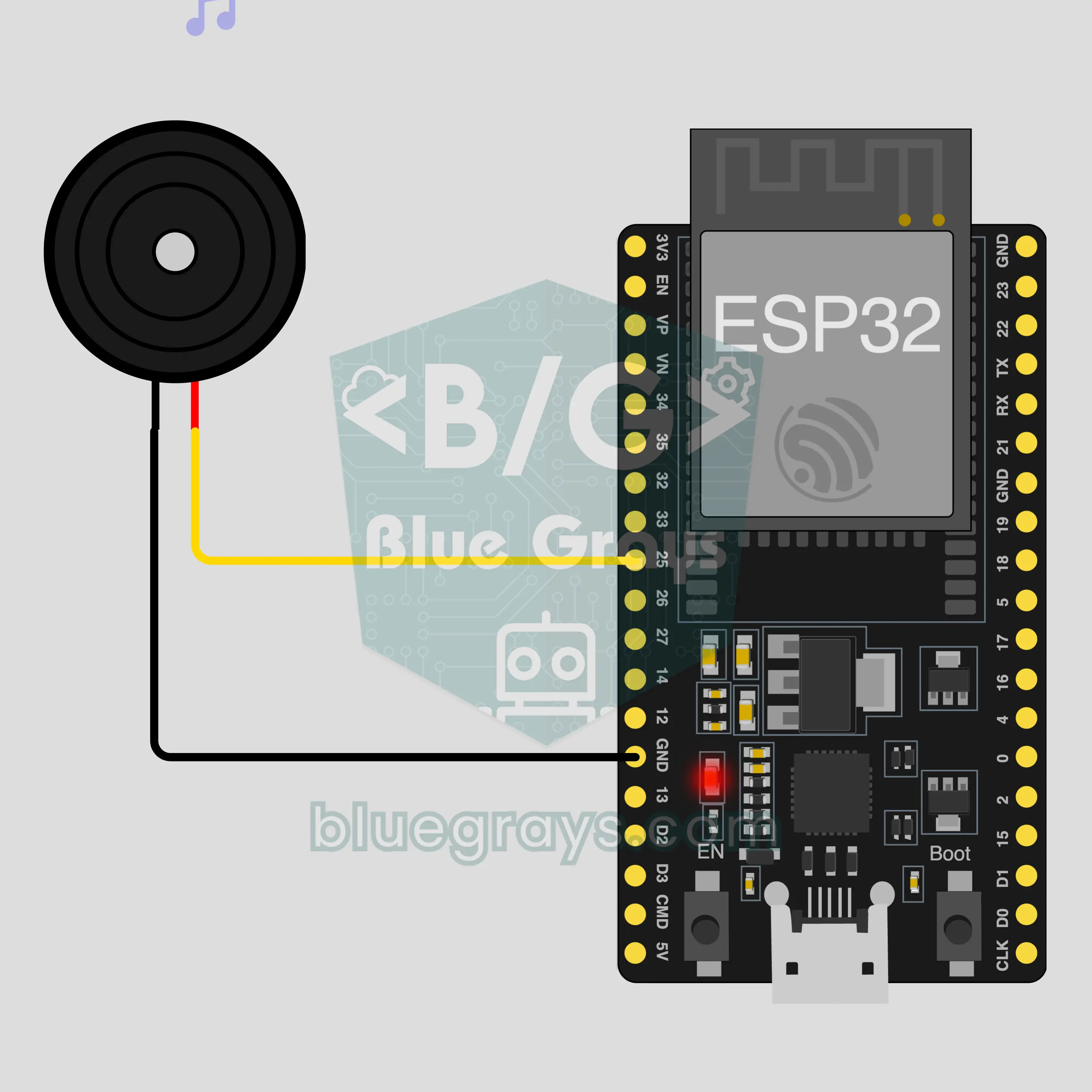
회로도
소스 코드
1// ┌───────────────────────────┐
2// │ BlueGrays · bluegrays.com │
3// │ Bluetooth · ESP32         │
4// │ BG-Piyano                 │
5// └───────────────────────────┘
6// Phone piano
7// Arduino IDE board: ESP32 Dev Module
8// the BLE library comes with the ESP32 board package, nothing extra to install
9
10#include <BLEDevice.h>
11#include <BLEServer.h>
12#include <BLE2902.h>
13
14const char BLE_NAME[] = "BG-Piyano";  // the board advertises with this name, the app finds it in the list by it
15
16// Pins: change them here if you wired differently
17const int BUZZER_PIN = 25;  // use a passive buzzer (an active one only makes a single tone)
18
19void btWrite(const char *text);
20void onValue(const char *key, const char *value);
21void sendAll();
22void onLinkLost();
23
24// ── The app sends "key=value" lines; on "?" the board sends all its values ──
25char line[65];
26uint8_t lineLen = 0;
27unsigned long lastRxMs = 0;
28
29bool is(const char *a, const char *b) { return strcmp(a, b) == 0; }
30bool isOn(const char *v) { return v[0] == '1'; }
31
32void sendText(const char *key, const char *value) {
33  char out[72];
34  snprintf(out, sizeof(out), "%s=%s\n", key, value);
35  btWrite(out);
36}
37
38void sendInt(const char *key, long value) {
39  char text[12];
40  snprintf(text, sizeof(text), "%ld", value);
41  sendText(key, text);
42}
43
44void sendFloat(const char *key, float value) {
45  char text[16];
46  dtostrf(value, 1, 1, text);
47  sendText(key, text);
48}
49
50void handleLine(char *text) {
51  char *eq = strchr(text, '=');
52  if (eq == nullptr) {
53    if (text[strlen(text) - 1] == '?') {
54      btWrite("@v=1.0\n");  // the "@v" line tells the app the code version
55      sendAll();
56    }
57    return;
58  }
59  *eq = '\0';
60  onValue(text, eq + 1);
61}
62
63void feed(char c) {
64  lastRxMs = millis();
65  if (c == '\n' || c == '\r') {
66    if (lineLen == 0) return;
67    line[lineLen] = '\0';
68    lineLen = 0;
69    handleLine(line);
70  } else if (lineLen < sizeof(line) - 1) {
71    line[lineLen++] = c;
72  }
73}
74
75// ── Bluetooth (Nordic UART) ──
76#define UART_SERVICE "6E400001-B5A3-F393-E0A9-E50E24DCCA9E"
77#define UART_RX "6E400002-B5A3-F393-E0A9-E50E24DCCA9E"
78#define UART_TX "6E400003-B5A3-F393-E0A9-E50E24DCCA9E"
79
80BLECharacteristic *txChar = nullptr;
81volatile bool linked = false;
82volatile bool linkLost = false;
83// incoming bytes move from the Bluetooth task to loop() through a small ring buffer
84const int RX_SIZE = 256;
85volatile uint8_t rxBuf[RX_SIZE];
86volatile int rxHead = 0, rxTail = 0;
87
88class ServerEvents : public BLEServerCallbacks {
89  void onConnect(BLEServer *server) override { linked = true; }
90  void onDisconnect(BLEServer *server) override { linked = false; linkLost = true; }
91};
92
93class RxEvents : public BLECharacteristicCallbacks {
94  void onWrite(BLECharacteristic *c) override {
95    auto v = c->getValue();
96    for (size_t i = 0; i < v.length(); i++) {
97      int next = (rxHead + 1) % RX_SIZE;
98      if (next == rxTail) break;
99      rxBuf[rxHead] = (uint8_t)v[i];
100      rxHead = next;
101    }
102  }
103};
104
105// lines go out in 20-byte packets (works with every phone)
106void btWrite(const char *text) {
107  if (!linked || txChar == nullptr) return;
108  size_t n = strlen(text);
109  for (size_t i = 0; i < n; i += 20) {
110    size_t len = n - i < 20 ? n - i : 20;
111    txChar->setValue((uint8_t *)text + i, len);
112    txChar->notify();
113    delay(4);
114  }
115}
116
117void btBegin() {
118  BLEDevice::init(BLE_NAME);
119  BLEServer *server = BLEDevice::createServer();
120  server->setCallbacks(new ServerEvents());
121  BLEService *uart = server->createService(UART_SERVICE);
122  txChar = uart->createCharacteristic(UART_TX, BLECharacteristic::PROPERTY_NOTIFY);
123  txChar->addDescriptor(new BLE2902());
124  BLECharacteristic *rx = uart->createCharacteristic(UART_RX, BLECharacteristic::PROPERTY_WRITE | BLECharacteristic::PROPERTY_WRITE_NR);
125  rx->setCallbacks(new RxEvents());
126  uart->start();
127  BLEAdvertisementData adv;
128  adv.setFlags(0x06);
129  adv.setCompleteServices(BLEUUID(UART_SERVICE));
130  BLEAdvertisementData scan;
131  scan.setName(BLE_NAME);
132  BLEAdvertising *advertising = BLEDevice::getAdvertising();
133  advertising->setAdvertisementData(adv);
134  advertising->setScanResponseData(scan);
135  BLEDevice::startAdvertising();
136}
137
138void btPoll() {
139  while (rxTail != rxHead) {
140    char c = (char)rxBuf[rxTail];
141    rxTail = (rxTail + 1) % RX_SIZE;
142    feed(c);
143  }
144  if (linkLost) {
145    linkLost = false;
146    onLinkLost();
147    delay(100);
148    BLEDevice::startAdvertising();
149  }
150}
151
152// ── ESP32 ──
153void onValue(const char *key, const char *value) {
154  if (is(key, "nota")) {  // "nota=Hz" plays the note, "nota=0" stops it
155    int hz = atoi(value);
156    if (hz > 0) tone(BUZZER_PIN, hz);
157    else noTone(BUZZER_PIN);
158  }
159}
160
161void sendAll() {
162  sendInt("nota", 0);
163}
164
165void onLinkLost() {
166  noTone(BUZZER_PIN);  // Connection lost: the sound stops
167}
168
169void setup() {
170  Serial.begin(115200);
171  pinMode(BUZZER_PIN, OUTPUT);
172  btBegin();
173  Serial.print(F("BlueGrays Bluetooth: "));
174  Serial.println(BLE_NAME);
175}
176
177void loop() {
178  btPoll();
179}
180FAQ
iPhone에서도 돼요?
네. ESP32의 내장 Bluetooth Low Energy(BLE)는 iPhone, Android와 모두 통신해요. iPhone은 HC-05나 HC-06 같은 클래식 Bluetooth 모듈에 연결할 수 없고, 이 프로젝트에는 그런 모듈이 필요 없어요. 휴대폰의 Bluetooth 설정에서 보드를 페어링하려고 하지 마세요. BLE 보드는 거기에 안 보일 수 있고, 그게 정상이에요. 연결은 BlueGrays 앱이 해요.
능동 부저와 수동 부저는 무엇이 다르고, 어느 쪽이 필요해요?
수동 부저가 필요해요. 수동 부저는 작은 스피커처럼 동작해서 보낸 주파수를 그대로 연주해요. 능동 부저는 안에 자체 회로가 있어서 전원만 들어오면 늘 같은 소리를 내기 때문에 건반을 구별할 수 없어요. 이 프로젝트로 어느 쪽인지 알 수 있어요. 건반마다 다른 음이 나면 수동, 모든 건반에서 같은 윙윙 소리가 나면 능동이에요. 살 때는 상품명에 수동(passive)이라는 말이 있는지 보세요.
건반 두 개를 함께 눌러 화음을 낼 수 있어요?
아니요. 부저는 한 번에 한 주파수만 낼 수 있고, 보드의 tone 명령은 음 하나만 만들어요. 건반 두 개를 함께 누르면 음이 겹치지 않고 마지막에 도착한 음만 연주돼요. 멜로디는 한 음씩 연주하세요. 패널의 전체 화면 연주 버튼을 누르면 건반이 커지고, 거기서는 손가락을 건반 위로 미끄러뜨려 음에서 음으로 이어 갈 수도 있어요.
다른 음이나 건반을 더 추가할 수 있어요?
패널의 건반 8개는 고정되어 있어요. 낮은 도부터 높은 도까지이고 샵이나 플랫이 없으며, 앱에서 건반을 추가할 수 없어요. 대신 보드 쪽은 유연해요. 코드는 휴대폰에서 오는 양수를 모두 주파수로 연주하고 0을 받으면 조용해져요. 그래서 코드에서 소리를 바꿀 수 있어요. 예를 들어 들어온 주파수에 2를 곱하면 피아노 전체가 한 옥타브 올라가요.