
Raspberry Pi Pico LED 줄다리기 게임 (NeoPixel 스트립 + 버튼 2개 + 부저)
두 사람이 겨루는 버튼 대결이에요! Raspberry Pi Pico가 LED 30개짜리 WS2812B NeoPixel 스트립을 줄로 바꿔요. 왼쪽은 빨강 플레이어, 오른쪽은 파랑 플레이어예요. 누를 때마다 내 색이 LED 하나만큼 앞으로 나가고, 스트립을 다 채우면 라운드에서 이기고, 3라운드를 이기면 경기에서 이겨요. 카운트다운 중에 너무 일찍 누르면 자리를 잃고, 수동 부저는 플레이어마다 다른 클릭 소리를 내며, 경기는 무지개로 끝나요. MicroPython의 neopixel, 디바운싱, 논블로킹 소리를 배워요.
동영상
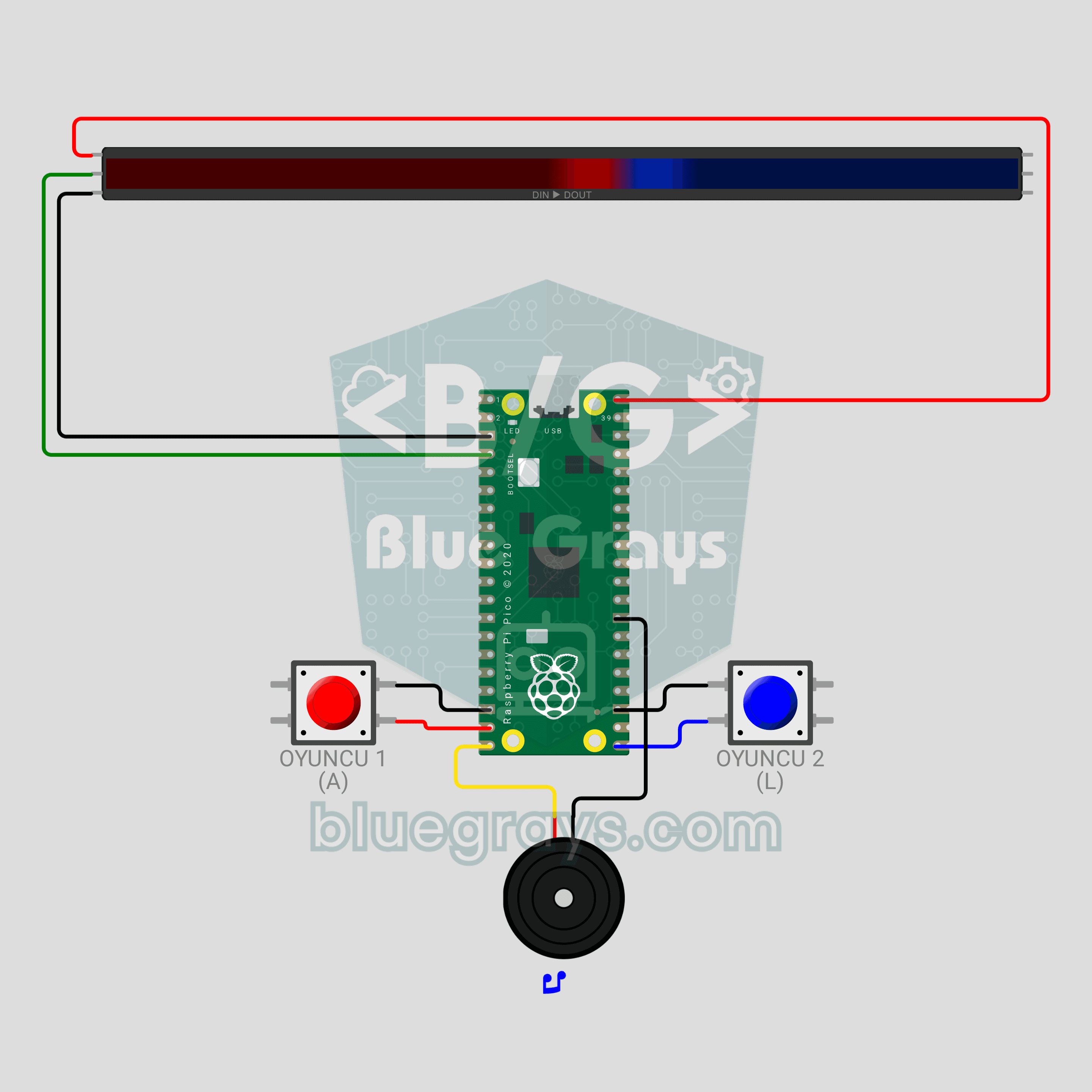
회로도
소스 코드
1# ─────────────────────────────────────────
2#   BlueGrays · bluegrays.com
3#   Raspberry Pi Pico LED Tug of War Game (NeoPixel Strip + 2 Buttons + Buzzer)
4# ─────────────────────────────────────────
5# Two-player button duel. Every press pushes your color one step along the
6# strip; the first to reach the far end wins the round, first to 3 rounds
7# wins the match. Pressing early during the countdown costs you 2 steps.
8#
9# Pins:
10#   GP2  -> strip DIN
11#   GP14 -> Player 1 button (RED), diger ucu GND
12#   GP16 -> Player 2 button (BLUE), diger ucu GND
13#   GP15 -> Buzzer (+)
14
15from machine import Pin, PWM
16from neopixel import NeoPixel
17import time
18import math
19
20# ============ SETTINGS ============
21NUM_LEDS = 30          # LEDs on the strip
22BRIGHTNESS = 0.6       # ~0.4 A with colours, fine for USB
23WIN_ROUNDS = 3         # Rounds to win the match
24FALSE_START_STEPS = 2  # False start penalty
25SOUND_ON = True        # Sound effects
26
27RED = (255, 0, 0)      # Player 1
28BLUE = (0, 60, 255)    # Player 2
29
30# Knot = number of red LEDs (the border between colors). Both players need the same number of steps.
31START = NUM_LEDS // 2                   # Starting border
32GOAL = min(START, NUM_LEDS - START)     # Steps needed to win
33
34# ============ HARDWARE ============
35strip = NeoPixel(Pin(2), NUM_LEDS)
36btn1 = Pin(14, Pin.IN, Pin.PULL_UP)   # Player 1
37btn2 = Pin(16, Pin.IN, Pin.PULL_UP)   # Player 2
38buzzer = PWM(Pin(15))
39buzzer.duty_u16(0)
40
41
42# ============ SOUND ============
43class Sound:
44    """
45    Non-blocking note player: the game keeps reading buttons while sound plays
46    """
47
48    def __init__(self, pwm):
49        self.pwm = pwm
50        self.queue = []
51        self.until = 0
52
53    def play(self, notes):
54        # notes = [(frequency, ms), ...], frequency 0 = rest
55        if SOUND_ON:
56            self.queue = list(notes)
57            self.until = 0
58
59    def update(self):
60        now = time.ticks_ms()
61        if self.until and time.ticks_diff(now, self.until) < 0:
62            return
63        if not self.queue:
64            if self.until:
65                self.pwm.duty_u16(0)
66                self.until = 0
67            return
68        freq, ms = self.queue.pop(0)
69        if freq:
70            self.pwm.freq(freq)
71            self.pwm.duty_u16(20000)
72        else:
73            self.pwm.duty_u16(0)
74        self.until = time.ticks_add(now, ms)
75
76
77sound = Sound(buzzer)
78
79
80# ============ BUTTON ============
81class Button:
82    """
83    Catches new presses with a 15 ms debounce
84    """
85
86    def __init__(self, pin):
87        self.pin = pin
88        self.state = 1
89        self.raw = 1
90        self.changed = time.ticks_ms()
91
92    def pressed(self):
93        now = time.ticks_ms()
94        raw = self.pin.value()
95        if raw != self.raw:
96            self.raw = raw
97            self.changed = now
98        if time.ticks_diff(now, self.changed) > 15 and raw != self.state:
99            self.state = raw
100            return raw == 0
101        return False
102
103    def sync(self):
104        # Forget stale presses (a button held between rounds is not penalized)
105        self.state = self.raw = self.pin.value()
106        self.changed = time.ticks_ms()
107
108
109b1 = Button(btn1)
110b2 = Button(btn2)
111
112
113# ============ DRAWING HELPERS ============
114def dim(color, k=1.0):
115    # Scale a color by global brightness and k
116    s = BRIGHTNESS * k
117    return (int(color[0] * s), int(color[1] * s), int(color[2] * s))
118
119
120def fill(color, k=1.0):
121    c = dim(color, k)
122    for i in range(NUM_LEDS):
123        strip[i] = c
124    strip.write()
125
126
127def draw_rope(knot):
128    # `knot` LEDs are red (left), the rest blue (right); 2 LEDs on each side of the border form the
129    # bright "knot"
130    for i in range(NUM_LEDS):
131        if i < knot:
132            k = 1.0 if knot - i <= 2 else 0.45   # LEDs near the knot are brighter
133            strip[i] = dim(RED, k)
134        else:
135            k = 1.0 if i - knot < 2 else 0.45
136            strip[i] = dim(BLUE, k)
137    strip.write()
138
139
140def wheel(pos):
141    # Convert 0-255 to a rainbow color
142    pos %= 256
143    if pos < 85:
144        return (255 - pos * 3, pos * 3, 0)
145    if pos < 170:
146        pos -= 85
147        return (0, 255 - pos * 3, pos * 3)
148    pos -= 170
149    return (pos * 3, 0, 255 - pos * 3)
150
151
152def wait_ms(ms):
153    # Wait while keeping the sound running
154    end = time.ticks_add(time.ticks_ms(), ms)
155    while time.ticks_diff(end, time.ticks_ms()) > 0:
156        sound.update()
157        time.sleep_ms(5)
158
159
160# ============ GAME PHASES ============
161def attract():
162    # Waiting: both colors breathe, any button starts the game
163    print("Press a button to start")
164    b1.sync()
165    b2.sync()
166    t0 = time.ticks_ms()
167    while True:
168        sound.update()
169        t = time.ticks_diff(time.ticks_ms(), t0)
170        k = 0.25 + 0.75 * (math.sin(t / 400) + 1) / 2
171        for i in range(NUM_LEDS):
172            if i < START:
173                strip[i] = dim(RED, k)
174            else:
175                strip[i] = dim(BLUE, 1.25 - k)   # Breathes in opposite phase
176        strip.write()
177        if b1.pressed() or b2.pressed():
178            return
179        time.sleep_ms(15)
180
181
182def countdown():
183    # 3-2-1 countdown; early presses are penalized. Returns the starting knot
184    knot = START
185    b1.sync()
186    b2.sync()
187    colors = [(255, 0, 0), (255, 150, 0), (0, 255, 0)]   # Red, yellow, green
188    for step in range(3):
189        fill(colors[step], 0.6)
190        if step == 2:
191            sound.play([(1200, 200)])   # GO!
192            break
193        sound.play([(600, 150)])
194        end = time.ticks_add(time.ticks_ms(), 800)
195        while time.ticks_diff(end, time.ticks_ms()) > 0:
196            sound.update()
197            if b1.pressed():
198                knot -= FALSE_START_STEPS
199                print("Player 1 false start!")
200                sound.play([(150, 200)])
201            if b2.pressed():
202                knot += FALSE_START_STEPS
203                print("Player 2 false start!")
204                sound.play([(150, 200)])
205            time.sleep_ms(5)
206    # Penalties must not push the knot to an end
207    return max(START - GOAL + 2, min(START + GOAL - 2, knot))
208
209
210def play_round(knot):
211    # Button duel; returns the winner (1 or 2) when the knot reaches an end
212    draw_rope(knot)
213    while True:
214        sound.update()
215        moved = False
216        if b1.pressed():
217            knot += 1
218            sound.play([(440, 25)])
219            moved = True
220        if b2.pressed():
221            knot -= 1
222            sound.play([(660, 25)])
223            moved = True
224        if moved:
225            if knot >= START + GOAL:   # Strip fully red
226                return 1
227            if knot <= START - GOAL:   # Strip fully blue
228                return 2
229            draw_rope(knot)
230        time.sleep_ms(1)
231
232
233def celebrate_round(winner, scores):
234    # Winner color flashes 3 times, then the score dots are shown
235    color = RED if winner == 1 else BLUE
236    print("Round winner: Player", winner, "| Score:", scores[0], "-", scores[1])
237    sound.play([(523, 120), (659, 120), (784, 120), (1047, 300)])
238    for _ in range(3):
239        fill(color)
240        wait_ms(180)
241        fill((0, 0, 0))
242        wait_ms(120)
243    # Score: red dots from the left, blue dots from the right
244    for i in range(NUM_LEDS):
245        strip[i] = (0, 0, 0)
246    for s in range(scores[0]):
247        strip[s * 2] = dim(RED)
248    for s in range(scores[1]):
249        strip[NUM_LEDS - 1 - s * 2] = dim(BLUE)
250    strip.write()
251    wait_ms(1800)
252
253
254def celebrate_match(winner):
255    # End of match: rainbow wave and victory tune
256    print("MATCH WINNER: Player", winner)
257    sound.play([(784, 150), (784, 150), (784, 150), (1047, 450), (0, 80), (988, 150), (1047, 500)])
258    t0 = time.ticks_ms()
259    while time.ticks_diff(time.ticks_ms(), t0) < 3500:
260        sound.update()
261        offset = time.ticks_diff(time.ticks_ms(), t0) // 8
262        for i in range(NUM_LEDS):
263            strip[i] = dim(wheel(i * 256 // NUM_LEDS + offset))
264        strip.write()
265        time.sleep_ms(15)
266    fill(RED if winner == 1 else BLUE)
267    wait_ms(1000)
268
269
270# ============ MAIN LOOP ============
271print("== BlueGrays · bluegrays.com ==")
272print("Pico LED Tug of War")
273
274scores = [0, 0]
275while True:
276    attract()
277    while max(scores) < WIN_ROUNDS:
278        start_knot = countdown()
279        winner = play_round(start_knot)
280        scores[winner - 1] += 1
281        celebrate_round(winner, scores)
282    celebrate_match(1 if scores[0] > scores[1] else 2)
283    scores = [0, 0]
284FAQ
내 스트립은 LED가 30개가 아니에요. 다른 길이를 써도 돼요?
네. 코드 맨 위의 `NUM_LEDS`를 내 스트립의 LED 개수로 정하세요. 시작 지점(`START`)과 이기는 데 필요한 단계(`GOAL`)는 자동으로 계산돼요. LED 60개짜리 스트립이면 플레이어마다 30번 눌러야 해서 라운드가 더 길어져요.
330 Ω 저항과 470 µF 커패시터가 정말 필요해요?
Wokwi에서는 필요 없지만 실제 회로에서는 권장해요. GP2와 스트립의 DIN 사이에 330 Ω 저항을 직렬로, 스트립의 5V와 GND 사이에 470 µF 커패시터를 다세요(긴 다리를 5V로). 첫 번째 LED를 보호하고 깜박임과 엉뚱한 색을 막아 줘요.
Pico의 USB로 스트립 전원을 줘도 충분해요?
LED 30개에 `BRIGHTNESS = 0.6`이면 스트립은 최대 약 0.4 A를 써서 USB로 감당할 수 있어요. VBUS는 USB가 꽂혀 있을 때만 5V를 내보내요. 더 긴 스트립이나 더 높은 밝기에는 별도의 5V/2A 어댑터를 쓰고 접지를 연결하세요.
라운드 수와 부정 출발 벌칙은 어떻게 바꿔요?
`WIN_ROUNDS`는 경기에서 이기는 데 필요한 라운드 수예요(기본값 3). `FALSE_START_STEPS`는 너무 일찍 누른 사람이 몇 단계 뒤로 밀리는지 정해요(기본값 2, 0으로 하면 벌칙이 꺼져요). 소리 없이 하려면 `SOUND_ON = False`로 정하세요.