
Raspberry Pi Pico 주차 센서 (HC-SR04 + LED 3개 + 부저)
자동차의 후방 주차 센서를 책상 위로 가져와요! Raspberry Pi Pico가 HC-SR04 초음파 센서로 1초에 약 16번 장애물까지의 거리를 재요. 가까워질수록 초록, 노랑, 빨강 LED가 차례로 켜지고 부저가 더 빠르게 울려요. 10 cm 아래에서는 소리가 계속 이어지고 빨간 LED가 깜박여요. 초음파 거리 측정, PWM 소리, 논블로킹 타이밍을 한 프로젝트에서 배워요.
동영상
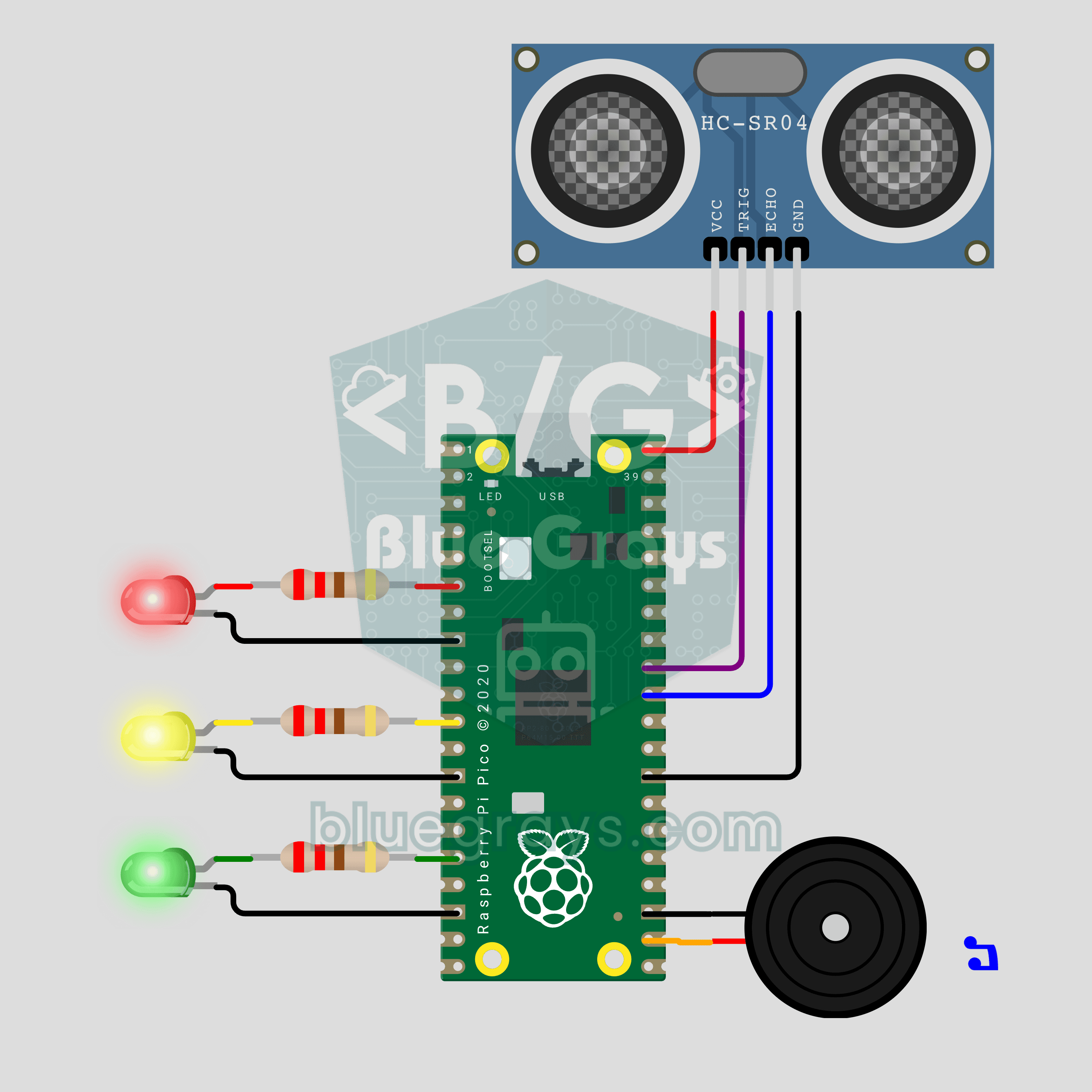
회로도
소스 코드
1# ─────────────────────────────────────────
2#   BlueGrays · bluegrays.com
3#   Raspberry Pi Pico Parking Sensor (HC-SR04 + 3 LEDs + Buzzer)
4# ─────────────────────────────────────────
5# Car parking sensor. The HC-SR04 measures the distance to an obstacle; as
6# it gets closer the green, yellow and red LEDs light up in turn and the
7# beeps speed up. Very close, the tone becomes continuous and the red LED
8# flashes.
9#
10# Pins:
11#   GP27 -> HC-SR04 TRIG
12#   GP26 -> HC-SR04 ECHO (1k + 2k divider on real hardware)
13#   VBUS -> HC-SR04 VCC (5V), GND.6 -> HC-SR04 GND
14#   GP4  -> 220 ohm -> Red LED (cathode to GND)
15#   GP8  -> 220 ohm -> Yellow LED (cathode to GND)
16#   GP12 -> 220 ohm -> Green LED (cathode to GND)
17#   GP17 -> Buzzer (+), other leg to GND
18
19from machine import Pin, PWM, time_pulse_us
20import time
21
22# ============ SETTINGS ============
23GREEN_CM = 100         # Green on, beeping starts
24YELLOW_CM = 50         # Yellow joins in
25RED_CM = 25            # Red joins in
26STOP_CM = 10           # Continuous tone + flashing red
27
28BEEP_MS = 60           # Length of one beep
29SLOW_GAP_MS = 700      # Gap between beeps at GREEN_CM
30FAST_GAP_MS = 50       # Gap between beeps near STOP_CM
31VOLUME = 32768         # PWM duty, 32768 = 50%
32FLASH_MS = 120         # Red flash period in STOP zone
33
34MEASURE_MS = 60        # Measure interval, min 60 ms
35PRINT_MS = 250         # Serial print interval
36ECHO_TIMEOUT_US = 12000  # beyond ~2 m = no obstacle
37SOUND_CM_PER_US = 0.0343  # Speed of sound (20 C)
38LOOP_MS = 5            # Main loop step
39
40# Zones from near to far: (name, upper limit cm, (green, yellow, red), tone Hz)
41ZONES = (
42    ("STOP", STOP_CM, (1, 1, 1), 1900),
43    ("RED", RED_CM, (1, 1, 1), 1900),
44    ("YELLOW", YELLOW_CM, (1, 1, 0), 1500),
45    ("GREEN", GREEN_CM, (1, 0, 0), 1200),
46)
47CLEAR = len(ZONES)     # No obstacle zone
48STOP = 0               # Index of the STOP zone
49
50# ============ HARDWARE ============
51trig = Pin(27, Pin.OUT, value=0)
52echo = Pin(26, Pin.IN)
53led_green = Pin(12, Pin.OUT, value=0)
54led_yellow = Pin(8, Pin.OUT, value=0)
55led_red = Pin(4, Pin.OUT, value=0)
56buzzer = PWM(Pin(17))
57buzzer.duty_u16(0)
58
59
60# ============ MEASUREMENT ============
61def measure_cm():
62    # Send a 10 us TRIG pulse, time how long ECHO stays HIGH
63    trig.value(0)
64    time.sleep_us(2)
65    trig.value(1)
66    time.sleep_us(10)
67    trig.value(0)
68    pulse = time_pulse_us(echo, 1, ECHO_TIMEOUT_US)
69    if pulse < 0:
70        return None    # No echo or too far
71    # Sound travels there and back: half
72    return pulse * SOUND_CM_PER_US / 2
73
74
75def median3(values):
76    # Median of the last 3 readings: one bad reading does not flicker the LEDs
77    a, b, c = values
78    return max(min(a, b), min(max(a, b), c))
79
80
81def zone_of(dist):
82    if dist is None:
83        return CLEAR
84    for i, zone in enumerate(ZONES):
85        if dist <= zone[1]:
86            return i
87    return CLEAR
88
89
90def beep_gap_ms(dist):
91    # Between STOP_CM and GREEN_CM the beep gap grows linearly from FAST to SLOW
92    ratio = (dist - STOP_CM) / (GREEN_CM - STOP_CM)
93    ratio = min(1.0, max(0.0, ratio))
94    return int(FAST_GAP_MS + ratio * (SLOW_GAP_MS - FAST_GAP_MS))
95
96
97# ============ SOUND ============
98tone_on = False
99tone_hz = 0
100
101
102def tone(hz):
103    # Leave PWM alone if the tone is already on
104    global tone_on, tone_hz
105    if tone_on and tone_hz == hz:
106        return
107    buzzer.freq(hz)
108    buzzer.duty_u16(VOLUME)
109    tone_on = True
110    tone_hz = hz
111
112
113def silence():
114    global tone_on
115    if tone_on:
116        buzzer.duty_u16(0)
117        tone_on = False
118
119
120def set_leds(green, yellow, red):
121    led_green.value(green)
122    led_yellow.value(yellow)
123    led_red.value(red)
124
125
126def self_test():
127    # Short power-on test of LEDs and buzzer: green -> yellow -> red
128    for leds, hz in (((1, 0, 0), 1200), ((1, 1, 0), 1500), ((1, 1, 1), 1900)):
129        set_leds(*leds)
130        tone(hz)
131        time.sleep_ms(90)
132        silence()
133        time.sleep_ms(160)
134    set_leds(0, 0, 0)
135
136
137# ============ MAIN LOOP ============
138print("== BlueGrays · bluegrays.com ==")
139print("Parking Sensor")
140print("LEDs: green <= %d cm, yellow <= %d cm, red <= %d cm, continuous tone <= %d cm"
141      % (GREEN_CM, YELLOW_CM, RED_CM, STOP_CM))
142print("Beep: starts at %d cm, higher pitch at %d cm and %d cm, continuous at %d cm"
143      % (GREEN_CM, YELLOW_CM, RED_CM, STOP_CM))
144self_test()
145
146FAR = 999.0                       # Placeholder for no obstacle
147history = [FAR, FAR, FAR]         # Last 3 readings
148distance = None                   # Filtered distance (cm)
149zone = CLEAR
150last_zone = -1
151now = time.ticks_ms()
152next_measure = now
153next_print = now
154last_beep = time.ticks_add(now, -10000)   # First beep plays at once
155beep_end = now
156
157while True:
158    now = time.ticks_ms()
159
160    # 1) Measurement: every MEASURE_MS, with a median filter
161    if time.ticks_diff(now, next_measure) >= 0:
162        next_measure = time.ticks_add(now, MEASURE_MS)
163        reading = measure_cm()
164        history = history[1:] + [reading if reading is not None else FAR]
165        filtered = median3(history)
166        distance = None if filtered >= FAR else filtered
167        zone = zone_of(distance)
168        if zone != last_zone:
169            name = "CLEAR" if zone == CLEAR else ZONES[zone][0]
170            print("Zone ->", name)
171            last_zone = zone
172
173    # 2) LEDs: bar graph, red flashes in the STOP zone
174    if zone == CLEAR:
175        set_leds(0, 0, 0)
176    elif zone == STOP:
177        flash_on = (now // FLASH_MS) % 2 == 0
178        set_leds(1, 1, 1 if flash_on else 0)
179    else:
180        set_leds(*ZONES[zone][2])
181
182    # 3) Sound: non-blocking beep timer
183    if zone == CLEAR:
184        silence()
185    elif zone == STOP:
186        tone(ZONES[STOP][3])          # Very close: continuous tone
187    else:
188        if tone_on and time.ticks_diff(now, beep_end) >= 0:
189            silence()
190        # The gap is recalculated every pass: the next beep speeds up as soon as you get closer
191        period = BEEP_MS + beep_gap_ms(distance)
192        if not tone_on and time.ticks_diff(now, last_beep) >= period:
193            tone(ZONES[zone][3])
194            last_beep = now
195            beep_end = time.ticks_add(now, BEEP_MS)
196
197    # 4) Serial monitor: distance in cm
198    if time.ticks_diff(now, next_print) >= 0:
199        next_print = time.ticks_add(now, PRINT_MS)
200        if distance is None:
201            print("Distance: --- (no obstacle)")
202        else:
203            print("Distance: %5.1f cm" % distance)
204
205    time.sleep_ms(LOOP_MS)
206FAQ
실제 회로에서는 ECHO에 왜 전압 분배기가 필요해요?
HC-SR04는 5V로 작동하고 ECHO 출력도 5V지만, Pico 핀은 최대 3.3V까지만 받아요. ECHO를 1 kΩ을 거쳐 GP26에, GP26을 2 kΩ을 거쳐 GND에 연결하면 핀에 약 3.3V가 걸려요. Wokwi에서는 분배기가 필요 없어요.
경고 거리는 어떻게 바꿔요?
코드 맨 위의 `GREEN_CM`, `YELLOW_CM`, `RED_CM`, `STOP_CM` 상수를 고치세요. 기준값은 `STOP_CM < RED_CM < YELLOW_CM < GREEN_CM` 순서를 지켜야 해요. 예를 들어 `STOP_CM = 30`, `RED_CM = 50`, `YELLOW_CM = 100`, `GREEN_CM = 150`처럼 쓰세요. LED와 삐 소리는 새 기준값을 자동으로 따라가요.
삐 소리가 구간별로가 아니라 왜 부드럽게 빨라져요?
`beep_gap_ms()`는 간격을 거리에 비례해서 바꿔요. 100 cm에서는 700 ms, 10 cm에서는 50 ms예요. 메인 반복문이 돌 때마다 다시 계산하므로 장애물이 가까워지는 순간 다음 삐 소리가 더 빨리 와요. 구간은 LED와 음 높이만 바꿔요.
라이브러리를 설치해야 해요?
아니요. 측정에 쓰는 `time_pulse_us()` 함수는 내장 `machine` 모듈에 들어 있어요. Pico에 MicroPython을 설치하고 Thonny에서 코드를 `main.py`로 저장하면, LED 테스트와 삐 소리 세 번으로 센서가 저절로 시작돼요.