
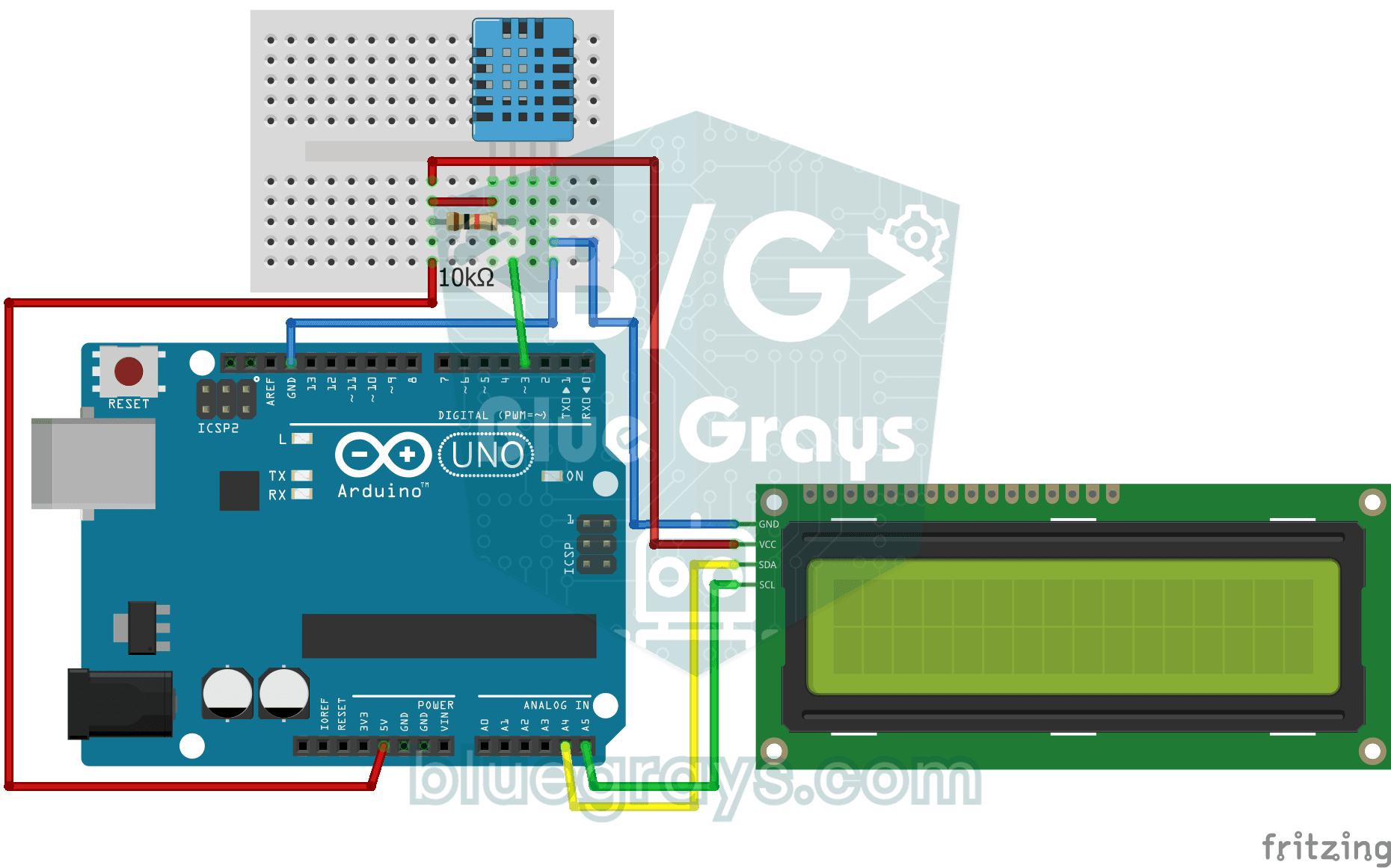
방이 얼마나 따뜻한지, 공기가 습한지 건조한지 궁금하지 않나요? DHT11 센서가 온도와 습도를 재고, Arduino가 그 값을 두 줄짜리 LCD 화면에 보여 주며 2초 정도마다 새로 고쳐요. 센서에 문제가 생기면 오류 메시지가 나와요. 나만의 작은 기상 관측소를 향한 첫걸음이에요.
동영상
회로도
소스 코드
C++ (Arduino IDE)
1// ─────────────────────────────────────────
2//   BlueGrays · bluegrays.com
3//   Temperature and Humidity with DHT11
4// ─────────────────────────────────────────
5// The DHT11 sensor measures room temperature and humidity; the I2C LCD
6// shows the temperature on the first line and the humidity on the second.
7// The reading refreshes every 2 s. If a reading fails the screen shows
8// "Sensor Error!".
9//
10// Pins:
11//   D3 -> DHT11 data
12//   (10k resistor between data and 5V, pull-up)
13//   A4 -> LCD SDA
14//   A5 -> LCD SCL
15//   DHT11 and LCD: VCC to 5V, GND to GND
16
17#include <LiquidCrystal_I2C.h>
18#include <Wire.h>
19#include <DHT.h>
20
21#define DHTPIN 3        // DHT11 data pin
22#define DHTTYPE DHT11   // Sensor type in use
23
24LiquidCrystal_I2C lcd(0x27, 16, 2);   // I2C address 0x27, 16x2 LCD
25DHT dht(DHTPIN, DHTTYPE);
26
27void setup() {
28  dht.begin();
29  // Modern libraries prefer init() over begin()
30  lcd.init();
31  lcd.backlight();
32}
33
34void loop() {
35  // Read humidity and temperature (C)
36  float humidity = dht.readHumidity();
37  float temperature = dht.readTemperature();
38
39  // Check if readings failed
40  if (isnan(humidity) || isnan(temperature)) {
41    lcd.setCursor(0, 0);
42    lcd.print("Sensor Error!   ");
43    return;
44  }
45
46  // Line 1: temperature
47  lcd.setCursor(0, 0);
48  lcd.print("Temp: ");
49  lcd.print(temperature);
50  lcd.print((char)223); // Degree symbol (°)
51  lcd.print("C   ");
52
53  // Line 2: humidity
54  lcd.setCursor(0, 1);
55  lcd.print("Humidity: %");
56  lcd.print((int)humidity);   // Print as a whole number (45)
57  lcd.print("   "); // Trailing spaces to clear old data
58
59  delay(2000); // DHT11 is slow, 2 seconds is more stable
60}
61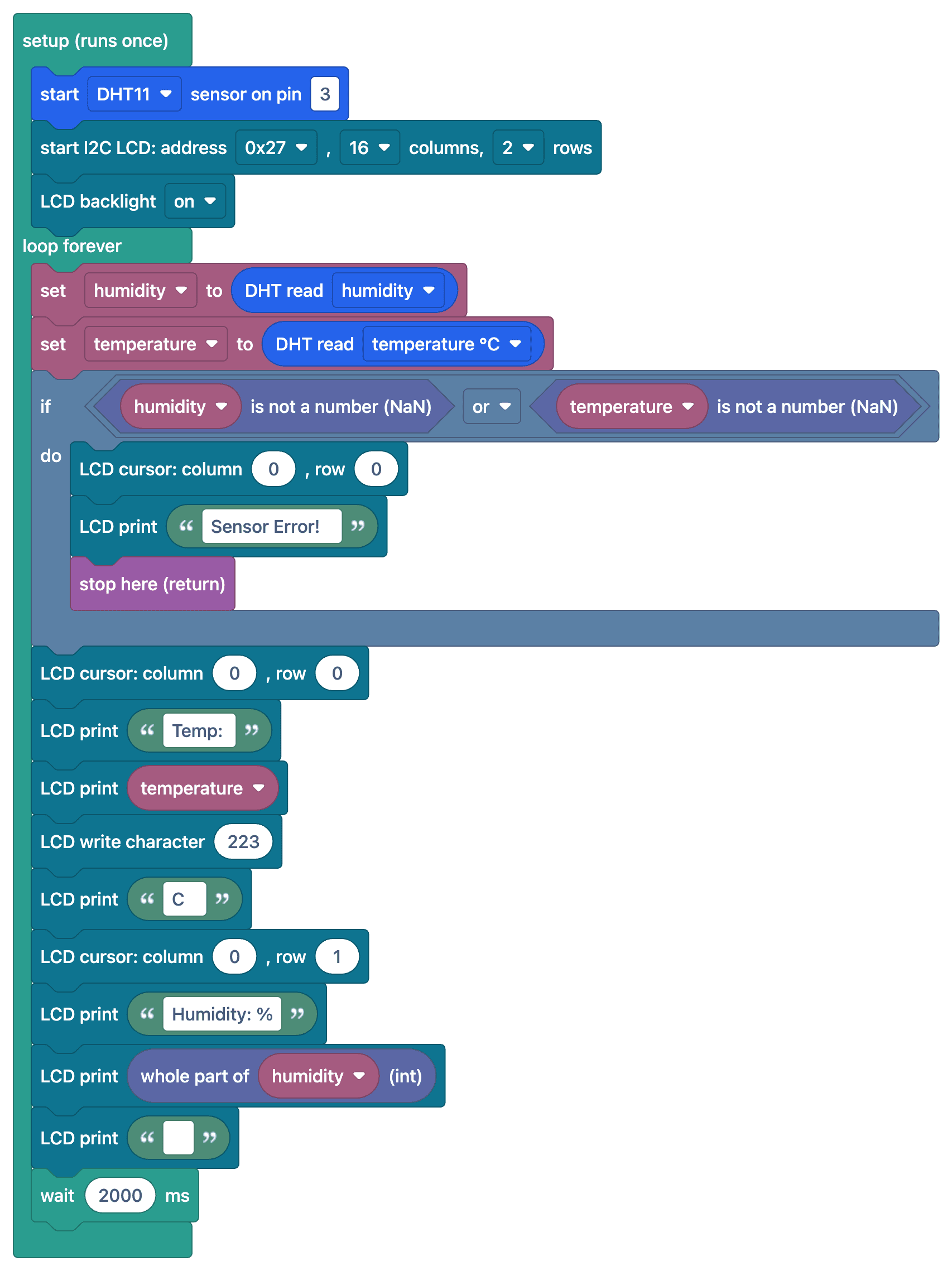
FAQ
DHT11은 얼마나 정확하게 재요?
DHT11은 온도를 ±2 °C, 습도를 ±5%의 정확도로 재고, 0–50 °C 범위에서 작동해요. 더 정확하게 재려면 DHT22(±0.5 °C)나 BME280을 추천해요.
화면에 "nan"이나 오류 메시지가 나와요. 왜 그래요?
센서를 읽지 못했다는 뜻이에요. 데이터 핀의 10 kΩ 풀업 저항, 라이브러리 설정의 센서 종류(DHT11)를 확인하고, 측정 사이에 적어도 1–2초를 기다리는지 확인하세요.
값이 왜 느리게 바뀌어요?
DHT11은 1초에 최대 한 번만 잴 수 있어요. 그보다 자주 읽으려고 하면 틀리거나 지난 값이 나오므로, 측정 사이에 2초를 기다리는 것을 추천해요.
체감 온도도 계산할 수 있어요?
네, DHT 라이브러리의 computeHeatIndex() 함수가 온도와 습도로 체감 온도를 계산해 줘요.