
Piano de botões com Raspberry Pi Pico (5 botões + buzzer + gravador de melodias)
Um minipiano de cinco teclas que lembra o que você toca! O **Raspberry Pi Pico** toca dó, ré, mi, fá e sol em um **buzzer passivo** usando **cinco botões**, e a nota dura enquanto a tecla está pressionada. **Segure dó por um segundo**, toque sua melodia e segure dó de novo: o Pico reproduz a melodia, **limitando os silêncios entre as notas a 1,5 segundo**. O indicador de gravação é o LED da própria placa, sem peças extras. Notas com PWM, debounce e temporização sem bloqueio em um só projeto.
Vídeo
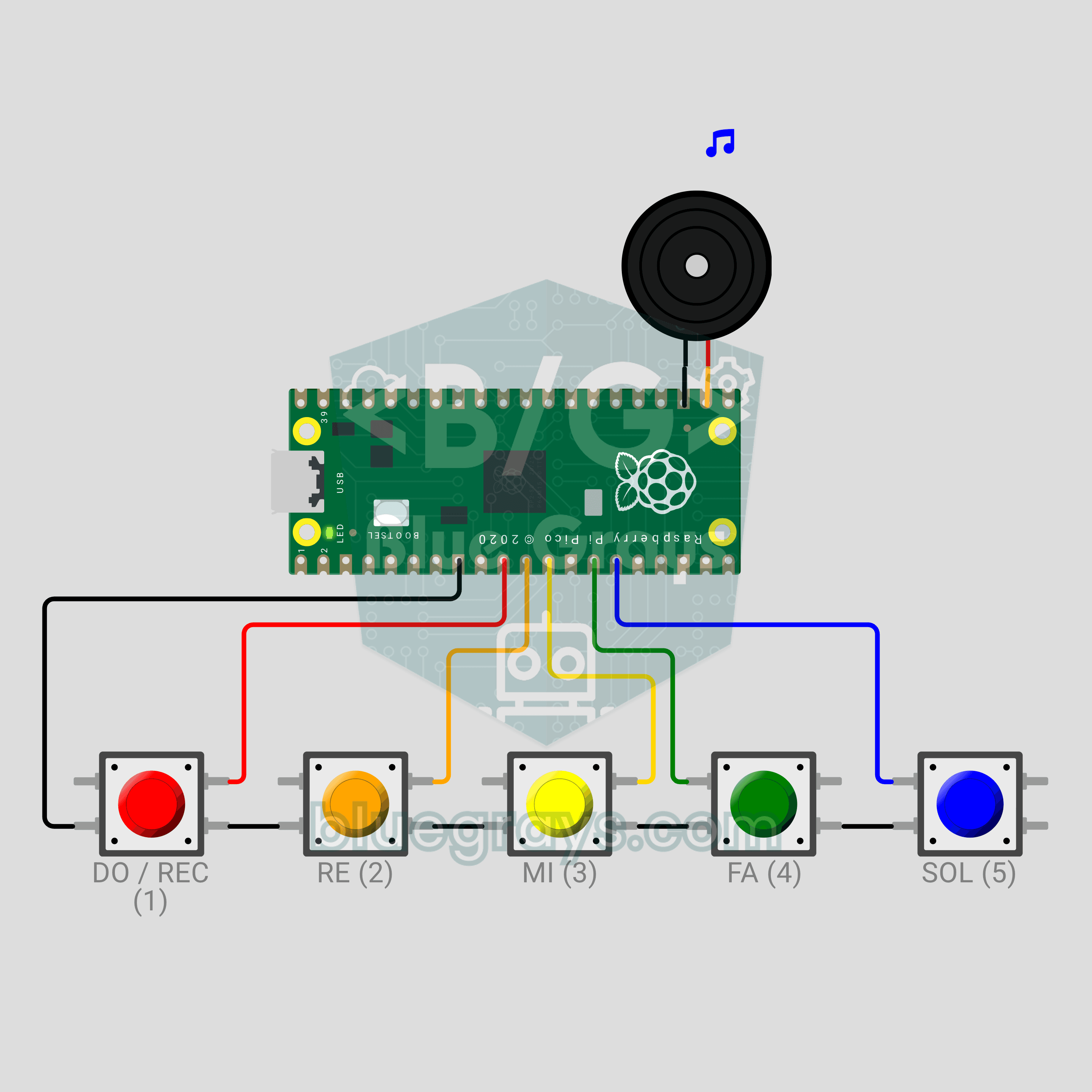
Esquema do circuito
Código-fonte
1# ─────────────────────────────────────────
2#   BlueGrays · bluegrays.com
3#   Raspberry Pi Pico Button Piano (5 Buttons + Buzzer + Melody Recorder)
4# ─────────────────────────────────────────
5# Five-button mini piano: DO, RE, MI, FA, SOL. A note plays while its key
6# is held. Hold DO for 1 s: recording starts and the notes are stored with
7# their timing. Hold DO for 1 s again: recording stops and the melody is
8# played back in rhythm.
9#
10# Pins:
11#   GP7  -> DO button (other leg to GND)
12#   GP8  -> RE button (other leg to GND)
13#   GP9  -> MI button (other leg to GND)
14#   GP10 -> FA button (other leg to GND)
15#   GP11 -> SOL button (other leg to GND)
16#   GP17 -> Buzzer (+), other leg to GND
17#   LED  -> Onboard LED: record / play
18
19from machine import Pin, PWM
20import time
21
22# ============ SETTINGS ============
23NOTE_PINS = (7, 8, 9, 10, 11)
24NOTE_NAMES = ("DO", "RE", "MI", "FA", "SOL")
25NOTE_HZ = (523, 587, 659, 698, 784)   # C5 D5 E5 F5 G5 (Hz)
26VOLUME = 32768         # PWM duty, 32768 = 50%
27
28REC_KEY = 0            # Record key: DO
29LONG_PRESS_MS = 1000   # Hold time for record
30DEBOUNCE_MS = 20       # Button debounce
31MAX_NOTES = 64         # Max notes in a recording
32MAX_GAP_MS = 1500      # Longest silence in playback
33PLAY_DELAY_MS = 500    # Pause before playback
34REC_BLINK_MS = 500     # LED blink while recording
35LOOP_MS = 2            # Main loop step
36
37FREE, REC, PLAY = 0, 1, 2   # Modes
38
39# ============ HARDWARE ============
40buzzer = PWM(Pin(17))
41buzzer.duty_u16(0)
42try:
43    led = Pin("LED", Pin.OUT)      # onboard LED
44except (TypeError, ValueError):
45    led = Pin(25, Pin.OUT)         # Older firmware
46led.value(0)
47
48
49class Key:
50    # Debounced button; update() returns +1 on press, -1 on release
51    def __init__(self, gpio):
52        self.pin = Pin(gpio, Pin.IN, Pin.PULL_UP)
53        self.raw = 1
54        self.stable = 1
55        self.changed = time.ticks_ms()
56        self.down_at = 0
57        self.used = False      # Consumed by a command
58
59    def update(self, now):
60        raw = self.pin.value()
61        if raw != self.raw:
62            self.raw = raw
63            self.changed = now
64        if raw != self.stable and time.ticks_diff(now, self.changed) >= DEBOUNCE_MS:
65            self.stable = raw
66            if raw == 0:
67                self.down_at = now
68                self.used = False
69                return 1
70            return -1
71        return 0
72
73    def held_ms(self, now):
74        return time.ticks_diff(now, self.down_at) if self.stable == 0 else 0
75
76
77keys = [Key(p) for p in NOTE_PINS]
78
79
80# ============ SOUND ============
81def tone(hz):
82    buzzer.freq(hz)
83    buzzer.duty_u16(VOLUME)
84
85
86def silence():
87    buzzer.duty_u16(0)
88
89
90def chirp(*steps):
91    # Short signal sound: (Hz, ms) pairs; 0 Hz = silence
92    for hz, ms in steps:
93        if hz:
94            tone(hz)
95        else:
96            silence()
97        time.sleep_ms(ms)
98    silence()
99
100
101# ============ STATE ============
102mode = FREE
103held = []          # Held notes, latest last
104rec_notes = []     # Recording: [key, start ms, length ms]
105rec_t0 = 0
106play_list = []     # Playback: (time ms, key, length ms)
107play_index = 0
108play_start = 0
109play_end = 0
110play_sounding = False
111
112
113def update_sound():
114    # The buzzer plays one note: the latest pressed key wins
115    if held:
116        tone(NOTE_HZ[held[-1]])
117    else:
118        silence()
119
120
121def start_recording(now):
122    global mode, rec_notes, rec_t0
123    mode = REC
124    rec_notes = []
125    rec_t0 = now
126    chirp((880, 70), (0, 40), (1319, 110))       # Rising signal
127    print("Kayit basladi / Recording started (en fazla / max %d nota / notes)" % MAX_NOTES)
128
129
130def build_play_list():
131    # Sort notes by start, shift the first to 0, shorten long silences
132    notes = sorted(rec_notes, key=lambda n: n[1])
133    result = []
134    t = 0
135    for i, (k, start, length) in enumerate(notes):
136        if i > 0:
137            prev_k, prev_start, prev_len = notes[i - 1]
138            t += min(start - prev_start, prev_len + MAX_GAP_MS)
139        result.append((t, k, length))
140    return result
141
142
143def stop_recording(now):
144    global mode, play_list, play_index, play_start, play_end, play_sounding
145    led.value(0)
146    chirp((1319, 70), (0, 40), (880, 110))       # Falling signal
147    if not rec_notes:
148        mode = FREE
149        print("Kayit bos / Recording is empty")
150        chirp((220, 300))
151        return
152    play_list = build_play_list()
153    names = " ".join(NOTE_NAMES[n[1]] for n in play_list)
154    print("Kayit bitti / Recording stopped: %d nota / notes" % len(play_list))
155    print("Melodi / Melody:", names)
156    mode = PLAY
157    play_index = 0
158    play_end = 0
159    play_sounding = False
160    play_start = time.ticks_add(time.ticks_ms(), PLAY_DELAY_MS)
161    print("Geri calma / Playback...")
162
163
164def finish_playback(message):
165    global mode
166    mode = FREE
167    silence()
168    led.value(0)
169    print(message)
170
171
172def update_playback(now):
173    # Non-blocking playback: start notes when due, silence them when they end
174    global play_index, play_end, play_sounding
175    elapsed = time.ticks_diff(now, play_start)
176    if elapsed < 0:
177        return
178    while play_index < len(play_list) and elapsed >= play_list[play_index][0]:
179        t, k, length = play_list[play_index]
180        tone(NOTE_HZ[k])
181        led.value(1)                  # LED lights with the note
182        play_end = t + length
183        play_sounding = True
184        play_index += 1
185    if play_sounding and elapsed >= play_end:
186        silence()
187        led.value(0)
188        play_sounding = False
189    if not play_sounding and play_index >= len(play_list):
190        finish_playback("Bitti / Done. DO 1 sn = yeni kayit / DO 1 s = new recording")
191
192
193def on_press(k, now):
194    if mode == PLAY:
195        # Any key stops the playback
196        keys[k].used = True
197        finish_playback("Durduruldu / Stopped")
198        return
199    held.append(k)
200    update_sound()
201    tag = "[REC] " if mode == REC else ""
202    print("%sNota / Note: %s (%d Hz)" % (tag, NOTE_NAMES[k], NOTE_HZ[k]))
203
204
205def on_release(k, now):
206    if k in held:
207        held.remove(k)
208        update_sound()
209    if keys[k].used or mode != REC:
210        return
211    start = time.ticks_diff(keys[k].down_at, rec_t0)
212    length = time.ticks_diff(now, keys[k].down_at)
213    rec_notes.append([k, start, length])
214    if len(rec_notes) >= MAX_NOTES:
215        print("Kayit dolu / Recording full")
216        stop_recording(now)
217
218
219def on_long_press(k, now):
220    # Long press on DO: start or stop recording. The held DO note is not recorded.
221    keys[k].used = True
222    if k in held:
223        held.remove(k)
224    update_sound()
225    if mode == FREE:
226        start_recording(now)
227    elif mode == REC:
228        stop_recording(now)
229
230
231# ============ MAIN LOOP ============
232print("== BlueGrays · bluegrays.com ==")
233print("Pico Buton Piyano / Button Piano")
234print("Tuslar / Keys: DO RE MI FA SOL")
235print("DO 1 sn basili = kayit baslat / bitir + geri cal")
236print("Hold DO 1 s = start / stop recording + play back")
237chirp((NOTE_HZ[0], 90), (NOTE_HZ[2], 90), (NOTE_HZ[4], 90), (1047, 180))   # Startup
238
239while True:
240    now = time.ticks_ms()
241    for i, key in enumerate(keys):
242        event = key.update(now)
243        if event == 1:
244            on_press(i, now)
245        elif event == -1:
246            on_release(i, now)
247
248    rec_key = keys[REC_KEY]
249    if (mode != PLAY and not rec_key.used
250            and rec_key.held_ms(now) >= LONG_PRESS_MS):
251        on_long_press(REC_KEY, now)
252
253    if mode == PLAY:
254        update_playback(now)
255    elif mode == REC:
256        # LED blinks while recording
257        led.value(1 if (time.ticks_diff(now, rec_t0) // REC_BLINK_MS) % 2 == 0 else 0)
258
259    time.sleep_ms(LOOP_MS)
260
Perguntas frequentes
Como gravar uma melodia e reproduzi-la?▾
Mantenha dó pressionado por um segundo: dois bipes ascendentes indicam que a gravação começou. Toque sua melodia e mantenha dó pressionado por um segundo novamente. Após dois bipes descendentes, a melodia é reproduzida; os silêncios de mais de 1,5 segundo entre as notas são reduzidos para 1,5 segundo. Pressionar qualquer tecla durante a reprodução interrompe a melodia.
Preciso adicionar um LED separado como indicador de gravação?▾
Não. O código controla o LED da placa por `Pin("LED")`, que corresponde ao GP25 no Pico e também funciona no Pico W. Ele pisca a cada meio segundo durante a gravação e acende a cada nota durante a reprodução.
Como mudar as notas ou a oitava?▾
As frequências estão em `NOTE_HZ`: 523, 587, 659, 698 e 784 Hz. Divida todas por dois para baixar uma oitava ou multiplique por dois para subir uma oitava. Para adicionar uma sexta tecla, acrescente o novo pino, nome e frequência (880 para lá) a `NOTE_PINS`, `NOTE_NAMES` e `NOTE_HZ`.
Como tocar o piano no Wokwi?▾
Inicie a simulação e clique uma vez no circuito. As teclas de 1 a 5 do teclado tocam de dó a sol, e manter uma tecla pressionada prolonga a nota. Para gravar, mantenha 1 pressionado por cerca de um segundo; as notas tocadas e a melodia gravada aparecem no Monitor Serial.