
ESP32 Bluetooth: pianoforte sul telefono
Il telefono diventa un pianoforte a 8 tasti: premi un tasto e un buzzer passivo sull'ESP32 suona la nota, senza internet né Wi-Fi. È la guida passo passo del modello Bluetooth Pianoforte sul telefono dell'app, montato con un buzzer e due jumper. Vai in La Mia Officina › Dispositivi › Aggiungi dispositivo › Bluetooth, scegli il modello e carica il codice con Ottieni il codice. Anche il pulsante Configura come pannello Bluetooth in questa pagina apre la procedura.
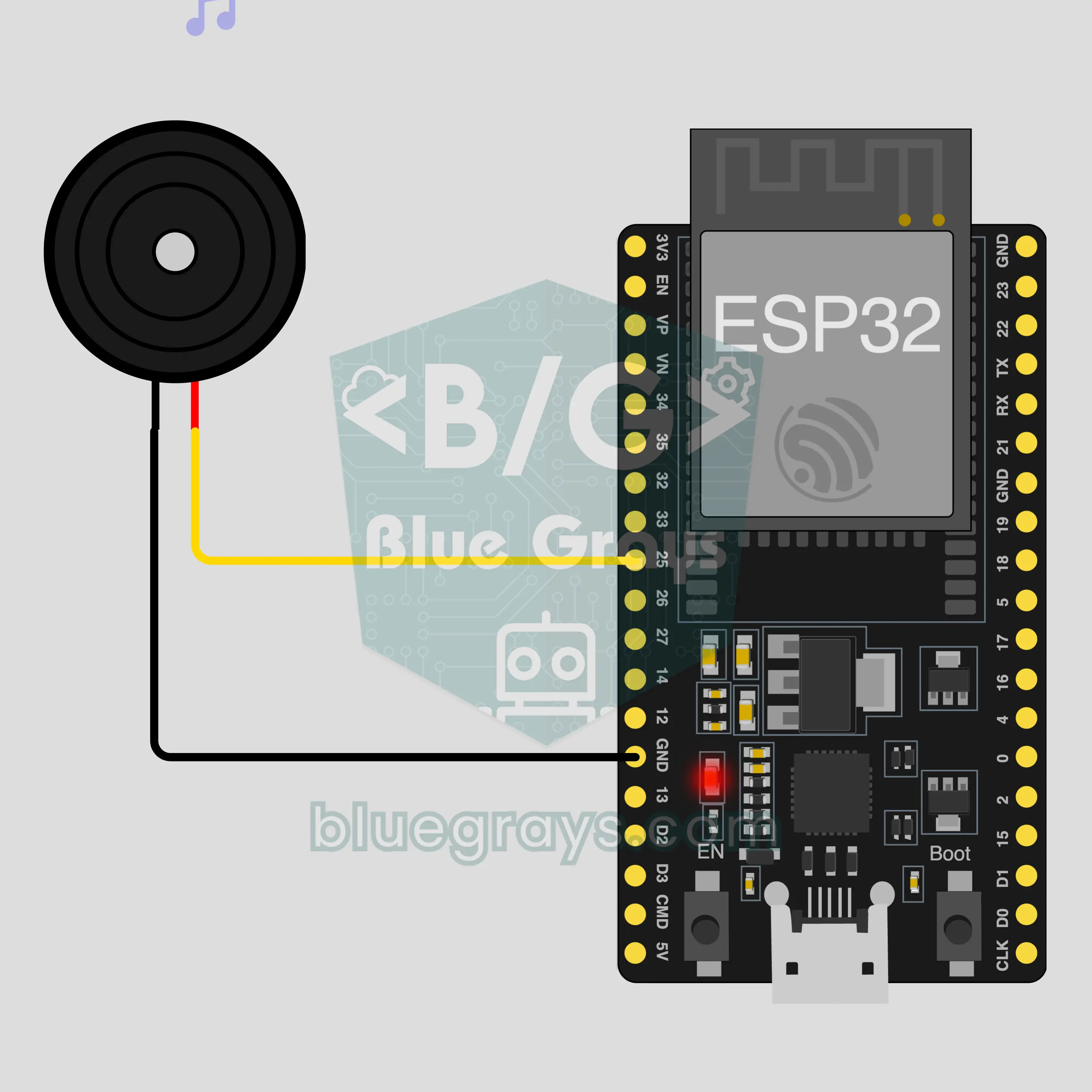
Video
Schema circuito
Codice sorgente
1// ┌───────────────────────────┐
2// │ BlueGrays · bluegrays.com │
3// │ Bluetooth · ESP32         │
4// │ BG-Piyano                 │
5// └───────────────────────────┘
6// Pianoforte sul telefono
7// Scheda in Arduino IDE: ESP32 Dev Module
8// la libreria BLE arriva con il pacchetto schede ESP32, niente da installare in più
9
10#include <BLEDevice.h>
11#include <BLEServer.h>
12#include <BLE2902.h>
13
14const char BLE_NAME[] = "BG-Piyano";  // la scheda si annuncia con questo nome e l’app la trova così nell’elenco
15
16// Pin: cambiali qui se hai collegato in modo diverso
17const int BUZZER_PIN = 25;  // usa un buzzer passivo (uno attivo fa un solo suono)
18
19void btWrite(const char *text);
20void onValue(const char *key, const char *value);
21void sendAll();
22void onLinkLost();
23
24// ── L’app invia righe "chiave=valore"; con "?" la scheda manda tutti i suoi valori ──
25char line[65];
26uint8_t lineLen = 0;
27unsigned long lastRxMs = 0;
28
29bool is(const char *a, const char *b) { return strcmp(a, b) == 0; }
30bool isOn(const char *v) { return v[0] == '1'; }
31
32void sendText(const char *key, const char *value) {
33  char out[72];
34  snprintf(out, sizeof(out), "%s=%s\n", key, value);
35  btWrite(out);
36}
37
38void sendInt(const char *key, long value) {
39  char text[12];
40  snprintf(text, sizeof(text), "%ld", value);
41  sendText(key, text);
42}
43
44void sendFloat(const char *key, float value) {
45  char text[16];
46  dtostrf(value, 1, 1, text);
47  sendText(key, text);
48}
49
50void handleLine(char *text) {
51  char *eq = strchr(text, '=');
52  if (eq == nullptr) {
53    if (text[strlen(text) - 1] == '?') {
54      btWrite("@v=1.0\n");  // la riga "@v" comunica all’app la versione del codice
55      sendAll();
56    }
57    return;
58  }
59  *eq = '\0';
60  onValue(text, eq + 1);
61}
62
63void feed(char c) {
64  lastRxMs = millis();
65  if (c == '\n' || c == '\r') {
66    if (lineLen == 0) return;
67    line[lineLen] = '\0';
68    lineLen = 0;
69    handleLine(line);
70  } else if (lineLen < sizeof(line) - 1) {
71    line[lineLen++] = c;
72  }
73}
74
75// ── Bluetooth (Nordic UART) ──
76#define UART_SERVICE "6E400001-B5A3-F393-E0A9-E50E24DCCA9E"
77#define UART_RX "6E400002-B5A3-F393-E0A9-E50E24DCCA9E"
78#define UART_TX "6E400003-B5A3-F393-E0A9-E50E24DCCA9E"
79
80BLECharacteristic *txChar = nullptr;
81volatile bool linked = false;
82volatile bool linkLost = false;
83// i byte in arrivo passano dal task Bluetooth a loop() tramite un piccolo buffer circolare
84const int RX_SIZE = 256;
85volatile uint8_t rxBuf[RX_SIZE];
86volatile int rxHead = 0, rxTail = 0;
87
88class ServerEvents : public BLEServerCallbacks {
89  void onConnect(BLEServer *server) override { linked = true; }
90  void onDisconnect(BLEServer *server) override { linked = false; linkLost = true; }
91};
92
93class RxEvents : public BLECharacteristicCallbacks {
94  void onWrite(BLECharacteristic *c) override {
95    auto v = c->getValue();
96    for (size_t i = 0; i < v.length(); i++) {
97      int next = (rxHead + 1) % RX_SIZE;
98      if (next == rxTail) break;
99      rxBuf[rxHead] = (uint8_t)v[i];
100      rxHead = next;
101    }
102  }
103};
104
105// le righe partono in pacchetti da 20 byte (funziona con ogni telefono)
106void btWrite(const char *text) {
107  if (!linked || txChar == nullptr) return;
108  size_t n = strlen(text);
109  for (size_t i = 0; i < n; i += 20) {
110    size_t len = n - i < 20 ? n - i : 20;
111    txChar->setValue((uint8_t *)text + i, len);
112    txChar->notify();
113    delay(4);
114  }
115}
116
117void btBegin() {
118  BLEDevice::init(BLE_NAME);
119  BLEServer *server = BLEDevice::createServer();
120  server->setCallbacks(new ServerEvents());
121  BLEService *uart = server->createService(UART_SERVICE);
122  txChar = uart->createCharacteristic(UART_TX, BLECharacteristic::PROPERTY_NOTIFY);
123  txChar->addDescriptor(new BLE2902());
124  BLECharacteristic *rx = uart->createCharacteristic(UART_RX, BLECharacteristic::PROPERTY_WRITE | BLECharacteristic::PROPERTY_WRITE_NR);
125  rx->setCallbacks(new RxEvents());
126  uart->start();
127  BLEAdvertisementData adv;
128  adv.setFlags(0x06);
129  adv.setCompleteServices(BLEUUID(UART_SERVICE));
130  BLEAdvertisementData scan;
131  scan.setName(BLE_NAME);
132  BLEAdvertising *advertising = BLEDevice::getAdvertising();
133  advertising->setAdvertisementData(adv);
134  advertising->setScanResponseData(scan);
135  BLEDevice::startAdvertising();
136}
137
138void btPoll() {
139  while (rxTail != rxHead) {
140    char c = (char)rxBuf[rxTail];
141    rxTail = (rxTail + 1) % RX_SIZE;
142    feed(c);
143  }
144  if (linkLost) {
145    linkLost = false;
146    onLinkLost();
147    delay(100);
148    BLEDevice::startAdvertising();
149  }
150}
151
152// ── ESP32 ──
153void onValue(const char *key, const char *value) {
154  if (is(key, "nota")) {  // "nota=Hz" suona la nota, "nota=0" la ferma
155    int hz = atoi(value);
156    if (hz > 0) tone(BUZZER_PIN, hz);
157    else noTone(BUZZER_PIN);
158  }
159}
160
161void sendAll() {
162  sendInt("nota", 0);
163}
164
165void onLinkLost() {
166  noTone(BUZZER_PIN);  // Connessione persa: il suono si ferma
167}
168
169void setup() {
170  Serial.begin(115200);
171  pinMode(BUZZER_PIN, OUTPUT);
172  btBegin();
173  Serial.print(F("BlueGrays Bluetooth: "));
174  Serial.println(BLE_NAME);
175}
176
177void loop() {
178  btPoll();
179}
180FAQ
Funziona con l'iPhone?
Sì. Il Bluetooth Low Energy (BLE) integrato nell'ESP32 parla sia con iPhone sia con Android. Un iPhone non può collegarsi ai moduli Bluetooth classici come HC-05 e HC-06, e questo progetto non ne ha bisogno. Non provare ad associare la scheda dalle impostazioni Bluetooth del telefono; le schede BLE possono non comparire lì, è normale. La connessione la crea l'app BlueGrays.
Che differenza c'è tra buzzer attivo e passivo, e quale mi serve?
Ti serve un buzzer passivo. Funziona come un altoparlante minuscolo: suona la frequenza che gli mandi. Un buzzer attivo ha un proprio circuito interno e, appena riceve tensione, emette sempre lo stesso suono fisso, quindi i tasti non si distinguono. Questo progetto ti dice quale hai: se i tasti danno note diverse è passivo; se tutti fanno lo stesso ronzio, è attivo. Quando lo compri, cerca la parola passivo (passive) nel nome del prodotto.
Posso premere due tasti insieme e suonare un accordo?
No. Un buzzer può suonare una sola frequenza alla volta, e il comando tone sulla scheda produce una nota singola. Se premi due tasti insieme le note non si sommano; la scheda suona solo l'ultima arrivata. Suona le melodie una nota alla volta. Il pulsante Suona a schermo intero del pannello ingrandisce i tasti, e lì puoi anche far scorrere il dito sui tasti per passare da una nota all'altra.
Posso aggiungere altre note o più tasti?
Gli otto tasti del pannello sono fissi: dal Do basso al Do alto, senza diesis né bemolle, e dall'app non se ne possono aggiungere. Il lato scheda invece è flessibile: il codice suona come frequenza qualsiasi numero positivo in arrivo dal telefono e tace quando arriva 0. Quindi puoi cambiare il suono nel codice; per esempio, moltiplica per due la frequenza ricevuta e tutto il pianoforte sale di un'ottava.