
ESP32 Bluetooth RGB LEDテープ(WS2812B)
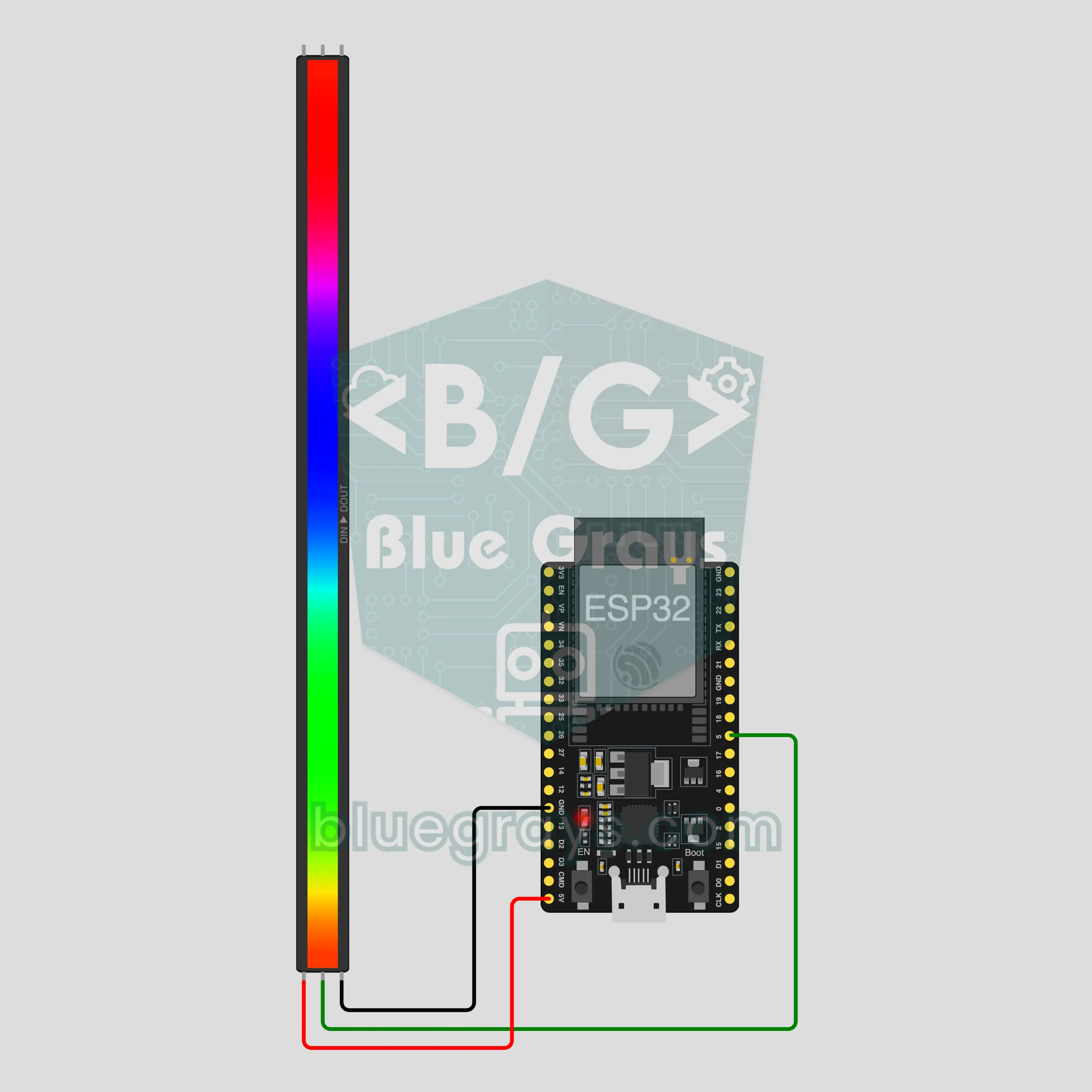
テープの色、明るさ、エフェクトをスマホから変えられます。ESP32は内蔵のBluetoothでスマホに直接つながり、WS2812Bテープは3本の線だけで接続できます。このプロジェクトは、アプリのBluetoothテンプレートRGB LEDテープの手順ガイドです。マイ工房 › デバイス › デバイスを追加 › Bluetoothに進み、RGB LEDテープを選んで、コードを取得でコードをボードに書き込みます。このページのBluetoothパネルとして設定ボタンを押すと、このテンプレートを選んだ状態でウィザードが開きます。
動画
回路図
ソースコード
1// ┌───────────────────────────┐
2// │ BlueGrays · bluegrays.com │
3// │ Bluetooth · ESP32         │
4// │ BG-Isik                   │
5// └───────────────────────────┘
6// RGB LEDテープ
7// Arduino IDEのボード:ESP32 Dev Module
8// BLEライブラリはESP32ボードパッケージに含まれているので、追加のインストールは不要です
9
10#include <BLEDevice.h>
11#include <BLEServer.h>
12#include <BLE2902.h>
13#include <Adafruit_NeoPixel.h>  // ライブラリマネージャー:'Adafruit NeoPixel'
14
15const char BLE_NAME[] = "BG-Isik";  // ボードはこの名前で発信し、アプリは一覧でこの名前を探します
16
17// ピン:配線が違う場合はここを変更してください
18const int STRIP_PIN = 5;
19const int LED_COUNT = 30;  // ストリップのLEDの数
20
21void btWrite(const char *text);
22void onValue(const char *key, const char *value);
23void sendAll();
24void onLinkLost();
25
26// ── アプリは「キー=値」の行を送ります。「?」を受け取るとボードは全部の値を返します ──
27char line[65];
28uint8_t lineLen = 0;
29unsigned long lastRxMs = 0;
30
31bool is(const char *a, const char *b) { return strcmp(a, b) == 0; }
32bool isOn(const char *v) { return v[0] == '1'; }
33
34void sendText(const char *key, const char *value) {
35  char out[72];
36  snprintf(out, sizeof(out), "%s=%s\n", key, value);
37  btWrite(out);
38}
39
40void sendInt(const char *key, long value) {
41  char text[12];
42  snprintf(text, sizeof(text), "%ld", value);
43  sendText(key, text);
44}
45
46void sendFloat(const char *key, float value) {
47  char text[16];
48  dtostrf(value, 1, 1, text);
49  sendText(key, text);
50}
51
52void handleLine(char *text) {
53  char *eq = strchr(text, '=');
54  if (eq == nullptr) {
55    if (text[strlen(text) - 1] == '?') {
56      btWrite("@v=1.0\n");  // 「@v」の行でアプリにコードのバージョンを伝えます
57      sendAll();
58    }
59    return;
60  }
61  *eq = '\0';
62  onValue(text, eq + 1);
63}
64
65void feed(char c) {
66  lastRxMs = millis();
67  if (c == '\n' || c == '\r') {
68    if (lineLen == 0) return;
69    line[lineLen] = '\0';
70    lineLen = 0;
71    handleLine(line);
72  } else if (lineLen < sizeof(line) - 1) {
73    line[lineLen++] = c;
74  }
75}
76
77// ── Bluetooth (Nordic UART) ──
78#define UART_SERVICE "6E400001-B5A3-F393-E0A9-E50E24DCCA9E"
79#define UART_RX "6E400002-B5A3-F393-E0A9-E50E24DCCA9E"
80#define UART_TX "6E400003-B5A3-F393-E0A9-E50E24DCCA9E"
81
82BLECharacteristic *txChar = nullptr;
83volatile bool linked = false;
84volatile bool linkLost = false;
85// 受信したバイトは小さなリングバッファを通ってBluetoothタスクからloop()へ渡ります
86const int RX_SIZE = 256;
87volatile uint8_t rxBuf[RX_SIZE];
88volatile int rxHead = 0, rxTail = 0;
89
90class ServerEvents : public BLEServerCallbacks {
91  void onConnect(BLEServer *server) override { linked = true; }
92  void onDisconnect(BLEServer *server) override { linked = false; linkLost = true; }
93};
94
95class RxEvents : public BLECharacteristicCallbacks {
96  void onWrite(BLECharacteristic *c) override {
97    auto v = c->getValue();
98    for (size_t i = 0; i < v.length(); i++) {
99      int next = (rxHead + 1) % RX_SIZE;
100      if (next == rxTail) break;
101      rxBuf[rxHead] = (uint8_t)v[i];
102      rxHead = next;
103    }
104  }
105};
106
107// 行は20バイトずつのパケットで送ります(どのスマホでも動きます)
108void btWrite(const char *text) {
109  if (!linked || txChar == nullptr) return;
110  size_t n = strlen(text);
111  for (size_t i = 0; i < n; i += 20) {
112    size_t len = n - i < 20 ? n - i : 20;
113    txChar->setValue((uint8_t *)text + i, len);
114    txChar->notify();
115    delay(4);
116  }
117}
118
119void btBegin() {
120  BLEDevice::init(BLE_NAME);
121  BLEServer *server = BLEDevice::createServer();
122  server->setCallbacks(new ServerEvents());
123  BLEService *uart = server->createService(UART_SERVICE);
124  txChar = uart->createCharacteristic(UART_TX, BLECharacteristic::PROPERTY_NOTIFY);
125  txChar->addDescriptor(new BLE2902());
126  BLECharacteristic *rx = uart->createCharacteristic(UART_RX, BLECharacteristic::PROPERTY_WRITE | BLECharacteristic::PROPERTY_WRITE_NR);
127  rx->setCallbacks(new RxEvents());
128  uart->start();
129  BLEAdvertisementData adv;
130  adv.setFlags(0x06);
131  adv.setCompleteServices(BLEUUID(UART_SERVICE));
132  BLEAdvertisementData scan;
133  scan.setName(BLE_NAME);
134  BLEAdvertising *advertising = BLEDevice::getAdvertising();
135  advertising->setAdvertisementData(adv);
136  advertising->setScanResponseData(scan);
137  BLEDevice::startAdvertising();
138}
139
140void btPoll() {
141  while (rxTail != rxHead) {
142    char c = (char)rxBuf[rxTail];
143    rxTail = (rxTail + 1) % RX_SIZE;
144    feed(c);
145  }
146  if (linkLost) {
147    linkLost = false;
148    onLinkLost();
149    delay(100);
150    BLEDevice::startAdvertising();
151  }
152}
153
154// ── ESP32 ──
155Adafruit_NeoPixel strip(LED_COUNT, STRIP_PIN, NEO_GRB + NEO_KHZ800);
156bool stripOn = false;
157uint8_t cr = 255, cg = 255, cb = 255;
158int brightness = 70;
159char effect[16] = "sabit";
160uint16_t hue = 0;
161unsigned long lastFrameMs = 0;
162
163uint8_t level() { return map(brightness, 0, 100, 0, 255); }
164
165// ガンマ補正:LEDの色が画面の色に近づきます
166void fillColor(uint32_t color, uint8_t bright) {
167  strip.setBrightness(bright);
168  strip.fill(strip.gamma32(color));
169  strip.show();
170}
171
172void paint() {
173  if (!stripOn) { strip.clear(); strip.show(); return; }
174  fillColor(strip.Color(cr, cg, cb), level());
175}
176
177void onValue(const char *key, const char *value) {
178  if (is(key, "acik")) {
179    stripOn = isOn(value);
180  } else if (is(key, "renk") && value[0] == '#' && strlen(value) == 7) {
181    long c = strtol(value + 1, nullptr, 16);
182    cr = c >> 16; cg = (c >> 8) & 0xFF; cb = c & 0xFF;
183  } else if (is(key, "parlaklik")) {
184    brightness = constrain(atoi(value), 0, 100);
185  } else if (is(key, "efekt")) {
186    strncpy(effect, value, sizeof(effect) - 1);
187  }
188  paint();
189}
190
191void sendAll() {
192  char hex[8];
193  snprintf(hex, sizeof(hex), "#%02X%02X%02X", cr, cg, cb);
194  sendInt("acik", stripOn);
195  sendText("renk", hex);
196  sendInt("parlaklik", brightness);
197  sendText("efekt", effect);
198}
199
200void onLinkLost() {
201}
202
203void setup() {
204  Serial.begin(115200);
205  strip.begin();
206  paint();
207  btBegin();
208  Serial.print(F("BlueGrays Bluetooth: "));
209  Serial.println(BLE_NAME);
210}
211
212void loop() {
213  btPoll();
214  if (stripOn && !is(effect, "sabit")) {
215    // コマンド受信中は効果を一瞬止めます(ストリップ書き込み中は割り込みが止まるため)
216    if (millis() - lastRxMs > 150 && millis() - lastFrameMs >= 30) {
217      lastFrameMs = millis();
218      if (is(effect, "gokkusagi")) {  // 虹色がストリップに沿って流れます
219        hue += 512;
220        strip.setBrightness(level());
221        for (int i = 0; i < LED_COUNT; i++) strip.setPixelColor(i, strip.gamma32(strip.ColorHSV(hue + i * 65536L / LED_COUNT)));
222        strip.show();
223      } else if (is(effect, "nefes")) {  // ゆっくり暗くなったり明るくなったりします
224        float wave = (sin(millis() / 600.0) + 1.0) / 2.0;
225        fillColor(strip.Color(cr, cg, cb), level() * (0.15 + 0.85 * wave));
226      } else if (is(effect, "yanip_sonme")) {  // 0.5秒ごとに点滅します
227        fillColor(strip.Color(cr, cg, cb), (millis() / 500) % 2 ? level() : 0);
228      } else if (is(effect, "renk_dongusu")) {  // ストリップ全体が同じ色で、色相がなめらかに変わります
229        hue += 128;
230        fillColor(strip.ColorHSV(hue), level());
231      }
232    }
233  }
234}
235よくある質問
iPhoneでも使えますか?
はい。このプロジェクトはESP32に内蔵されたBluetooth Low Energy(BLE)を使うので、iPhoneでもAndroidでも動きます。iPhoneはHC-05やHC-06のようなクラシックBluetoothモジュールには接続できないため、ここでは別のモジュールを使っていません。スマホのBluetooth設定からボードをペアリングしようとしないでください。接続はBlueGraysアプリだけが行います。
LEDはいくつまでつなげますか?電源は何が必要ですか?
LEDは1個あたり白の最大輝度で最大60 mA流れるので、30個で約1.8 Aになります。パソコンのUSBではこれをまかなえないため、USBで短く試すときは明るさを20くらいにしてください。普段使いでは、テープを別の5 V 2 Aアダプターから給電し、アダプターのGNDをESP32のGNDとつなぎます。長いテープを使うときはコードのLED_COUNTを変え、LED 1個あたり60 mAで計算してアダプターを選びましょう。テープの入力に1000 µFのコンデンサー、データ線に直列で330 Ωの抵抗を入れるとテープを守れます。
色が画面と違って見えるのはなぜですか?
LEDの明るさは値に比例してまっすぐ上がりますが、人の目は光をそのようには感じません。補正しないと色が白っぽく、薄く見えます。そこでコードはgamma32ですべての色を補正しています。暗い色やパステル調の色は画面に近づきますが、まったく同じにはなりません。明るさがとても低いと色がずれ、黄色やオレンジのような混ざった色は薄くなります。40くらいより上にすると差が小さくなります。
停電のあと、テープはどうなりますか?
ボードは起動するたびにテープが消えた状態で始まり、色は白、明るさは70、エフェクトは点灯に戻ります。値はボードに保存されないためです。アプリが再接続すると、パネルにはボードから送られた今の値が表示されるので、ライトのスイッチを入れるだけです。スマホとの接続だけが切れた場合は、テープはそのままの状態で光り続けます。