
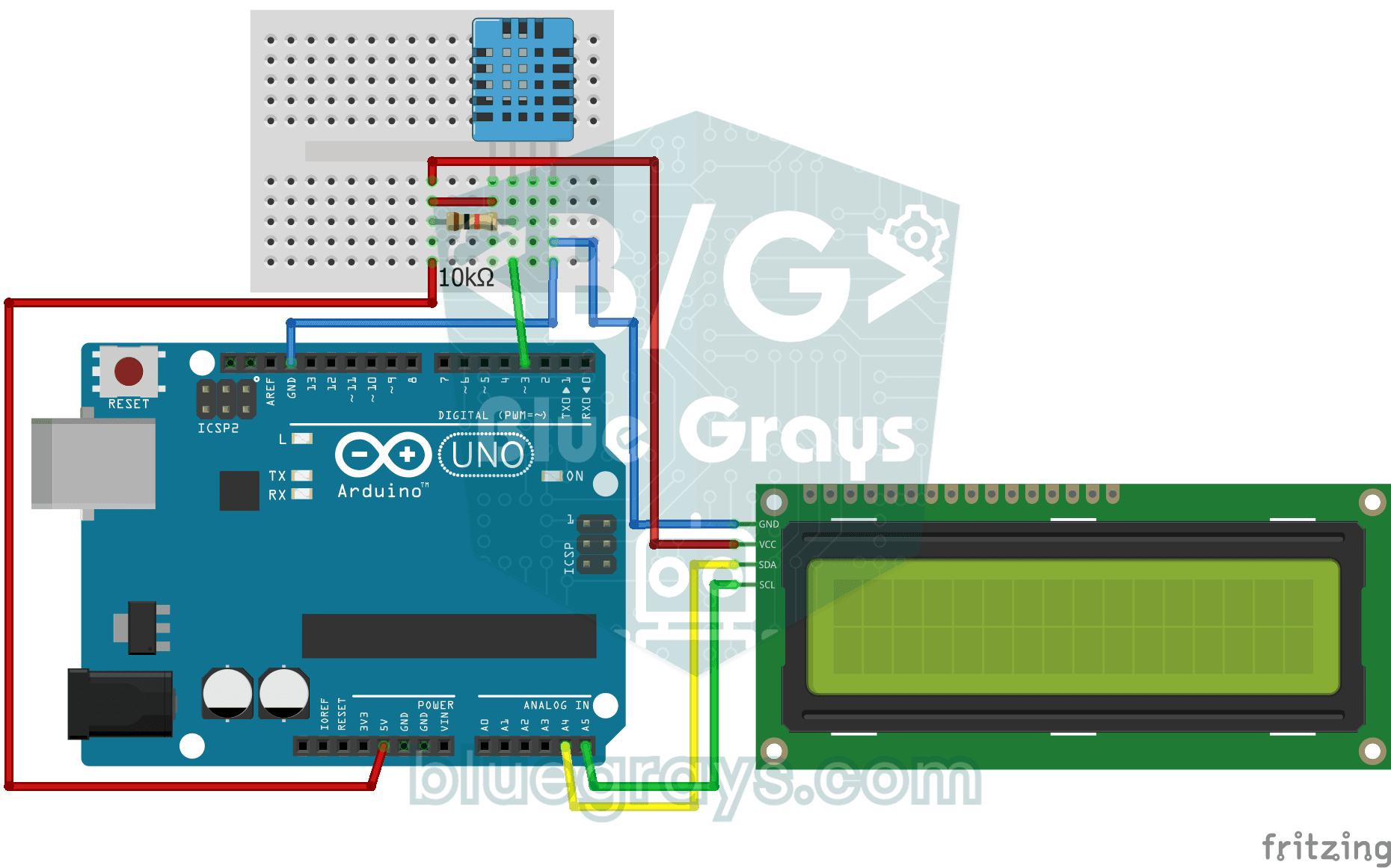
部屋の温度は何度で、空気は湿っているでしょうか、それとも乾燥しているでしょうか?DHT11センサーが温度と湿度を測定し、Arduinoが2行のLCDディスプレイに値を表示して、数秒ごとに更新します。センサーに異常があればエラーメッセージが表示されます。自分だけの小さな気象観測装置を作る第一歩です。
動画
回路図
ソースコード
Arduino (C++)
1// ─────────────────────────────────────────
2//   BlueGrays · bluegrays.com
3//   Temperature and Humidity with DHT11
4// ─────────────────────────────────────────
5// The DHT11 sensor measures room temperature and humidity; the I2C LCD
6// shows the temperature on the first line and the humidity on the second.
7// The reading refreshes every 2 s. If a reading fails the screen shows
8// "Sensor Error!".
9//
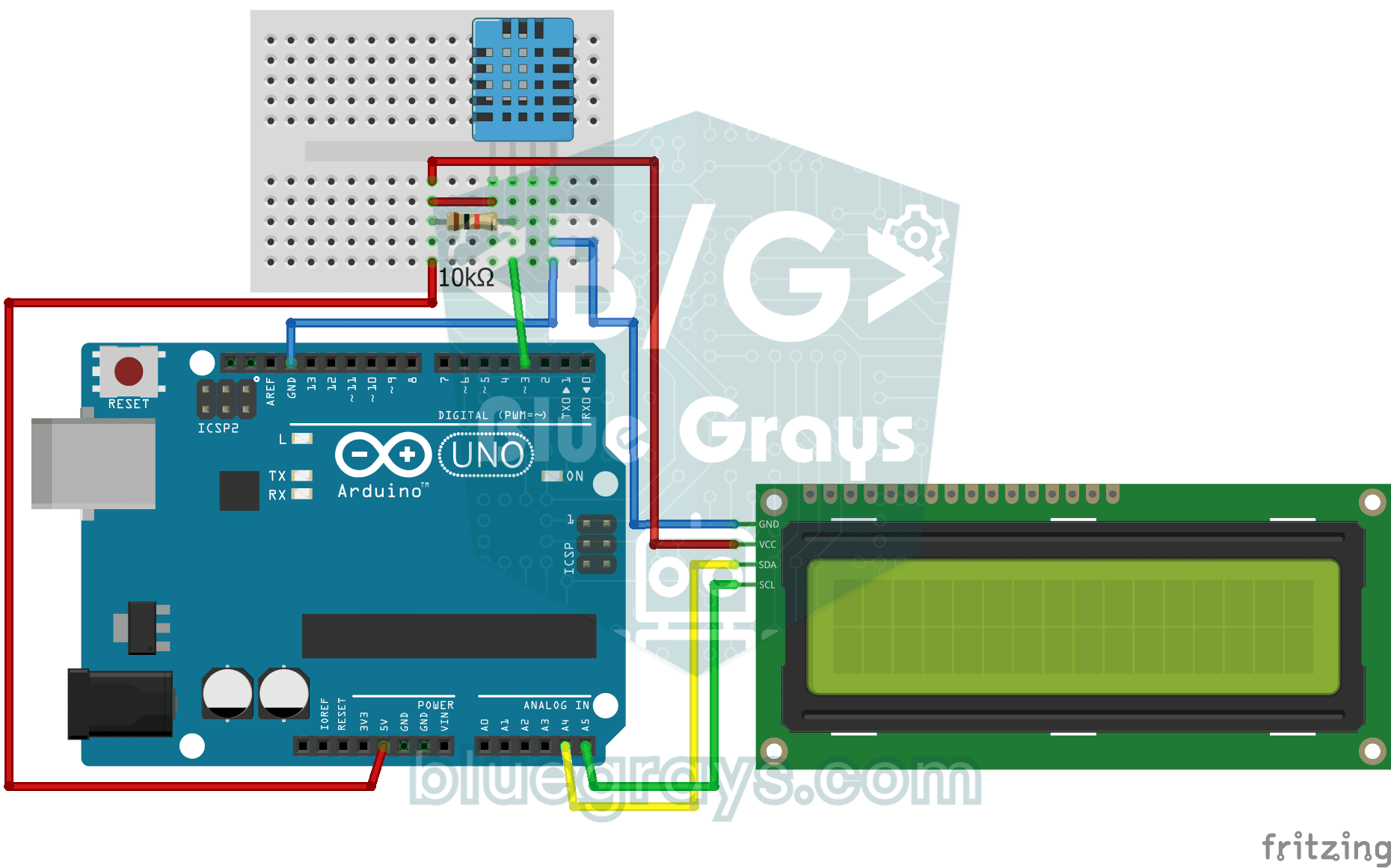
10// Pins:
11//   D3 -> DHT11 data
12//   (10k resistor between data and 5V, pull-up)
13//   A4 -> LCD SDA
14//   A5 -> LCD SCL
15//   DHT11 and LCD: VCC to 5V, GND to GND
16
17#include <LiquidCrystal_I2C.h>
18#include <Wire.h>
19#include <DHT.h>
20
21#define DHTPIN 3        // DHT11 data pin
22#define DHTTYPE DHT11   // Sensor type in use
23
24LiquidCrystal_I2C lcd(0x27, 16, 2);   // I2C address 0x27, 16x2 LCD
25DHT dht(DHTPIN, DHTTYPE);
26
27void setup() {
28  dht.begin();
29  // Modern libraries prefer init() over begin()
30  lcd.init();
31  lcd.backlight();
32}
33
34void loop() {
35  // Read humidity and temperature (C)
36  float humidity = dht.readHumidity();
37  float temperature = dht.readTemperature();
38
39  // Check if readings failed
40  if (isnan(humidity) || isnan(temperature)) {
41    lcd.setCursor(0, 0);
42    lcd.print("Sensor Error!   ");
43    return;
44  }
45
46  // Line 1: temperature
47  lcd.setCursor(0, 0);
48  lcd.print("Temp: ");
49  lcd.print(temperature);
50  lcd.print((char)223); // Degree symbol (°)
51  lcd.print("C   ");
52
53  // Line 2: humidity
54  lcd.setCursor(0, 1);
55  lcd.print("Humidity: %");
56  lcd.print((int)humidity);   // Print as a whole number (45)
57  lcd.print("   "); // Trailing spaces to clear old data
58
59  delay(2000); // DHT11 is slow, 2 seconds is more stable
60}
61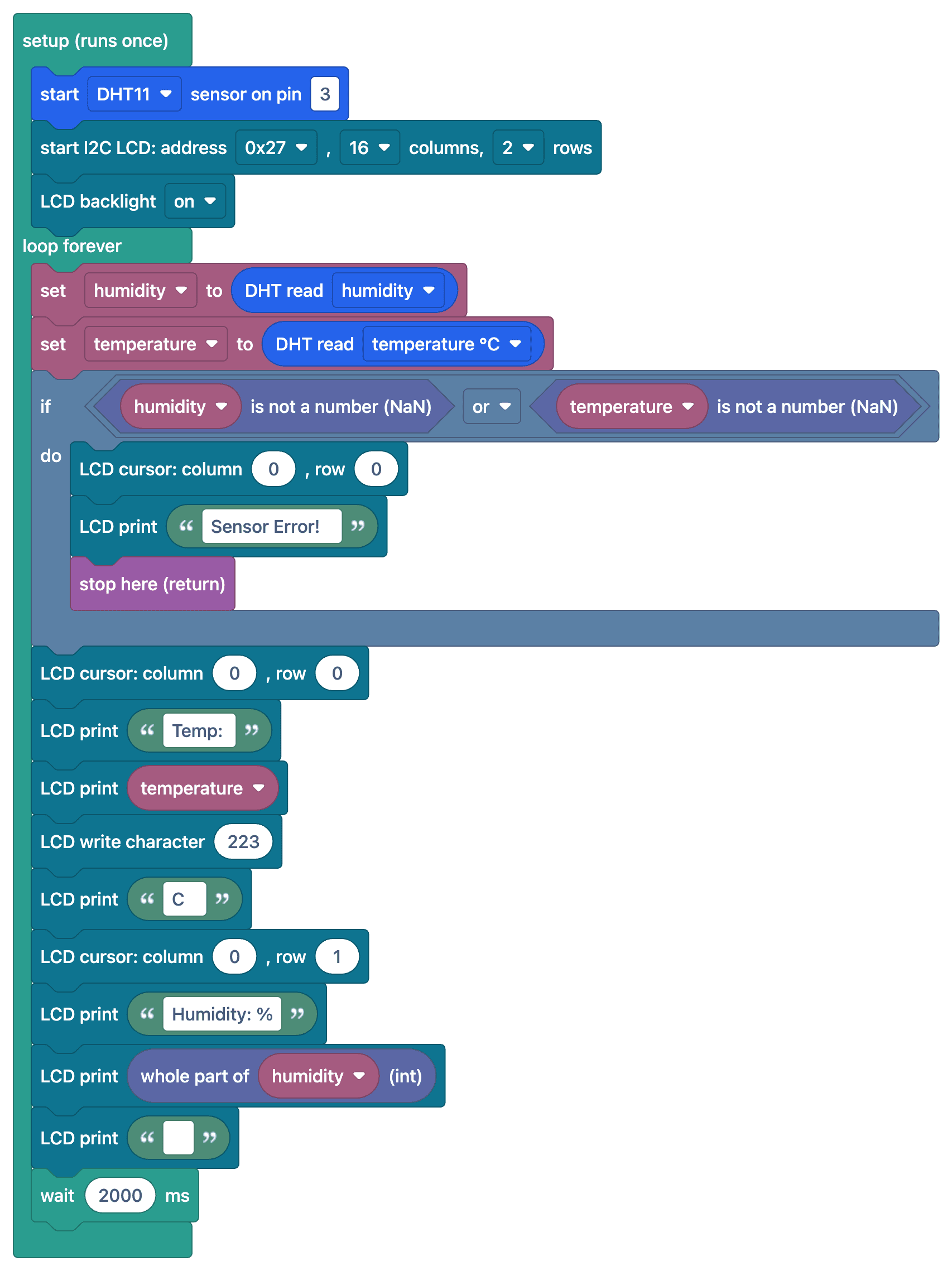
よくある質問
DHT11の測定精度はどのくらいですか?▾
DHT11の測定精度は温度が±2 °C、湿度が±5%で、動作範囲は0–50 °Cです。より精度の高い測定には、DHT22(±0.5 °C)やBME280がおすすめです。
画面に「nan」やエラーメッセージが表示されるのはなぜですか?▾
センサーの値を読み取れませんでした。データピンの10 kΩのプルアップ抵抗と、ライブラリ設定のセンサーの種類(DHT11)を確認してください。また、読み取りの間隔が少なくとも1–2秒あることを確認してください。
測定値の更新が遅いのはなぜですか?▾
DHT11が測定できるのは、最大で1秒に1回です。それより短い間隔で読み取ろうとすると、誤った値や古い値が返されます。測定の間隔を2秒空けることをおすすめします。
体感温度を計算できますか?▾
はい、DHTライブラリのcomputeHeatIndex()関数で、温度と湿度から体感温度を計算できます。