
ESP32 Bluetooth: piano no celular
Transforme o celular num piano de 8 teclas: toque numa tecla e um buzzer passivo no ESP32 toca a nota, sem internet nem Wi-Fi. Este é o guia passo a passo do modelo Bluetooth Piano no celular do app, montado com um buzzer e dois jumpers. Vá em Minha oficina › Dispositivos › Adicionar dispositivo › Bluetooth, escolha o modelo e grave o código com Pegar o código. O botão Configurar como painel Bluetooth nesta página também abre o assistente.
Vídeo
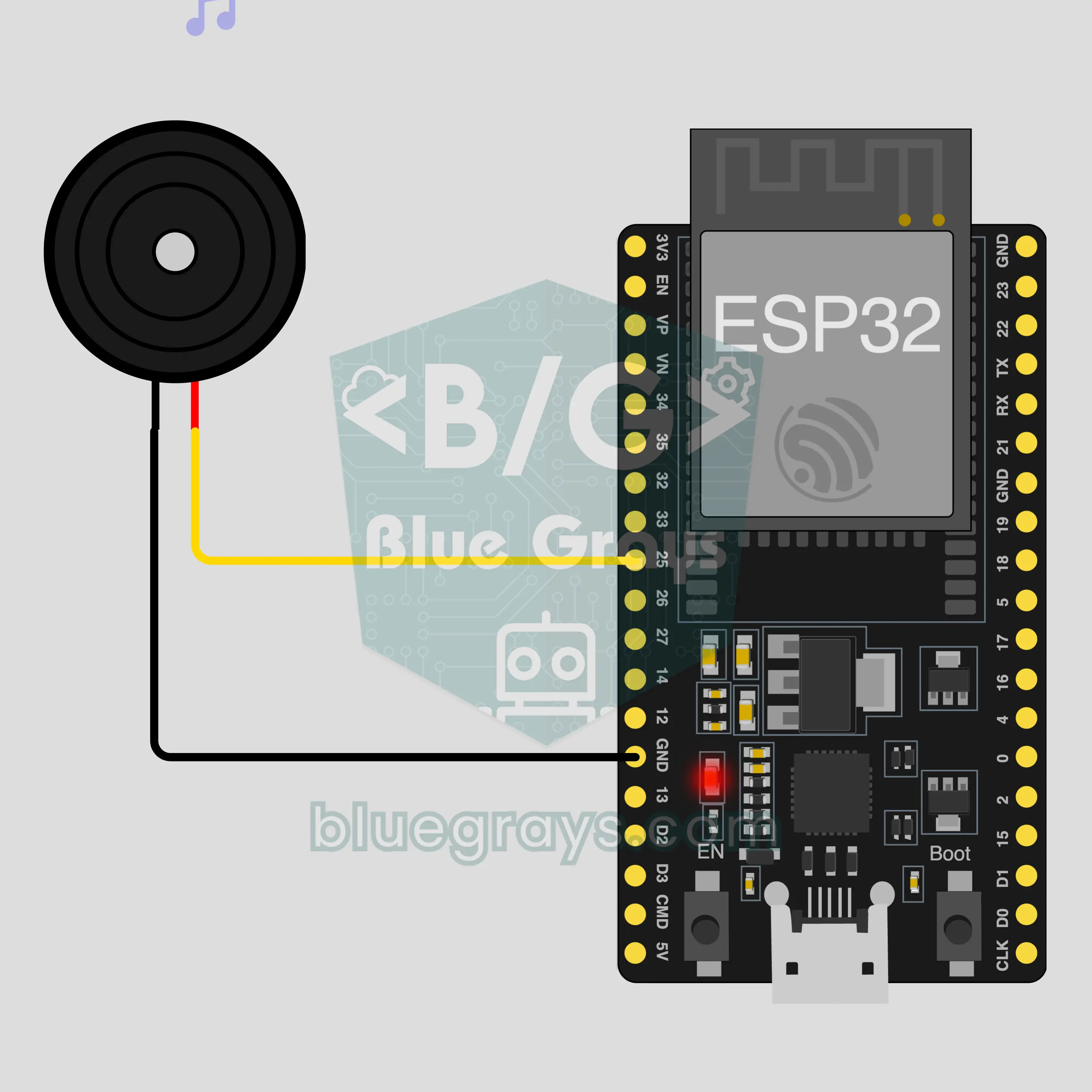
Esquema do circuito
Código-fonte
1// ┌───────────────────────────┐
2// │ BlueGrays · bluegrays.com │
3// │ Bluetooth · ESP32         │
4// │ BG-Piyano                 │
5// └───────────────────────────┘
6// Piano no celular
7// Placa no Arduino IDE: ESP32 Dev Module
8// a biblioteca BLE vem com o pacote de placas ESP32, não precisa instalar nada a mais
9
10#include <BLEDevice.h>
11#include <BLEServer.h>
12#include <BLE2902.h>
13
14const char BLE_NAME[] = "BG-Piyano";  // a placa se anuncia com este nome e o app a encontra assim na lista
15
16// Pinos: mude aqui se você ligou de outro jeito
17const int BUZZER_PIN = 25;  // use um buzzer passivo (um ativo só faz um som)
18
19void btWrite(const char *text);
20void onValue(const char *key, const char *value);
21void sendAll();
22void onLinkLost();
23
24// ── O app envia linhas "chave=valor"; ao receber "?" a placa manda todos os valores ──
25char line[65];
26uint8_t lineLen = 0;
27unsigned long lastRxMs = 0;
28
29bool is(const char *a, const char *b) { return strcmp(a, b) == 0; }
30bool isOn(const char *v) { return v[0] == '1'; }
31
32void sendText(const char *key, const char *value) {
33  char out[72];
34  snprintf(out, sizeof(out), "%s=%s\n", key, value);
35  btWrite(out);
36}
37
38void sendInt(const char *key, long value) {
39  char text[12];
40  snprintf(text, sizeof(text), "%ld", value);
41  sendText(key, text);
42}
43
44void sendFloat(const char *key, float value) {
45  char text[16];
46  dtostrf(value, 1, 1, text);
47  sendText(key, text);
48}
49
50void handleLine(char *text) {
51  char *eq = strchr(text, '=');
52  if (eq == nullptr) {
53    if (text[strlen(text) - 1] == '?') {
54      btWrite("@v=1.0\n");  // a linha "@v" informa ao app a versão do código
55      sendAll();
56    }
57    return;
58  }
59  *eq = '\0';
60  onValue(text, eq + 1);
61}
62
63void feed(char c) {
64  lastRxMs = millis();
65  if (c == '\n' || c == '\r') {
66    if (lineLen == 0) return;
67    line[lineLen] = '\0';
68    lineLen = 0;
69    handleLine(line);
70  } else if (lineLen < sizeof(line) - 1) {
71    line[lineLen++] = c;
72  }
73}
74
75// ── Bluetooth (Nordic UART) ──
76#define UART_SERVICE "6E400001-B5A3-F393-E0A9-E50E24DCCA9E"
77#define UART_RX "6E400002-B5A3-F393-E0A9-E50E24DCCA9E"
78#define UART_TX "6E400003-B5A3-F393-E0A9-E50E24DCCA9E"
79
80BLECharacteristic *txChar = nullptr;
81volatile bool linked = false;
82volatile bool linkLost = false;
83// os bytes recebidos passam da tarefa Bluetooth para o loop() por um pequeno buffer circular
84const int RX_SIZE = 256;
85volatile uint8_t rxBuf[RX_SIZE];
86volatile int rxHead = 0, rxTail = 0;
87
88class ServerEvents : public BLEServerCallbacks {
89  void onConnect(BLEServer *server) override { linked = true; }
90  void onDisconnect(BLEServer *server) override { linked = false; linkLost = true; }
91};
92
93class RxEvents : public BLECharacteristicCallbacks {
94  void onWrite(BLECharacteristic *c) override {
95    auto v = c->getValue();
96    for (size_t i = 0; i < v.length(); i++) {
97      int next = (rxHead + 1) % RX_SIZE;
98      if (next == rxTail) break;
99      rxBuf[rxHead] = (uint8_t)v[i];
100      rxHead = next;
101    }
102  }
103};
104
105// as linhas saem em pacotes de 20 bytes (funciona com qualquer celular)
106void btWrite(const char *text) {
107  if (!linked || txChar == nullptr) return;
108  size_t n = strlen(text);
109  for (size_t i = 0; i < n; i += 20) {
110    size_t len = n - i < 20 ? n - i : 20;
111    txChar->setValue((uint8_t *)text + i, len);
112    txChar->notify();
113    delay(4);
114  }
115}
116
117void btBegin() {
118  BLEDevice::init(BLE_NAME);
119  BLEServer *server = BLEDevice::createServer();
120  server->setCallbacks(new ServerEvents());
121  BLEService *uart = server->createService(UART_SERVICE);
122  txChar = uart->createCharacteristic(UART_TX, BLECharacteristic::PROPERTY_NOTIFY);
123  txChar->addDescriptor(new BLE2902());
124  BLECharacteristic *rx = uart->createCharacteristic(UART_RX, BLECharacteristic::PROPERTY_WRITE | BLECharacteristic::PROPERTY_WRITE_NR);
125  rx->setCallbacks(new RxEvents());
126  uart->start();
127  BLEAdvertisementData adv;
128  adv.setFlags(0x06);
129  adv.setCompleteServices(BLEUUID(UART_SERVICE));
130  BLEAdvertisementData scan;
131  scan.setName(BLE_NAME);
132  BLEAdvertising *advertising = BLEDevice::getAdvertising();
133  advertising->setAdvertisementData(adv);
134  advertising->setScanResponseData(scan);
135  BLEDevice::startAdvertising();
136}
137
138void btPoll() {
139  while (rxTail != rxHead) {
140    char c = (char)rxBuf[rxTail];
141    rxTail = (rxTail + 1) % RX_SIZE;
142    feed(c);
143  }
144  if (linkLost) {
145    linkLost = false;
146    onLinkLost();
147    delay(100);
148    BLEDevice::startAdvertising();
149  }
150}
151
152// ── ESP32 ──
153void onValue(const char *key, const char *value) {
154  if (is(key, "nota")) {  // "nota=Hz" toca a nota e "nota=0" para
155    int hz = atoi(value);
156    if (hz > 0) tone(BUZZER_PIN, hz);
157    else noTone(BUZZER_PIN);
158  }
159}
160
161void sendAll() {
162  sendInt("nota", 0);
163}
164
165void onLinkLost() {
166  noTone(BUZZER_PIN);  // Conexão perdida: o som para
167}
168
169void setup() {
170  Serial.begin(115200);
171  pinMode(BUZZER_PIN, OUTPUT);
172  btBegin();
173  Serial.print(F("BlueGrays Bluetooth: "));
174  Serial.println(BLE_NAME);
175}
176
177void loop() {
178  btPoll();
179}
180Perguntas frequentes
Funciona com iPhone?
Funciona. O Bluetooth Low Energy (BLE) embutido no ESP32 conversa com iPhone e com Android. O iPhone não se conecta a módulos de Bluetooth clássico como o HC-05 e o HC-06, e este projeto não precisa deles. Não tente parear a placa nas configurações de Bluetooth do celular; placas BLE podem não aparecer lá, isso é normal. Quem faz a conexão é o app BlueGrays.
Qual é a diferença entre buzzer ativo e passivo, e de qual eu preciso?
Você precisa de um buzzer passivo. Ele funciona como um alto-falante minúsculo: toca a frequência que você mandar. O buzzer ativo tem um circuito próprio e, assim que recebe tensão, emite sempre o mesmo som fixo, então não dá para distinguir as teclas. Este projeto mostra qual você tem: se as teclas dão notas diferentes, é passivo; se todas fazem o mesmo zumbido, é ativo. Na hora de comprar, procure a palavra passivo (passive) no nome do produto.
Posso apertar duas teclas ao mesmo tempo e tocar um acorde?
Não. Um buzzer só toca uma frequência por vez, e o comando tone na placa gera uma única nota. Se você apertar duas teclas juntas, as notas não se somam; a placa toca só a última que chegou. Toque as melodias nota por nota. O botão Tocar em tela cheia do painel aumenta as teclas, e lá você também pode deslizar o dedo sobre elas para passar de uma nota para outra.
Posso adicionar outras notas ou mais teclas?
As oito teclas do painel são fixas: do Dó grave ao Dó agudo, sem sustenidos nem bemóis, e não dá para adicionar teclas pelo app. Já o lado da placa é flexível: o código toca como frequência qualquer número positivo que chegar do celular e se cala quando chega 0. Então você pode mudar o som no código; por exemplo, multiplique por dois a frequência recebida e o piano inteiro sobe uma oitava.