
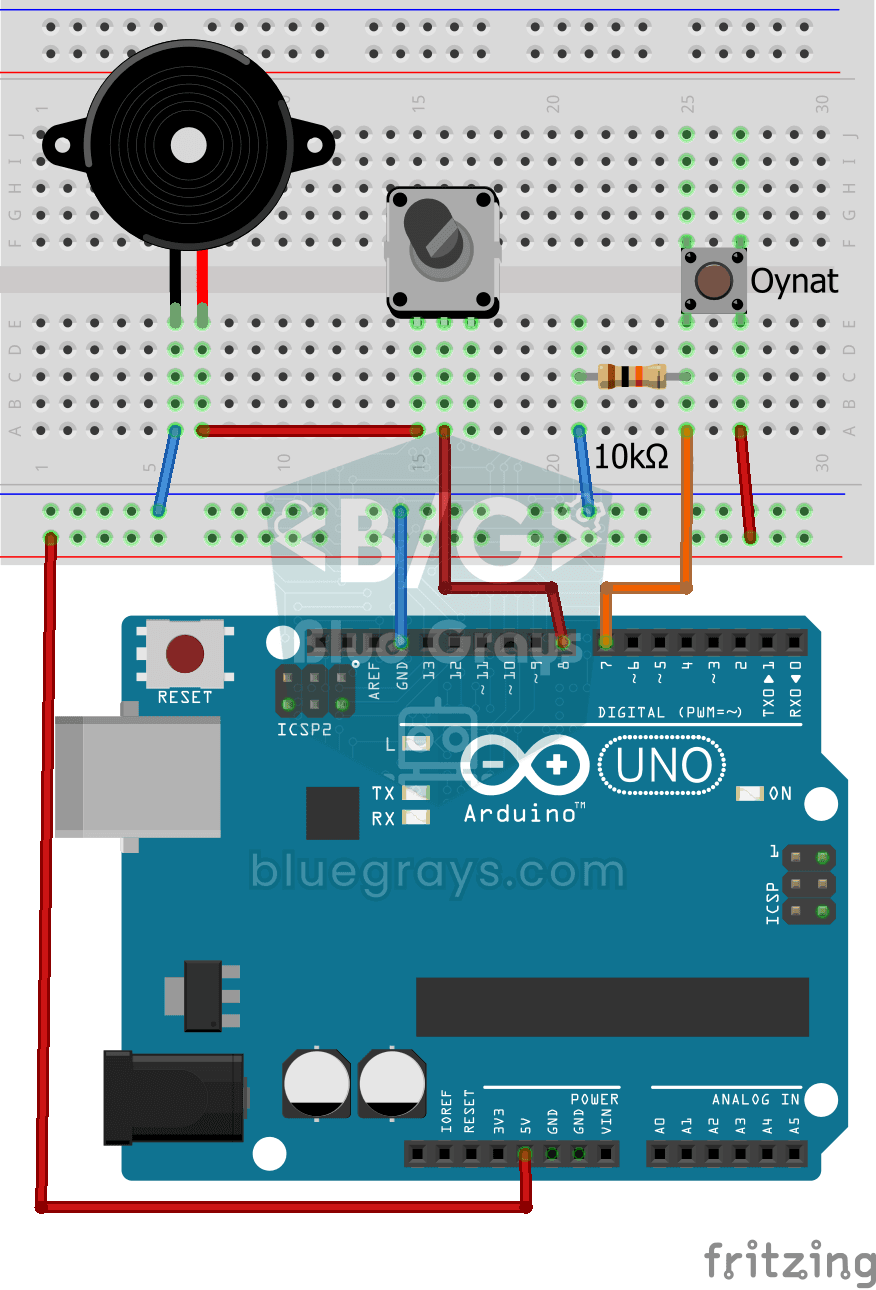
Vídeo
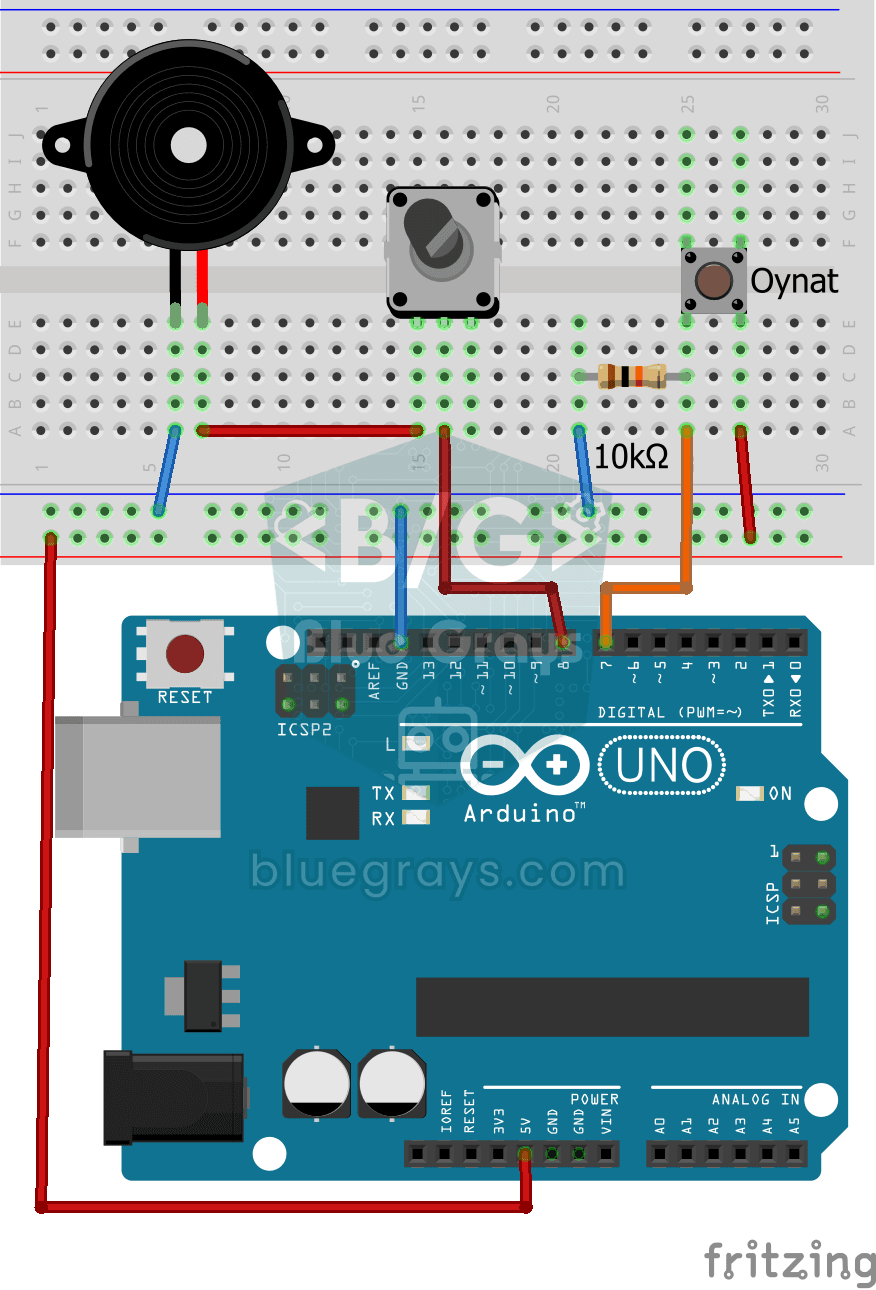
Esquema do circuito
Código-fonte
1// ─────────────────────────────────────────
2//   BlueGrays · bluegrays.com
3//   Turkish National Anthem with Buzzer
4// ─────────────────────────────────────────
5// Press the button and the buzzer plays the first two verses of the
6// Turkish National Anthem note by note. A potentiometer in series with the
7// buzzer sets the volume. Lyrics: Mehmet Akif Ersoy, music: Osman Zeki
8// Ungor.
9//
10// Pins:
11//   D7 -> Play button, other leg to 5V
12//   D7 -> 10k resistor to GND (pull-down)
13//   D8 -> Potentiometer (volume) to Buzzer +
14//   Buzzer - to GND
15
16int buttonPin = 7;   // Play button
17int buzzer = 8;      // Buzzer output pin
18
19// Note frequencies (Hz). A trailing "d" means sharp (ad = A#), 2 and 3 are higher octaves
20int a = 440, ad = 466, b = 494, c = 523, cd = 554, d = 587, dd = 622, e = 659, f = 698;
21int fd = 740, g = 784, gd = 830, a2 = 880, ad2 = 932, b2 = 988, c2 = 1046, cd2 = 1108;
22int d2 = 1174, dd2 = 1244, e2 = 1318, f2 = 1396, fd2 = 1480, g2 = 1568, gd2 = 1660;
23int a3 = 1760;
24
25void setup() {
26  pinMode(buttonPin, INPUT);   // Button input (pull-down)
27  pinMode(buzzer, OUTPUT);
28}
29
30void loop() {
31  if (digitalRead(buttonPin)) {   // Button pressed?
32    playSong();                   // Play the anthem start to end
33  }
34}
35
36// Each tone() starts a note and the delay() after it is the note length (ms). noTone() adds a short
37// rest.
38void playSong() {
39  // Verse 1
40  // Lyrics
41  tone(buzzer, c);
42  delay(800);
43  tone(buzzer, f);
44  delay(800);
45  tone(buzzer, g);
46  delay(800);
47  tone(buzzer, gd);
48  delay(800);
49  tone(buzzer, e);
50  delay(400);
51  tone(buzzer, g);
52  delay(200);
53  tone(buzzer, f);
54  delay(1600);
55  noTone(buzzer);
56  delay(300);
57
58  // Lyrics
59  tone(buzzer, f);
60  delay(800);
61  tone(buzzer, ad2);
62  delay(800);
63  tone(buzzer, c2);
64  delay(800);
65  tone(buzzer, cd2);
66  delay(800);
67  tone(buzzer, a2);
68  delay(400);
69  tone(buzzer, c2);
70  delay(200);
71  tone(buzzer, ad2);
72  delay(1600);
73
74  // Lyrics
75  tone(buzzer, c2);
76  delay(200);
77  tone(buzzer, ad2);
78  delay(200);
79  tone(buzzer, c2);
80  delay(200);
81  tone(buzzer, g);
82  delay(400);
83  noTone(buzzer);
84  delay(100);
85  tone(buzzer, g);
86  delay(400);
87  tone(buzzer, ad);
88  delay(200);
89  tone(buzzer, gd);
90  delay(400);
91  tone(buzzer, e);
92  delay(200);
93  tone(buzzer, f);
94  delay(400);
95  tone(buzzer, g);
96  delay(200);
97  tone(buzzer, gd);
98  delay(400);
99  tone(buzzer, ad);
100  delay(200);
101  tone(buzzer, c2);
102  delay(400);
103  tone(buzzer, cd2);
104  delay(200);
105  tone(buzzer, dd2);
106  delay(400);
107  tone(buzzer, f2);
108  delay(200);
109  tone(buzzer, dd2);
110  delay(400);
111
112  // Lyrics
113  tone(buzzer, dd);
114  delay(200);
115  tone(buzzer, d);
116  delay(200);
117  tone(buzzer, dd);
118  delay(200);
119  tone(buzzer, c2);
120  delay(800);
121  tone(buzzer, ad);
122  delay(800);
123  tone(buzzer, gd);
124  delay(1600);
125
126  // Lyrics
127  tone(buzzer, c);
128  delay(200);
129  tone(buzzer, b);
130  delay(200);
131  tone(buzzer, c);
132  delay(200);
133  tone(buzzer, g);
134  delay(800);
135  tone(buzzer, c);
136  delay(800);
137  tone(buzzer, c2);
138  delay(800);
139  tone(buzzer, ad);
140  delay(200);
141  tone(buzzer, gd);
142  delay(200);
143  tone(buzzer, g);
144  delay(400);
145  tone(buzzer, gd);
146  delay(200);
147  tone(buzzer, f);
148  delay(800);
149
150  // "Dir, Lyrics
151  tone(buzzer, f2);
152  delay(800);
153  tone(buzzer, dd2);
154  delay(200);
155  tone(buzzer, cd2);
156  delay(400);
157  tone(buzzer, c2);
158  delay(200);
159  tone(buzzer, ad);
160  delay(400);
161  tone(buzzer, gd);
162  delay(200);
163  tone(buzzer, g);
164  delay(400);
165  tone(buzzer, f);
166  delay(200);
167  tone(buzzer, c2);
168  delay(400);
169  tone(buzzer, c);
170  delay(800);
171  tone(buzzer, f);
172  delay(1600);
173
174  // Verse 2
175  // Lyrics
176  tone(buzzer, c);
177  delay(800);
178  tone(buzzer, f);
179  delay(800);
180  tone(buzzer, g);
181  delay(800);
182  tone(buzzer, gd);
183  delay(800);
184  tone(buzzer, e);
185  delay(400);
186  tone(buzzer, g);
187  delay(200);
188  tone(buzzer, f);
189  delay(1600);
190  noTone(buzzer);
191  delay(300);
192
193  // Lyrics
194  tone(buzzer, f);
195  delay(800);
196  tone(buzzer, ad2);
197  delay(800);
198  tone(buzzer, c2);
199  delay(800);
200  tone(buzzer, cd2);
201  delay(400);
202  tone(buzzer, ad2);
203  delay(400);
204  tone(buzzer, a2);
205  delay(400);
206  tone(buzzer, c2);
207  delay(400);
208  tone(buzzer, ad2);
209  delay(800);
210
211  // Lyrics
212  tone(buzzer, c2);
213  delay(200);
214  tone(buzzer, ad2);
215  delay(200);
216  tone(buzzer, c2);
217  delay(200);
218  tone(buzzer, g);
219  delay(400);
220  noTone(buzzer);
221  delay(100);
222  tone(buzzer, g);
223  delay(400);
224  tone(buzzer, ad);
225  delay(200);
226  tone(buzzer, gd);
227  delay(400);
228  tone(buzzer, e);
229  delay(200);
230  tone(buzzer, f);
231  delay(400);
232  tone(buzzer, g);
233  delay(200);
234  tone(buzzer, gd);
235  delay(400);
236  tone(buzzer, ad);
237  delay(200);
238  tone(buzzer, c2);
239  delay(400);
240  tone(buzzer, cd2);
241  delay(200);
242  tone(buzzer, dd2);
243  delay(400);
244  tone(buzzer, f2);
245  delay(200);
246  tone(buzzer, dd2);
247  delay(400);
248
249  // Lyrics
250  tone(buzzer, dd);
251  delay(200);
252  tone(buzzer, d);
253  delay(200);
254  tone(buzzer, dd);
255  delay(200);
256  tone(buzzer, c2);
257  delay(800);
258  tone(buzzer, ad);
259  delay(800);
260  tone(buzzer, gd);
261  delay(1600);
262
263  // Lyrics
264  tone(buzzer, c);
265  delay(200);
266  tone(buzzer, b);
267  delay(200);
268  tone(buzzer, c);
269  delay(200);
270  tone(buzzer, g);
271  delay(800);
272  tone(buzzer, c);
273  delay(800);
274  tone(buzzer, c2);
275  delay(800);
276  tone(buzzer, ad);
277  delay(200);
278  tone(buzzer, gd);
279  delay(200);
280  tone(buzzer, g);
281  delay(400);
282  tone(buzzer, gd);
283  delay(200);
284  tone(buzzer, f);
285  delay(800);
286
287  // Lyrics
288  tone(buzzer, f2);
289  delay(800);
290  tone(buzzer, dd2);
291  delay(200);
292  tone(buzzer, cd2);
293  delay(400);
294  tone(buzzer, c2);
295  delay(200);
296  tone(buzzer, ad);
297  delay(400);
298  tone(buzzer, gd);
299  delay(200);
300  tone(buzzer, g);
301  delay(400);
302  tone(buzzer, f);
303  delay(200);
304  tone(buzzer, c2);
305  delay(400);
306  tone(buzzer, c);
307  delay(800);
308  tone(buzzer, f);
309  delay(1600);
310  noTone(buzzer);
311}
312
Perguntas frequentes
Como as notas musicais são convertidas em frequências?▾
Cada nota corresponde a uma frequência específica; por exemplo, na 4ª oitava, dó corresponde a aproximadamente 262 Hz e lá, a 440 Hz. Neste código, as frequências ficam armazenadas em variáveis separadas. As chamadas de `tone()` em playSong() iniciam as notas, e as chamadas de `delay()` seguintes determinam suas durações.
Como mudar o andamento de uma melodia?▾
No código apresentado, as durações das notas são determinadas pelos valores fixos em delay(). Para acelerar a melodia, reduza as durações das notas e das pausas na mesma proporção; para desacelerar, aumente essas durações. Para controlar o andamento com um potenciômetro, você precisa adicionar uma leitura analógica e ajustar essas durações usando um fator calculado a partir da leitura.
As notas estão emendadas. Como separá-las?▾
Após cada nota, deixe um breve silêncio de cerca de 10–30% da duração da nota (noTone e delay). Essa pausa permite ouvir as notas separadamente.
Posso adicionar minha própria música?▾
Sim. Para adicionar sua própria música, você pode alterar as frequências e as durações das notas em playSong(). Se preferir armazenar as notas e as durações em arrays, também precisará escrever um laço que leia esses arrays em sequência e chame tone() e delay(). Na internet, você encontra arrays de notas prontos para muitas músicas, compatíveis com Arduino.