
Servidor web assíncrono com ESP32 (IP no LCD)
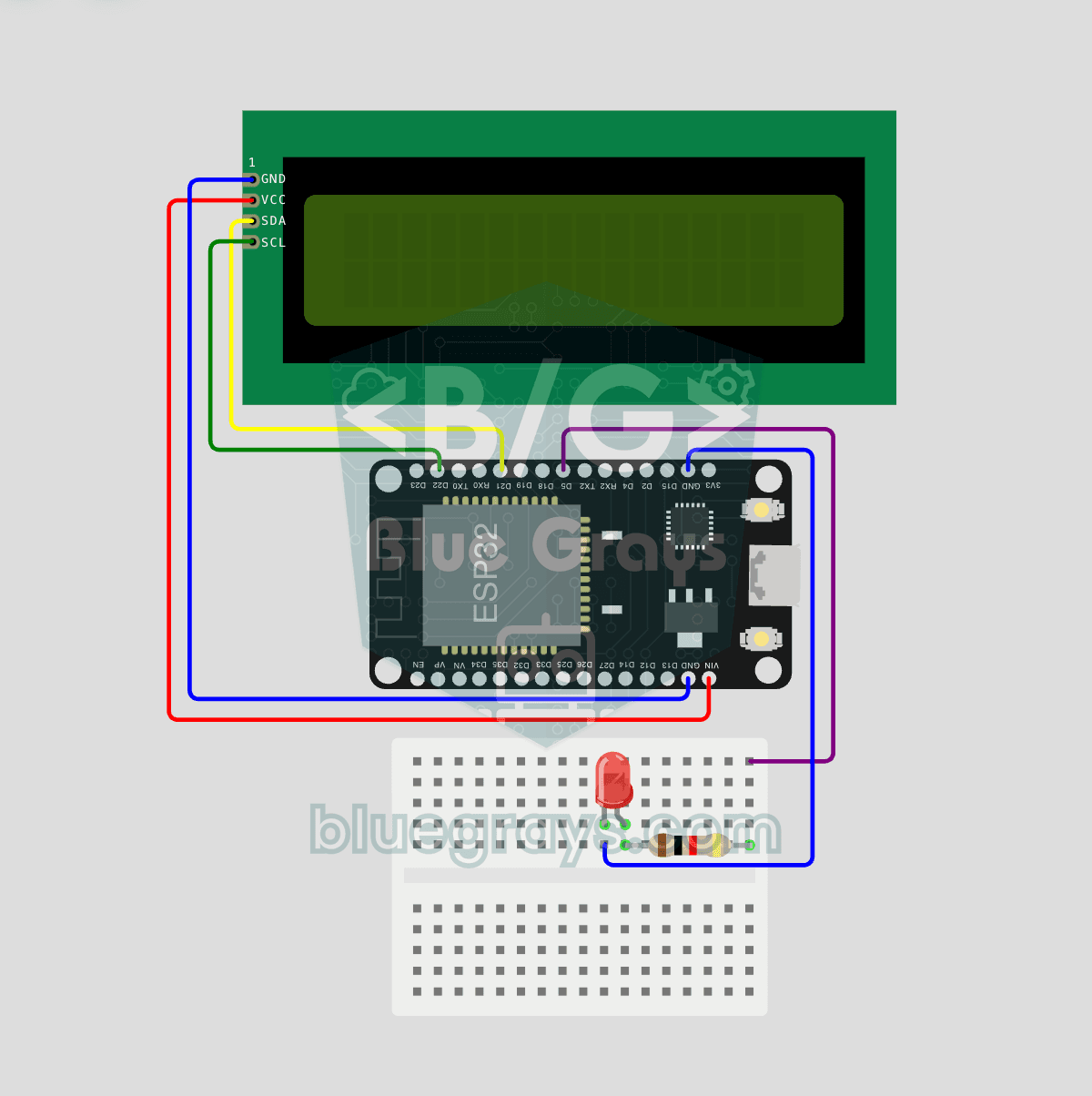
Neste projeto, transformamos o ESP32 em um **servidor web assíncrono** que você pode controlar pelo celular ou computador na mesma rede Wi-Fi. Com a biblioteca ESPAsyncWebServer, o servidor processa várias requisições ao mesmo tempo (ao contrário do `WebServer.h` tradicional, que bloqueia a execução ao processar uma requisição). Você poderá abrir o endereço IP do ESP32 no navegador e clicar nos botões ON/OFF (as rotas `/on` e `/off`) para ligar e desligar o LED conectado ao GPIO 5.

Vídeo
Esquema do circuito
Código-fonte
1// ─────────────────────────────────────────
2//   BlueGrays · bluegrays.com
3//   ESP32 Asynchronous Web Server (with IP Display on LCD)
4// ─────────────────────────────────────────
5// The ESP32 runs an asynchronous web server. Open its IP address from a
6// phone or computer on the same Wi-Fi and switch the LED with the ON/OFF
7// buttons. The I2C LCD shows the IP address on the top row and the LED
8// state on the bottom row.
9//
10// Pins:
11//   GPIO 5  -> LED (with a 220 ohm resistor, cathode to GND)
12//   GPIO 21 -> LCD SDA
13//   GPIO 22 -> LCD SCL
14//   LCD VCC -> VIN (5V), GND -> GND
15
16#include <Wire.h>
17#include <LiquidCrystal_I2C.h>
18#include <WiFi.h>
19#include <AsyncTCP.h>
20#include <ESPAsyncWebServer.h>
21
22// Wi-Fi credentials (Wokwi default). Use your own network on real hardware
23const char* WIFI_SSID = "Wokwi-GUEST";
24const char* WIFI_PASS = "";
25
26// Pin definitions
27#define LED_PIN 5
28
29bool ledState = false;                 // Is the LED on
30AsyncWebServer server(80);             // Web server on port 80
31LiquidCrystal_I2C lcd(0x27, 16, 2);    // Address 0x27, 16x2
32
33// Refreshes the LCD: IP and LED state
34void updateLcd() {
35  lcd.clear();
36  lcd.setCursor(0, 0);
37  // Skip "IP:" when the IP is over 13 chars
38  String ip = WiFi.localIP().toString();
39  if (ip.length() <= 13) lcd.print("IP:");
40  lcd.print(ip);
41  lcd.setCursor(0, 1);
42  lcd.print(ledState ? "LED: ACIK   " : "LED: KAPALI ");
43}
44
45// HTML page, stored in flash (PROGMEM). processor() fills the %STATE% placeholder
46const char INDEX_HTML[] PROGMEM = R"rawliteral(
47<!DOCTYPE html>
48<html lang="tr">
49<head>
50<meta charset="utf-8">
51<meta name="viewport" content="width=device-width,initial-scale=1">
52<title>BlueGrays LED Kontrol</title>
53<style>
54body{font-family:Arial;text-align:center;padding:20px;background:#1a1a2e;color:#fff}
55h1{color:#4ea8de}
56.state{font-size:28px;margin:30px}
57button{padding:18px 40px;font-size:18px;margin:8px;border:none;border-radius:8px;cursor:pointer;color:#fff}
58.on{background:#2ecc71}.off{background:#e74c3c}
59</style>
60</head>
61<body>
62<h1>BlueGrays LED Kontrol</h1>
63<div class="state">LED: %STATE%</div>
64<a href="/on"><button class="on">ON</button></a>
65<a href="/off"><button class="off">OFF</button></a>
66</body>
67</html>
68)rawliteral";
69
70// Replaces %STATE% in the page with the LED state
71String processor(const String& var) {
72  if (var == "STATE") return ledState ? "ACIK" : "KAPALI";
73  return String();
74}
75
76void setup() {
77  pinMode(LED_PIN, OUTPUT);
78  digitalWrite(LED_PIN, LOW);
79
80  // V1 default I2C: SDA=21 SCL=22
81  Wire.begin(21, 22);
82  lcd.init();
83  lcd.backlight();
84
85  // Splash screen, 3 s
86  lcd.setCursor(3, 0);
87  lcd.print("BlueGrays");
88  lcd.setCursor(2, 1);
89  lcd.print("WebServer v1");
90  delay(3000);
91  lcd.clear();
92
93  // Connect to Wi-Fi, wait until connected
94  lcd.setCursor(0, 0);
95  lcd.print("WiFi baglaniyor");
96  lcd.setCursor(0, 1);
97  lcd.print("Connecting...");
98
99  WiFi.mode(WIFI_STA);
100  WiFi.begin(WIFI_SSID, WIFI_PASS);
101  while (WiFi.status() != WL_CONNECTED) delay(500);
102
103  // Routes: "/" page, "/on" on, "/off" off
104  server.on("/", HTTP_GET, [](AsyncWebServerRequest *r) {
105    r->send_P(200, "text/html", INDEX_HTML, processor);
106  });
107
108  server.on("/on", HTTP_GET, [](AsyncWebServerRequest *r) {
109    ledState = true;
110    digitalWrite(LED_PIN, HIGH);
111    updateLcd();
112    r->redirect("/");
113  });
114
115  server.on("/off", HTTP_GET, [](AsyncWebServerRequest *r) {
116    ledState = false;
117    digitalWrite(LED_PIN, LOW);
118    updateLcd();
119    r->redirect("/");
120  });
121
122  // Start the server, show the IP on the LCD
123  server.begin();
124  updateLcd();
125}
126
127void loop() {
128  // The async server runs in the background
129  delay(100);
130}
131
Perguntas frequentes
Por que um servidor web assíncrono é melhor que o WebServer tradicional?▾
O WebServer tradicional processa as requisições em sequência e chama `handleClient()` continuamente dentro de um loop. O ESPAsyncWebServer processa as requisições em segundo plano; vários navegadores podem se conectar ao mesmo tempo, e o loop fica livre para outras tarefas.
Como instalar as bibliotecas?▾
Você precisa das bibliotecas ESPAsyncWebServer e AsyncTCP. Busque "ESPAsyncWebServer" (ESP32Async) no gerenciador de bibliotecas do Arduino IDE e instale-a; a AsyncTCP é incluída como dependência.
Posso acessar a página de fora da rede local?▾
Por padrão, o acesso fica restrito à mesma rede local. Para acessar de fora, é necessário redirecionar portas, mas isso representa um risco de segurança; por isso, recomenda-se usar Blynk, MQTT ou soluções na nuvem.
O que significa incorporar HTML com PROGMEM?▾
A página HTML é armazenada na memória flash como texto dentro do código e não ocupa RAM. Assim, é possível disponibilizar a interface web sem configurar um sistema de arquivos separado (LittleFS).