
Ceas binar cu Raspberry Pi Pico (6 LED-uri + buton)
Acest ceas nu folosește cifre! Construiești un ceas cu Raspberry Pi Pico care arată ora în sistem binar. Cele 6 LED-uri reprezintă valorile 32-16-8-4-2-1; adună valorile celor aprinse pentru a citi secundele, minutele sau orele. Un singur buton schimbă câmpul afișat și permite reglarea orei, iar la fiecare oră fixă o lumină parcurge șirul de LED-uri.
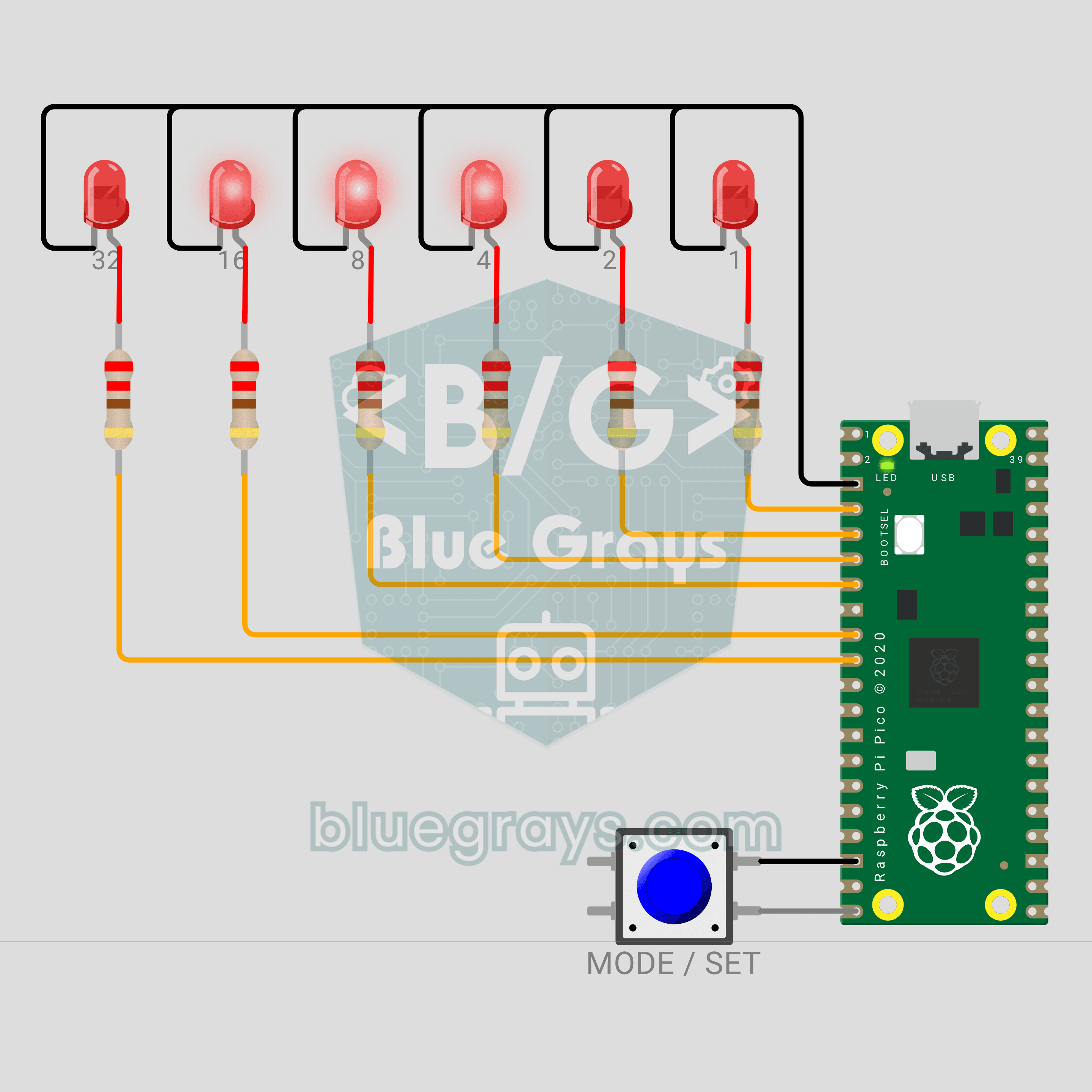
Video
Schemă electrică
Cod sursă
1# ─────────────────────────────────────────
2#   BlueGrays · bluegrays.com
3#   Raspberry Pi Pico Binary Clock (6 LEDs + Button)
4# ─────────────────────────────────────────
5# A clock that shows the time as binary numbers. The 6 LEDs are the
6# 32-16-8-4-2-1 places; the lit LEDs add up to the value. A short press
7# switches between seconds, minutes and hours; a long press sets the
8# field. Every full hour a light sweep runs, and the onboard LED ticks the
9# seconds.
10#
11# Pins:
12#   GP2  -> LED 1 (bit 0), through 220 ohm
13#   GP3  -> LED 2 (bit 1), through 220 ohm
14#   GP4  -> LED 4 (bit 2), through 220 ohm
15#   GP5  -> LED 8 (bit 3), through 220 ohm
16#   GP6  -> LED 16 (bit 4), through 220 ohm
17#   GP7  -> LED 32 (bit 5), through 220 ohm
18#   GP15 -> Button (other leg to GND)
19#   LED  -> Onboard LED (seconds tick)
20#   GND  -> LED cathodes, button
21
22from machine import Pin
23import time
24
25# ============ SETTINGS ============
26START_TIME = (12, 59, 50)  # Start time (h, m, s)
27SEC, MIN, HOUR = range(3)
28START_MODE = SEC       # Field shown at start
29LONG_MS = 800          # Long press time
30DEBOUNCE_MS = 20       # Button debounce time
31MODE_MS = 500          # How long the mode marker shows
32BLINK_MS = 300         # Blink period in set mode
33SET_TIMEOUT_MS = 10000 # Set mode saves after this idle time
34SWEEP_STEP_MS = 60     # Step of the full hour sweep
35SWEEP_ROUNDS = 2       # Number of sweeps
36TICK_MS = 100          # Onboard LED flash length
37LOOP_MS = 5            # Loop step
38
39# In order bit 0 (1) ... bit 5 (32)
40LED_PINS = (2, 3, 4, 5, 6, 7)
41MODE_NAMES = ("SECONDS", "MINUTES", "HOURS")
42# Mode marker: 1, 2 or 3 LEDs from the left (seconds, minutes, hours)
43MODE_MARKS = (0b100000, 0b110000, 0b111000)
44
45
46# ============ HARDWARE ============
47leds = [Pin(gp, Pin.OUT, value=0) for gp in LED_PINS]
48# The name "LED" finds the onboard LED on both the Pico and the Pico W (not a GP pin on the W)
49tick_led = Pin("LED", Pin.OUT, value=0)   # The Pico's onboard LED
50
51
52class Button:
53    # Pull-up button: reads 0 when pressed. update() 1 = pressed, -1 = released
54    def __init__(self, gp):
55        self.pin = Pin(gp, Pin.IN, Pin.PULL_UP)
56        self.down = False
57        self.changed_at = time.ticks_ms()
58
59    def update(self, now):
60        pressed = self.pin.value() == 0
61        if pressed != self.down and time.ticks_diff(now, self.changed_at) >= DEBOUNCE_MS:
62            self.down = pressed
63            self.changed_at = now
64            return 1 if pressed else -1
65        return 0
66
67    def held_ms(self, now):
68        return time.ticks_diff(now, self.changed_at)
69
70
71button = Button(15)
72shown = -1                 # Last pattern on the LEDs
73
74
75def show_bits(pattern):
76    # If the pattern changed, write the 6 LEDs: bit i -> LED i
77    global shown
78    if pattern == shown:
79        return
80    shown = pattern
81    for i, led in enumerate(leds):
82        led.value((pattern >> i) & 1)
83
84
85def binary(v):
86    # 6 digit binary text, e.g. 13 -> 001101
87    return "".join("1" if v >> i & 1 else "0" for i in range(5, -1, -1))
88
89
90# ============ CLOCK ============
91clock_s = (START_TIME[0] * 3600 + START_TIME[1] * 60 + START_TIME[2]) % 86400
92start = time.ticks_ms()
93next_second = time.ticks_add(start, 1000)
94tick_off_at = start
95
96
97def hms():
98    return clock_s // 3600, clock_s // 60 % 60, clock_s % 60
99
100
101def field_value(m):
102    h, mi, s = hms()
103    return (s, mi, h)[m]
104
105
106def time_text():
107    return "%02d:%02d:%02d" % hms()
108
109
110# ============ STATE ============
111mode = START_MODE
112setting = False            # Set mode
113long_done = False          # Long press handled for this press
114marker_until = start       # When the mode marker ends
115sweep_at = None            # Start of the light sweep
116blink_ref = start          # Start of the blink cycle
117last_press = start         # Last press in set mode
118
119
120def report(prefix):
121    v = field_value(mode)
122    print("%s %s: %d = %s  (%s)" % (prefix, MODE_NAMES[mode], v, binary(v), time_text()))
123
124
125def save_setting(now):
126    global setting
127    setting = False
128    print("Time set: %s" % time_text())
129
130
131def on_short(now):
132    global mode, marker_until, clock_s, blink_ref, last_press
133    if setting:
134        # In set mode every short press adds 1 to the selected field
135        h, mi, s = hms()
136        if mode == HOUR:
137            h = (h + 1) % 24
138        else:
139            mi = (mi + 1) % 60
140        clock_s = h * 3600 + mi * 60 + s
141        blink_ref = now
142        last_press = now
143        report("+1")
144    else:
145        mode = (mode + 1) % 3
146        marker_until = time.ticks_add(now, MODE_MS)
147        report("Mode")
148
149
150def on_long(now):
151    global setting, clock_s, next_second, blink_ref, last_press
152    if setting:
153        if mode == MIN:
154            # After setting the minutes, the seconds restart from zero
155            clock_s -= clock_s % 60
156            next_second = time.ticks_add(now, 1000)
157        save_setting(now)
158    elif mode == SEC:
159        # In seconds mode a long press zeroes the seconds (sync to a time signal)
160        clock_s -= clock_s % 60
161        next_second = time.ticks_add(now, 1000)
162        print("Seconds zeroed: %s" % time_text())
163    else:
164        setting = True
165        blink_ref = now
166        last_press = now
167        report("Set")
168
169
170def frame(now):
171    # The LED pattern right now: sweep > mode marker > set (blinking) > value
172    if sweep_at is not None:
173        step = time.ticks_diff(now, sweep_at) // SWEEP_STEP_MS
174        pos = step % 10
175        return 1 << (pos if pos < 6 else 10 - pos)     # back and forth
176    if time.ticks_diff(marker_until, now) > 0:
177        return MODE_MARKS[mode]
178    if setting and time.ticks_diff(now, blink_ref) // BLINK_MS % 2:
179        return 0
180    return field_value(mode)
181
182
183# ============ MAIN LOOP ============
184print("== BlueGrays · bluegrays.com ==")
185print("Pico Binary Clock")
186print("Short press: next field, long: set")
187print("LEDs: 32 16 8 4 2 1")
188report("Mode")
189
190next_loop = time.ticks_ms()
191while True:
192    now = time.ticks_ms()
193
194    # Second counter: each next second is added to the last one, so it never drifts
195    if time.ticks_diff(now, next_second) >= 0:
196        next_second = time.ticks_add(next_second, 1000)
197        clock_s = (clock_s + 1) % 86400
198        tick_led.value(1)
199        tick_off_at = time.ticks_add(now, TICK_MS)
200        if clock_s % 60 == 0:
201            print("Time %s" % time_text()[:5])
202        if clock_s % 3600 == 0 and not setting:
203            sweep_at = now                 # Full hour: light sweep
204    if not setting and time.ticks_diff(now, tick_off_at) >= 0:
205        tick_led.value(0)
206    if sweep_at is not None and time.ticks_diff(now, sweep_at) >= SWEEP_STEP_MS * 10 * SWEEP_ROUNDS:
207        sweep_at = None
208
209    # Button: a short press acts on release, a long press as soon as LONG_MS passes
210    b = button.update(now)
211    if b == 1:
212        long_done = False
213        sweep_at = None                    # A press stops the sweep
214    elif button.down and not long_done and button.held_ms(now) >= LONG_MS:
215        long_done = True
216        on_long(now)
217    elif b == -1 and not long_done:
218        on_short(now)
219
220    if setting:
221        tick_led.value(1)          # Onboard LED on while setting
222        if time.ticks_diff(now, last_press) >= SET_TIMEOUT_MS:
223            save_setting(now)
224
225    show_bits(frame(now))
226
227    # Fixed step: wait until the next 5 ms
228    next_loop = time.ticks_add(next_loop, LOOP_MS)
229    wait = time.ticks_diff(next_loop, time.ticks_ms())
230    if wait > 0:
231        time.sleep_ms(wait)
232    else:
233        next_loop = time.ticks_ms()
234Întrebări frecvente
Cum citesc un ceas binar?
De la stânga la dreapta, LED-urile au valorile 32, 16, 8, 4, 2 și 1. Adună valorile LED-urilor aprinse: în configurația 001101 sunt aprinse cele cu valorile 8, 4 și 1, deci rezultatul este 13. Orele nu depășesc 23, așa că LED-ul din extrema stângă rămâne stins când sunt afișate orele. Serial Monitor afișează fiecare valoare împreună cu forma sa binară.
De ce sunt suficiente 6 LED-uri?
Cu 6 biți poți număra de la 0 la 63 (2 la puterea 6 = 64 de valori). Secundele și minutele ajung până la 59, iar orele până la 23, deci toate încap în 6 biți. Pentru a vedea simultan orele, minutele și secundele, ai avea nevoie de un șir separat de LED-uri pentru fiecare câmp (17 LED-uri în total).
Ceasul se resetează după întreruperea alimentării?
Da. Placa Pico nu are un ceas cu baterie de rezervă, așa că la fiecare pornire codul începe de la `START_TIME`. Un modul RTC cu baterie, precum DS1307, ar păstra ora. În acest proiect, poți regla orele și minutele din buton în câteva secunde după pornire.
Pot folosi LED-uri de culori diferite?
Da. LED-urile roșii, verzi, galbene și portocalii luminează bine la 3,3 V cu un rezistor de 220 Ω. LED-urile albastre și albe au nevoie de aproximativ 3 V și pot lumina slab la 3,3 V; pentru acestea, redu valoarea rezistorului la 100 Ω. Dacă folosești altă culoare pentru valorile mai mari, ceasul va fi mai ușor de citit.