
Raspberry Pi Pico: semafor cu 4 moduri selectate din buton (mașină de stări)
4 moduri de semafor, un singur buton! Fiecare apăsare schimbă modul: ciclu normal (roșu → galben → verde), doar roșu (oprire), galben intermitent (atenție/mod de noapte) și oprit (întreținere). Înveți cum funcționează o mașină de stări, în care variabila mode stabilește comportamentul, și cum parcurgi ciclic modurile cu (mode + 1) % 4.
Video
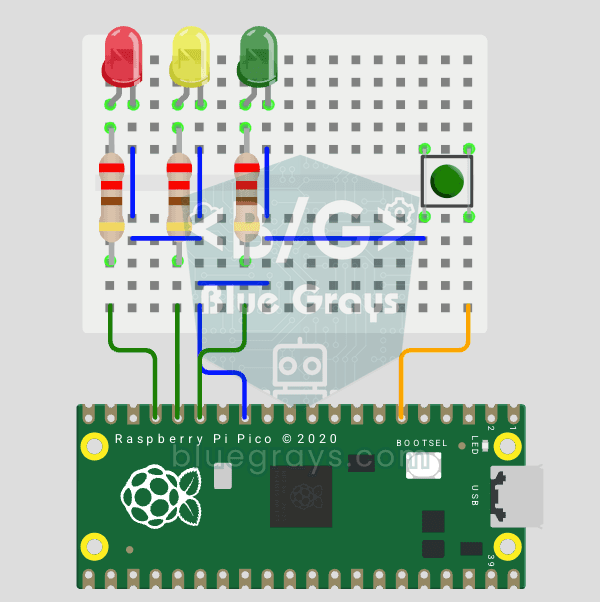
Schemă electrică
Cod sursă
1# ─────────────────────────────────────────
2#   BlueGrays · bluegrays.com
3#   Raspberry Pi Pico Traffic Light with 4-Mode Button Selector (State Machine, GP11-13 + GP4)
4# ─────────────────────────────────────────
5# One button cycles 4 modes: normal cycle (red -> yellow -> green), red
6# only, yellow flash and off. Uses a state machine and non-blocking timing
7# with time.ticks_ms(), so the button is always responsive.
8#
9# Pins:
10#   GP11 -> Green LED
11#   GP12 -> Yellow LED
12#   GP13 -> Red LED (each LED with 220 ohm)
13#   GP4  -> Button (other leg to GND)
14
15from machine import Pin
16import time
17
18# ============ LEDS ============
19green  = Pin(11, Pin.OUT)   # Green
20yellow = Pin(12, Pin.OUT)   # Yellow
21red    = Pin(13, Pin.OUT)   # Red
22
23# ============ BUTTON ============
24button = Pin(4, Pin.IN, Pin.PULL_UP)   # Reads 0 when pressed
25
26# ============ STATE ============
27# Mode: 0 normal cycle, 1 red only, 2 yellow flash, 3 off
28mode = 0
29last_btn = 1                 # Previous button value
30blink_state = False          # Yellow flash state
31last_tick = time.ticks_ms()  # Last flash toggle
32
33# ============ NORMAL CYCLE ============
34normal_step = 0                     # 0: red, 1: yellow, 2: green
35normal_last = time.ticks_ms()       # Step start time
36NORMAL_TIMES = [3000, 1000, 3000]   # Red, Yellow, Green (ms)
37LEDS = [red, yellow, green]
38
39def all_off():
40    # Turn all LEDs off
41    red.off(); yellow.off(); green.off()
42
43# ============ MAIN LOOP ============
44while True:
45    btn = button.value()
46
47    # ---- Button pressed (1 -> 0): mode change ----
48    if last_btn == 1 and btn == 0:
49        mode = (mode + 1) % 4
50        all_off()
51        normal_step = 0
52        normal_last = time.ticks_ms()
53        time.sleep_ms(200)   # Debounce
54    last_btn = btn
55
56    now = time.ticks_ms()
57
58    # ---- Normal traffic light cycle ----
59    if mode == 0:
60        if time.ticks_diff(now, normal_last) > NORMAL_TIMES[normal_step]:
61            normal_step = (normal_step + 1) % 3
62            normal_last = now
63        all_off()
64        LEDS[normal_step].on()
65
66    # ---- Red only (stop) ----
67    elif mode == 1:
68        all_off(); red.on()
69
70    # ---- Yellow flash, 0.4 s (caution/night) ----
71    elif mode == 2:
72        if time.ticks_diff(now, last_tick) > 400:
73            blink_state = not blink_state
74            yellow.value(blink_state)
75            last_tick = now
76            red.off(); green.off()
77
78    # ---- Off ----
79    else:
80        all_off()
81
82    time.sleep_ms(10)
83Întrebări frecvente
Ce este o mașină de stări?
O singură variabilă (mode) stabilește ce face programul în acel moment. Fiecare apăsare de buton schimbă mode, iar bucla execută doar codul modului curent. Este metoda standard de a organiza comportamente complexe.
Ce face (mode + 1) % 4?
Mărește valoarea modului cu unu și revine la 0 când ajunge la 4. Astfel, modurile se succed la nesfârșit: 0, 1, 2, 3, 0, 1...
De ce se folosește ticks_ms() în loc de time.sleep()?
În timpul sleep(), Pico nu poate citi butonul, așa că schimbarea modului întârzie. ticks_ms() și ticks_diff() evită așteptările lungi pe durata fazelor LED-urilor. Totuși, această versiune așteaptă 200 ms la schimbarea modului pentru filtrarea oscilațiilor contactelor și 10 ms la sfârșitul fiecărei treceri prin buclă. În aceste intervale, butonul nu este citit din nou.
Pot adăuga un mod nou?
Da, mărește numărul de moduri la 5 și scrie un bloc separat de cod pentru noul mod. De exemplu, poți face LED-ul verde să clipească sau poți aprinde toate luminile pe rând.