
วิดีโอ
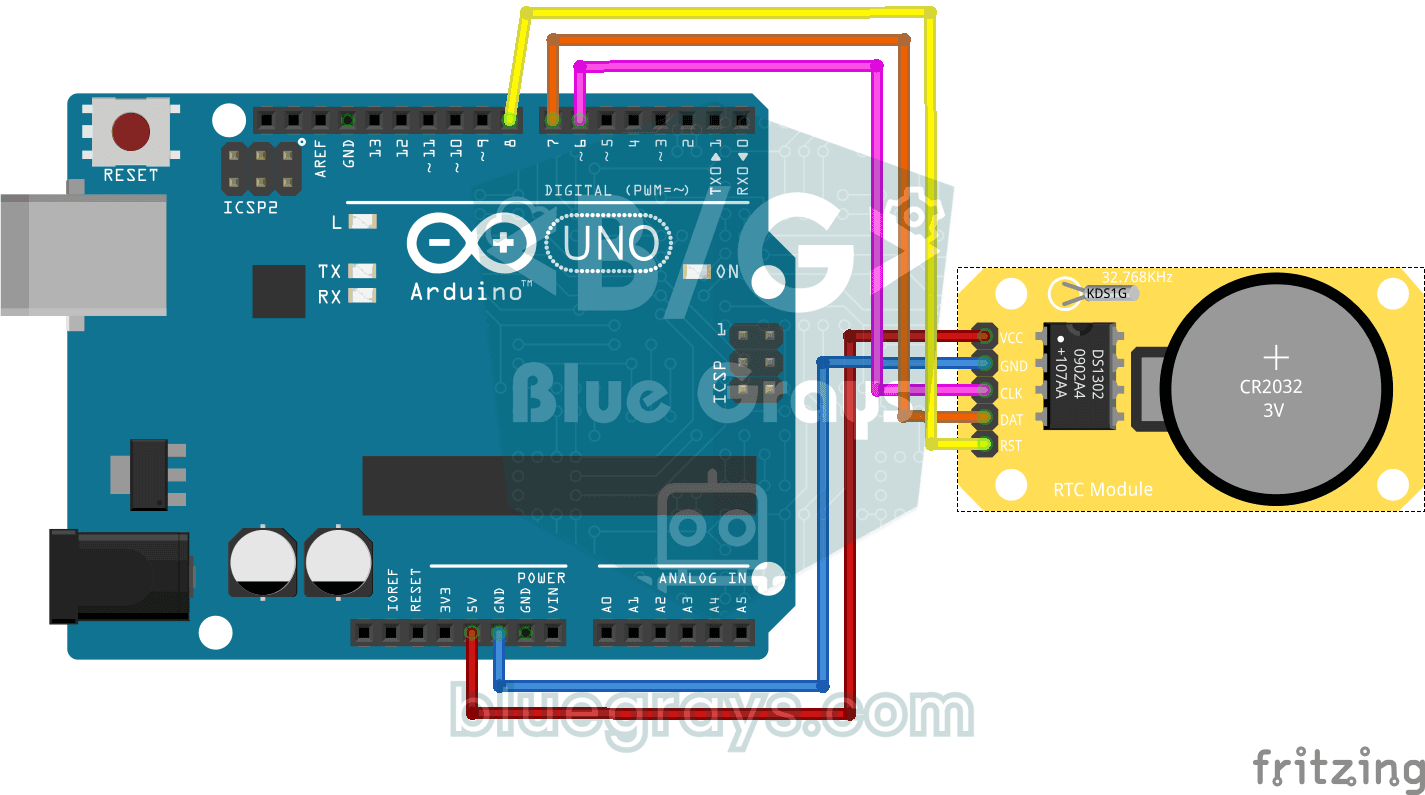
แผนผังวงจร
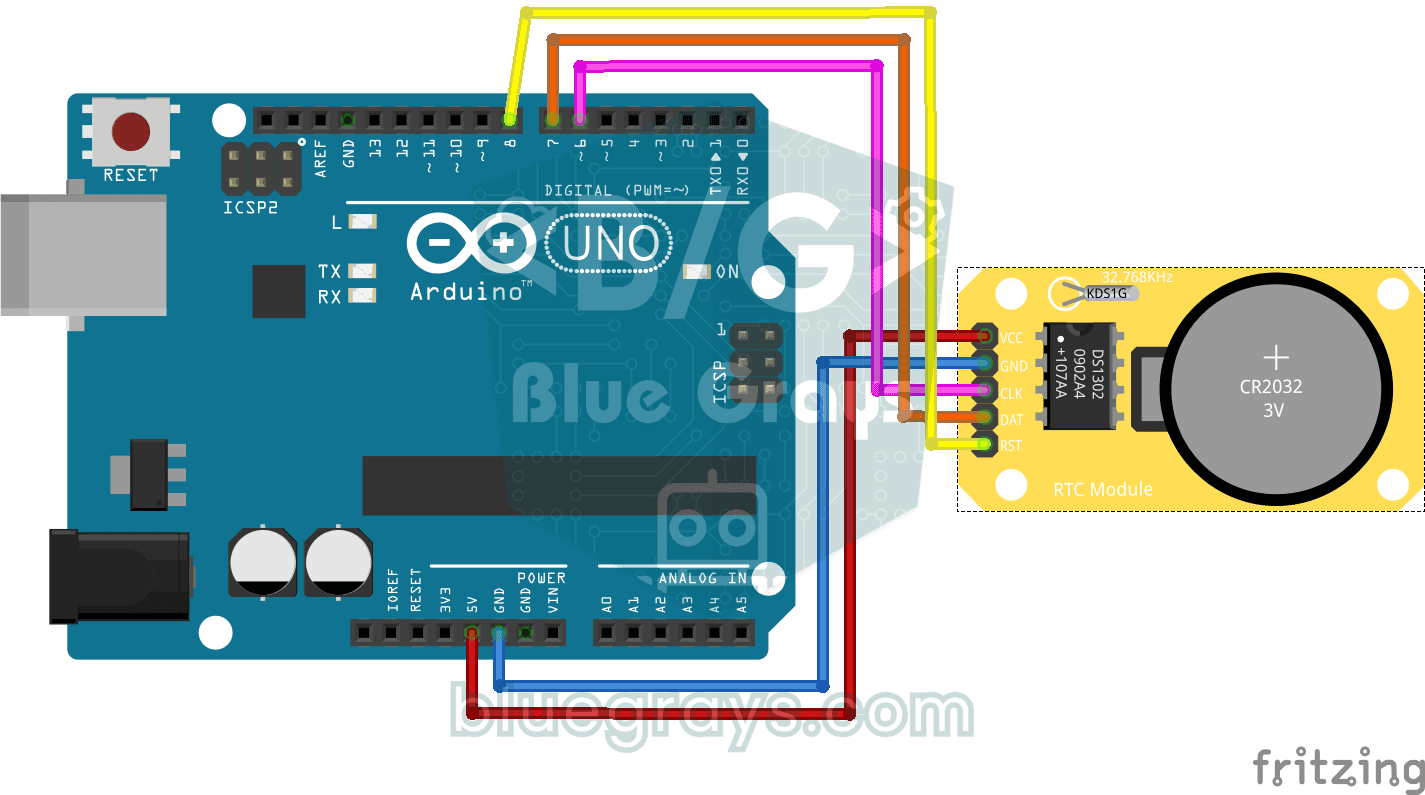
ซอร์สโค้ด
1// ─────────────────────────────────────────
2//   BlueGrays · bluegrays.com
3//   DS1302 RTC Clock Module Setup
4// ─────────────────────────────────────────
5// If the RTC's time is invalid (new module, flat battery) it writes the
6// compile date and time to the DS1302 once, then prints the date and time
7// to the Serial Monitor every second. The module's battery keeps the time
8// with the power off; later starts do not set it again.
9//
10// Pins:
11//   D6 -> RTC CLK
12//   D7 -> RTC DAT
13//   D8 -> RTC RST
14//   RTC VCC to 5V, GND to GND
15
16#include <virtuabotixRTC.h>   // DS1302 library
17
18// Pins: CLK, DAT, RST
19virtuabotixRTC myRTC(6, 7, 8);
20
21void setup() {
22  Serial.begin(9600);   // Serial at 9600 baud
23
24  // Read the RTC first. A year below 2024 or a month outside 1-12 means the time was never set;
25  // write the compile time. If it is valid leave it, so uploading again or power cycling the
26  // Arduino keeps the time.
27  myRTC.updateTime();
28  if (myRTC.year < 2024 || myRTC.month < 1 || myRTC.month > 12) {
29    setFromCompileTime();
30  }
31}
32
33// Writes the compile time (__DATE__ "Oct 28 2026", __TIME__ "13:42:15") to the RTC. Uploading takes
34// a few seconds, so the clock starts that far behind.
35void setFromCompileTime() {
36  const char *date = __DATE__;
37  const char *time = __TIME__;
38  const char *months = "JanFebMarAprMayJunJulAugSepOctNovDec";
39  char monthName[4] = {date[0], date[1], date[2], '\0'};
40
41  int month = (strstr(months, monthName) - months) / 3 + 1;   // "Oct" -> 10
42  int day = atoi(date + 4);
43  int year = atoi(date + 7);
44  int hour = atoi(time);
45  int minute = atoi(time + 3);
46  int second = atoi(time + 6);
47
48  // Day of the week (Sakamoto's method), 0 = Sunday
49  int offsets[] = {0, 3, 2, 5, 0, 3, 5, 1, 4, 6, 2, 4};
50  int y = year - (month < 3);
51  int weekday = (y + y / 4 - y / 100 + y / 400 + offsets[month - 1] + day) % 7;
52  if (weekday == 0) {
53    weekday = 7;   // Monday = 1 ... Sunday = 7
54  }
55
56  // Order: s, min, h, weekday, day, month, year
57  myRTC.setDS1302Time(second, minute, hour, weekday, day, month, year);
58}
59
60void loop() {
61  // Read the current time from the RTC module
62  myRTC.updateTime();
63
64  // Print the time (day/month/year h:m:s)
65  Serial.print("Current Date/Time: ");
66  Serial.print(myRTC.dayofmonth);
67  Serial.print("/");
68  Serial.print(myRTC.month);
69  Serial.print("/");
70  Serial.print(myRTC.year);
71  Serial.print("  ");
72  Serial.print(myRTC.hours);
73  Serial.print(":");
74  Serial.print(myRTC.minutes);
75  Serial.print(":");
76  Serial.println(myRTC.seconds);
77
78  delay(1000);   // Wait 1 s
79}
80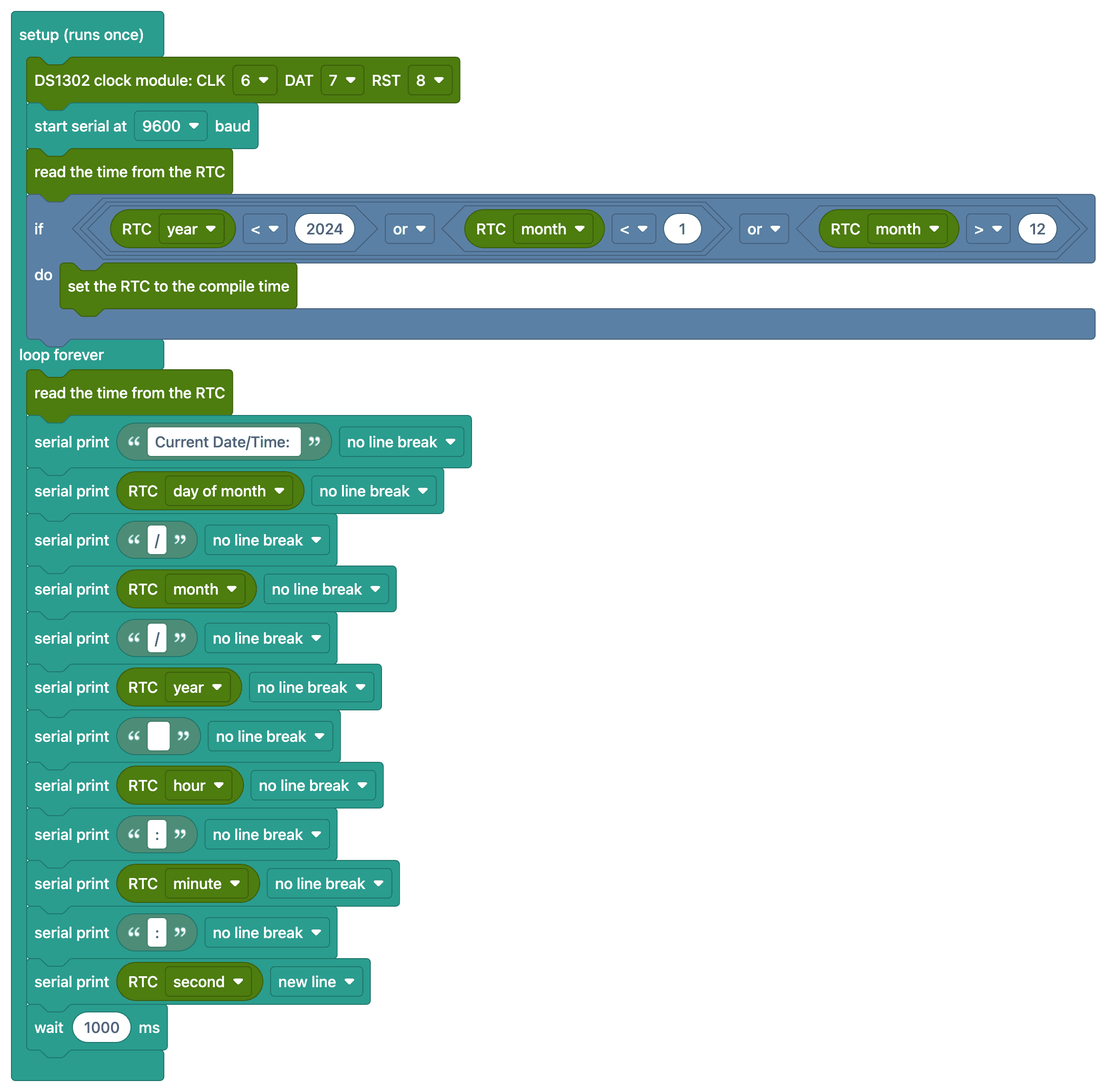
FAQ
โมดูล RTC ใช้ทำอะไร
โมดูลนาฬิกาเวลาจริง (RTC) ใช้แบตเตอรี่บนโมดูลเพื่อให้เดินนาฬิกาและเก็บวันที่ต่อได้แม้ปิด Arduino เนื่องจากตัวนับ millis() ของ Arduino เริ่มใหม่จากศูนย์ทุกครั้งที่เปิดเครื่อง จึงต้องใช้ RTC เมื่อต้องการข้อมูลเวลาจริง
ตั้งเวลาแค่ครั้งเดียวก็พอไหม
พอ โค้ดจะอ่านเวลาจากโมดูลก่อน หากยังไม่เคยตั้งเวลา ก็จะบันทึกวันที่และเวลาขณะคอมไพล์โค้ดลงไปครั้งเดียว หากเวลาถูกต้องอยู่แล้วก็จะไม่เปลี่ยนค่า ดังนั้นการอัปโหลดโค้ดใหม่หรือปิดแล้วเปิด Arduino จึงไม่ทำให้เวลาที่ตั้งไว้เสีย และไม่ต้องใส่เครื่องหมายคอมเมนต์เพื่อปิดการทำงานของบรรทัดใดเอง
เวลาของนาฬิกาค่อยๆ คลาดเคลื่อน เป็นเรื่องปกติไหม
DS1302 ใช้คริสตัลเป็นแหล่งกำเนิดสัญญาณนาฬิกา จึงอาจคลาดเคลื่อนวันละไม่กี่วินาที หากต้องการนาฬิกาที่แม่นยำขึ้น แนะนำโมดูล DS3231 ที่มีการชดเชยอุณหภูมิ (คลาดเคลื่อนประมาณ ±1 นาทีต่อปี)
ถ้าแบตเตอรี่ในโมดูลหมดจะเกิดอะไรขึ้น
นาฬิกาจะเดินต่อได้ตราบใดที่ Arduino ยังได้รับไฟ แต่หากไฟดับและแบตเตอรี่หมดด้วย นาฬิกาจะรีเซ็ตและต้องตั้งเวลาใหม่ โดยทั่วไปแบตเตอรี่ CR2032 ใช้งานได้นานหลายปี