
รถบังคับ Bluetooth ด้วย ESP32 (L298N)
บังคับรถ 2 ล้อผ่าน Bluetooth ด้วย จอยสติ๊ก บนโทรศัพท์ ไม่ต้องใช้อินเทอร์เน็ต รองรับ iPhone และ Android โปรเจกต์นี้เป็นคู่มือทีละขั้นตอนของเทมเพลต Bluetooth รีโมตรถ ในแอป ใช้ ESP32 L298N และมอเตอร์ 2 ตัว ไปที่ คลังของฉัน › อุปกรณ์ › เพิ่มอุปกรณ์ › Bluetooth เลือกรีโมตรถ แล้วอัปโหลดโค้ดจาก รับโค้ด ปุ่ม ตั้งค่าเป็นแผงควบคุม Bluetooth ในหน้านี้จะเปิดตัวช่วยตั้งค่าพร้อมเทมเพลตนี้
วิดีโอ
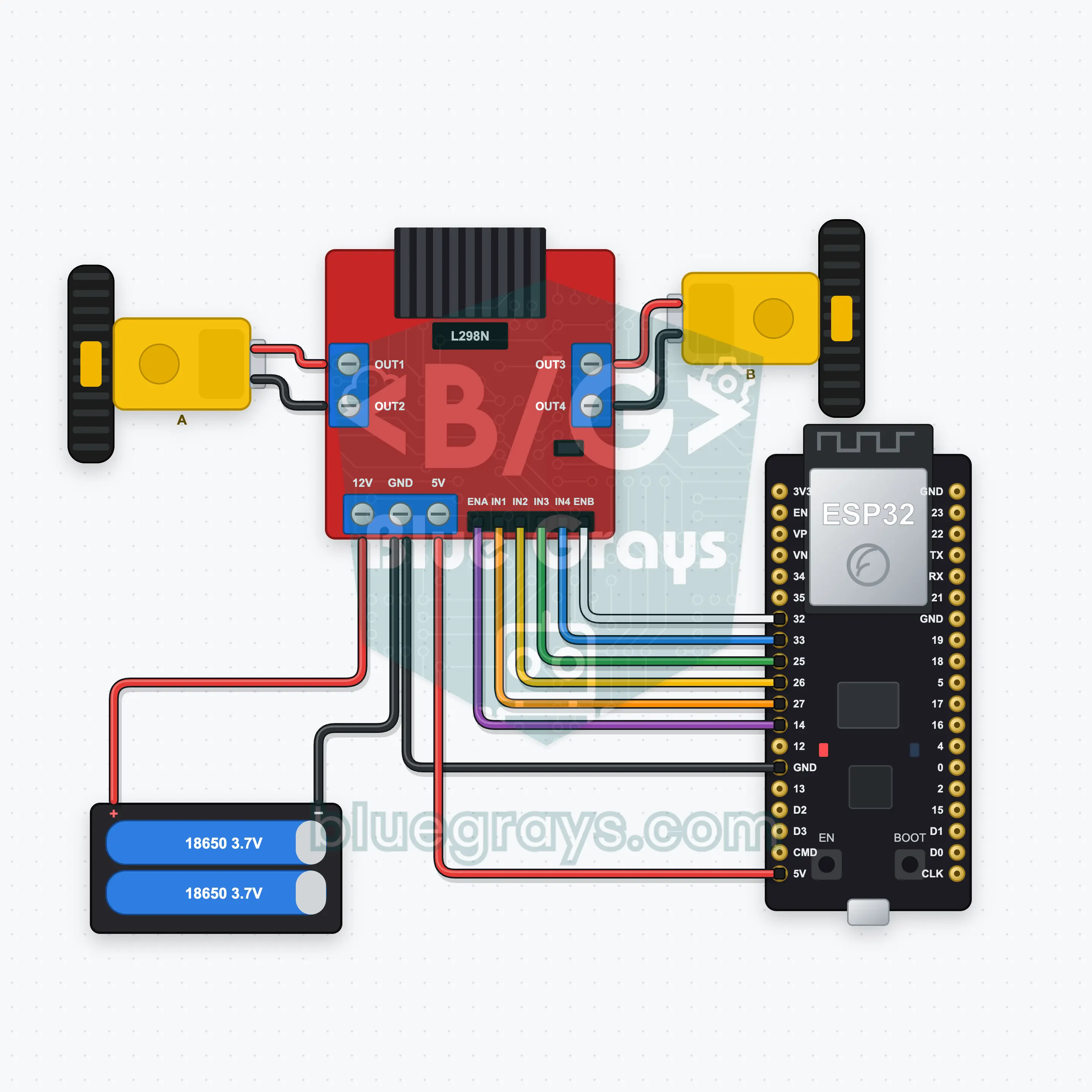
แผนผังวงจร
ซอร์สโค้ด
1// ┌───────────────────────────┐
2// │ BlueGrays · bluegrays.com │
3// │ Bluetooth · ESP32         │
4// │ BG-Araba                  │
5// └───────────────────────────┘
6// Car remote
7// Arduino IDE board: ESP32 Dev Module
8// the BLE library comes with the ESP32 board package, nothing extra to install
9
10#include <BLEDevice.h>
11#include <BLEServer.h>
12#include <BLE2902.h>
13
14const char BLE_NAME[] = "BG-Araba";  // the board advertises with this name, the app finds it in the list by it
15
16// Pins: change them here if you wired differently
17const int ENA = 14, IN1 = 27, IN2 = 26;  // Motor A (ENA, IN1, IN2) is the left wheel, motor B (ENB, IN3, IN4) the right one
18const int ENB = 32, IN3 = 25, IN4 = 33;
19const unsigned long COMMAND_TIMEOUT_MS = 500;  // Safety: the motors stop if no command arrives for 500 ms (the app repeats it while you drive)
20
21void btWrite(const char *text);
22void onValue(const char *key, const char *value);
23void sendAll();
24void onLinkLost();
25
26// ── The app sends "key=value" lines; on "?" the board sends all its values ──
27char line[65];
28uint8_t lineLen = 0;
29unsigned long lastRxMs = 0;
30
31bool is(const char *a, const char *b) { return strcmp(a, b) == 0; }
32bool isOn(const char *v) { return v[0] == '1'; }
33
34void sendText(const char *key, const char *value) {
35  char out[72];
36  snprintf(out, sizeof(out), "%s=%s\n", key, value);
37  btWrite(out);
38}
39
40void sendInt(const char *key, long value) {
41  char text[12];
42  snprintf(text, sizeof(text), "%ld", value);
43  sendText(key, text);
44}
45
46void sendFloat(const char *key, float value) {
47  char text[16];
48  dtostrf(value, 1, 1, text);
49  sendText(key, text);
50}
51
52void handleLine(char *text) {
53  char *eq = strchr(text, '=');
54  if (eq == nullptr) {
55    if (text[strlen(text) - 1] == '?') {
56      btWrite("@v=1.0\n");  // the "@v" line tells the app the code version
57      sendAll();
58    }
59    return;
60  }
61  *eq = '\0';
62  onValue(text, eq + 1);
63}
64
65void feed(char c) {
66  lastRxMs = millis();
67  if (c == '\n' || c == '\r') {
68    if (lineLen == 0) return;
69    line[lineLen] = '\0';
70    lineLen = 0;
71    handleLine(line);
72  } else if (lineLen < sizeof(line) - 1) {
73    line[lineLen++] = c;
74  }
75}
76
77// ── Bluetooth (Nordic UART) ──
78#define UART_SERVICE "6E400001-B5A3-F393-E0A9-E50E24DCCA9E"
79#define UART_RX "6E400002-B5A3-F393-E0A9-E50E24DCCA9E"
80#define UART_TX "6E400003-B5A3-F393-E0A9-E50E24DCCA9E"
81
82BLECharacteristic *txChar = nullptr;
83volatile bool linked = false;
84volatile bool linkLost = false;
85// incoming bytes move from the Bluetooth task to loop() through a small ring buffer
86const int RX_SIZE = 256;
87volatile uint8_t rxBuf[RX_SIZE];
88volatile int rxHead = 0, rxTail = 0;
89
90class ServerEvents : public BLEServerCallbacks {
91  void onConnect(BLEServer *server) override { linked = true; }
92  void onDisconnect(BLEServer *server) override { linked = false; linkLost = true; }
93};
94
95class RxEvents : public BLECharacteristicCallbacks {
96  void onWrite(BLECharacteristic *c) override {
97    auto v = c->getValue();
98    for (size_t i = 0; i < v.length(); i++) {
99      int next = (rxHead + 1) % RX_SIZE;
100      if (next == rxTail) break;
101      rxBuf[rxHead] = (uint8_t)v[i];
102      rxHead = next;
103    }
104  }
105};
106
107// lines go out in 20-byte packets (works with every phone)
108void btWrite(const char *text) {
109  if (!linked || txChar == nullptr) return;
110  size_t n = strlen(text);
111  for (size_t i = 0; i < n; i += 20) {
112    size_t len = n - i < 20 ? n - i : 20;
113    txChar->setValue((uint8_t *)text + i, len);
114    txChar->notify();
115    delay(4);
116  }
117}
118
119void btBegin() {
120  BLEDevice::init(BLE_NAME);
121  BLEServer *server = BLEDevice::createServer();
122  server->setCallbacks(new ServerEvents());
123  BLEService *uart = server->createService(UART_SERVICE);
124  txChar = uart->createCharacteristic(UART_TX, BLECharacteristic::PROPERTY_NOTIFY);
125  txChar->addDescriptor(new BLE2902());
126  BLECharacteristic *rx = uart->createCharacteristic(UART_RX, BLECharacteristic::PROPERTY_WRITE | BLECharacteristic::PROPERTY_WRITE_NR);
127  rx->setCallbacks(new RxEvents());
128  uart->start();
129  BLEAdvertisementData adv;
130  adv.setFlags(0x06);
131  adv.setCompleteServices(BLEUUID(UART_SERVICE));
132  BLEAdvertisementData scan;
133  scan.setName(BLE_NAME);
134  BLEAdvertising *advertising = BLEDevice::getAdvertising();
135  advertising->setAdvertisementData(adv);
136  advertising->setScanResponseData(scan);
137  BLEDevice::startAdvertising();
138}
139
140void btPoll() {
141  while (rxTail != rxHead) {
142    char c = (char)rxBuf[rxTail];
143    rxTail = (rxTail + 1) % RX_SIZE;
144    feed(c);
145  }
146  if (linkLost) {
147    linkLost = false;
148    onLinkLost();
149    delay(100);
150    BLEDevice::startAdvertising();
151  }
152}
153
154// ── ESP32 ──
155int speedLimit = 80;  // speed limit from the app (0–100 %)
156unsigned long lastCommandMs = 0;
157bool moving = false;
158
159// if the car drives backwards, swap that motor's two wires
160void motor(int en, int a, int b, int power) {
161  power = constrain(power, -100, 100);
162  digitalWrite(a, power > 0 ? HIGH : LOW);
163  digitalWrite(b, power < 0 ? HIGH : LOW);
164  analogWrite(en, abs(power) * speedLimit * 255L / 10000);
165}
166
167void drive(int left, int right) {
168  motor(ENA, IN1, IN2, left);
169  motor(ENB, IN3, IN4, right);
170  moving = left != 0 || right != 0;
171  lastCommandMs = millis();
172}
173
174void onValue(const char *key, const char *value) {
175  if (is(key, "joy")) {  // Joystick: y is forward/back, x turns; mixed into left and right wheel speeds
176    const char *comma = strchr(value, ',');
177    int x = atoi(value), y = comma ? atoi(comma + 1) : 0;
178    drive(constrain(y + x, -100, 100), constrain(y - x, -100, 100));
179  } else if (is(key, "yon")) {
180    if (is(value, "ileri")) drive(100, 100);
181    else if (is(value, "geri")) drive(-100, -100);
182    else if (is(value, "sol")) drive(-70, 70);
183    else if (is(value, "sag")) drive(70, -70);
184    else drive(0, 0);
185  } else if (is(key, "hiz")) {
186    speedLimit = constrain(atoi(value), 0, 100);
187  }
188}
189
190void sendAll() {
191  sendInt("hiz", speedLimit);
192}
193
194void onLinkLost() {
195  drive(0, 0);  // Connection lost: the motors stop
196}
197
198void setup() {
199  Serial.begin(115200);
200  int pins[] = { ENA, IN1, IN2, ENB, IN3, IN4 };
201  for (int pin : pins) pinMode(pin, OUTPUT);
202  drive(0, 0);
203  btBegin();
204  Serial.print(F("BlueGrays Bluetooth: "));
205  Serial.println(BLE_NAME);
206}
207
208void loop() {
209  btPoll();
210  if (moving && millis() - lastCommandMs > COMMAND_TIMEOUT_MS) drive(0, 0);
211}
212FAQ
ใช้กับ iPhone ได้ไหม ต่างจาก HC-05 อย่างไร
ใช้ได้ทั้ง iPhone และ Android โมดูล Bluetooth แบบคลาสสิก เช่น HC-05 และ HC-06 เชื่อมต่อกับ iPhone ไม่ได้ โปรเจกต์นี้จึงใช้ Bluetooth Low Energy ในตัว ESP32 โดยไม่ต้องมีโมดูลเพิ่ม อย่าจับคู่บอร์ดผ่านการตั้งค่า Bluetooth ของโทรศัพท์ ให้เชื่อมต่อผ่านแอป BlueGrays เท่านั้น
รถวิ่งถอยหลังหรือล้อข้างหนึ่งหมุนผิดทาง แก้อย่างไร
สลับสายไฟ 2 เส้นของมอเตอร์ที่หมุนผิดทางตรงขั้วสกรูของ L298N (มอเตอร์ซ้าย OUT1/OUT2 มอเตอร์ขวา OUT3/OUT4) คอมเมนต์ในโค้ดก็อธิบายไว้เช่นกัน หากกดเดินหน้าแล้วรถหมุนอยู่กับที่ แสดงว่ามีมอเตอร์เพียงตัวเดียวที่หมุนกลับด้าน หากทั้งคู่หมุนถูกทางแต่กดซ้ายแล้วไปขวา ให้สลับมอเตอร์ซ้ายกับขวา
จ่ายไฟให้ ESP32 อย่างไร ต่อ USB กับแบตเตอรี่พร้อมกันได้ไหม
ต่อแบตเตอรี่ 18650 จำนวน 2 ก้อน (7.4 V) เข้าขั้วอินพุต 12V ของ L298N แล้วต่อเอาต์พุต 5V ของ L298N ไปเลี้ยงขา VIN ของ ESP32 โดยต้องเสียบจัมเปอร์เรกูเลเตอร์ 5V บน L298N ไว้ รถจึงทำงานได้โดยไม่ต้องเสียบสาย หากเสียบ USB ขณะอัปโหลดโค้ด ให้ปิดสวิตช์แบตเตอรี่หรือถอดสาย 5V เพื่อไม่ให้แหล่งจ่ายไฟทั้งสองจ่ายไฟชนกัน ต้องต่อ GND ของ L298N และ GND ของ ESP32 เข้าด้วยกันเสมอ
ควบคุมได้ไกลแค่ไหน ถ้าการเชื่อมต่อหลุด รถจะทำอย่างไร
Bluetooth Low Energy มักมีระยะประมาณ 10 ถึง 30 เมตรในพื้นที่โล่ง กำแพงและคนที่ขวางอยู่จะทำให้ระยะสั้นลง หากการเชื่อมต่อหลุด บอร์ดจะหยุดมอเตอร์ทันทีแล้วเริ่มส่งสัญญาณให้ค้นพบอีกครั้ง คุณจึงเชื่อมต่อใหม่จากแอปได้ รถจะหยุดด้วยหากบอร์ดไม่ได้รับคำสั่งนาน 500 ms จึงไม่วิ่งหนีไปเมื่ออยู่นอกระยะ