
ควบคุม LED และรีเลย์ผ่าน Bluetooth ด้วย ESP32
เปิดปิด LED และ รีเลย์ จากโทรศัพท์ผ่าน Bluetooth ไม่ต้องใช้อินเทอร์เน็ตหรือ Wi-Fi โปรเจกต์นี้เป็นคู่มือทีละขั้นตอนของเทมเพลต Bluetooth LED และรีเลย์ ในแอป ใช้ ESP32 กับโมดูลรีเลย์ 5 V ไปที่ คลังของฉัน › อุปกรณ์ › เพิ่มอุปกรณ์ › Bluetooth เลือกเทมเพลต LED และรีเลย์ แล้วอัปโหลดโค้ดด้วย รับโค้ด ปุ่ม ตั้งค่าเป็นแผงควบคุม Bluetooth ในหน้านี้ก็เปิดตัวช่วยตั้งค่าพร้อมเทมเพลตนี้ได้เช่นกัน
วิดีโอ
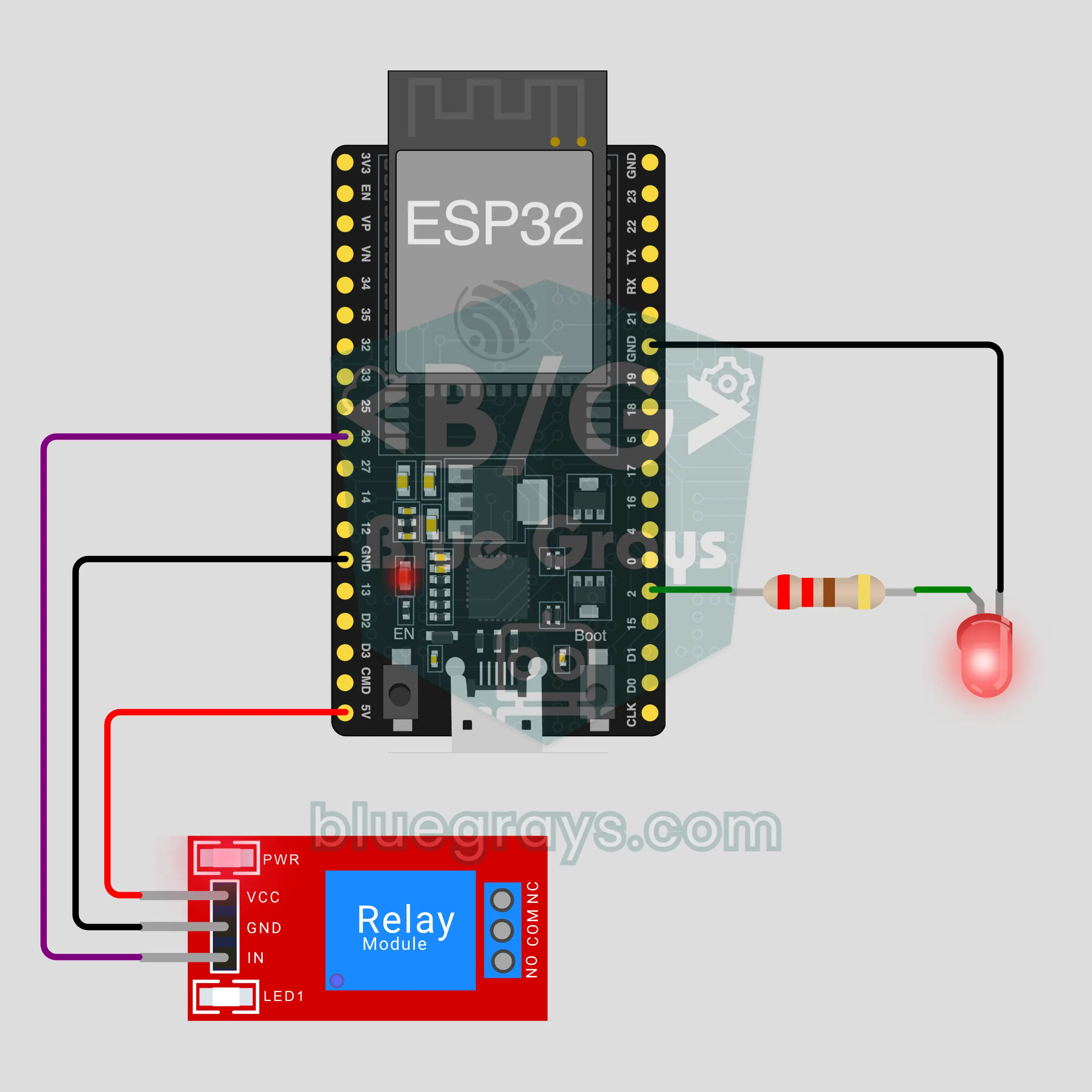
แผนผังวงจร
ซอร์สโค้ด
1// ┌───────────────────────────┐
2// │ BlueGrays · bluegrays.com │
3// │ Bluetooth · ESP32         │
4// │ BG-Lamba                  │
5// └───────────────────────────┘
6// LED and relay
7// Arduino IDE board: ESP32 Dev Module
8// the BLE library comes with the ESP32 board package, nothing extra to install
9
10#include <BLEDevice.h>
11#include <BLEServer.h>
12#include <BLE2902.h>
13
14const char BLE_NAME[] = "BG-Lamba";  // the board advertises with this name, the app finds it in the list by it
15
16// Pins: change them here if you wired differently
17const int LED_PIN = 2;
18const int RELAY_PIN = 26;
19const bool RELAY_ACTIVE_LOW = true;  // most relay modules switch on LOW
20
21void btWrite(const char *text);
22void onValue(const char *key, const char *value);
23void sendAll();
24void onLinkLost();
25
26// ── The app sends "key=value" lines; on "?" the board sends all its values ──
27char line[65];
28uint8_t lineLen = 0;
29unsigned long lastRxMs = 0;
30
31bool is(const char *a, const char *b) { return strcmp(a, b) == 0; }
32bool isOn(const char *v) { return v[0] == '1'; }
33
34void sendText(const char *key, const char *value) {
35  char out[72];
36  snprintf(out, sizeof(out), "%s=%s\n", key, value);
37  btWrite(out);
38}
39
40void sendInt(const char *key, long value) {
41  char text[12];
42  snprintf(text, sizeof(text), "%ld", value);
43  sendText(key, text);
44}
45
46void sendFloat(const char *key, float value) {
47  char text[16];
48  dtostrf(value, 1, 1, text);
49  sendText(key, text);
50}
51
52void handleLine(char *text) {
53  char *eq = strchr(text, '=');
54  if (eq == nullptr) {
55    if (text[strlen(text) - 1] == '?') {
56      btWrite("@v=1.0\n");  // the "@v" line tells the app the code version
57      sendAll();
58    }
59    return;
60  }
61  *eq = '\0';
62  onValue(text, eq + 1);
63}
64
65void feed(char c) {
66  lastRxMs = millis();
67  if (c == '\n' || c == '\r') {
68    if (lineLen == 0) return;
69    line[lineLen] = '\0';
70    lineLen = 0;
71    handleLine(line);
72  } else if (lineLen < sizeof(line) - 1) {
73    line[lineLen++] = c;
74  }
75}
76
77// ── Bluetooth (Nordic UART) ──
78#define UART_SERVICE "6E400001-B5A3-F393-E0A9-E50E24DCCA9E"
79#define UART_RX "6E400002-B5A3-F393-E0A9-E50E24DCCA9E"
80#define UART_TX "6E400003-B5A3-F393-E0A9-E50E24DCCA9E"
81
82BLECharacteristic *txChar = nullptr;
83volatile bool linked = false;
84volatile bool linkLost = false;
85// incoming bytes move from the Bluetooth task to loop() through a small ring buffer
86const int RX_SIZE = 256;
87volatile uint8_t rxBuf[RX_SIZE];
88volatile int rxHead = 0, rxTail = 0;
89
90class ServerEvents : public BLEServerCallbacks {
91  void onConnect(BLEServer *server) override { linked = true; }
92  void onDisconnect(BLEServer *server) override { linked = false; linkLost = true; }
93};
94
95class RxEvents : public BLECharacteristicCallbacks {
96  void onWrite(BLECharacteristic *c) override {
97    auto v = c->getValue();
98    for (size_t i = 0; i < v.length(); i++) {
99      int next = (rxHead + 1) % RX_SIZE;
100      if (next == rxTail) break;
101      rxBuf[rxHead] = (uint8_t)v[i];
102      rxHead = next;
103    }
104  }
105};
106
107// lines go out in 20-byte packets (works with every phone)
108void btWrite(const char *text) {
109  if (!linked || txChar == nullptr) return;
110  size_t n = strlen(text);
111  for (size_t i = 0; i < n; i += 20) {
112    size_t len = n - i < 20 ? n - i : 20;
113    txChar->setValue((uint8_t *)text + i, len);
114    txChar->notify();
115    delay(4);
116  }
117}
118
119void btBegin() {
120  BLEDevice::init(BLE_NAME);
121  BLEServer *server = BLEDevice::createServer();
122  server->setCallbacks(new ServerEvents());
123  BLEService *uart = server->createService(UART_SERVICE);
124  txChar = uart->createCharacteristic(UART_TX, BLECharacteristic::PROPERTY_NOTIFY);
125  txChar->addDescriptor(new BLE2902());
126  BLECharacteristic *rx = uart->createCharacteristic(UART_RX, BLECharacteristic::PROPERTY_WRITE | BLECharacteristic::PROPERTY_WRITE_NR);
127  rx->setCallbacks(new RxEvents());
128  uart->start();
129  BLEAdvertisementData adv;
130  adv.setFlags(0x06);
131  adv.setCompleteServices(BLEUUID(UART_SERVICE));
132  BLEAdvertisementData scan;
133  scan.setName(BLE_NAME);
134  BLEAdvertising *advertising = BLEDevice::getAdvertising();
135  advertising->setAdvertisementData(adv);
136  advertising->setScanResponseData(scan);
137  BLEDevice::startAdvertising();
138}
139
140void btPoll() {
141  while (rxTail != rxHead) {
142    char c = (char)rxBuf[rxTail];
143    rxTail = (rxTail + 1) % RX_SIZE;
144    feed(c);
145  }
146  if (linkLost) {
147    linkLost = false;
148    onLinkLost();
149    delay(100);
150    BLEDevice::startAdvertising();
151  }
152}
153
154// ── ESP32 ──
155bool ledOn = false, relayOn = false;
156
157void setRelay(bool on) {
158  if (RELAY_ACTIVE_LOW) {
159    if (on) { pinMode(RELAY_PIN, OUTPUT); digitalWrite(RELAY_PIN, LOW); }
160    else { pinMode(RELAY_PIN, INPUT); }  // off releases the pin: a 3.3 V HIGH is not enough to turn a 5 V module off
161  } else {
162    pinMode(RELAY_PIN, OUTPUT); digitalWrite(RELAY_PIN, on ? HIGH : LOW);
163  }
164}
165
166void apply() {
167  digitalWrite(LED_PIN, ledOn ? HIGH : LOW);
168  setRelay(relayOn);
169}
170
171void onValue(const char *key, const char *value) {
172  if (is(key, "led")) ledOn = isOn(value);
173  else if (is(key, "role")) relayOn = isOn(value);
174  apply();
175}
176
177void sendAll() {
178  sendInt("led", ledOn);
179  sendInt("role", relayOn);
180}
181
182void onLinkLost() {
183}
184
185void setup() {
186  Serial.begin(115200);
187  pinMode(LED_PIN, OUTPUT);
188  apply();
189  btBegin();
190  Serial.print(F("BlueGrays Bluetooth: "));
191  Serial.println(BLE_NAME);
192}
193
194void loop() {
195  btPoll();
196}
197FAQ
ใช้กับ iPhone ได้ไหม
ใช้ได้ Bluetooth Low Energy (BLE) ในตัว ESP32 สื่อสารได้กับทั้ง iPhone และ Android แม้ iPhone จะเชื่อมต่อกับโมดูล Bluetooth แบบคลาสสิกอย่าง HC-05 และ HC-06 ไม่ได้ แต่โปรเจกต์นี้ไม่ต้องใช้โมดูลเหล่านั้น อย่าจับคู่บอร์ดผ่านการตั้งค่า Bluetooth ของโทรศัพท์ บอร์ด BLE อาจไม่ปรากฏในหน้านั้น ซึ่งเป็นเรื่องปกติ ให้เชื่อมต่อผ่านแอป BlueGrays
ต่อหลอดไฟจริงเข้ากับรีเลย์ได้ไหม
โมดูลรีเลย์ตัดต่อไฟ 220 V ได้ แต่ไฟบ้านเป็นอันตรายถึงชีวิต โปรเจกต์นี้ไม่ได้ต่ออะไรเข้าขั้ว COM และ NO ของรีเลย์ เสียงคลิกและ LED บนโมดูลใช้บอกว่ารีเลย์ทำงานแล้ว หากต้องการลองต่อโหลด ให้เริ่มจากวงจรแรงดันต่ำ เช่น แบตเตอรี่หรืออะแดปเตอร์ 12 V หากจะใช้ไฟ 220 V ต้องทำร่วมกับผู้ที่มีความรู้ด้านนี้ อย่าปล่อยให้สายไฟเปลือยหรือขั้วสกรูเปิดโล่ง และอย่าใช้กระแสเกินพิกัดที่ระบุบนโมดูล
ทำไม LED สีฟ้าบนบอร์ดถึงติดพร้อมกับ LED ที่ฉันต่อไว้
บอร์ด ESP32 DevKit หลายรุ่นมี LED สีน้ำเงินบนบอร์ดต่ออยู่กับ GPIO2 เช่นกัน เมื่อ LED ของคุณต่อขาเดียวกัน ทั้งสองดวงจึงกะพริบพร้อมกัน ซึ่งเป็นการทำงานปกติ และยังมีประโยชน์ด้วย เพราะแม้สายไฟจะหลวม LED สีน้ำเงินก็ยังบอกได้ว่าคำสั่งส่งถึงบอร์ดแล้ว หากไม่ต้องการให้ติดพร้อมกัน ให้ย้าย LED ไปขาอื่น เช่น GPIO4 แล้วเปลี่ยนค่า LED_PIN ในโค้ด
ต้องใช้อินเทอร์เน็ตหรือ Wi-Fi ไหม และใช้งานได้ไกลแค่ไหน
ไม่จำเป็น โทรศัพท์เชื่อมต่อกับบอร์ดโดยตรงผ่าน Bluetooth โดยไม่ใช้เราเตอร์หรือเซิร์ฟเวอร์ ระยะใช้งานภายในบ้านมักอยู่ที่ประมาณ 10 เมตร และผนังจะทำให้ระยะสั้นลง บอร์ดเชื่อมต่อกับโทรศัพท์ได้ครั้งละเครื่อง เมื่อโทรศัพท์เครื่องนั้นตัดการเชื่อมต่อ บอร์ดจะเริ่มส่งสัญญาณให้ค้นพบอีกครั้งเพื่อให้เครื่องอื่นเชื่อมต่อได้ หากต้องการควบคุมจากนอกบ้าน ให้เลือกโปรเจกต์ที่ใช้แผงควบคุม IoT ผ่าน Wi-Fi ในแอป