
วัดอุณหภูมิและความชื้นผ่าน Bluetooth ด้วย ESP32 (DHT11)
ดูอุณหภูมิและความชื้นในห้องผ่านโทรศัพท์ด้วย ESP32 และ DHT11 ช่องแสดงค่า 2 ช่องและกราฟอัปเดตทุก 2 วินาทีโดยไม่ใช้อินเทอร์เน็ต คู่มือนี้สอนใช้เทมเพลต Bluetooth อุณหภูมิและความชื้น ทีละขั้นตอน ไปที่ คลังของฉัน › อุปกรณ์ › เพิ่มอุปกรณ์ › Bluetooth เลือกเทมเพลตแล้วกด รับโค้ด เพื่ออัปโหลดลงบอร์ด หรือกด ตั้งค่าเป็นแผงควบคุม Bluetooth ในหน้านี้เพื่อเปิดตัวช่วยตั้งค่า
วิดีโอ
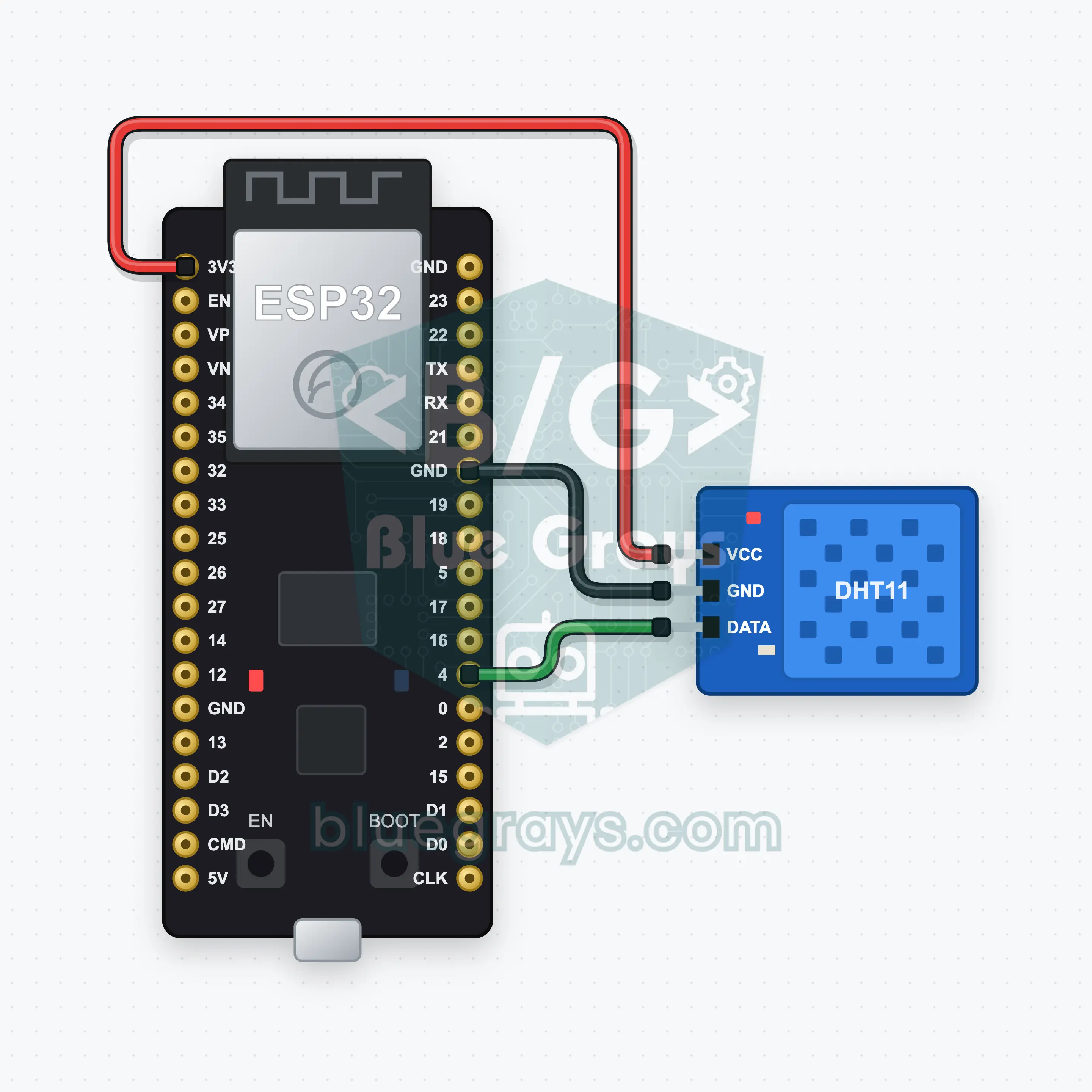
แผนผังวงจร
ซอร์สโค้ด
1// ┌───────────────────────────┐
2// │ BlueGrays · bluegrays.com │
3// │ Bluetooth · ESP32         │
4// │ BG-Hava                   │
5// └───────────────────────────┘
6// Temperature and humidity
7// Arduino IDE board: ESP32 Dev Module
8// the BLE library comes with the ESP32 board package, nothing extra to install
9
10#include <BLEDevice.h>
11#include <BLEServer.h>
12#include <BLE2902.h>
13#include <DHT.h>  // Library Manager: 'DHT sensor library' (Adafruit)
14
15const char BLE_NAME[] = "BG-Hava";  // the board advertises with this name, the app finds it in the list by it
16
17// Pins: change them here if you wired differently
18const int DHT_PIN = 4;
19const unsigned long READ_EVERY_MS = 2000;  // a new reading is sent every 2 seconds
20
21void btWrite(const char *text);
22void onValue(const char *key, const char *value);
23void sendAll();
24void onLinkLost();
25
26// ── The app sends "key=value" lines; on "?" the board sends all its values ──
27char line[65];
28uint8_t lineLen = 0;
29unsigned long lastRxMs = 0;
30
31bool is(const char *a, const char *b) { return strcmp(a, b) == 0; }
32bool isOn(const char *v) { return v[0] == '1'; }
33
34void sendText(const char *key, const char *value) {
35  char out[72];
36  snprintf(out, sizeof(out), "%s=%s\n", key, value);
37  btWrite(out);
38}
39
40void sendInt(const char *key, long value) {
41  char text[12];
42  snprintf(text, sizeof(text), "%ld", value);
43  sendText(key, text);
44}
45
46void sendFloat(const char *key, float value) {
47  char text[16];
48  dtostrf(value, 1, 1, text);
49  sendText(key, text);
50}
51
52void handleLine(char *text) {
53  char *eq = strchr(text, '=');
54  if (eq == nullptr) {
55    if (text[strlen(text) - 1] == '?') {
56      btWrite("@v=1.0\n");  // the "@v" line tells the app the code version
57      sendAll();
58    }
59    return;
60  }
61  *eq = '\0';
62  onValue(text, eq + 1);
63}
64
65void feed(char c) {
66  lastRxMs = millis();
67  if (c == '\n' || c == '\r') {
68    if (lineLen == 0) return;
69    line[lineLen] = '\0';
70    lineLen = 0;
71    handleLine(line);
72  } else if (lineLen < sizeof(line) - 1) {
73    line[lineLen++] = c;
74  }
75}
76
77// ── Bluetooth (Nordic UART) ──
78#define UART_SERVICE "6E400001-B5A3-F393-E0A9-E50E24DCCA9E"
79#define UART_RX "6E400002-B5A3-F393-E0A9-E50E24DCCA9E"
80#define UART_TX "6E400003-B5A3-F393-E0A9-E50E24DCCA9E"
81
82BLECharacteristic *txChar = nullptr;
83volatile bool linked = false;
84volatile bool linkLost = false;
85// incoming bytes move from the Bluetooth task to loop() through a small ring buffer
86const int RX_SIZE = 256;
87volatile uint8_t rxBuf[RX_SIZE];
88volatile int rxHead = 0, rxTail = 0;
89
90class ServerEvents : public BLEServerCallbacks {
91  void onConnect(BLEServer *server) override { linked = true; }
92  void onDisconnect(BLEServer *server) override { linked = false; linkLost = true; }
93};
94
95class RxEvents : public BLECharacteristicCallbacks {
96  void onWrite(BLECharacteristic *c) override {
97    auto v = c->getValue();
98    for (size_t i = 0; i < v.length(); i++) {
99      int next = (rxHead + 1) % RX_SIZE;
100      if (next == rxTail) break;
101      rxBuf[rxHead] = (uint8_t)v[i];
102      rxHead = next;
103    }
104  }
105};
106
107// lines go out in 20-byte packets (works with every phone)
108void btWrite(const char *text) {
109  if (!linked || txChar == nullptr) return;
110  size_t n = strlen(text);
111  for (size_t i = 0; i < n; i += 20) {
112    size_t len = n - i < 20 ? n - i : 20;
113    txChar->setValue((uint8_t *)text + i, len);
114    txChar->notify();
115    delay(4);
116  }
117}
118
119void btBegin() {
120  BLEDevice::init(BLE_NAME);
121  BLEServer *server = BLEDevice::createServer();
122  server->setCallbacks(new ServerEvents());
123  BLEService *uart = server->createService(UART_SERVICE);
124  txChar = uart->createCharacteristic(UART_TX, BLECharacteristic::PROPERTY_NOTIFY);
125  txChar->addDescriptor(new BLE2902());
126  BLECharacteristic *rx = uart->createCharacteristic(UART_RX, BLECharacteristic::PROPERTY_WRITE | BLECharacteristic::PROPERTY_WRITE_NR);
127  rx->setCallbacks(new RxEvents());
128  uart->start();
129  BLEAdvertisementData adv;
130  adv.setFlags(0x06);
131  adv.setCompleteServices(BLEUUID(UART_SERVICE));
132  BLEAdvertisementData scan;
133  scan.setName(BLE_NAME);
134  BLEAdvertising *advertising = BLEDevice::getAdvertising();
135  advertising->setAdvertisementData(adv);
136  advertising->setScanResponseData(scan);
137  BLEDevice::startAdvertising();
138}
139
140void btPoll() {
141  while (rxTail != rxHead) {
142    char c = (char)rxBuf[rxTail];
143    rxTail = (rxTail + 1) % RX_SIZE;
144    feed(c);
145  }
146  if (linkLost) {
147    linkLost = false;
148    onLinkLost();
149    delay(100);
150    BLEDevice::startAdvertising();
151  }
152}
153
154// ── ESP32 ──
155DHT dht(DHT_PIN, DHT11);
156float temperature = NAN, humidity = NAN;
157unsigned long lastReadMs = 0;
158
159// if the sensor can't be read the app gets "@err=dht": check the wiring
160void readSensor() {
161  float t = dht.readTemperature();
162  float h = dht.readHumidity();
163  if (isnan(t) || isnan(h)) {
164    btWrite("@err=dht\n");
165    return;
166  }
167  temperature = t;
168  humidity = h;
169}
170
171void sendReadings() {
172  if (isnan(temperature)) return;
173  sendFloat("sicaklik", temperature);
174  sendInt("nem", lround(humidity));
175}
176
177void onValue(const char *key, const char *value) {
178}
179
180void sendAll() {
181  if (isnan(temperature)) readSensor();
182  sendReadings();
183}
184
185void onLinkLost() {
186}
187
188void setup() {
189  Serial.begin(115200);
190  dht.begin();
191  btBegin();
192  Serial.print(F("BlueGrays Bluetooth: "));
193  Serial.println(BLE_NAME);
194}
195
196void loop() {
197  btPoll();
198  if (millis() - lastReadMs >= READ_EVERY_MS) {
199    lastReadMs = millis();
200    readSensor();
201    sendReadings();
202  }
203}
204FAQ
ใช้กับ iPhone ได้ไหม
ใช้ได้ บอร์ดใช้ Bluetooth Low Energy (BLE) ที่มีใน ESP32 และแอป BlueGrays เชื่อมต่อได้ทั้งบน iPhone และ Android โมดูล Bluetooth แบบคลาสสิกอย่าง HC-05 หรือ HC-06 เชื่อมต่อกับ iPhone ไม่ได้ โปรเจกต์นี้จึงไม่ใช้โมดูลเหล่านั้น ไม่ต้องจับคู่บอร์ดจากการตั้งค่า Bluetooth ของโทรศัพท์ ให้เชื่อมต่อผ่านแอปเท่านั้น
ใช้ DHT22 แทน DHT11 ได้ไหม
ใช้ได้ DHT22 (AM2302) วัดได้แม่นยำกว่าและครอบคลุมช่วงกว้างกว่า คือประมาณ -40 ถึง 80 °C โดยมีความคลาดเคลื่อน ±0.5 °C การต่อสายเหมือนเดิม เทมเพลตในแอปทำมาสำหรับ DHT11 จึงต้องเปลี่ยน DHT11 เป็น DHT22 ในบรรทัด DHT dht(DHT_PIN, DHT11) แล้วอัปโหลดใหม่ สเกลกราฟบนแผงควบคุมตั้งไว้ตามช่วงของ DHT11 คือ 0 ถึง 50 °C
ทำไมค่าถึงเปลี่ยนทุก 2 วินาที และแม่นยำแค่ไหน
DHT11 อ่านค่าได้ไม่เกินวินาทีละครั้ง โค้ดจึงกำหนด READ_EVERY_MS = 2000 เพื่อวัดและส่งค่าทุก 2 วินาที เซ็นเซอร์วัดอุณหภูมิได้ตั้งแต่ 0 ถึง 50 °C และความชื้นตั้งแต่ 20% ถึง 90% โดยมีความคลาดเคลื่อนประมาณ ±2 °C และความชื้น ±5% ซึ่งเพียงพอสำหรับติดตามสภาพห้อง หากต้องการความแม่นยำมากขึ้น ให้เปลี่ยนเป็น DHT22
ถ้าโทรศัพท์อยู่ไกลจากบอร์ด ระบบจะบันทึกค่าที่วัดได้ไว้ไหม
ไม่บันทึก บอร์ดส่งเฉพาะค่าปัจจุบันและไม่เก็บประวัติ กราฟสร้างจากค่าที่ได้รับขณะเปิดแผงควบคุมและเชื่อมต่อกับบอร์ดอยู่ เมื่อโทรศัพท์ออกนอกระยะหรือคุณปิดแอป จะไม่มีจุดข้อมูลใหม่เพิ่มเข้ามา เมื่อเชื่อมต่ออีกครั้ง แอปจะส่ง ? และบอร์ดจะส่งค่าล่าสุดกลับมาทันที