
วิดีโอ
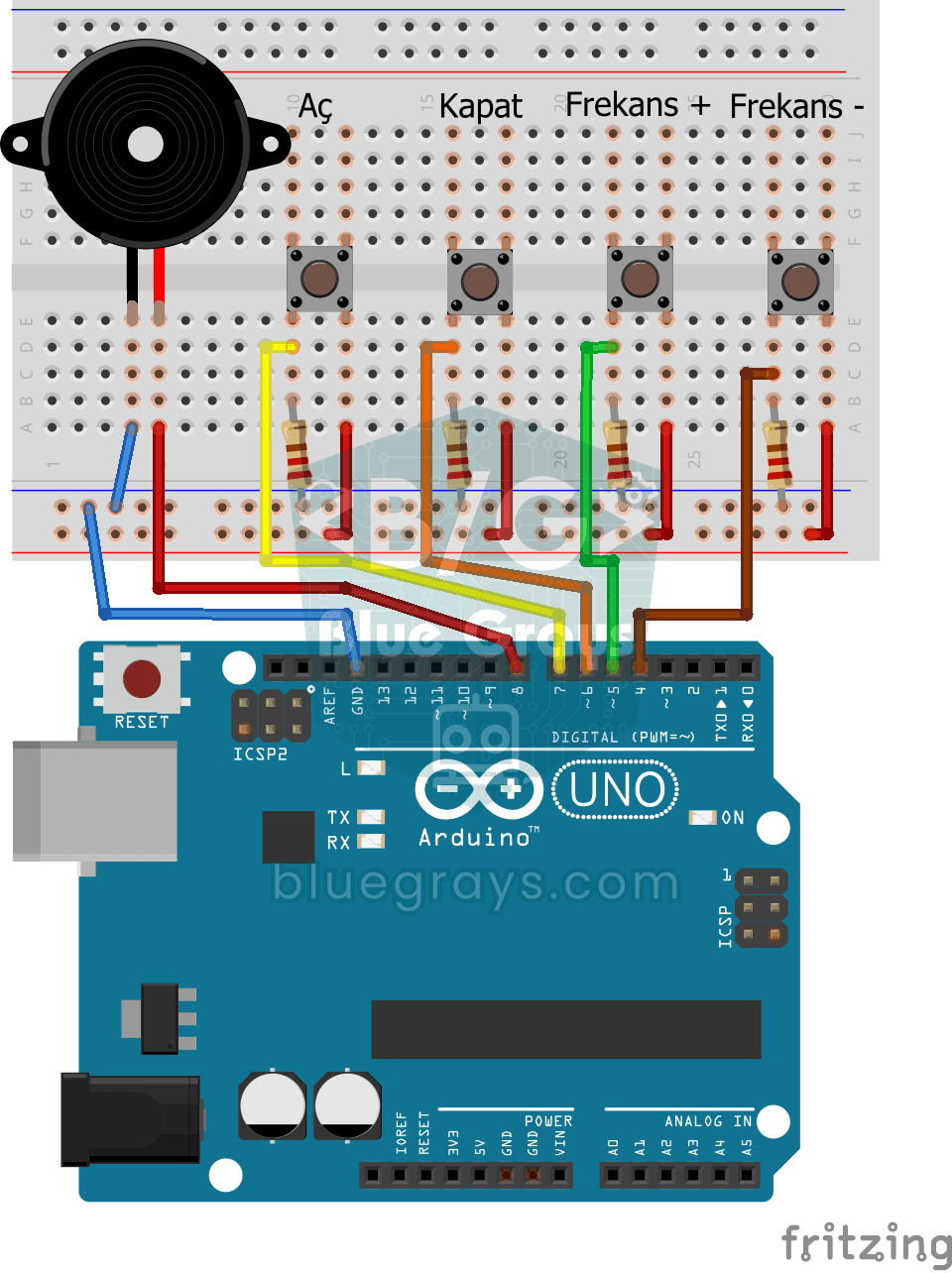
แผนผังวงจร
ซอร์สโค้ด
1// ─────────────────────────────────────────
2//   BlueGrays · bluegrays.com
3//   Frequency Setting with Buzzer
4// ─────────────────────────────────────────
5// Four buttons control the buzzer: On, Off, Frequency + and Frequency -.
6// Pressing On makes the buzzer play at the current frequency. The + and -
7// buttons change it by 50 Hz per press (starting at 300 Hz); the frequency
8// stays within 50-5000 Hz.
9//
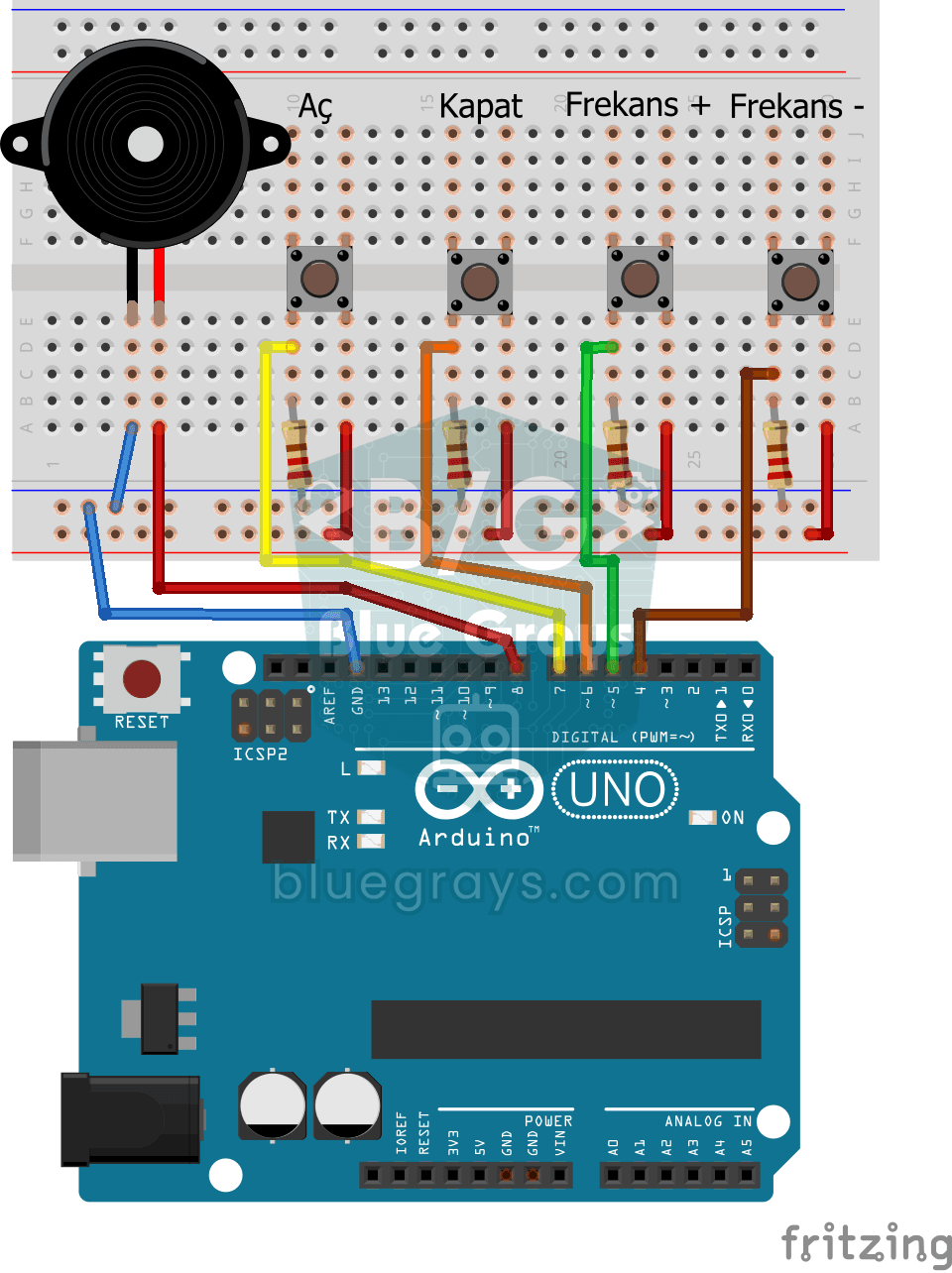
10// Pins:
11//   D8 -> Buzzer + (other leg to GND)
12//   D7 -> On button
13//   D6 -> Off button
14//   D5 -> Frequency + button
15//   D4 -> Frequency - button
16//   Other leg to 5V, pin to GND via 220 ohm
17
18int buzzerPin = 8;     // Buzzer output pin
19int btnOn = 7;         // On button
20int btnOff = 6;        // Off button
21int btnIncrease = 5;   // Frequency + button
22int btnDecrease = 4;   // Frequency - button
23int frequency = 300;   // Start frequency (Hz)
24int state = 0;         // 1 = 1 = sound on, 0 = off
25
26void setup() {
27  // Buttons as inputs, with external pull-downs
28  pinMode(btnOn, INPUT);
29  pinMode(btnOff, INPUT);
30  pinMode(btnIncrease, INPUT);
31  pinMode(btnDecrease, INPUT);
32}
33
34void loop() {
35  if (digitalRead(btnOn)) {          // On: start the sound
36    state = 1;
37  }
38
39  if (digitalRead(btnOff)) {         // Off: stop the sound
40    state = 0;
41  }
42
43  if (digitalRead(btnIncrease)) {    // Raise the frequency by 50 Hz
44    frequency = frequency + 50;
45    delay(100);                      // Step slowly while held
46  }
47
48  if (digitalRead(btnDecrease)) {    // Lower the frequency by 50 Hz
49    frequency = frequency - 50;
50    delay(100);
51  }
52
53  frequency = constrain(frequency, 50, 5000);   // Keep it within 50-5000 Hz
54
55  // Play or silence the buzzer by state
56  if (state == 1) {
57    tone(buzzerPin, frequency);
58  } else {
59    noTone(buzzerPin);
60  }
61}
62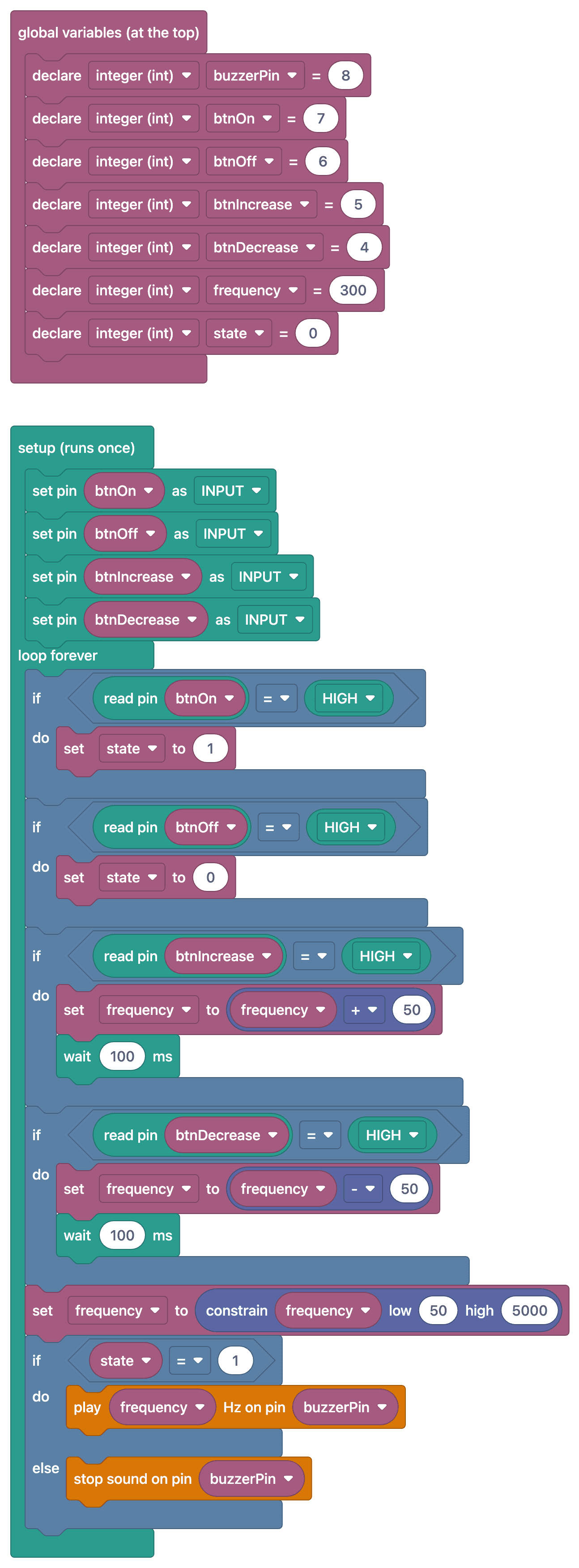
FAQ
ทำไมปุ่มกดจึงใช้ตัวต้านทาน 220 Ω
โค้ดนี้อ่านปุ่มกดในโหมด INPUT โดยใช้ตัวต้านทาน pull-down ภายนอก ตัวต้านทานแต่ละตัวต่อระหว่างขาอินพุตที่เกี่ยวข้องกับ GND เพื่อให้อ่านค่า LOW เมื่อปล่อยปุ่ม หากใช้ตัวต้านทาน 220 Ω ตามรายการในวงจรที่จ่ายไฟ 5 V เมื่อกดปุ่มจะมีกระแสไหลผ่านตัวต้านทานประมาณ 23 mA การใช้ 10 kΩ จะลดกระแสนี้เหลือประมาณ 0.5 mA หากเปลี่ยนค่าตัวต้านทาน ต้องอัปเดตรายการชิ้นส่วนด้วย
ควรปรับความถี่ในช่วงเท่าไร
หูคนได้ยินความถี่ประมาณ 20 Hz ถึง 20 kHz แต่บัซเซอร์ขนาดเล็กส่งเสียงได้ดีที่สุดในช่วง 500–5,000 Hz การกำหนดให้เพิ่มหรือลดครั้งละ 50–100 Hz จะทำให้ได้ยินความเปลี่ยนแปลงชัดเจน
เมื่อกดปุ่มค้างไว้ความถี่เปลี่ยนเร็วมาก ทำให้ช้าลงได้อย่างไร
หากเปลี่ยนความถี่ทุกครั้งที่วนลูป การกดปุ่มค้างไว้จะทำให้ความถี่เพิ่มเร็วมาก ให้เปลี่ยนเพียงครั้งเดียวต่อการกดโดยตรวจจับจังหวะเปลี่ยนสถานะ หรือเพิ่มเวลาหน่วงสั้นๆ หลังเปลี่ยนค่าแต่ละครั้ง
ป้องกันไม่ให้ความถี่เกินขอบเขตที่กำหนดได้อย่างไร
โค้ดจำกัดค่าไว้แล้วด้วยบรรทัด `frequency = constrain(frequency, 50, 5000);` ซึ่งคุมค่าให้อยู่ระหว่าง 50 ถึง 5000 Hz หากต้องการเปลี่ยนช่วง ให้แก้ตัวเลขทั้ง 2 ค่านี้ เช่น ตั้งค่าต่ำสุดเป็น 100 เพื่อเลี่ยงเสียงทุ้มต่ำมากจนฟังเป็นเสียงหึ่ง