
ไฟจราจรด้วย Raspberry Pi Pico: ปุ่มเดียวเลือกได้ 4 โหมด (เครื่องสถานะ)
เลือกไฟจราจรได้ 4 โหมดด้วยปุ่มเดียว กดแต่ละครั้งเพื่อเปลี่ยนโหมด: วนรอบปกติ (แดง → เหลือง → เขียว) แดงอย่างเดียว (หยุด) เหลืองกะพริบ (ระวัง/โหมดกลางคืน) และปิด (ซ่อมบำรุง) คุณจะได้เรียนรู้เครื่องสถานะ ซึ่งใช้ตัวแปร mode กำหนดการทำงาน และการวนเปลี่ยนโหมดด้วย (mode + 1) % 4
วิดีโอ
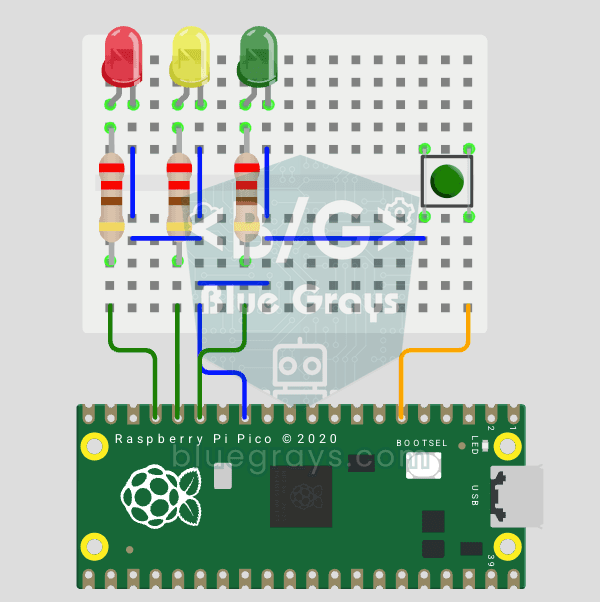
แผนผังวงจร
ซอร์สโค้ด
1# ─────────────────────────────────────────
2#   BlueGrays · bluegrays.com
3#   Raspberry Pi Pico Traffic Light with 4-Mode Button Selector (State Machine, GP11-13 + GP4)
4# ─────────────────────────────────────────
5# One button cycles 4 modes: normal cycle (red -> yellow -> green), red
6# only, yellow flash and off. Uses a state machine and non-blocking timing
7# with time.ticks_ms(), so the button is always responsive.
8#
9# Pins:
10#   GP11 -> Green LED
11#   GP12 -> Yellow LED
12#   GP13 -> Red LED (each LED with 220 ohm)
13#   GP4  -> Button (other leg to GND)
14
15from machine import Pin
16import time
17
18# ============ LEDS ============
19green  = Pin(11, Pin.OUT)   # Green
20yellow = Pin(12, Pin.OUT)   # Yellow
21red    = Pin(13, Pin.OUT)   # Red
22
23# ============ BUTTON ============
24button = Pin(4, Pin.IN, Pin.PULL_UP)   # Reads 0 when pressed
25
26# ============ STATE ============
27# Mode: 0 normal cycle, 1 red only, 2 yellow flash, 3 off
28mode = 0
29last_btn = 1                 # Previous button value
30blink_state = False          # Yellow flash state
31last_tick = time.ticks_ms()  # Last flash toggle
32
33# ============ NORMAL CYCLE ============
34normal_step = 0                     # 0: red, 1: yellow, 2: green
35normal_last = time.ticks_ms()       # Step start time
36NORMAL_TIMES = [3000, 1000, 3000]   # Red, Yellow, Green (ms)
37LEDS = [red, yellow, green]
38
39def all_off():
40    # Turn all LEDs off
41    red.off(); yellow.off(); green.off()
42
43# ============ MAIN LOOP ============
44while True:
45    btn = button.value()
46
47    # ---- Button pressed (1 -> 0): mode change ----
48    if last_btn == 1 and btn == 0:
49        mode = (mode + 1) % 4
50        all_off()
51        normal_step = 0
52        normal_last = time.ticks_ms()
53        time.sleep_ms(200)   # Debounce
54    last_btn = btn
55
56    now = time.ticks_ms()
57
58    # ---- Normal traffic light cycle ----
59    if mode == 0:
60        if time.ticks_diff(now, normal_last) > NORMAL_TIMES[normal_step]:
61            normal_step = (normal_step + 1) % 3
62            normal_last = now
63        all_off()
64        LEDS[normal_step].on()
65
66    # ---- Red only (stop) ----
67    elif mode == 1:
68        all_off(); red.on()
69
70    # ---- Yellow flash, 0.4 s (caution/night) ----
71    elif mode == 2:
72        if time.ticks_diff(now, last_tick) > 400:
73            blink_state = not blink_state
74            yellow.value(blink_state)
75            last_tick = now
76            red.off(); green.off()
77
78    # ---- Off ----
79    else:
80        all_off()
81
82    time.sleep_ms(10)
83FAQ
เครื่องสถานะคืออะไร
ใช้ตัวแปรเดียว (mode) กำหนดว่าโปรแกรมกำลังทำอะไรอยู่ เมื่อกดปุ่มแต่ละครั้งค่า mode จะเปลี่ยน และลูปจะเรียกใช้เฉพาะโค้ดของโหมดปัจจุบัน เป็นวิธีมาตรฐานในการจัดระเบียบการทำงานที่ซับซ้อน
(mode + 1) % 4 ทำหน้าที่อะไร
เพิ่มค่าโหมดทีละ 1 และวนกลับไปที่ 0 เมื่อถึง 4 ทำให้โหมดเปลี่ยนตามลำดับ 0 → 1 → 2 → 3 → 0 → 1 วนไปเรื่อยๆ
ทำไมจึงใช้ ticks_ms() แทน time.sleep()
ระหว่าง sleep() บอร์ด Pico จะอ่านปุ่มกดไม่ได้ ทำให้เปลี่ยนโหมดช้า การใช้ ticks_ms() และ ticks_diff() ช่วยเลี่ยงการรอนานระหว่างช่วงการทำงานของ LED อย่างไรก็ตาม เวอร์ชันนี้ยังรอ 200 ms เพื่อกรองสัญญาณเด้งตอนเปลี่ยนโหมด และรอ 10 ms เมื่อจบแต่ละรอบของลูป โดยจะไม่อ่านปุ่มซ้ำในช่วงเวลานี้
เพิ่มโหมดใหม่ได้ไหม
ได้ เพียงเพิ่มจำนวนโหมดเป็น 5 แล้วเขียนบล็อกการทำงานแยกสำหรับโหมดใหม่ เช่น ไฟเขียวกะพริบหรือเปิดไฟทั้งหมดเรียงตามลำดับ