
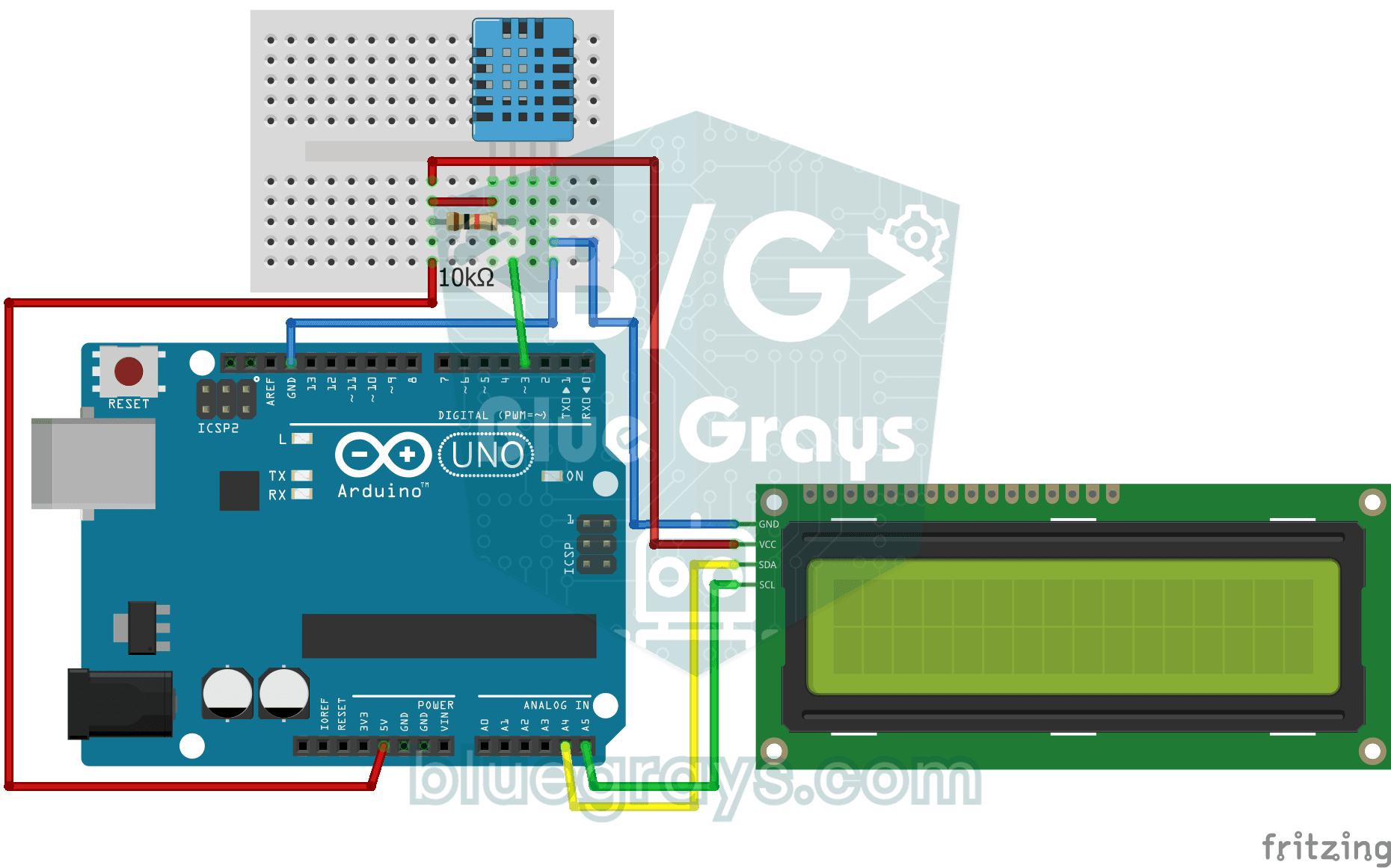
ห้องของคุณอุณหภูมิกี่องศา อากาศชื้นหรือแห้ง เซ็นเซอร์ DHT11 จะวัดอุณหภูมิและความชื้น แล้ว Arduino จะแสดงค่าบนจอ LCD แบบ 2 บรรทัดและอัปเดตทุกสองสามวินาที หากเซ็นเซอร์มีปัญหา จอจะแสดงข้อความแจ้งข้อผิดพลาด นี่คือก้าวแรกสู่สถานีตรวจอากาศขนาดเล็กของคุณเอง
วิดีโอ
แผนผังวงจร
ซอร์สโค้ด
C++ (Arduino IDE)
1// ─────────────────────────────────────────
2//   BlueGrays · bluegrays.com
3//   Temperature and Humidity with DHT11
4// ─────────────────────────────────────────
5// The DHT11 sensor measures room temperature and humidity; the I2C LCD
6// shows the temperature on the first line and the humidity on the second.
7// The reading refreshes every 2 s. If a reading fails the screen shows
8// "Sensor Error!".
9//
10// Pins:
11//   D3 -> DHT11 data
12//   (10k resistor between data and 5V, pull-up)
13//   A4 -> LCD SDA
14//   A5 -> LCD SCL
15//   DHT11 and LCD: VCC to 5V, GND to GND
16
17#include <LiquidCrystal_I2C.h>
18#include <Wire.h>
19#include <DHT.h>
20
21#define DHTPIN 3        // DHT11 data pin
22#define DHTTYPE DHT11   // Sensor type in use
23
24LiquidCrystal_I2C lcd(0x27, 16, 2);   // I2C address 0x27, 16x2 LCD
25DHT dht(DHTPIN, DHTTYPE);
26
27void setup() {
28  dht.begin();
29  // Modern libraries prefer init() over begin()
30  lcd.init();
31  lcd.backlight();
32}
33
34void loop() {
35  // Read humidity and temperature (C)
36  float humidity = dht.readHumidity();
37  float temperature = dht.readTemperature();
38
39  // Check if readings failed
40  if (isnan(humidity) || isnan(temperature)) {
41    lcd.setCursor(0, 0);
42    lcd.print("Sensor Error!   ");
43    return;
44  }
45
46  // Line 1: temperature
47  lcd.setCursor(0, 0);
48  lcd.print("Temp: ");
49  lcd.print(temperature);
50  lcd.print((char)223); // Degree symbol (°)
51  lcd.print("C   ");
52
53  // Line 2: humidity
54  lcd.setCursor(0, 1);
55  lcd.print("Humidity: %");
56  lcd.print((int)humidity);   // Print as a whole number (45)
57  lcd.print("   "); // Trailing spaces to clear old data
58
59  delay(2000); // DHT11 is slow, 2 seconds is more stable
60}
61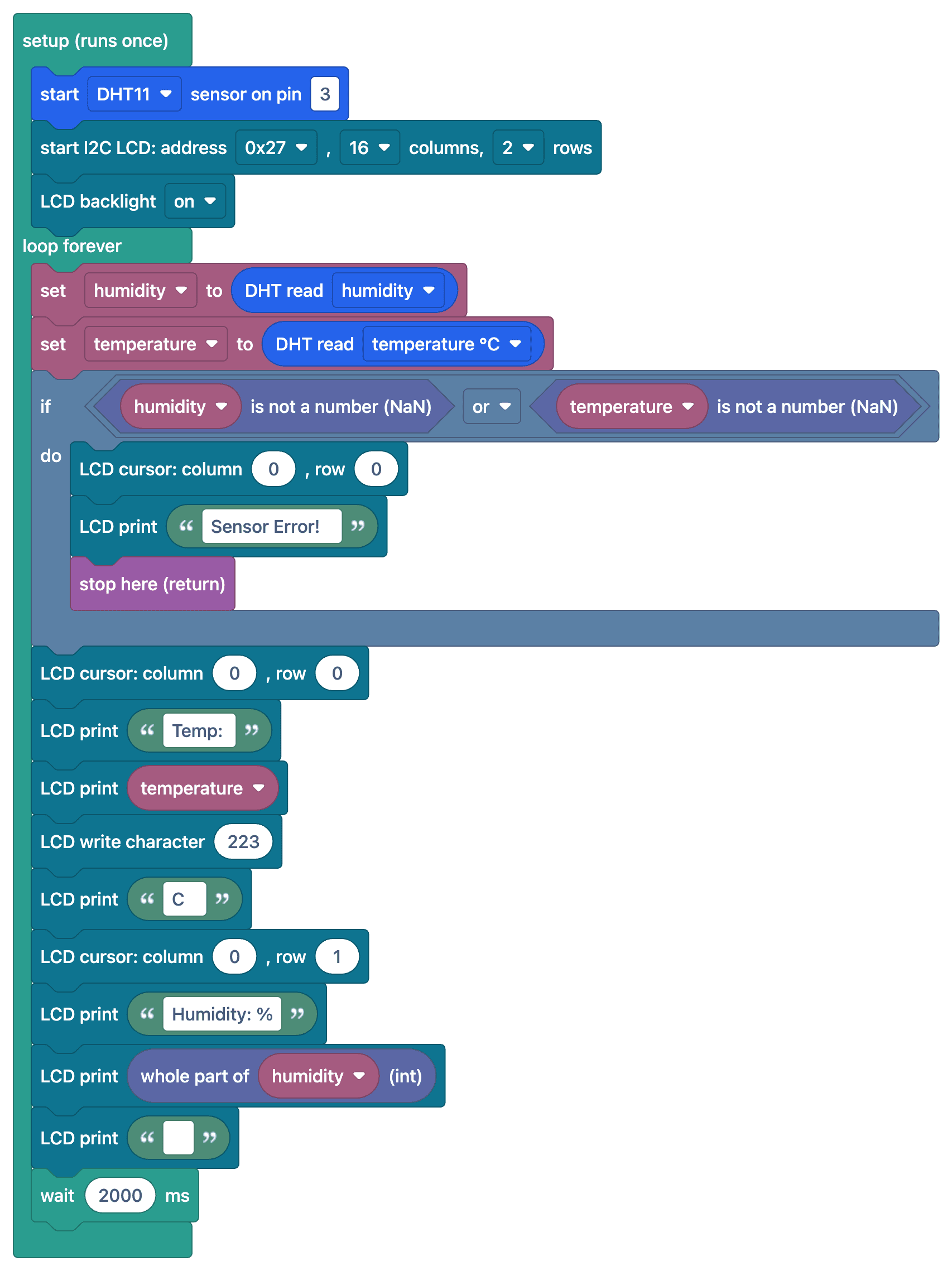
FAQ
DHT11 วัดค่าได้แม่นยำแค่ไหน
DHT11 วัดอุณหภูมิได้โดยมีความคลาดเคลื่อน ±2 °C และความชื้น ±5% ทำงานในช่วง 0–50 °C หากต้องการวัดได้แม่นยำขึ้น แนะนำให้ใช้ DHT22 (±0.5 °C) หรือ BME280
ทำไมจอจึงแสดง "nan" หรือข้อความแจ้งข้อผิดพลาด
อ่านค่าจากเซ็นเซอร์ไม่สำเร็จ ตรวจสอบตัวต้านทาน pull-up ขนาด 10 kΩ ที่ขาข้อมูล การตั้งค่าชนิดเซ็นเซอร์ในไลบรารีว่าเป็น DHT11 และตรวจสอบว่าเว้นช่วงระหว่างการอ่านค่าอย่างน้อย 1–2 วินาที
ทำไมค่าที่อ่านได้จึงอัปเดตช้า
DHT11 วัดค่าได้สูงสุด 1 ครั้งต่อวินาที หากอ่านถี่กว่านี้อาจได้ค่าผิดหรือค่าเก่า แนะนำให้เว้นช่วงระหว่างการวัด 2 วินาที
คำนวณอุณหภูมิที่ร่างกายรู้สึกได้ไหม
ได้ ฟังก์ชัน computeHeatIndex() ในไลบรารี DHT คำนวณอุณหภูมิที่ร่างกายรู้สึกได้จากค่าอุณหภูมิและความชื้น