

วิดีโอ
แผนผังวงจร

ซอร์สโค้ด
1// ─────────────────────────────────────────
2//   BlueGrays · bluegrays.com
3//   Toggle an LED with a Button (On/Off)
4// ─────────────────────────────────────────
5// Each button press toggles the LED once (on/off). The code only catches
6// the moment of the press (LOW -> HIGH); holding the button does not make
7// the LED blink. The 50 ms wait ignores button bounce.
8//
9// Pins:
10//   D13 -> Button, other leg to 5V
11//   D13 -> 10k resistor to GND (pull-down)
12//   D7  -> LED (with a 330 ohm resistor)
13
14int ledState = 0;     // LED state: 0 = off, 1 = on
15int lastButton = 0;   // Previous button reading
16
17void setup() {
18  pinMode(13, INPUT);   // Button input (external pull-down)
19  pinMode(7, OUTPUT);   // LED output
20}
21
22void loop() {
23  int button = digitalRead(13);   // Read the button
24  if (button != lastButton) {     // Button state changed
25    if (button == 1) {            // Only at the press (LOW -> HIGH)
26      ledState = !ledState;       // Flip the state
27      digitalWrite(7, ledState);
28    }
29    delay(50);                    // Short wait to skip the bounce
30    lastButton = button;          // Store this reading
31  }
32}
33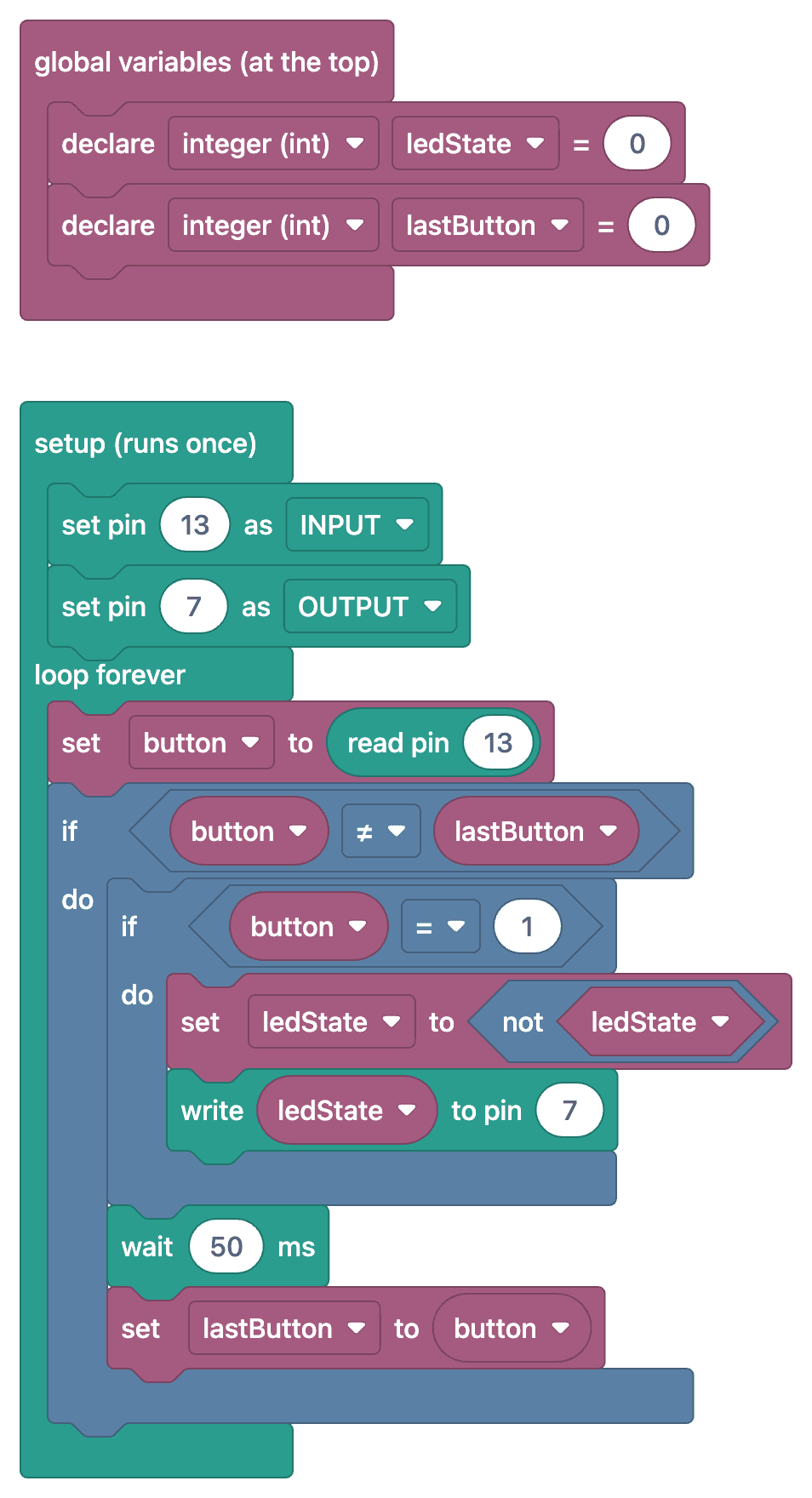
FAQ
การทำ debounce คืออะไรและทำไมจึงจำเป็น
เมื่อกดปุ่มแบบกลไก หน้าสัมผัสจะเปิดและปิดซ้ำหลายครั้งในช่วงไม่กี่มิลลิวินาที เรียกว่าหน้าสัมผัสเด้ง Arduino อาจมองว่าเป็นการกดหลายครั้ง ทำให้สถานะสุดท้ายของ LED ไม่แน่นอน การทำ debounce จะรอสักครู่หลังสถานะเปลี่ยน เช่น 50 ms เพื่อข้ามสัญญาณเด้งเหล่านี้
ทำไมบางครั้ง LED ไม่เปลี่ยนสถานะหรือเปลี่ยน 2 ครั้ง
มักเกิดจากไม่ได้ทำ debounce หรือหน่วงเวลาสั้นเกินไป อีกอย่างคือต้องตรวจจับเฉพาะจังหวะที่ปุ่ม "ถูกกด" เท่านั้น โดยสถานะก่อนหน้าเป็น LOW และสถานะใหม่เป็น HIGH หากสลับสถานะทุกครั้งที่วนลูปขณะกดปุ่มค้างไว้ LED จะกะพริบรัวและจบที่สถานะไม่แน่นอน
ตัวแปรเก็บสถานะใช้ทำอะไร
ใช้จำว่า LED กำลังเปิดหรือปิดอยู่ ทุกครั้งที่ตรวจพบการกดที่ถูกต้อง จะกลับค่าตัวแปร (ledStatus = !ledStatus) แล้วตั้งสถานะ LED ตามค่านั้น
ใช้หลายปุ่มควบคุม LED คนละดวงได้ไหม
ได้ เพียงใช้ขาแยกกันสำหรับแต่ละปุ่ม พร้อมตัวแปรเก็บสถานะก่อนหน้าของปุ่มและสถานะ LED แยกกัน หากใช้หลายปุ่ม การใช้อาร์เรย์และโค้ด debounce ที่อิง millis() จะช่วยให้โค้ดเป็นระเบียบขึ้น