
ESP32 Bluetooth LED y relé
Enciende y apaga un LED y un relé desde tu móvil por Bluetooth, sin internet ni wifi. Este proyecto es la guía paso a paso de la plantilla Bluetooth LED y relé de la app, montada con un ESP32 y un módulo de relé de 5 V. Ve a Mi Taller › Dispositivos › Añadir dispositivo › Bluetooth, elige LED y relé y sube el código con Obtener el código. El botón Configurar como panel Bluetooth de esta página también abre el asistente con esta plantilla.
Video
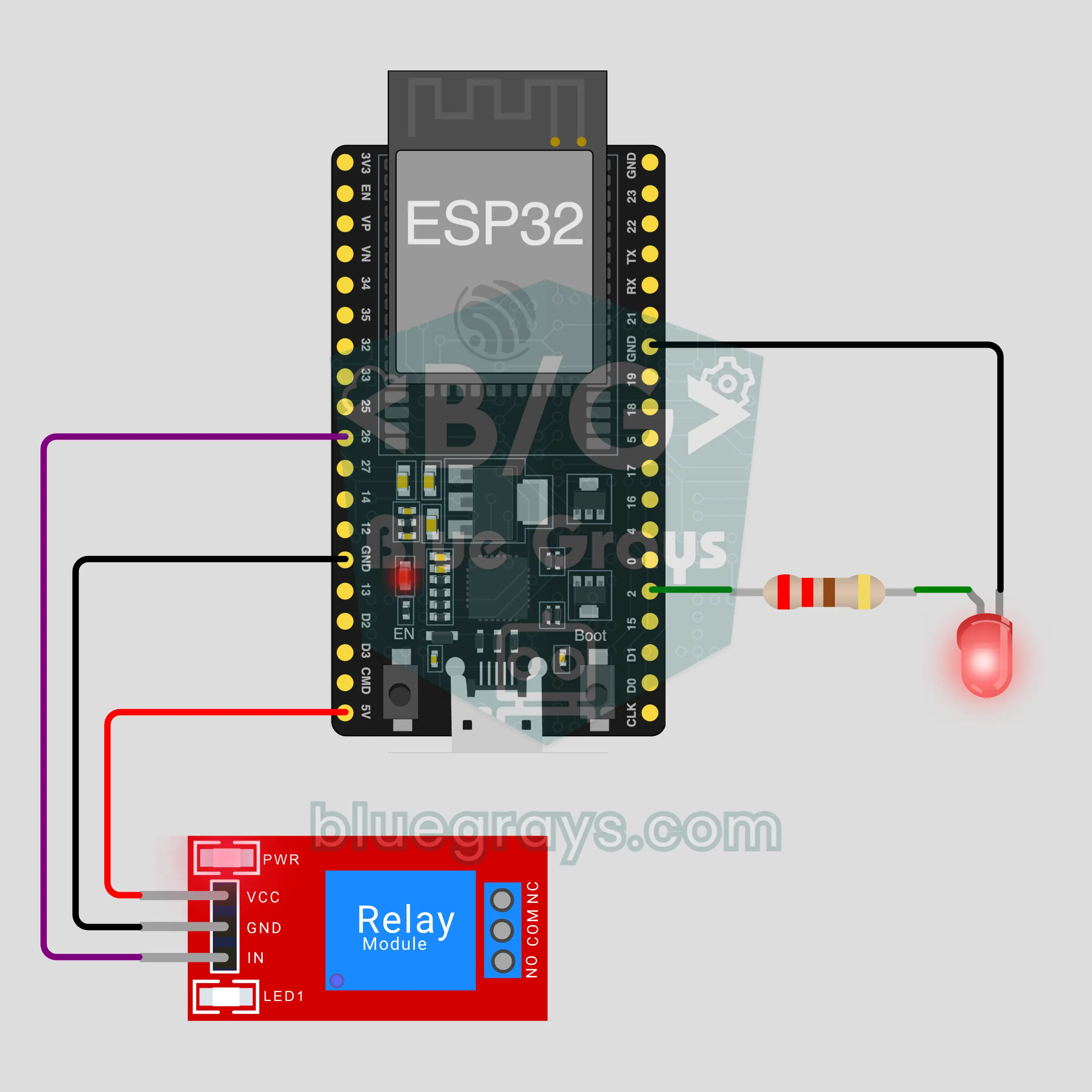
Diagrama del circuito
Código fuente
1// ┌───────────────────────────┐
2// │ BlueGrays · bluegrays.com │
3// │ Bluetooth · ESP32         │
4// │ BG-Lamba                  │
5// └───────────────────────────┘
6// LED y relé
7// Placa en Arduino IDE: ESP32 Dev Module
8// la biblioteca BLE viene con el paquete de placas ESP32, no hay que instalar nada más
9
10#include <BLEDevice.h>
11#include <BLEServer.h>
12#include <BLE2902.h>
13
14const char BLE_NAME[] = "BG-Lamba";  // la placa se anuncia con este nombre y la app la encuentra así en la lista
15
16// Pines: cámbialos aquí si conectaste de otra forma
17const int LED_PIN = 2;
18const int RELAY_PIN = 26;
19const bool RELAY_ACTIVE_LOW = true;  // la mayoría de los módulos de relé se activan con LOW
20
21void btWrite(const char *text);
22void onValue(const char *key, const char *value);
23void sendAll();
24void onLinkLost();
25
26// ── La app envía líneas "clave=valor"; con "?" la placa manda todos sus valores ──
27char line[65];
28uint8_t lineLen = 0;
29unsigned long lastRxMs = 0;
30
31bool is(const char *a, const char *b) { return strcmp(a, b) == 0; }
32bool isOn(const char *v) { return v[0] == '1'; }
33
34void sendText(const char *key, const char *value) {
35  char out[72];
36  snprintf(out, sizeof(out), "%s=%s\n", key, value);
37  btWrite(out);
38}
39
40void sendInt(const char *key, long value) {
41  char text[12];
42  snprintf(text, sizeof(text), "%ld", value);
43  sendText(key, text);
44}
45
46void sendFloat(const char *key, float value) {
47  char text[16];
48  dtostrf(value, 1, 1, text);
49  sendText(key, text);
50}
51
52void handleLine(char *text) {
53  char *eq = strchr(text, '=');
54  if (eq == nullptr) {
55    if (text[strlen(text) - 1] == '?') {
56      btWrite("@v=1.0\n");  // la línea "@v" indica a la app la versión del código
57      sendAll();
58    }
59    return;
60  }
61  *eq = '\0';
62  onValue(text, eq + 1);
63}
64
65void feed(char c) {
66  lastRxMs = millis();
67  if (c == '\n' || c == '\r') {
68    if (lineLen == 0) return;
69    line[lineLen] = '\0';
70    lineLen = 0;
71    handleLine(line);
72  } else if (lineLen < sizeof(line) - 1) {
73    line[lineLen++] = c;
74  }
75}
76
77// ── Bluetooth (Nordic UART) ──
78#define UART_SERVICE "6E400001-B5A3-F393-E0A9-E50E24DCCA9E"
79#define UART_RX "6E400002-B5A3-F393-E0A9-E50E24DCCA9E"
80#define UART_TX "6E400003-B5A3-F393-E0A9-E50E24DCCA9E"
81
82BLECharacteristic *txChar = nullptr;
83volatile bool linked = false;
84volatile bool linkLost = false;
85// los bytes que llegan pasan de la tarea Bluetooth a loop() por un pequeño búfer circular
86const int RX_SIZE = 256;
87volatile uint8_t rxBuf[RX_SIZE];
88volatile int rxHead = 0, rxTail = 0;
89
90class ServerEvents : public BLEServerCallbacks {
91  void onConnect(BLEServer *server) override { linked = true; }
92  void onDisconnect(BLEServer *server) override { linked = false; linkLost = true; }
93};
94
95class RxEvents : public BLECharacteristicCallbacks {
96  void onWrite(BLECharacteristic *c) override {
97    auto v = c->getValue();
98    for (size_t i = 0; i < v.length(); i++) {
99      int next = (rxHead + 1) % RX_SIZE;
100      if (next == rxTail) break;
101      rxBuf[rxHead] = (uint8_t)v[i];
102      rxHead = next;
103    }
104  }
105};
106
107// las líneas salen en paquetes de 20 bytes (funciona con cualquier móvil)
108void btWrite(const char *text) {
109  if (!linked || txChar == nullptr) return;
110  size_t n = strlen(text);
111  for (size_t i = 0; i < n; i += 20) {
112    size_t len = n - i < 20 ? n - i : 20;
113    txChar->setValue((uint8_t *)text + i, len);
114    txChar->notify();
115    delay(4);
116  }
117}
118
119void btBegin() {
120  BLEDevice::init(BLE_NAME);
121  BLEServer *server = BLEDevice::createServer();
122  server->setCallbacks(new ServerEvents());
123  BLEService *uart = server->createService(UART_SERVICE);
124  txChar = uart->createCharacteristic(UART_TX, BLECharacteristic::PROPERTY_NOTIFY);
125  txChar->addDescriptor(new BLE2902());
126  BLECharacteristic *rx = uart->createCharacteristic(UART_RX, BLECharacteristic::PROPERTY_WRITE | BLECharacteristic::PROPERTY_WRITE_NR);
127  rx->setCallbacks(new RxEvents());
128  uart->start();
129  BLEAdvertisementData adv;
130  adv.setFlags(0x06);
131  adv.setCompleteServices(BLEUUID(UART_SERVICE));
132  BLEAdvertisementData scan;
133  scan.setName(BLE_NAME);
134  BLEAdvertising *advertising = BLEDevice::getAdvertising();
135  advertising->setAdvertisementData(adv);
136  advertising->setScanResponseData(scan);
137  BLEDevice::startAdvertising();
138}
139
140void btPoll() {
141  while (rxTail != rxHead) {
142    char c = (char)rxBuf[rxTail];
143    rxTail = (rxTail + 1) % RX_SIZE;
144    feed(c);
145  }
146  if (linkLost) {
147    linkLost = false;
148    onLinkLost();
149    delay(100);
150    BLEDevice::startAdvertising();
151  }
152}
153
154// ── ESP32 ──
155bool ledOn = false, relayOn = false;
156
157void setRelay(bool on) {
158  if (RELAY_ACTIVE_LOW) {
159    if (on) { pinMode(RELAY_PIN, OUTPUT); digitalWrite(RELAY_PIN, LOW); }
160    else { pinMode(RELAY_PIN, INPUT); }  // apagar libera el pin: un HIGH de 3,3 V no basta para apagar un módulo de 5 V
161  } else {
162    pinMode(RELAY_PIN, OUTPUT); digitalWrite(RELAY_PIN, on ? HIGH : LOW);
163  }
164}
165
166void apply() {
167  digitalWrite(LED_PIN, ledOn ? HIGH : LOW);
168  setRelay(relayOn);
169}
170
171void onValue(const char *key, const char *value) {
172  if (is(key, "led")) ledOn = isOn(value);
173  else if (is(key, "role")) relayOn = isOn(value);
174  apply();
175}
176
177void sendAll() {
178  sendInt("led", ledOn);
179  sendInt("role", relayOn);
180}
181
182void onLinkLost() {
183}
184
185void setup() {
186  Serial.begin(115200);
187  pinMode(LED_PIN, OUTPUT);
188  apply();
189  btBegin();
190  Serial.print(F("BlueGrays Bluetooth: "));
191  Serial.println(BLE_NAME);
192}
193
194void loop() {
195  btPoll();
196}
197Preguntas frecuentes
¿Funciona con iPhone?
Sí. El Bluetooth Low Energy (BLE) integrado del ESP32 habla con iPhone y con Android. Un iPhone no puede conectarse a módulos de Bluetooth clásico como el HC-05 y el HC-06, y este proyecto no los necesita. No intentes emparejar la placa desde los ajustes Bluetooth del móvil; las placas BLE pueden no aparecer ahí, es normal. La conexión la hace la app BlueGrays.
¿Puedo conectar una lámpara de verdad al relé?
El módulo de relé puede conmutar 220 V, pero la corriente de la red puede matar. En este proyecto no hay nada conectado a los bornes COM y NO; el relé demuestra que funciona con su clic y el LED del módulo. Si quieres probar una carga, empieza con un circuito de baja tensión, como una pila o un adaptador de 12 V. Si pasas a 220 V, hazlo con alguien con experiencia, no dejes cables ni tornillos al aire y no superes la corriente indicada en el módulo.
¿Por qué el LED azul de la placa se enciende junto con mi LED?
En muchas placas ESP32 DevKit el LED azul integrado también está conectado a GPIO2. Tu LED está en el mismo pin, así que los dos parpadean juntos; no es un fallo. Incluso ayuda: si un cable está flojo, el LED azul te muestra que la orden llegó a la placa. Si no lo quieres, pasa tu LED a otro pin (por ejemplo GPIO4) y cambia LED_PIN en el código.
¿Hace falta internet o wifi? ¿Qué alcance tiene?
No hace falta. El móvil se conecta directo a la placa por Bluetooth, sin router ni servidor. Dentro de casa el alcance suele rondar los 10 metros y las paredes lo reducen. La placa se conecta a un solo móvil a la vez; cuando ese móvil se desconecta, la placa vuelve a anunciarse y otro móvil puede conectarse. Para controlarla desde fuera de casa, elige un proyecto que use el panel IoT por wifi de la app.