
Sensor de aparcamiento con Raspberry Pi Pico (HC-SR04 + 3 LED + zumbador)
¡Lleva el sensor de aparcamiento de tu coche a tu escritorio! La **Raspberry Pi Pico** mide con un **sensor ultrasónico HC-SR04** la distancia al obstáculo unas 16 veces por segundo. Cuanto más se acerca, más **LED verde, amarillo y rojo** se encienden y más rápido pita el **zumbador**; por debajo de 10 cm el tono se vuelve continuo y el LED rojo parpadea. Medición ultrasónica, sonido con PWM y temporización sin bloqueo en un solo proyecto.
Video
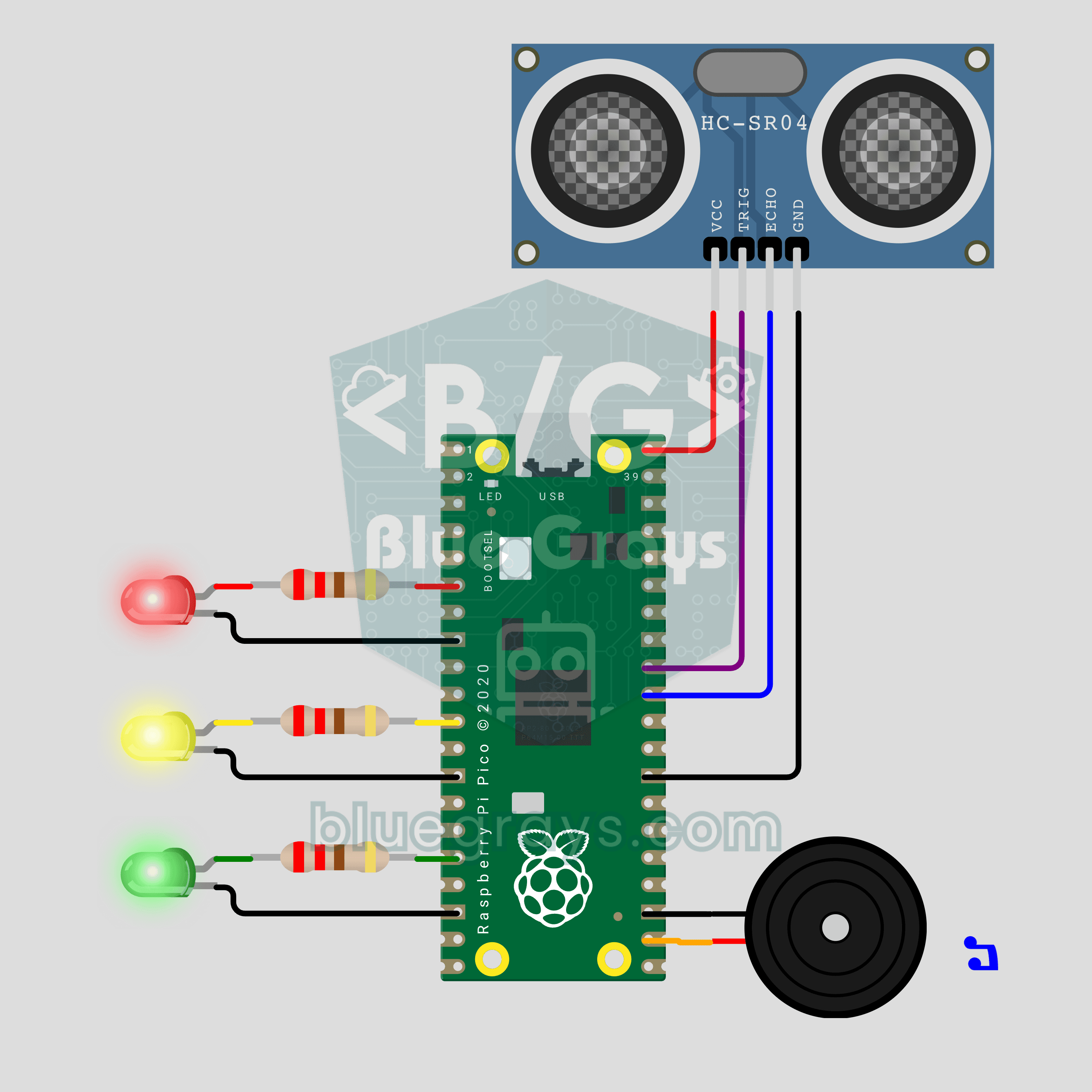
Diagrama del circuito
Código fuente
1# ─────────────────────────────────────────
2#   BlueGrays · bluegrays.com
3#   Sensor de aparcamiento con Raspberry Pi Pico (HC-SR04 + 3 LED + zumbador)
4# ─────────────────────────────────────────
5# Sensor de aparcamiento para coche. El HC-SR04 mide la distancia a un
6# obstáculo; a medida que se acerca, los LED verde, amarillo y rojo se
7# encienden por turnos y los pitidos se aceleran. Muy cerca, el tono se
8# vuelve continuo y el LED rojo destella.
9#
10# Pines:
11#   GP27 -> TRIG del HC-SR04
12#   GP26 -> ECHO del HC-SR04 (divisor de 1k + 2k en hardware real)
13#   VBUS -> VCC del HC-SR04 (5V), GND.6 -> GND del HC-SR04
14#   GP4  -> 220 ohmios -> LED rojo (cátodo a GND)
15#   GP8  -> 220 ohmios -> LED amarillo (cátodo a GND)
16#   GP12 -> 220 ohmios -> LED verde (cátodo a GND)
17#   GP17 -> Zumbador (+), otra patilla a GND
18
19from machine import Pin, PWM, time_pulse_us
20import time
21
22# ============ AJUSTES ============
23GREEN_CM = 100         # Verde encendido, empiezan los pitidos
24YELLOW_CM = 50         # Se suma el amarillo
25RED_CM = 25            # Se suma el rojo
26STOP_CM = 10           # Tono continuo + rojo parpadeante
27
28BEEP_MS = 60           # Duración de un pitido
29SLOW_GAP_MS = 700      # Pausa entre pitidos en GREEN_CM
30FAST_GAP_MS = 50       # Pausa entre pitidos cerca de STOP_CM
31VOLUME = 32768         # Ciclo de trabajo PWM, 32768 = 50%
32FLASH_MS = 120         # Periodo del destello rojo en la zona STOP
33
34MEASURE_MS = 60        # Intervalo de medición, mínimo 60 ms
35PRINT_MS = 250         # Intervalo de impresión por Serial
36ECHO_TIMEOUT_US = 12000  # más allá de ~2 m = sin obstáculo
37SOUND_CM_PER_US = 0.0343  # Velocidad del sonido (20 C)
38LOOP_MS = 5            # Paso del bucle principal
39
40# Zonas de cerca a lejos: (nombre, límite superior cm, (verde, amarillo, rojo), tono Hz)
41ZONES = (
42    ("DUR / STOP", STOP_CM, (1, 1, 1), 1900),
43    ("KIRMIZI / RED", RED_CM, (1, 1, 1), 1900),
44    ("SARI / YELLOW", YELLOW_CM, (1, 1, 0), 1500),
45    ("YESIL / GREEN", GREEN_CM, (1, 0, 0), 1200),
46)
47CLEAR = len(ZONES)     # Zona sin obstáculos
48STOP = 0               # Índice de la zona STOP
49
50# ============ HARDWARE ============
51trig = Pin(27, Pin.OUT, value=0)
52echo = Pin(26, Pin.IN)
53led_green = Pin(12, Pin.OUT, value=0)
54led_yellow = Pin(8, Pin.OUT, value=0)
55led_red = Pin(4, Pin.OUT, value=0)
56buzzer = PWM(Pin(17))
57buzzer.duty_u16(0)
58
59
60# ============ MEDICIÓN ============
61def measure_cm():
62    # Enviar un pulso TRIG de 10 us y medir cuánto tiempo ECHO permanece en HIGH
63    trig.value(0)
64    time.sleep_us(2)
65    trig.value(1)
66    time.sleep_us(10)
67    trig.value(0)
68    pulse = time_pulse_us(echo, 1, ECHO_TIMEOUT_US)
69    if pulse < 0:
70        return None    # Sin eco o demasiado lejos
71    # El sonido va y vuelve: la mitad
72    return pulse * SOUND_CM_PER_US / 2
73
74
75def median3(values):
76    # Mediana de las últimas 3 lecturas: una lectura mala no hace parpadear los LED
77    a, b, c = values
78    return max(min(a, b), min(max(a, b), c))
79
80
81def zone_of(dist):
82    if dist is None:
83        return CLEAR
84    for i, zone in enumerate(ZONES):
85        if dist <= zone[1]:
86            return i
87    return CLEAR
88
89
90def beep_gap_ms(dist):
91    # Entre STOP_CM y GREEN_CM el intervalo entre pitidos crece de forma lineal de FAST a SLOW
92    ratio = (dist - STOP_CM) / (GREEN_CM - STOP_CM)
93    ratio = min(1.0, max(0.0, ratio))
94    return int(FAST_GAP_MS + ratio * (SLOW_GAP_MS - FAST_GAP_MS))
95
96
97# ============ SONIDO ============
98tone_on = False
99tone_hz = 0
100
101
102def tone(hz):
103    # No tocar el PWM si el tono ya está activo
104    global tone_on, tone_hz
105    if tone_on and tone_hz == hz:
106        return
107    buzzer.freq(hz)
108    buzzer.duty_u16(VOLUME)
109    tone_on = True
110    tone_hz = hz
111
112
113def silence():
114    global tone_on
115    if tone_on:
116        buzzer.duty_u16(0)
117        tone_on = False
118
119
120def set_leds(green, yellow, red):
121    led_green.value(green)
122    led_yellow.value(yellow)
123    led_red.value(red)
124
125
126def self_test():
127    # Breve prueba de encendido de los LED y el zumbador: verde -> amarillo -> rojo
128    for leds, hz in (((1, 0, 0), 1200), ((1, 1, 0), 1500), ((1, 1, 1), 1900)):
129        set_leds(*leds)
130        tone(hz)
131        time.sleep_ms(90)
132        silence()
133        time.sleep_ms(160)
134    set_leds(0, 0, 0)
135
136
137# ============ BUCLE PRINCIPAL ============
138print("== BlueGrays · bluegrays.com ==")
139print("Pico Park Sensoru / Parking Sensor")
140print("Yesil <= %d cm, sari <= %d cm, kirmizi <= %d cm, surekli ses <= %d cm"
141      % (GREEN_CM, YELLOW_CM, RED_CM, STOP_CM))
142print("Green <= %d cm, yellow <= %d cm, red <= %d cm, continuous tone <= %d cm"
143      % (GREEN_CM, YELLOW_CM, RED_CM, STOP_CM))
144self_test()
145
146FAR = 999.0                       # Marcador de posición para sin obstáculo
147history = [FAR, FAR, FAR]         # Últimas 3 lecturas
148distance = None                   # Distancia filtrada (cm)
149zone = CLEAR
150last_zone = -1
151now = time.ticks_ms()
152next_measure = now
153next_print = now
154last_beep = time.ticks_add(now, -10000)   # El primer pitido suena al instante
155beep_end = now
156
157while True:
158    now = time.ticks_ms()
159
160    # 1) Medición: cada MEASURE_MS, con un filtro de mediana
161    if time.ticks_diff(now, next_measure) >= 0:
162        next_measure = time.ticks_add(now, MEASURE_MS)
163        reading = measure_cm()
164        history = history[1:] + [reading if reading is not None else FAR]
165        filtered = median3(history)
166        distance = None if filtered >= FAR else filtered
167        zone = zone_of(distance)
168        if zone != last_zone:
169            name = "ENGEL YOK / CLEAR" if zone == CLEAR else ZONES[zone][0]
170            print("Bolge / Zone ->", name)
171            last_zone = zone
172
173    # 2) LED: gráfico de barras, el rojo parpadea en la zona de STOP
174    if zone == CLEAR:
175        set_leds(0, 0, 0)
176    elif zone == STOP:
177        flash_on = (now // FLASH_MS) % 2 == 0
178        set_leds(1, 1, 1 if flash_on else 0)
179    else:
180        set_leds(*ZONES[zone][2])
181
182    # 3) Sonido: temporizador de pitido sin bloqueo
183    if zone == CLEAR:
184        silence()
185    elif zone == STOP:
186        tone(ZONES[STOP][3])          # Muy cerca: tono continuo
187    else:
188        if tone_on and time.ticks_diff(now, beep_end) >= 0:
189            silence()
190        # La pausa se recalcula en cada pasada: el siguiente pitido se acelera en cuanto te acercas
191        period = BEEP_MS + beep_gap_ms(distance)
192        if not tone_on and time.ticks_diff(now, last_beep) >= period:
193            tone(ZONES[zone][3])
194            last_beep = now
195            beep_end = time.ticks_add(now, BEEP_MS)
196
197    # 4) Monitor Serie: distancia en cm
198    if time.ticks_diff(now, next_print) >= 0:
199        next_print = time.ticks_add(now, PRINT_MS)
200        if distance is None:
201            print("Mesafe / Distance: --- (engel yok / no obstacle)")
202        else:
203            print("Mesafe / Distance: %5.1f cm" % distance)
204
205    time.sleep_ms(LOOP_MS)
206
Preguntas frecuentes
¿Por qué ECHO necesita un divisor de tensión en el circuito real?▾
El HC-SR04 funciona a 5V y su salida ECHO da 5V, pero los pines de la Pico admiten como máximo 3,3V. Conecta ECHO a GP26 a través de 1 kΩ y GP26 a GND con 2 kΩ; al pin llegan unos 3,3V. En Wokwi no hace falta el divisor.
¿Cómo cambio las distancias de aviso?▾
Modifica las constantes `GREEN_CM`, `YELLOW_CM`, `RED_CM` y `STOP_CM` al principio del código. Mantén los umbrales en el orden `STOP_CM < RED_CM < YELLOW_CM < GREEN_CM`; por ejemplo, usa `STOP_CM = 30`, `RED_CM = 50`, `YELLOW_CM = 100` y `GREEN_CM = 150`. Los LED y los pitidos se adaptan solos a los nuevos umbrales.
¿Por qué los pitidos se aceleran de forma continua y no por zonas?▾
`beep_gap_ms()` calcula la pausa de forma lineal según la distancia: 700 ms a 100 cm, 50 ms a 10 cm. Se recalcula en cada vuelta del bucle principal, así que el siguiente pitido se adelanta en cuanto el obstáculo se acerca. Las zonas solo cambian los LED y el tono.
¿Tengo que instalar alguna librería?▾
No. La función `time_pulse_us()` que hace la medición forma parte del módulo `machine`, incluido en MicroPython. Instala MicroPython en la Pico y guarda el código en ella como `main.py` con Thonny; el sensor arranca solo con una prueba de LED y tres pitidos.