
Bluetooth na piano sa phone gamit ang ESP32
Gawing 8-key na piano ang phone: pindutin ang key at tutugtugin ng passive buzzer sa ESP32 ang nota, walang internet o Wi-Fi. Hakbang-hakbang na gabay ito sa Piano sa phone na Bluetooth template ng app, gamit ang buzzer at 2 jumper wire. Pumunta sa Workshop › Mga Device › Magdagdag ng device › Bluetooth, piliin ang Piano sa phone at i-upload ang code sa Kunin ang code. Binubuksan din ng I-set up bilang Bluetooth panel na button dito ang wizard na may template na ito.
Video
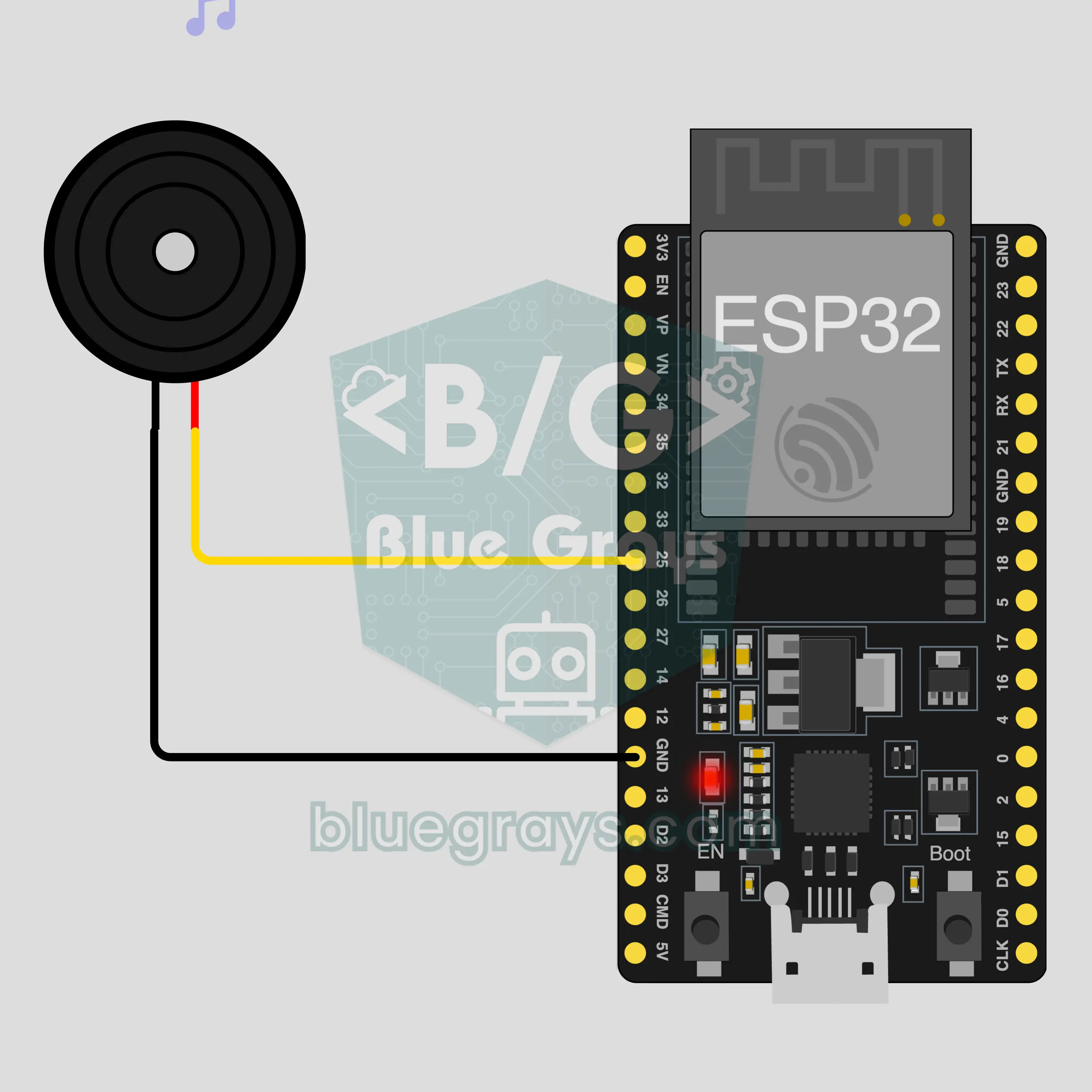
Circuit diagram
Source code
1// ┌───────────────────────────┐
2// │ BlueGrays · bluegrays.com │
3// │ Bluetooth · ESP32         │
4// │ BG-Piyano                 │
5// └───────────────────────────┘
6// Phone piano
7// Arduino IDE board: ESP32 Dev Module
8// the BLE library comes with the ESP32 board package, nothing extra to install
9
10#include <BLEDevice.h>
11#include <BLEServer.h>
12#include <BLE2902.h>
13
14const char BLE_NAME[] = "BG-Piyano";  // the board advertises with this name, the app finds it in the list by it
15
16// Pins: change them here if you wired differently
17const int BUZZER_PIN = 25;  // use a passive buzzer (an active one only makes a single tone)
18
19void btWrite(const char *text);
20void onValue(const char *key, const char *value);
21void sendAll();
22void onLinkLost();
23
24// ── The app sends "key=value" lines; on "?" the board sends all its values ──
25char line[65];
26uint8_t lineLen = 0;
27unsigned long lastRxMs = 0;
28
29bool is(const char *a, const char *b) { return strcmp(a, b) == 0; }
30bool isOn(const char *v) { return v[0] == '1'; }
31
32void sendText(const char *key, const char *value) {
33  char out[72];
34  snprintf(out, sizeof(out), "%s=%s\n", key, value);
35  btWrite(out);
36}
37
38void sendInt(const char *key, long value) {
39  char text[12];
40  snprintf(text, sizeof(text), "%ld", value);
41  sendText(key, text);
42}
43
44void sendFloat(const char *key, float value) {
45  char text[16];
46  dtostrf(value, 1, 1, text);
47  sendText(key, text);
48}
49
50void handleLine(char *text) {
51  char *eq = strchr(text, '=');
52  if (eq == nullptr) {
53    if (text[strlen(text) - 1] == '?') {
54      btWrite("@v=1.0\n");  // the "@v" line tells the app the code version
55      sendAll();
56    }
57    return;
58  }
59  *eq = '\0';
60  onValue(text, eq + 1);
61}
62
63void feed(char c) {
64  lastRxMs = millis();
65  if (c == '\n' || c == '\r') {
66    if (lineLen == 0) return;
67    line[lineLen] = '\0';
68    lineLen = 0;
69    handleLine(line);
70  } else if (lineLen < sizeof(line) - 1) {
71    line[lineLen++] = c;
72  }
73}
74
75// ── Bluetooth (Nordic UART) ──
76#define UART_SERVICE "6E400001-B5A3-F393-E0A9-E50E24DCCA9E"
77#define UART_RX "6E400002-B5A3-F393-E0A9-E50E24DCCA9E"
78#define UART_TX "6E400003-B5A3-F393-E0A9-E50E24DCCA9E"
79
80BLECharacteristic *txChar = nullptr;
81volatile bool linked = false;
82volatile bool linkLost = false;
83// incoming bytes move from the Bluetooth task to loop() through a small ring buffer
84const int RX_SIZE = 256;
85volatile uint8_t rxBuf[RX_SIZE];
86volatile int rxHead = 0, rxTail = 0;
87
88class ServerEvents : public BLEServerCallbacks {
89  void onConnect(BLEServer *server) override { linked = true; }
90  void onDisconnect(BLEServer *server) override { linked = false; linkLost = true; }
91};
92
93class RxEvents : public BLECharacteristicCallbacks {
94  void onWrite(BLECharacteristic *c) override {
95    auto v = c->getValue();
96    for (size_t i = 0; i < v.length(); i++) {
97      int next = (rxHead + 1) % RX_SIZE;
98      if (next == rxTail) break;
99      rxBuf[rxHead] = (uint8_t)v[i];
100      rxHead = next;
101    }
102  }
103};
104
105// lines go out in 20-byte packets (works with every phone)
106void btWrite(const char *text) {
107  if (!linked || txChar == nullptr) return;
108  size_t n = strlen(text);
109  for (size_t i = 0; i < n; i += 20) {
110    size_t len = n - i < 20 ? n - i : 20;
111    txChar->setValue((uint8_t *)text + i, len);
112    txChar->notify();
113    delay(4);
114  }
115}
116
117void btBegin() {
118  BLEDevice::init(BLE_NAME);
119  BLEServer *server = BLEDevice::createServer();
120  server->setCallbacks(new ServerEvents());
121  BLEService *uart = server->createService(UART_SERVICE);
122  txChar = uart->createCharacteristic(UART_TX, BLECharacteristic::PROPERTY_NOTIFY);
123  txChar->addDescriptor(new BLE2902());
124  BLECharacteristic *rx = uart->createCharacteristic(UART_RX, BLECharacteristic::PROPERTY_WRITE | BLECharacteristic::PROPERTY_WRITE_NR);
125  rx->setCallbacks(new RxEvents());
126  uart->start();
127  BLEAdvertisementData adv;
128  adv.setFlags(0x06);
129  adv.setCompleteServices(BLEUUID(UART_SERVICE));
130  BLEAdvertisementData scan;
131  scan.setName(BLE_NAME);
132  BLEAdvertising *advertising = BLEDevice::getAdvertising();
133  advertising->setAdvertisementData(adv);
134  advertising->setScanResponseData(scan);
135  BLEDevice::startAdvertising();
136}
137
138void btPoll() {
139  while (rxTail != rxHead) {
140    char c = (char)rxBuf[rxTail];
141    rxTail = (rxTail + 1) % RX_SIZE;
142    feed(c);
143  }
144  if (linkLost) {
145    linkLost = false;
146    onLinkLost();
147    delay(100);
148    BLEDevice::startAdvertising();
149  }
150}
151
152// ── ESP32 ──
153void onValue(const char *key, const char *value) {
154  if (is(key, "nota")) {  // "nota=Hz" plays the note, "nota=0" stops it
155    int hz = atoi(value);
156    if (hz > 0) tone(BUZZER_PIN, hz);
157    else noTone(BUZZER_PIN);
158  }
159}
160
161void sendAll() {
162  sendInt("nota", 0);
163}
164
165void onLinkLost() {
166  noTone(BUZZER_PIN);  // Connection lost: the sound stops
167}
168
169void setup() {
170  Serial.begin(115200);
171  pinMode(BUZZER_PIN, OUTPUT);
172  btBegin();
173  Serial.print(F("BlueGrays Bluetooth: "));
174  Serial.println(BLE_NAME);
175}
176
177void loop() {
178  btPoll();
179}
180FAQ
Gumagana ba ito sa iPhone?
Oo. Nakikipag-usap sa iPhone at Android ang built-in na Bluetooth Low Energy (BLE) ng ESP32. Hindi makakonekta ang iPhone sa mga classic na Bluetooth module gaya ng HC-05 at HC-06, at hindi kailangan ng project na ito ang mga iyon. Huwag subukang i-pair ang board sa Bluetooth settings ng phone mo; puwedeng hindi lumabas doon ang mga BLE board, at normal iyon. Ang BlueGrays app ang gumagawa ng koneksyon.
Ano ang pagkakaiba ng active at passive na buzzer, at alin ang kailangan ko?
Passive buzzer ang kailangan mo. Gumagana ang passive buzzer na parang maliit na speaker: tinutugtog nito ang anumang frequency na ipadala mo. May sariling circuit sa loob ang active buzzer at iisang tunog ang ginagawa nito tuwing may kuryente, kaya hindi mapag-iiba ang mga key. Sasabihin sa iyo ng project na ito kung alin ang mayroon ka: kung iba-ibang nota ang tinutugtog ng mga key, passive ito; kung iisang ugong ang bawat key, active ito. Kapag bibili ka, hanapin ang salitang passive sa pangalan ng produkto.
Puwede ko bang pindutin nang sabay ang dalawang key at tumugtog ng chord?
Hindi. Isang frequency lang sa bawat pagkakataon ang kayang tugtugin ng buzzer, at iisang nota ang ginagawa ng tone command sa board. Kung sabay mong pindutin ang dalawang key, hindi nagpapatong ang mga nota; ang huling dumating na nota lang ang tinutugtog ng board. Tugtugin ang mga melody nang isa-isang nota. Pinalalaki ng Tumugtog sa full screen na button sa panel ang mga key, at doon, puwede mo ring idausdos ang daliri mo sa mga key para dumulas mula nota hanggang nota.
Puwede ba akong magdagdag ng ibang nota o mas maraming key?
Nakapirmi ang walong key sa panel: mababang C hanggang mataas na C, walang sharp o flat, at hindi makakapagdagdag ng key mula sa app. Pero flexible ang panig ng board: tinutugtog ng code bilang frequency ang anumang positibong numerong galing sa phone at tumatahimik ito kapag 0 ang natanggap. Kaya mababago mo ang tunog sa code; halimbawa, i-multiply sa dalawa ang dumarating na frequency at tataas nang isang octave ang buong piano.