
RFID RC522 card reader gamit ang ESP32 (may LCD)
Sa project na ito, ikokonekta natin sa ESP32 ang RC522 RFID module na batay sa MFRC522 sa pamamagitan ng SPI at babasahin ang UID ng card/tag. Ito ang batayan ng mga application gaya ng door lock, membership system at access control. Ipapakita natin sa LCD screen ang nabasang UID; hindi ito ikinukumpara ng bersyong ito sa listahan ng mga awtorisadong card. BABALA: Sa 3.3V lang gumagana ang RC522; masusunog ang module kapag binigyan ng 5V!

Video
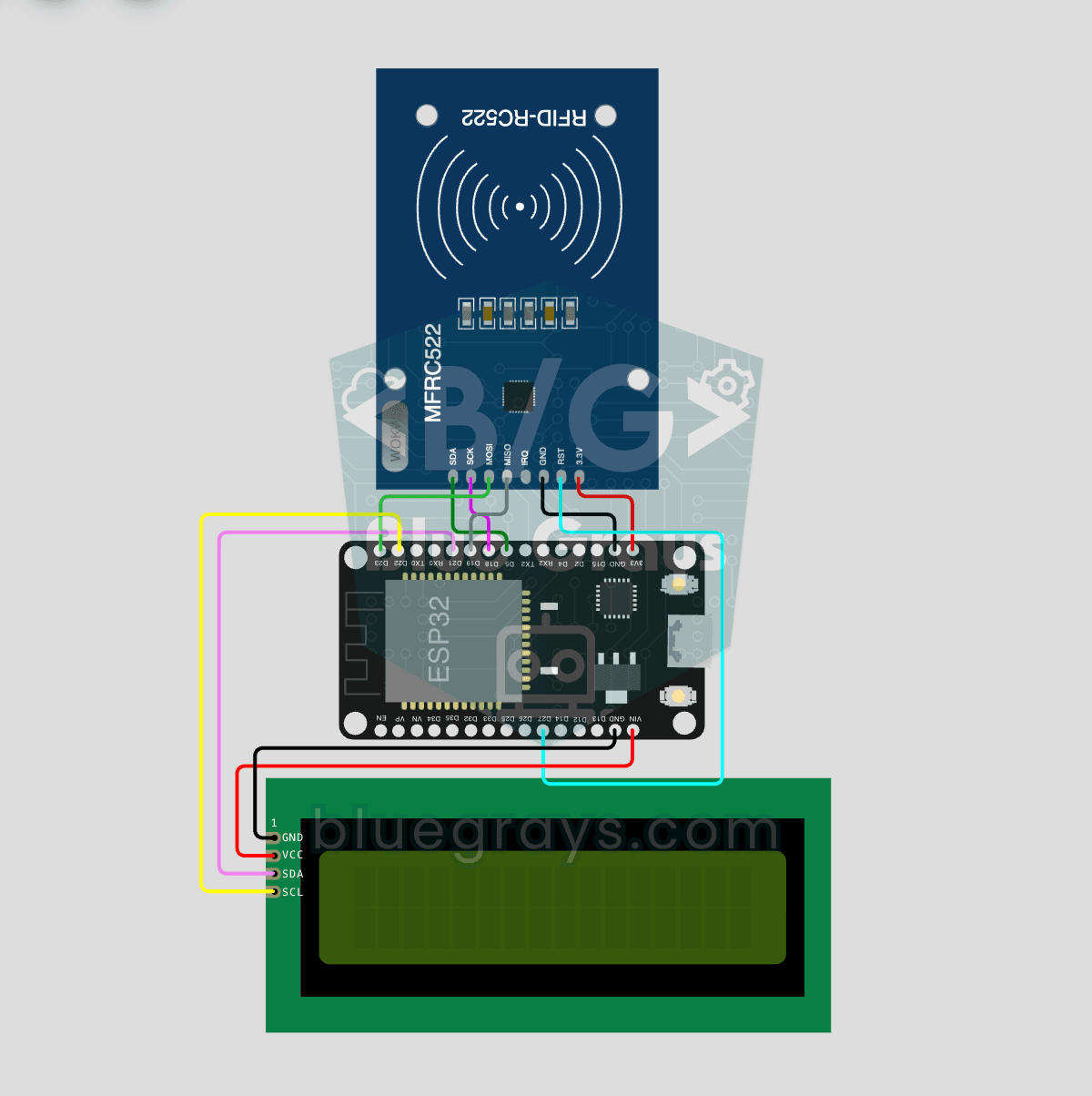
Circuit diagram
Source code
1// ─────────────────────────────────────────
2//   BlueGrays · bluegrays.com
3//   ESP32 RFID RC522 Card Reader (with LCD)
4// ─────────────────────────────────────────
5// Reads the RC522 RFID module over SPI; the UID of a scanned card is shown
6// in HEX on the 16x2 I2C LCD for 3 s, then the "scan a card" screen
7// returns.
8//
9// Pins:
10//   GPIO 5  -> RC522 SDA (SS)
11//   GPIO 18 -> RC522 SCK, GPIO 19 -> RC522 MISO, GPIO 23 -> RC522 MOSI
12//   GPIO 27 -> RC522 RST
13//   GPIO 21 -> LCD SDA, GPIO 22 -> LCD SCL
14//   RC522 3.3V -> RC522 3.3V -> 3V3, IRQ is left unconnected
15//   LCD VCC -> LCD VCC -> 5V (VIN), all GNDs common
16
17#include <Wire.h>
18#include <LiquidCrystal_I2C.h>
19#include <SPI.h>
20#include <MFRC522.h>
21
22// Pin definitions
23const int RST_PIN = 27;   // RC522 RST
24const int SS_PIN  = 5;    // RC522 SDA (SS)
25
26// SPI pins are the VSPI default
27MFRC522 rfid(SS_PIN, RST_PIN);
28LiquidCrystal_I2C lcd(0x27, 16, 2);   // LCD addr 0x27 or 0x3F
29
30unsigned long lastScan = 0;                 // Last scan time (ms)
31const unsigned long DISPLAY_HOLD = 3000;    // UID display time (ms)
32bool showingCard = false;                   // Is a UID on the screen
33
34// Waiting screen
35void showWaitMessage() {
36  lcd.clear();
37  lcd.setCursor(0, 0);
38  lcd.print("Scan a card");
39  lcd.setCursor(0, 1);
40  lcd.print("Waiting...");
41}
42
43void setup() {
44  Wire.begin(21, 22);   // I2C: SDA=21, SCL=22
45  lcd.init();
46  lcd.backlight();
47
48  // Splash screen 3 s
49  lcd.setCursor(3, 0);
50  lcd.print("BlueGrays");
51  lcd.setCursor(3, 1);
52  lcd.print("RFID v1.0");
53  delay(3000);
54
55  // Start SPI and the RC522
56  SPI.begin();
57  rfid.PCD_Init();
58  delay(50);
59
60  showWaitMessage();
61}
62
63void loop() {
64  // When the time is up, go back to the waiting screen
65  if (showingCard && millis() - lastScan > DISPLAY_HOLD) {
66    showWaitMessage();
67    showingCard = false;
68  }
69
70  // Leave if there is no new card or it cannot be read
71  if (!rfid.PICC_IsNewCardPresent() || !rfid.PICC_ReadCardSerial()) {
72    delay(50);
73    return;
74  }
75
76  // Print the UID in HEX, e.g. 0A:1B:2C:3D
77  lcd.clear();
78  lcd.setCursor(0, 0);
79  lcd.print("Card UID:");
80  lcd.setCursor(0, 1);
81  for (byte i = 0; i < rfid.uid.size; i++) {
82    if (rfid.uid.uidByte[i] < 0x10) lcd.print("0");
83    lcd.print(rfid.uid.uidByte[i], HEX);
84    // No separator for a 7-byte UID: 14 chars fit the line
85    if (rfid.uid.size <= 5 && i < rfid.uid.size - 1) lcd.print(":");
86  }
87
88  lastScan = millis();
89  showingCard = true;
90
91  // Halt the card and stop encryption
92  rfid.PICC_HaltA();
93  rfid.PCD_StopCrypto1();
94}
95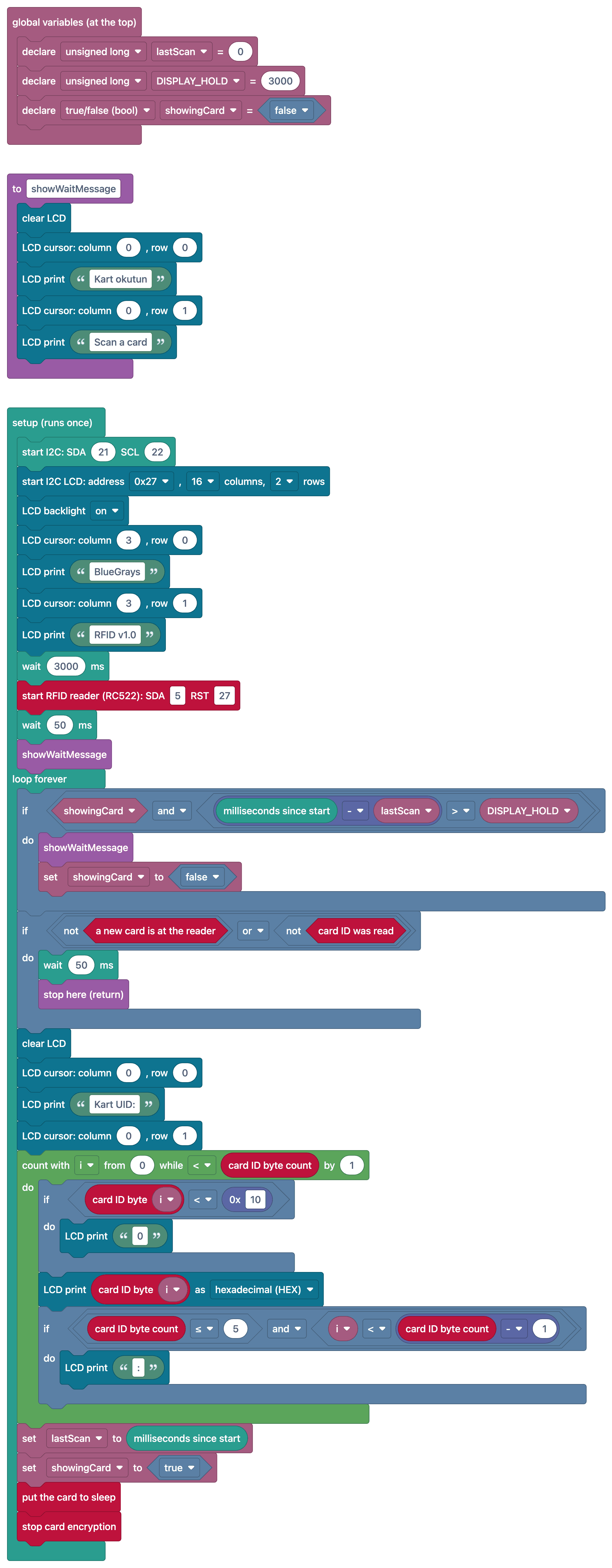
FAQ
Aling mga pin ang dapat kong gamitin para ikonekta ang RC522 sa ESP32?
Ginagamit ang default na SPI pin ng ESP32: SCK = GPIO 18, MISO = GPIO 19, MOSI = GPIO 23. Para sa SDA (SS) at RST, gamitin ang mga pin na nakatakda sa code (hal. 5 at 27); dapat 3.3 V ang supply voltage.
Sabay bang gumagana ang LCD at RFID?
Oo. Dahil I2C (GPIO 21/22) ang gamit ng LCD at SPI bus ang gamit ng RC522, hindi sila nagkakagambalaan; sabay na gumagana ang dalawang magkahiwalay na communication bus.
Bakit 4 byte ang UID sa ilang card at 7 byte sa iba?
Karaniwang 4-byte na UID ang gamit ng MIFARE Classic card, habang 7-byte na UID ang gamit ng MIFARE Ultralight at NTAG tag. Kapag nagkukumpara, dapat ding suriin ang haba ng UID.
Puwede ba akong magdagdag ng awtorisadong card nang hindi binabago ang code?
Oo, makakasulat ka ng mod na nagdadagdag sa listahan ng susunod na card kapag na-scan ang "administrator card", at mase-save mo ang listahan sa permanenteng storage gamit ang Preferences.