
Video
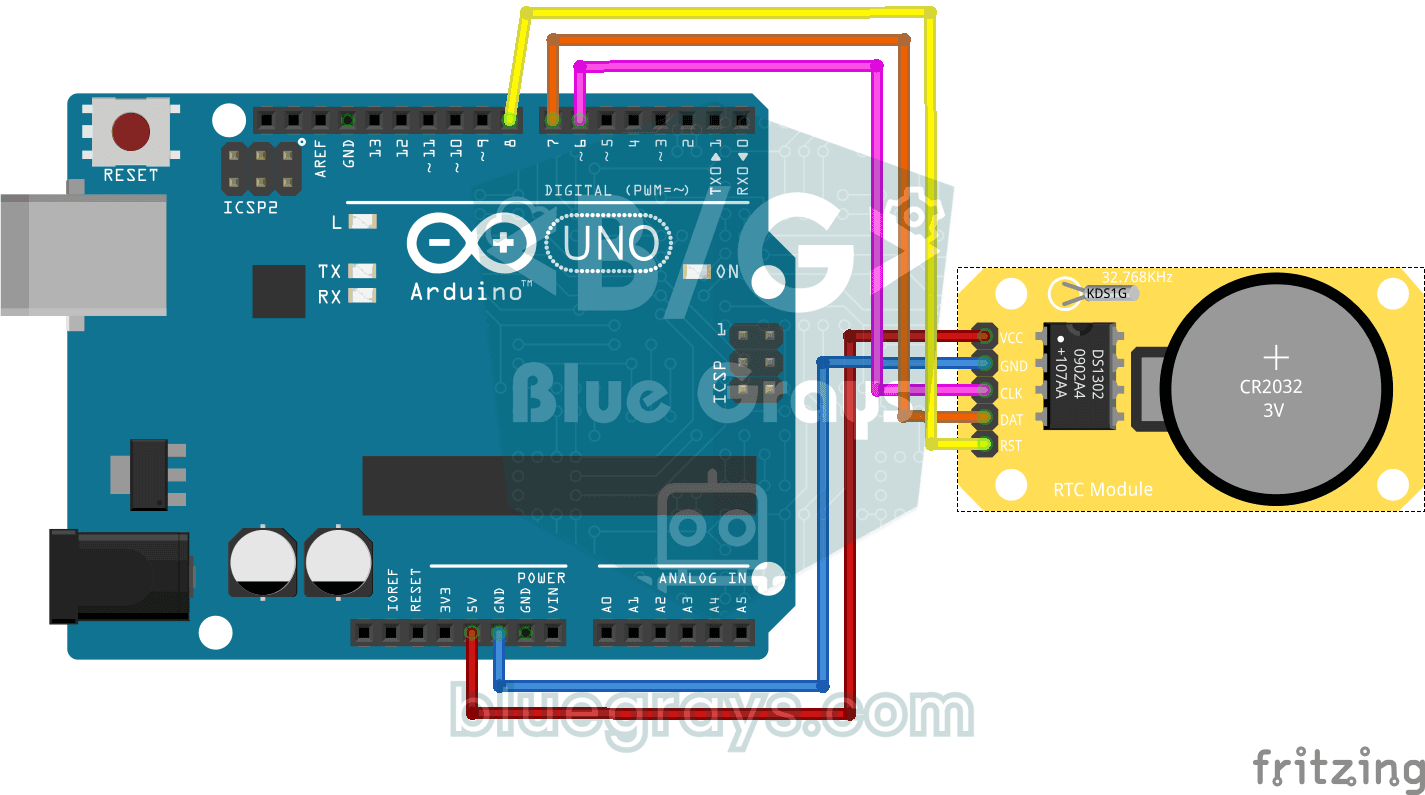
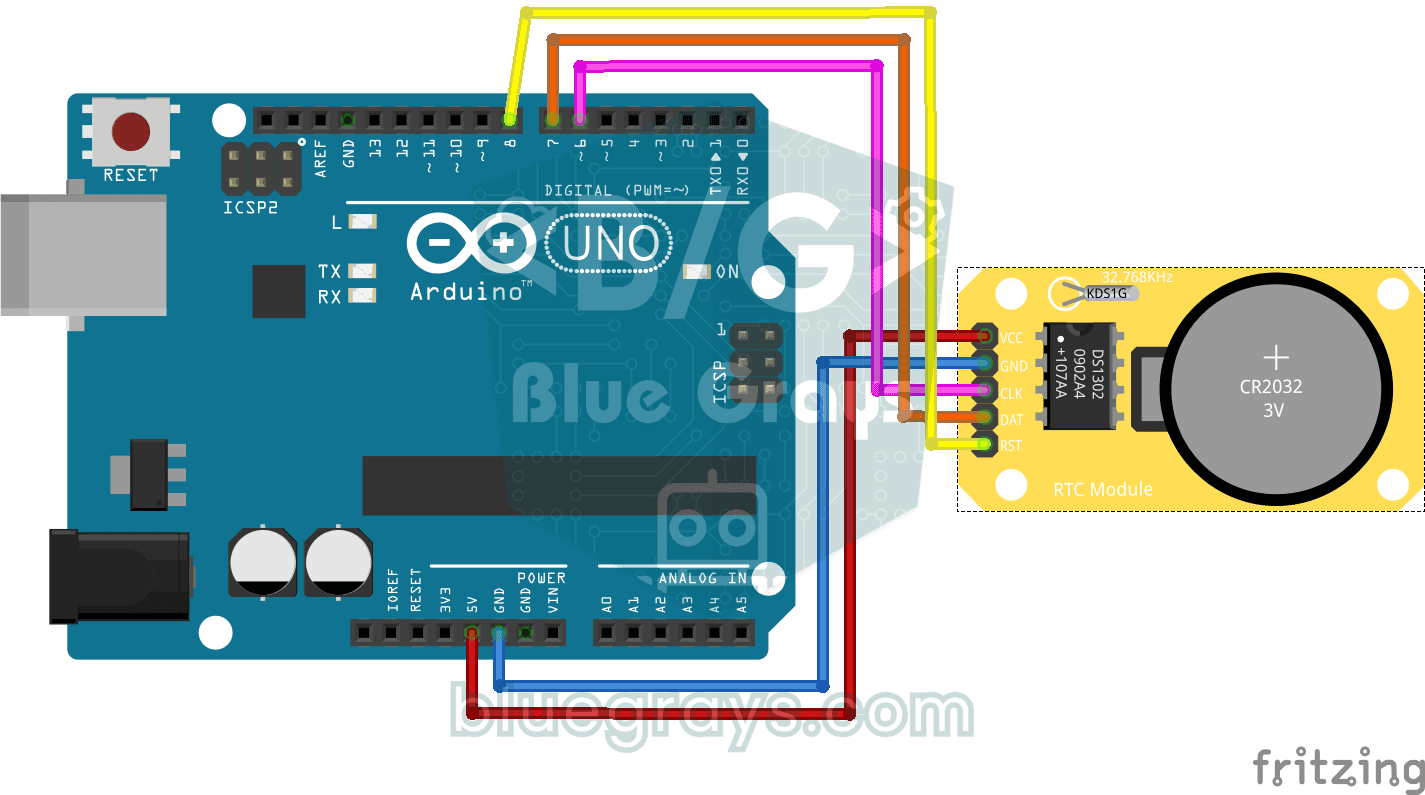
Circuit diagram
Source code
1// ─────────────────────────────────────────
2//   BlueGrays · bluegrays.com
3//   DS1302 RTC Clock Module Setup
4// ─────────────────────────────────────────
5// If the RTC's time is invalid (new module, flat battery) it writes the
6// compile date and time to the DS1302 once, then prints the date and time
7// to the Serial Monitor every second. The module's battery keeps the time
8// with the power off; later starts do not set it again.
9//
10// Pins:
11//   D6 -> RTC CLK
12//   D7 -> RTC DAT
13//   D8 -> RTC RST
14//   RTC VCC to 5V, GND to GND
15
16#include <virtuabotixRTC.h>   // DS1302 library
17
18// Pins: CLK, DAT, RST
19virtuabotixRTC myRTC(6, 7, 8);
20
21void setup() {
22  Serial.begin(9600);   // Serial at 9600 baud
23
24  // Read the RTC first. A year below 2024 or a month outside 1-12 means the time was never set;
25  // write the compile time. If it is valid leave it, so uploading again or power cycling the
26  // Arduino keeps the time.
27  myRTC.updateTime();
28  if (myRTC.year < 2024 || myRTC.month < 1 || myRTC.month > 12) {
29    setFromCompileTime();
30  }
31}
32
33// Writes the compile time (__DATE__ "Oct 28 2026", __TIME__ "13:42:15") to the RTC. Uploading takes
34// a few seconds, so the clock starts that far behind.
35void setFromCompileTime() {
36  const char *date = __DATE__;
37  const char *time = __TIME__;
38  const char *months = "JanFebMarAprMayJunJulAugSepOctNovDec";
39  char monthName[4] = {date[0], date[1], date[2], '\0'};
40
41  int month = (strstr(months, monthName) - months) / 3 + 1;   // "Oct" -> 10
42  int day = atoi(date + 4);
43  int year = atoi(date + 7);
44  int hour = atoi(time);
45  int minute = atoi(time + 3);
46  int second = atoi(time + 6);
47
48  // Day of the week (Sakamoto's method), 0 = Sunday
49  int offsets[] = {0, 3, 2, 5, 0, 3, 5, 1, 4, 6, 2, 4};
50  int y = year - (month < 3);
51  int weekday = (y + y / 4 - y / 100 + y / 400 + offsets[month - 1] + day) % 7;
52  if (weekday == 0) {
53    weekday = 7;   // Monday = 1 ... Sunday = 7
54  }
55
56  // Order: s, min, h, weekday, day, month, year
57  myRTC.setDS1302Time(second, minute, hour, weekday, day, month, year);
58}
59
60void loop() {
61  // Read the current time from the RTC module
62  myRTC.updateTime();
63
64  // Print the time (day/month/year h:m:s)
65  Serial.print("Current Date/Time: ");
66  Serial.print(myRTC.dayofmonth);
67  Serial.print("/");
68  Serial.print(myRTC.month);
69  Serial.print("/");
70  Serial.print(myRTC.year);
71  Serial.print("  ");
72  Serial.print(myRTC.hours);
73  Serial.print(":");
74  Serial.print(myRTC.minutes);
75  Serial.print(":");
76  Serial.println(myRTC.seconds);
77
78  delay(1000);   // Wait 1 s
79}
80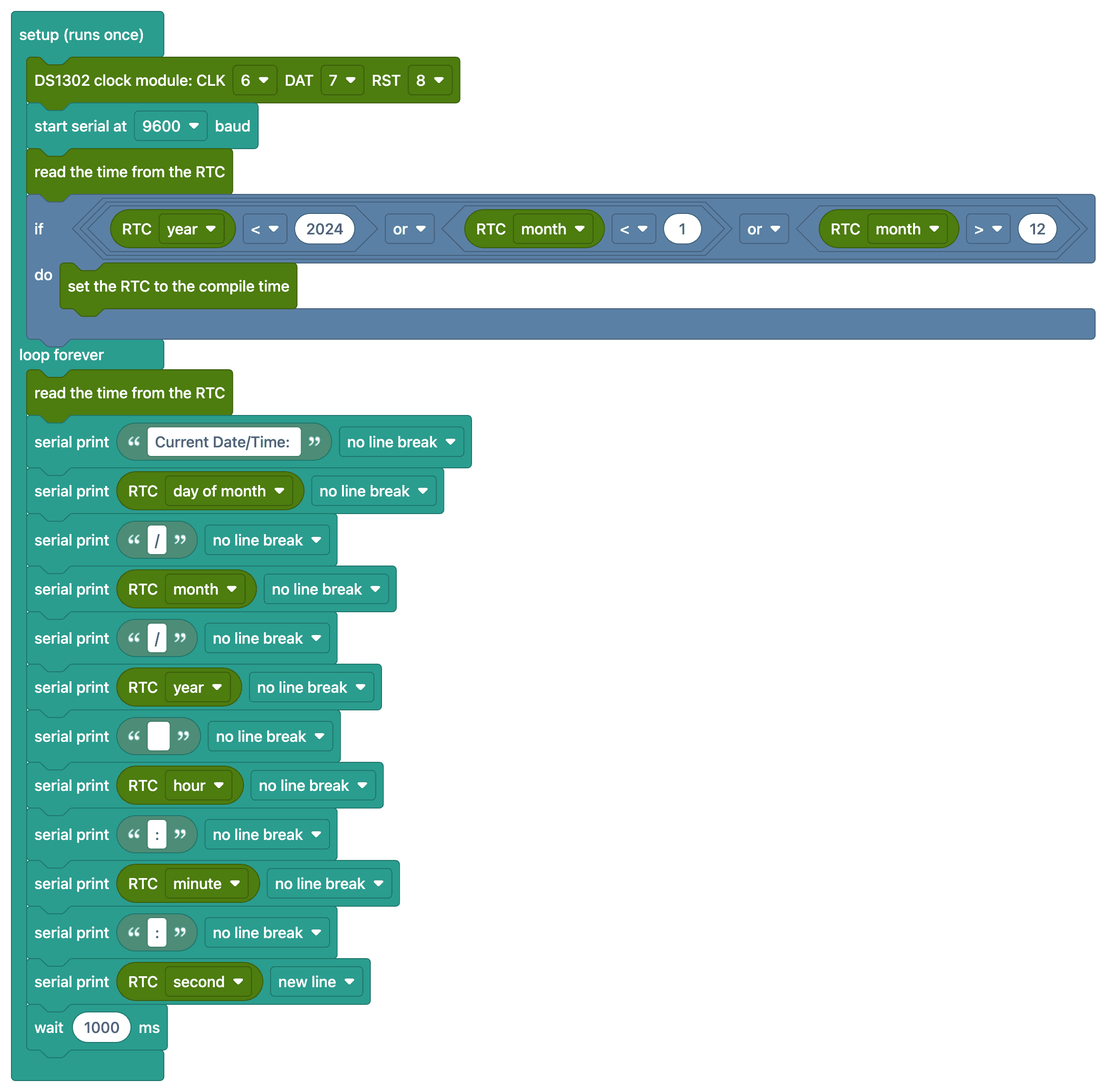
FAQ
Ano ang ginagawa ng RTC module?
Pinapanatili ng real-time clock (RTC) module ang oras at petsa kahit naka-off ang Arduino, dahil sa built-in na baterya nito. Dahil nare-reset ang millis() counter ng Arduino tuwing bubuksan ang Arduino, kailangan ang RTC para sa tumpak na impormasyon ng oras.
Sapat na ba ang isang beses na pagtakda ng oras?
Oo. Binabasa muna ng code ang oras mula sa module; kung hindi pa ito naitakda kailanman, isinusulat nito nang isang beses ang petsa at oras noong na-compile mo ang code. Kung valid ang oras, hindi na nito ito ginagalaw, kaya hindi masisira ang orasan kahit mag-upload ka ulit o i-off at i-on ang Arduino. Hindi mo kailangang mag-comment out ng anumang linya nang mano-mano.
Nahuhuli ang orasan. Normal ba iyon?
Crystal ang batayan ng DS1302 at puwede itong lumihis nang ilang segundo bawat araw. Para sa mas tumpak na orasan, inirerekomenda ang DS3231 module na may temperature compensation (mga ±1 minuto bawat taon).
Ano ang mangyayari kapag naubos ang baterya sa module?
Tumatakbo ang orasan hangga't may power ang Arduino; kung naputol ang power at ubos na ang baterya, nare-reset ang orasan at kailangan itong itakda ulit. Karaniwang tumatagal nang ilang taon ang CR2032 na baterya.