
LED na siga gamit ang Raspberry Pi Pico (8x8 NeoPixel matrix + potentiometer + buzzer)
Sigang walang sinusunog, pero lumalagitik pa rin! Gumuguhit ang Raspberry Pi Pico ng makatotohanang apoy sa 8x8 NeoPixel matrix, kinukuwenta bawat frame: lumilitaw ang mga kislap sa ibaba, lumalamig ang init habang tumataas at nagliliwanag mula pula hanggang puti. Itinatakda ng potentiometer ang taas ng apoy, nagpapalit ang button sa pagitan ng Fire, Gas, Magic at Amethyst na theme, at dagdag ng buzzer ang lagitik ng kahoy. Procedural animation, ADC, PWM at MicroPython sa iisang project.
Video
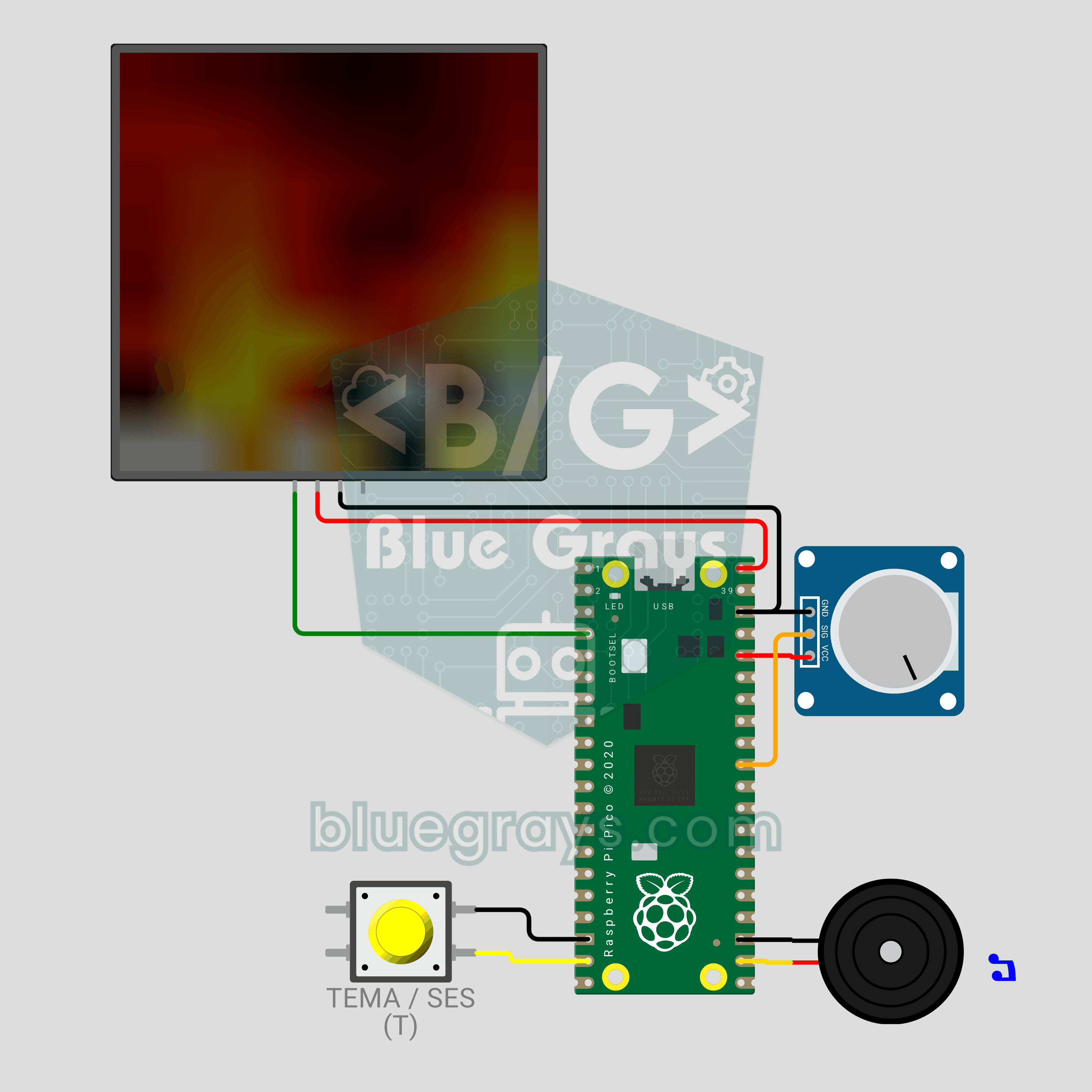
Circuit diagram
Source code
1# ─────────────────────────────────────────
2#   BlueGrays · bluegrays.com
3#   Raspberry Pi Pico LED Campfire (8x8 NeoPixel Matrix + Potentiometer + Buzzer)
4# ─────────────────────────────────────────
5# Realistic fire animation on an 8x8 NeoPixel matrix. The potentiometer
6# sets the flame height, a short button press changes the theme (Fire,
7# Gas, Magic, Amethyst) and a long press toggles the crackle sound.
8#
9# Pins:
10#   GP2  -> matrix DIN (VDD -> VBUS, VSS -> GND)
11#   GP26 -> Potentiometer wiper (ADC0)
12#   GP14 -> Button (other leg to GND)
13#   GP17 -> Buzzer (+)
14
15from machine import Pin, PWM, ADC
16from neopixel import NeoPixel
17import time
18import random
19
20# ============ SETTINGS ============
21W = 8                  # Columns
22H = 8                  # Rows
23SERPENTINE = False     # True for zigzag-wired panels
24BRIGHTNESS = 0.4       # Wokwi draws colors as-is, 0.4 shows the flame clearly
25                       # 0.15-0.2 recommended on USB 2.0 (500 mA), use external 5V for brighter
26FRAME_MS = 35          # Frame time (~28 FPS)
27LONG_PRESS_MS = 900    # Hold time to toggle sound
28
29# ============ HARDWARE ============
30matrix = NeoPixel(Pin(2), W * H)
31pot = ADC(26)                           # ADC0
32button = Pin(14, Pin.IN, Pin.PULL_UP)
33buzzer = PWM(Pin(17))
34buzzer.duty_u16(0)
35
36# ============ STATE ============
37# heat[x][y]: column x, y = 0 is the bottom row; 0 = cold, 255 = hottest
38heat = [[0] * H for _ in range(W)]
39theme = 0
40THEME_NAMES = ["Fire", "Gas", "Magic", "Amethyst"]
41sound_on = True
42
43
44# ============ COLOR PALETTE ============
45def heat_color(t):
46    # Map heat (0-255) to a color by theme: black -> deep -> bright -> white
47    t192 = (t * 191) // 255
48    ramp = (t192 & 0x3F) << 2      # 0-252 ramp per band
49    if t192 & 0x80:
50        r, g, b = 255, 255, ramp   # Hottest: yellow -> white
51    elif t192 & 0x40:
52        r, g, b = 255, ramp, 0     # Middle: red -> yellow
53    else:
54        r, g, b = ramp, 0, 0       # Cool: black -> red
55    if theme == 1:
56        r, b = b, r                # Gas: blue flame
57    elif theme == 2:
58        r, g = g, r                # Magic: green flame
59    elif theme == 3:
60        b = max(b, r * 3 // 4)     # Amethyst: purple flame
61        g = g // 2
62    return (int(r * BRIGHTNESS), int(g * BRIGHTNESS), int(b * BRIGHTNESS))
63
64
65def pixel_index(x, row):
66    # row 0 = top row
67    if SERPENTINE and row % 2 == 1:
68        return row * W + (W - 1 - x)
69    return row * W + x
70
71
72# ============ FIRE SIMULATION ============
73def fire_step(intensity):
74    # intensity 0-1: flame height. High = less cooling + more sparks
75    cooling = int(115 - 55 * intensity)    # 115 (short) -> 60 (tall)
76    sparking = int(70 + 150 * intensity)   # 70 -> 220 (probability)
77    max_cool = (cooling * 10) // H + 2
78
79    for x in range(W):
80        col = heat[x]
81        # Every cell cools a little
82        for y in range(H):
83            c = col[y] - random.getrandbits(8) % max_cool
84            col[y] = c if c > 0 else 0
85        # Heat drifts up and diffuses
86        for y in range(H - 1, 1, -1):
87            col[y] = (col[y - 1] + col[y - 2] + col[y - 2]) // 3
88        # Random sparks at the base
89        if random.getrandbits(8) < sparking:
90            y = random.getrandbits(1)
91            col[y] = min(255, col[y] + 160 + random.getrandbits(6))
92
93    # 4) Light blending with neighbor columns: the flame waves more naturally
94    for y in range(2, H):
95        row_vals = [heat[x][y] for x in range(W)]
96        for x in range(W):
97            left = row_vals[x - 1] if x > 0 else row_vals[x]
98            right = row_vals[x + 1] if x < W - 1 else row_vals[x]
99            heat[x][y] = (row_vals[x] * 2 + left + right) // 4
100
101
102def render():
103    for x in range(W):
104        for y in range(H):
105            matrix[pixel_index(x, H - 1 - y)] = heat_color(heat[x][y])
106    matrix.write()
107
108
109# ============ CRACKLE SOUND ============
110def crackle(intensity):
111    # Random very short "ticks" = crackling wood
112    if not sound_on:
113        return
114    if random.getrandbits(8) < int(10 + 50 * intensity):
115        buzzer.freq(1500 + random.getrandbits(12))   # 1500-5595 Hz
116        buzzer.duty_u16(6000)
117        time.sleep_ms(2 + random.getrandbits(2))
118        buzzer.duty_u16(0)
119
120
121def beep(freq, ms):
122    buzzer.freq(freq)
123    buzzer.duty_u16(20000)
124    time.sleep_ms(ms)
125    buzzer.duty_u16(0)
126
127
128# ============ BUTTON ============
129btn_state = 1
130btn_raw = 1
131btn_changed = time.ticks_ms()
132press_start = 0
133long_done = False
134
135
136def handle_button():
137    # Short press = theme, long press = sound on/off
138    global btn_state, btn_raw, btn_changed, press_start, long_done, theme, sound_on
139    now = time.ticks_ms()
140    raw = button.value()
141    if raw != btn_raw:
142        btn_raw = raw
143        btn_changed = now
144    if time.ticks_diff(now, btn_changed) > 25 and raw != btn_state:
145        btn_state = raw
146        if raw == 0:
147            press_start = now
148            long_done = False
149        elif not long_done:
150            theme = (theme + 1) % len(THEME_NAMES)
151            print("Theme:", THEME_NAMES[theme])
152            beep(1200, 30)
153    if btn_state == 0 and not long_done and time.ticks_diff(now, press_start) > LONG_PRESS_MS:
154        long_done = True
155        sound_on = not sound_on
156        print("Sound:", "ON" if sound_on else "OFF")
157        beep(1600 if sound_on else 500, 80)
158
159
160# ============ MAIN LOOP ============
161print("== BlueGrays · bluegrays.com ==")
162print("Pico 8x8 Campfire")
163print("Pot = flame height | Short press = theme | Long press = sound")
164
165smooth = pot.read_u16() / 65535
166while True:
167    start = time.ticks_ms()
168    handle_button()
169
170    # Smooth the pot value (jitter should not make the flame jump)
171    smooth += (pot.read_u16() / 65535 - smooth) * 0.2
172    fire_step(smooth)
173    render()
174    crackle(smooth)
175
176    # Constant frame rate
177    spent = time.ticks_diff(time.ticks_ms(), start)
178    if spent < FRAME_MS:
179        time.sleep_ms(FRAME_MS - spent)
180FAQ
Bakit dapat kong babaan ang liwanag sa totoong circuit?
`BRIGHTNESS = 0.4` ang gamit ng code dahil eksaktong iginuguhit ng Wokwi ang mga kulay ayon sa ipinadala. Puwedeng kumuha ng mga 1 A ang totoong matrix kapag malaki ang apoy, samantalang 500 mA ang ibinibigay ng USB 2.0 port. Sa USB, itakda ito sa 0.15–0.2; para sa mas maliwanag, paganahin ang matrix mula sa 5V 2A na adapter at pagdugtungin ang mga ground.
Paano ko papalitan ang taas at kulay ng apoy?
Ikutin pakaliwa ang potentiometer para sa nagbabagang uling at pakanan para sa apoy na umaabot sa itaas ng matrix. Umiikot sa Fire, Gas, Magic at Amethyst ang maikling pindot ng button. Sa Wokwi, i-click ang pot at gamitin ang mga arrow key, at pindutin ang T para palitan ang theme.
Paano ko io-off ang lagitik o pakakauntiin ito?
Pindutin nang matagal ang button nang mga isang segundo: mataas na beep kapag naka-on ang tunog, mababang beep kapag naka-off. Para kumaunti ang lagitik, babaan ang 10 at 50 sa `10 + 50 * intensity` sa loob ng `crackle()`. Gumamit ng passive buzzer para sa tunog.
Kailangan ko bang mag-install ng anumang library?
Hindi. Kasama na sa MicroPython para sa Pico ang mga module na `neopixel`, `machine` at `random`. I-flash ang MicroPython sa Pico at i-save dito ang code bilang `main.py` sa Thonny; kusa nang magsisimula ang apoy tuwing bubuksan ang Pico.