
ESP32 Bluetooth पार्किंग सेंसर (HC-SR04)
HC-SR04 से किसी रुकावट तक की दूरी मापें और फ़ोन पर देखें; जितने पास जाएँ, बज़र उतना तेज़ बीप करता है। इंटरनेट की ज़रूरत नहीं। यह ऐप के पार्किंग सेंसर Bluetooth टेम्पलेट की स्टेप बाय स्टेप गाइड है, जो ESP32 से बनी है। मेरी वर्कशॉप › मेरे डिवाइस › डिवाइस जोड़ें › Bluetooth पर जाएँ, पार्किंग सेंसर चुनें और कोड लें से कोड अपलोड करें। इस पेज का Bluetooth पैनल बनाएँ बटन भी इसी टेम्पलेट के साथ विज़ार्ड खोलता है।
वीडियो
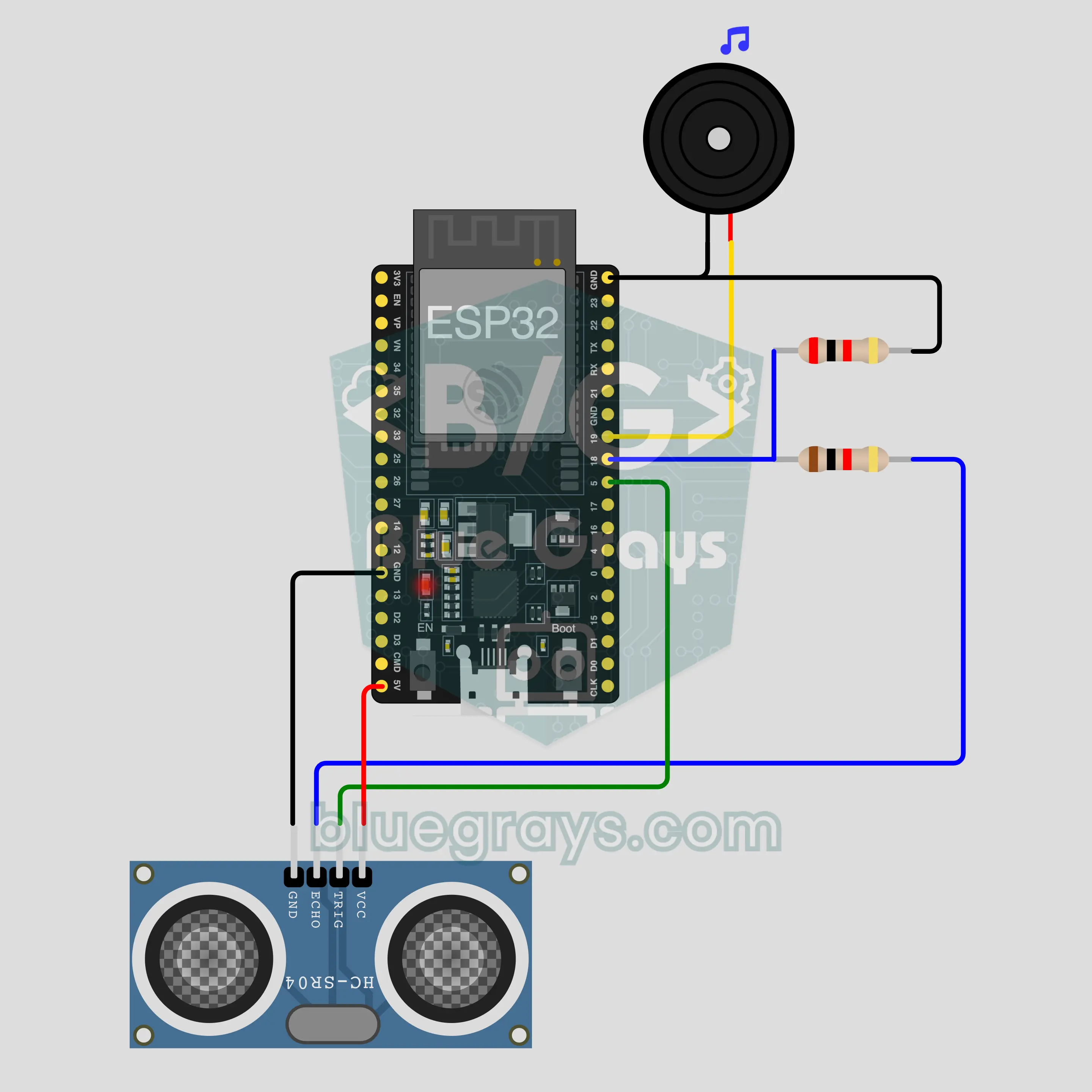
सर्किट डायग्राम
सोर्स कोड
1// ┌───────────────────────────┐
2// │ BlueGrays · bluegrays.com │
3// │ Bluetooth · ESP32         │
4// │ BG-Park                   │
5// └───────────────────────────┘
6// Parking sensor
7// Arduino IDE board: ESP32 Dev Module
8// the BLE library comes with the ESP32 board package, nothing extra to install
9
10#include <BLEDevice.h>
11#include <BLEServer.h>
12#include <BLE2902.h>
13
14const char BLE_NAME[] = "BG-Park";  // the board advertises with this name, the app finds it in the list by it
15
16// Pins: change them here if you wired differently
17const int TRIG_PIN = 5, ECHO_PIN = 18;  // ECHO outputs 5 V: connect it through a 1k/2k divider
18const int BUZZER_PIN = 19;
19const int ALARM_FROM_CM = 100;  // Alarm: under 100 cm it beeps faster as the obstacle gets closer, continuous under 10 cm
20
21void btWrite(const char *text);
22void onValue(const char *key, const char *value);
23void sendAll();
24void onLinkLost();
25
26// ── The app sends "key=value" lines; on "?" the board sends all its values ──
27char line[65];
28uint8_t lineLen = 0;
29unsigned long lastRxMs = 0;
30
31bool is(const char *a, const char *b) { return strcmp(a, b) == 0; }
32bool isOn(const char *v) { return v[0] == '1'; }
33
34void sendText(const char *key, const char *value) {
35  char out[72];
36  snprintf(out, sizeof(out), "%s=%s\n", key, value);
37  btWrite(out);
38}
39
40void sendInt(const char *key, long value) {
41  char text[12];
42  snprintf(text, sizeof(text), "%ld", value);
43  sendText(key, text);
44}
45
46void sendFloat(const char *key, float value) {
47  char text[16];
48  dtostrf(value, 1, 1, text);
49  sendText(key, text);
50}
51
52void handleLine(char *text) {
53  char *eq = strchr(text, '=');
54  if (eq == nullptr) {
55    if (text[strlen(text) - 1] == '?') {
56      btWrite("@v=1.0\n");  // the "@v" line tells the app the code version
57      sendAll();
58    }
59    return;
60  }
61  *eq = '\0';
62  onValue(text, eq + 1);
63}
64
65void feed(char c) {
66  lastRxMs = millis();
67  if (c == '\n' || c == '\r') {
68    if (lineLen == 0) return;
69    line[lineLen] = '\0';
70    lineLen = 0;
71    handleLine(line);
72  } else if (lineLen < sizeof(line) - 1) {
73    line[lineLen++] = c;
74  }
75}
76
77// ── Bluetooth (Nordic UART) ──
78#define UART_SERVICE "6E400001-B5A3-F393-E0A9-E50E24DCCA9E"
79#define UART_RX "6E400002-B5A3-F393-E0A9-E50E24DCCA9E"
80#define UART_TX "6E400003-B5A3-F393-E0A9-E50E24DCCA9E"
81
82BLECharacteristic *txChar = nullptr;
83volatile bool linked = false;
84volatile bool linkLost = false;
85// incoming bytes move from the Bluetooth task to loop() through a small ring buffer
86const int RX_SIZE = 256;
87volatile uint8_t rxBuf[RX_SIZE];
88volatile int rxHead = 0, rxTail = 0;
89
90class ServerEvents : public BLEServerCallbacks {
91  void onConnect(BLEServer *server) override { linked = true; }
92  void onDisconnect(BLEServer *server) override { linked = false; linkLost = true; }
93};
94
95class RxEvents : public BLECharacteristicCallbacks {
96  void onWrite(BLECharacteristic *c) override {
97    auto v = c->getValue();
98    for (size_t i = 0; i < v.length(); i++) {
99      int next = (rxHead + 1) % RX_SIZE;
100      if (next == rxTail) break;
101      rxBuf[rxHead] = (uint8_t)v[i];
102      rxHead = next;
103    }
104  }
105};
106
107// lines go out in 20-byte packets (works with every phone)
108void btWrite(const char *text) {
109  if (!linked || txChar == nullptr) return;
110  size_t n = strlen(text);
111  for (size_t i = 0; i < n; i += 20) {
112    size_t len = n - i < 20 ? n - i : 20;
113    txChar->setValue((uint8_t *)text + i, len);
114    txChar->notify();
115    delay(4);
116  }
117}
118
119void btBegin() {
120  BLEDevice::init(BLE_NAME);
121  BLEServer *server = BLEDevice::createServer();
122  server->setCallbacks(new ServerEvents());
123  BLEService *uart = server->createService(UART_SERVICE);
124  txChar = uart->createCharacteristic(UART_TX, BLECharacteristic::PROPERTY_NOTIFY);
125  txChar->addDescriptor(new BLE2902());
126  BLECharacteristic *rx = uart->createCharacteristic(UART_RX, BLECharacteristic::PROPERTY_WRITE | BLECharacteristic::PROPERTY_WRITE_NR);
127  rx->setCallbacks(new RxEvents());
128  uart->start();
129  BLEAdvertisementData adv;
130  adv.setFlags(0x06);
131  adv.setCompleteServices(BLEUUID(UART_SERVICE));
132  BLEAdvertisementData scan;
133  scan.setName(BLE_NAME);
134  BLEAdvertising *advertising = BLEDevice::getAdvertising();
135  advertising->setAdvertisementData(adv);
136  advertising->setScanResponseData(scan);
137  BLEDevice::startAdvertising();
138}
139
140void btPoll() {
141  while (rxTail != rxHead) {
142    char c = (char)rxBuf[rxTail];
143    rxTail = (rxTail + 1) % RX_SIZE;
144    feed(c);
145  }
146  if (linkLost) {
147    linkLost = false;
148    onLinkLost();
149    delay(100);
150    BLEDevice::startAdvertising();
151  }
152}
153
154// ── ESP32 ──
155bool alarmOn = true;
156bool buzzing = false;
157int distanceCm = -1, sentCm = -100;
158unsigned long lastMeasureMs = 0, lastSentMs = 0, lastBeepMs = 0;
159
160int measureCm() {
161  digitalWrite(TRIG_PIN, LOW);
162  delayMicroseconds(2);
163  digitalWrite(TRIG_PIN, HIGH);
164  delayMicroseconds(10);
165  digitalWrite(TRIG_PIN, LOW);
166  unsigned long us = pulseIn(ECHO_PIN, HIGH, 25000UL);
167  if (us == 0) return 400;  // no echo: nothing within 4 m
168  return min(400UL, us / 58);
169}
170
171void buzz(bool on) {
172  if (on == buzzing) return;
173  buzzing = on;
174  if (on) tone(BUZZER_PIN, 2000);
175  else noTone(BUZZER_PIN);
176}
177
178void onValue(const char *key, const char *value) {
179  if (is(key, "alarm")) alarmOn = isOn(value);
180}
181
182void sendAll() {
183  if (distanceCm >= 0) sendInt("mesafe", distanceCm);
184  sendInt("alarm", alarmOn);
185}
186
187void onLinkLost() {
188}
189
190void setup() {
191  Serial.begin(115200);
192  pinMode(TRIG_PIN, OUTPUT);
193  pinMode(ECHO_PIN, INPUT);
194  pinMode(BUZZER_PIN, OUTPUT);
195  btBegin();
196  Serial.print(F("BlueGrays Bluetooth: "));
197  Serial.println(BLE_NAME);
198}
199
200void loop() {
201  btPoll();
202  if (millis() - lastMeasureMs >= 100) {
203    lastMeasureMs = millis();
204    distanceCm = measureCm();
205    if ((distanceCm != sentCm && millis() - lastSentMs >= 250) || millis() - lastSentMs >= 2000) {
206      sendInt("mesafe", distanceCm);
207      sentCm = distanceCm;
208      lastSentMs = millis();
209    }
210  }
211  if (!alarmOn || distanceCm < 0 || distanceCm > ALARM_FROM_CM) {
212    buzz(false);
213  } else if (distanceCm <= 10) {
214    buzz(true);
215  } else if (millis() - lastBeepMs >= (unsigned long)map(distanceCm, 10, ALARM_FROM_CM, 60, 600)) {
216    lastBeepMs = millis();
217    buzz(!buzzing);
218  }
219}
220FAQ
क्या यह iPhone के साथ चलता है?
हाँ। ESP32 का बिल्ट-इन Bluetooth Low Energy (BLE) iPhone और Android दोनों से बात करता है। iPhone, HC-05 और HC-06 जैसे क्लासिक Bluetooth मॉड्यूल से कनेक्ट नहीं हो सकता, और इस प्रोजेक्ट को उनकी ज़रूरत भी नहीं। बोर्ड को फ़ोन की Bluetooth सेटिंग्स में पेयर करने की कोशिश न करें; BLE बोर्ड वहाँ शायद न दिखें, यह सामान्य है। कनेक्शन BlueGrays ऐप बनाता है।
वोल्टेज डिवाइडर क्यों चाहिए? क्या ECHO सीधे बोर्ड से जोड़ा जा सकता है?
HC-SR04, 5 V पर चलता है और उसका ECHO पिन 5 V सिग्नल देता है। ESP32 के पिन 3.3 V पर काम करते हैं और 5 V नहीं झेल सकते। 1 kΩ और 2 kΩ के रेज़िस्टर उस सिग्नल को बाँटते हैं, ताकि GPIO 18 तक लगभग 3.3 V पहुँचे। सीधे जोड़ने पर सर्किट चलता हुआ लग सकता है, लेकिन पिन खराब हो सकता है; डिवाइडर न छोड़ें। TRIG को डिवाइडर की ज़रूरत नहीं, क्योंकि वहाँ सिग्नल बोर्ड ही भेजता है। अगर आपके पास 2 kΩ रेज़िस्टर नहीं है, तो दो 1 kΩ रेज़िस्टर एक के बाद एक (सीरीज़ में) लगाएँ।
क्या इसे अपनी असली कार में लगाया जा सकता है?
नहीं, यह सीखने वाला और मॉडल प्रोजेक्ट है। यह टेबल पर, खिलौना कार पर या गैराज की दीवार की ओर जाकर आज़माने में अपना काम करता है। HC-SR04 और ब्रेडबोर्ड बारिश, कीचड़ और झटकों के लिए नहीं बने; नरम या तिरछी सतहों पर रीडिंग गलत आती है और Bluetooth कनेक्शन टूट सकता है। यह असली गाड़ी में ड्राइविंग सुरक्षा के लिए पार्किंग सिस्टम नहीं है, इसलिए वहाँ इस पर भरोसा न करें।
क्या कोई फ़ोन कनेक्ट न होने पर भी यह बीप करता है?
हाँ। मापना और बीप करना बोर्ड पर होता है; फ़ोन सिर्फ़ दूरी दिखाने और आवाज़ बंद-चालू करने के लिए है। हर बार चालू होने पर बोर्ड चेतावनी की आवाज़ चालू रखकर शुरू होता है, इसलिए पावर बैंक पर यह बिना किसी फ़ोन के 100 cm से बीप करता है। कनेक्शन टूट जाए तो मापना और बीप करना जारी रहता है। अगर आपने पैनल के स्विच से इसे चुप किया है, तो यह तब तक चुप रहता है जब तक आप स्विच फिर चालू न करें या बोर्ड रीस्टार्ट न हो। इंटरनेट और Wi-Fi की कभी ज़रूरत नहीं पड़ती।