
Raspberry Pi Pico बटन पियानो (5 बटन + बज़र + धुन रिकॉर्डर)
पाँच कुंजियों वाला छोटा पियानो, जो आपका बजाया याद रखता है! Raspberry Pi Pico पाँच बटन से पैसिव बज़र पर DO, RE, MI, FA और SOL बजाता है, और सुर तब तक बजता है जब तक कुंजी दबी रहे। DO को एक सेकंड दबाए रखें, अपनी धुन बजाएँ, फिर DO दोबारा दबाए रखें: Pico उसे वापस बजाता है, और सुरों के बीच 1.5 सेकंड से लंबी चुप्पी को 1.5 सेकंड कर देता है। रिकॉर्ड इंडिकेटर बोर्ड पर पहले से लगा LED है, इसलिए कोई अतिरिक्त पार्ट नहीं। PWM सुर, डिबाउंसिंग और नॉन-ब्लॉकिंग टाइमिंग, सब एक प्रोजेक्ट में।
वीडियो
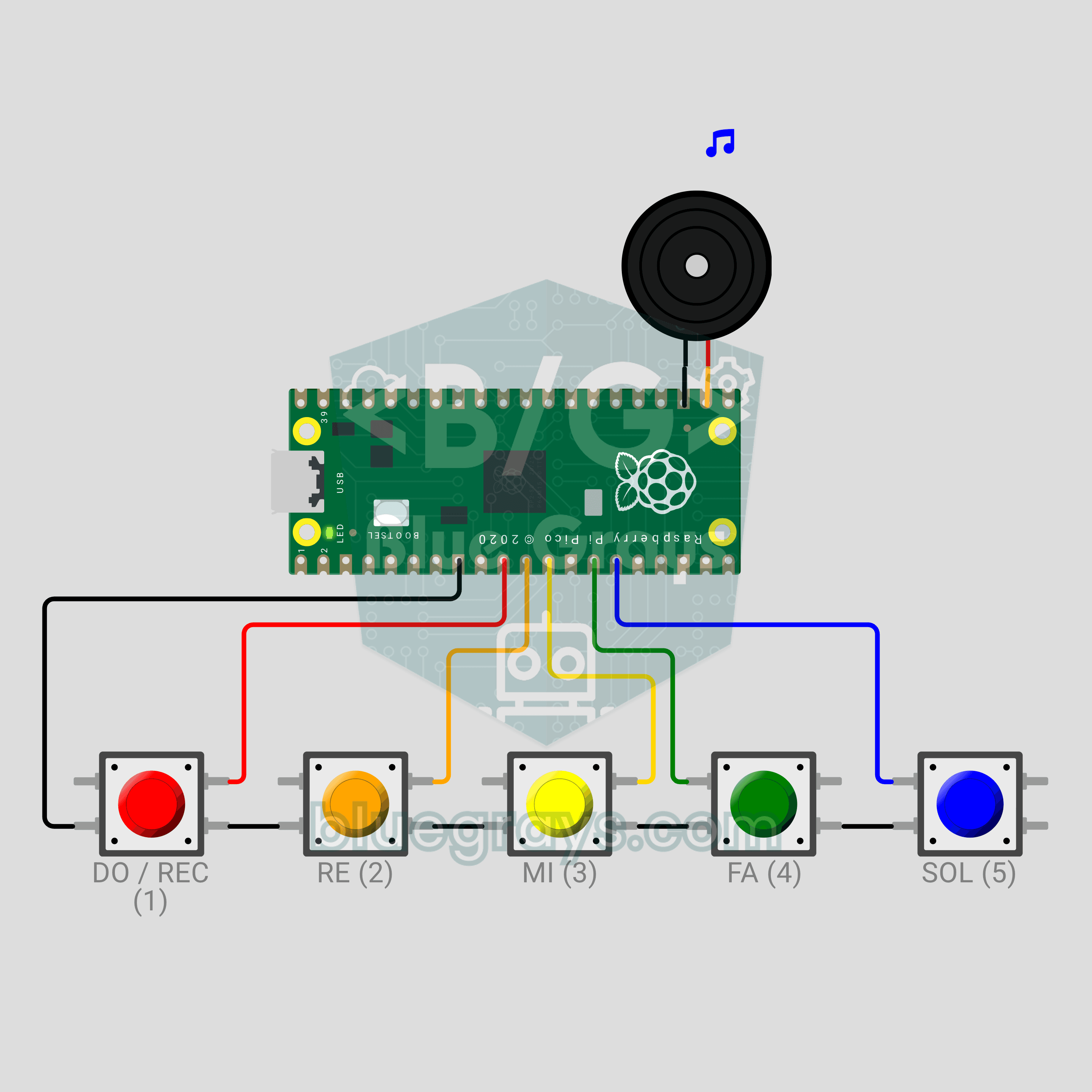
सर्किट डायग्राम
सोर्स कोड
1# ─────────────────────────────────────────
2#   BlueGrays · bluegrays.com
3#   Raspberry Pi Pico Button Piano (5 Buttons + Buzzer + Melody Recorder)
4# ─────────────────────────────────────────
5# Five-button mini piano: DO, RE, MI, FA, SOL. A note plays while its key
6# is held. Hold DO for 1 s: recording starts and the notes are stored with
7# their timing. Hold DO for 1 s again: recording stops and the melody is
8# played back in rhythm.
9#
10# Pins:
11#   GP7  -> DO button (other leg to GND)
12#   GP8  -> RE button (other leg to GND)
13#   GP9  -> MI button (other leg to GND)
14#   GP10 -> FA button (other leg to GND)
15#   GP11 -> SOL button (other leg to GND)
16#   GP17 -> Buzzer (+), other leg to GND
17#   LED  -> Onboard LED: record / play
18
19from machine import Pin, PWM
20import time
21
22# ============ SETTINGS ============
23NOTE_PINS = (7, 8, 9, 10, 11)
24NOTE_NAMES = ("DO", "RE", "MI", "FA", "SOL")
25NOTE_HZ = (523, 587, 659, 698, 784)   # C5 D5 E5 F5 G5 (Hz)
26VOLUME = 32768         # PWM duty, 32768 = 50%
27
28REC_KEY = 0            # Record key: DO
29LONG_PRESS_MS = 1000   # Hold time for record
30DEBOUNCE_MS = 20       # Button debounce
31MAX_NOTES = 64         # Max notes in a recording
32MAX_GAP_MS = 1500      # Longest silence in playback
33PLAY_DELAY_MS = 500    # Pause before playback
34REC_BLINK_MS = 500     # LED blink while recording
35LOOP_MS = 2            # Main loop step
36
37FREE, REC, PLAY = 0, 1, 2   # Modes
38
39# ============ HARDWARE ============
40buzzer = PWM(Pin(17))
41buzzer.duty_u16(0)
42try:
43    led = Pin("LED", Pin.OUT)      # onboard LED
44except (TypeError, ValueError):
45    led = Pin(25, Pin.OUT)         # Older firmware
46led.value(0)
47
48
49class Key:
50    # Debounced button; update() returns +1 on press, -1 on release
51    def __init__(self, gpio):
52        self.pin = Pin(gpio, Pin.IN, Pin.PULL_UP)
53        self.raw = 1
54        self.stable = 1
55        self.changed = time.ticks_ms()
56        self.down_at = 0
57        self.used = False      # Consumed by a command
58
59    def update(self, now):
60        raw = self.pin.value()
61        if raw != self.raw:
62            self.raw = raw
63            self.changed = now
64        if raw != self.stable and time.ticks_diff(now, self.changed) >= DEBOUNCE_MS:
65            self.stable = raw
66            if raw == 0:
67                self.down_at = now
68                self.used = False
69                return 1
70            return -1
71        return 0
72
73    def held_ms(self, now):
74        return time.ticks_diff(now, self.down_at) if self.stable == 0 else 0
75
76
77keys = [Key(p) for p in NOTE_PINS]
78
79
80# ============ SOUND ============
81def tone(hz):
82    buzzer.freq(hz)
83    buzzer.duty_u16(VOLUME)
84
85
86def silence():
87    buzzer.duty_u16(0)
88
89
90def chirp(*steps):
91    # Short signal sound: (Hz, ms) pairs; 0 Hz = silence
92    for hz, ms in steps:
93        if hz:
94            tone(hz)
95        else:
96            silence()
97        time.sleep_ms(ms)
98    silence()
99
100
101# ============ STATE ============
102mode = FREE
103held = []          # Held notes, latest last
104rec_notes = []     # Recording: [key, start ms, length ms]
105rec_t0 = 0
106play_list = []     # Playback: (time ms, key, length ms)
107play_index = 0
108play_start = 0
109play_end = 0
110play_sounding = False
111
112
113def update_sound():
114    # The buzzer plays one note: the latest pressed key wins
115    if held:
116        tone(NOTE_HZ[held[-1]])
117    else:
118        silence()
119
120
121def start_recording(now):
122    global mode, rec_notes, rec_t0
123    mode = REC
124    rec_notes = []
125    rec_t0 = now
126    chirp((880, 70), (0, 40), (1319, 110))       # Rising signal
127    print("Recording started (max %d notes)" % MAX_NOTES)
128
129
130def build_play_list():
131    # Sort notes by start, shift the first to 0, shorten long silences
132    notes = sorted(rec_notes, key=lambda n: n[1])
133    result = []
134    t = 0
135    for i, (k, start, length) in enumerate(notes):
136        if i > 0:
137            prev_k, prev_start, prev_len = notes[i - 1]
138            t += min(start - prev_start, prev_len + MAX_GAP_MS)
139        result.append((t, k, length))
140    return result
141
142
143def stop_recording(now):
144    global mode, play_list, play_index, play_start, play_end, play_sounding
145    led.value(0)
146    chirp((1319, 70), (0, 40), (880, 110))       # Falling signal
147    if not rec_notes:
148        mode = FREE
149        print("Recording is empty")
150        chirp((220, 300))
151        return
152    play_list = build_play_list()
153    names = " ".join(NOTE_NAMES[n[1]] for n in play_list)
154    print("Recording stopped: %d notes" % len(play_list))
155    print("Melody:", names)
156    mode = PLAY
157    play_index = 0
158    play_end = 0
159    play_sounding = False
160    play_start = time.ticks_add(time.ticks_ms(), PLAY_DELAY_MS)
161    print("Playback...")
162
163
164def finish_playback(message):
165    global mode
166    mode = FREE
167    silence()
168    led.value(0)
169    print(message)
170
171
172def update_playback(now):
173    # Non-blocking playback: start notes when due, silence them when they end
174    global play_index, play_end, play_sounding
175    elapsed = time.ticks_diff(now, play_start)
176    if elapsed < 0:
177        return
178    while play_index < len(play_list) and elapsed >= play_list[play_index][0]:
179        t, k, length = play_list[play_index]
180        tone(NOTE_HZ[k])
181        led.value(1)                  # LED lights with the note
182        play_end = t + length
183        play_sounding = True
184        play_index += 1
185    if play_sounding and elapsed >= play_end:
186        silence()
187        led.value(0)
188        play_sounding = False
189    if not play_sounding and play_index >= len(play_list):
190        finish_playback("Done. DO 1 s = new recording")
191
192
193def on_press(k, now):
194    if mode == PLAY:
195        # Any key stops the playback
196        keys[k].used = True
197        finish_playback("Stopped")
198        return
199    held.append(k)
200    update_sound()
201    tag = "[REC] " if mode == REC else ""
202    print("%sNote: %s (%d Hz)" % (tag, NOTE_NAMES[k], NOTE_HZ[k]))
203
204
205def on_release(k, now):
206    if k in held:
207        held.remove(k)
208        update_sound()
209    if keys[k].used or mode != REC:
210        return
211    start = time.ticks_diff(keys[k].down_at, rec_t0)
212    length = time.ticks_diff(now, keys[k].down_at)
213    rec_notes.append([k, start, length])
214    if len(rec_notes) >= MAX_NOTES:
215        print("Recording full")
216        stop_recording(now)
217
218
219def on_long_press(k, now):
220    # Long press on DO: start or stop recording. The held DO note is not recorded.
221    keys[k].used = True
222    if k in held:
223        held.remove(k)
224    update_sound()
225    if mode == FREE:
226        start_recording(now)
227    elif mode == REC:
228        stop_recording(now)
229
230
231# ============ MAIN LOOP ============
232print("== BlueGrays · bluegrays.com ==")
233print("Pico Button Piano")
234print("Keys: DO RE MI FA SOL")
235print("Hold DO 1 s = start / stop recording + play back")
236print("Any key stops the playback")
237chirp((NOTE_HZ[0], 90), (NOTE_HZ[2], 90), (NOTE_HZ[4], 90), (1047, 180))   # Startup
238
239while True:
240    now = time.ticks_ms()
241    for i, key in enumerate(keys):
242        event = key.update(now)
243        if event == 1:
244            on_press(i, now)
245        elif event == -1:
246            on_release(i, now)
247
248    rec_key = keys[REC_KEY]
249    if (mode != PLAY and not rec_key.used
250            and rec_key.held_ms(now) >= LONG_PRESS_MS):
251        on_long_press(REC_KEY, now)
252
253    if mode == PLAY:
254        update_playback(now)
255    elif mode == REC:
256        # LED blinks while recording
257        led.value(1 if (time.ticks_diff(now, rec_t0) // REC_BLINK_MS) % 2 == 0 else 0)
258
259    time.sleep_ms(LOOP_MS)
260FAQ
धुन कैसे रिकॉर्ड करें और वापस कैसे बजाएँ?
DO को एक सेकंड दबाए रखें: ऊपर चढ़ती दो बीप का मतलब रिकॉर्डिंग शुरू। अपनी धुन बजाएँ, फिर DO को एक सेकंड दोबारा दबाए रखें। नीचे उतरती दो बीप के बाद धुन वापस बजती है; सुरों के बीच 1.5 सेकंड से लंबी चुप्पी 1.5 सेकंड कर दी जाती है। बजते समय कोई भी कुंजी दबाने पर प्लेबैक रुक जाता है।
क्या रिकॉर्ड इंडिकेटर के लिए अलग LED जोड़ना होगा?
नहीं। कोड `Pin("LED")` से बोर्ड का LED चलाता है, जो Pico पर GP25 है और Pico W पर भी काम करता है। रिकॉर्डिंग के दौरान यह हर आधे सेकंड में ब्लिंक करता है और प्लेबैक में हर सुर के साथ जलता है।
सुर या ऑक्टेव कैसे बदलें?
फ़्रीक्वेंसी `NOTE_HZ` में हैं: 523, 587, 659, 698 और 784 Hz। एक ऑक्टेव नीचे के लिए सबको आधा, ऊपर के लिए दोगुना करें। छठी कुंजी जोड़ने के लिए नया पिन, नाम और फ़्रीक्वेंसी (LA के लिए 880) `NOTE_PINS`, `NOTE_NAMES` और `NOTE_HZ` में जोड़ें।
Wokwi में पियानो कैसे बजाएँ?
सिमुलेशन शुरू करें और सर्किट पर एक बार क्लिक करें। कीबोर्ड की 1 से 5 तक की कुंजियाँ DO से SOL तक बजाती हैं, और कुंजी दबाए रखने पर सुर लंबा होता है। रिकॉर्ड करने के लिए 1 को लगभग एक सेकंड दबाए रखें; बजाए गए सुर और रिकॉर्ड हुई धुन सीरियल मॉनिटर में दिखते हैं।