
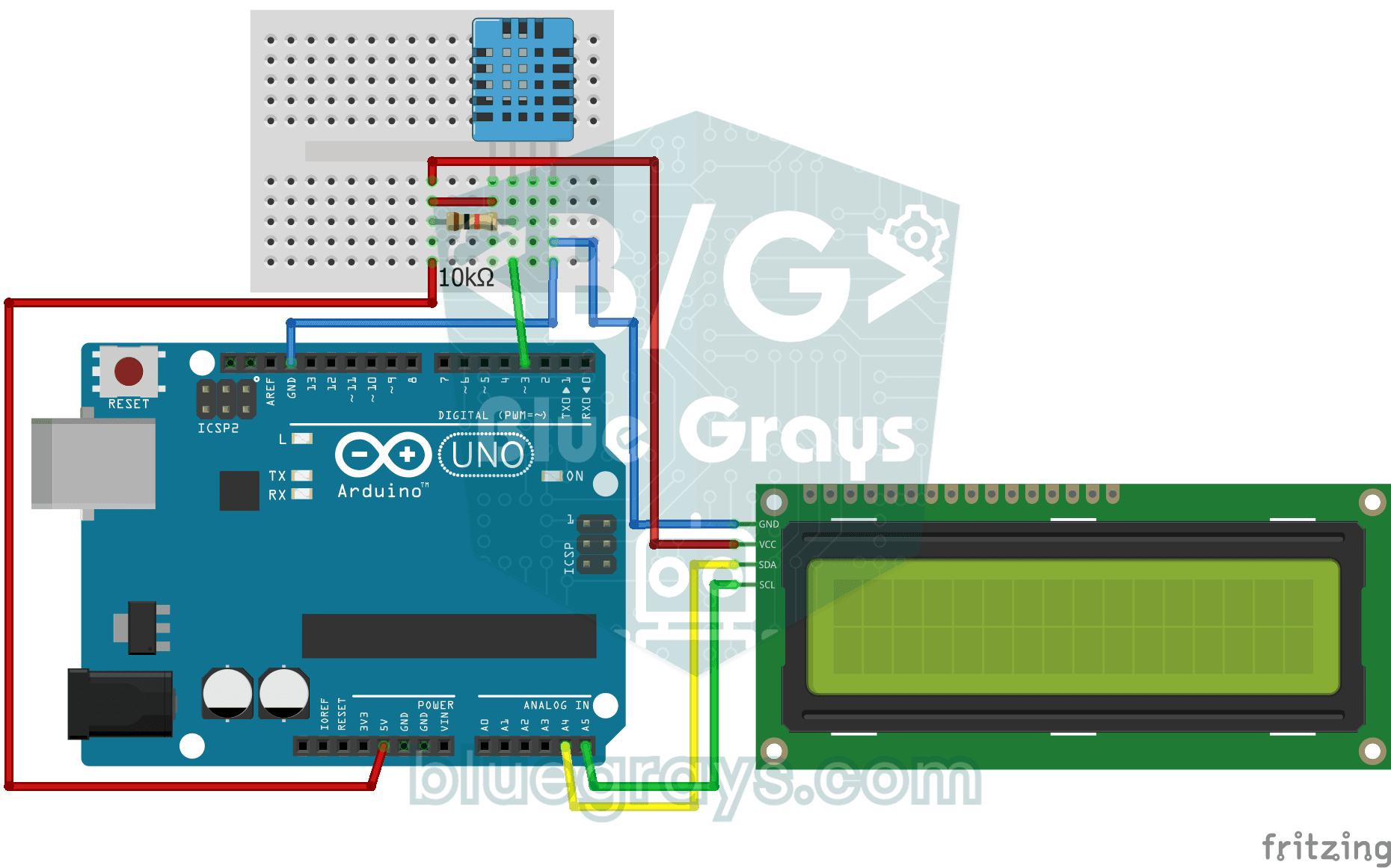
आपका कमरा कितना गर्म है, और हवा नम है या सूखी? DHT11 सेंसर तापमान और नमी मापता है और Arduino हर दो-एक सेकंड में वैल्यू को दो लाइन वाली LCD स्क्रीन पर लिखता है। सेंसर में कोई गड़बड़ हो तो एरर मैसेज दिखता है; यह आपके अपने छोटे मौसम स्टेशन की ओर पहला कदम है।
वीडियो
सर्किट डायग्राम
सोर्स कोड
C++ (Arduino IDE)
1// ─────────────────────────────────────────
2//   BlueGrays · bluegrays.com
3//   Temperature and Humidity with DHT11
4// ─────────────────────────────────────────
5// The DHT11 sensor measures room temperature and humidity; the I2C LCD
6// shows the temperature on the first line and the humidity on the second.
7// The reading refreshes every 2 s. If a reading fails the screen shows
8// "Sensor Error!".
9//
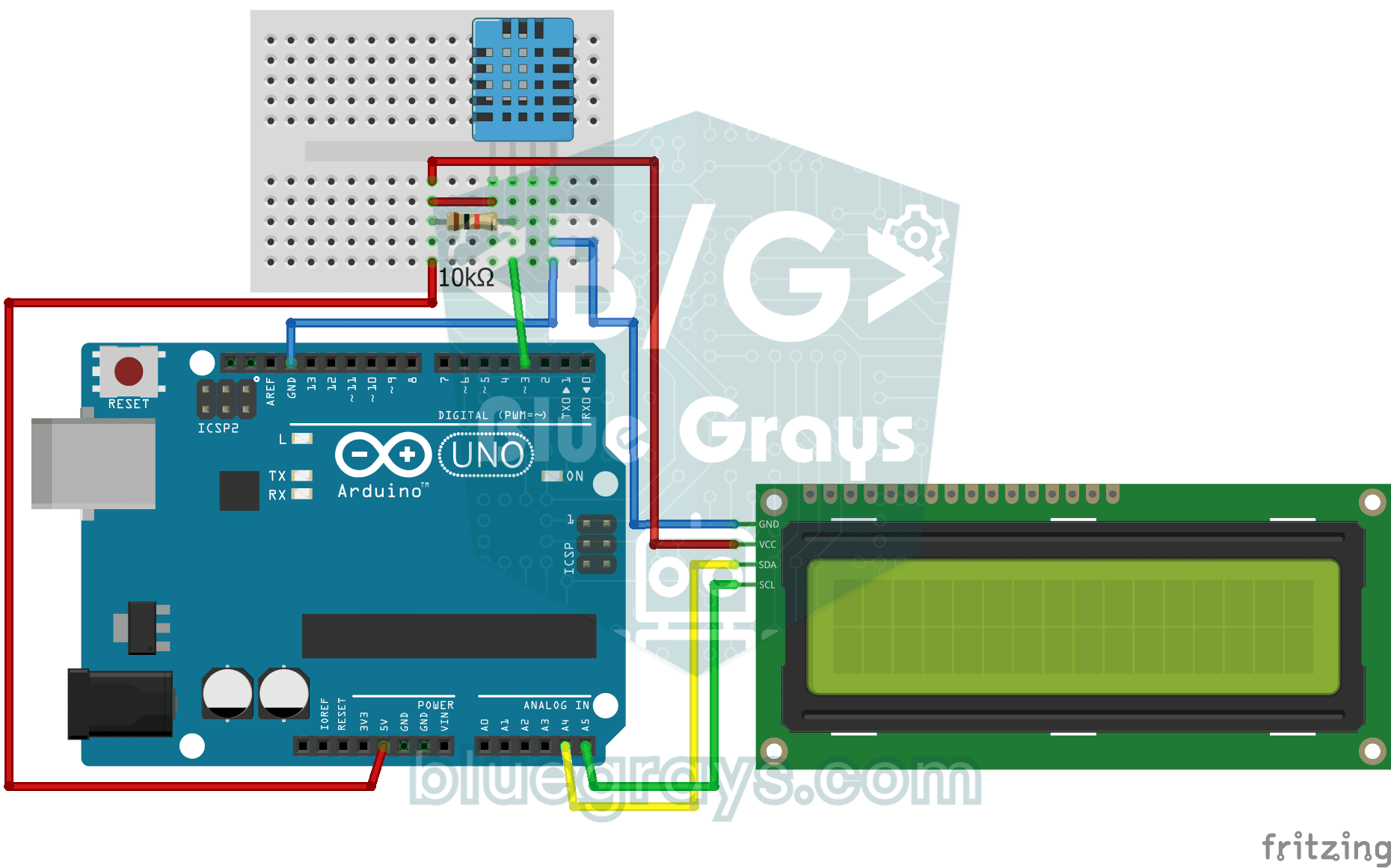
10// Pins:
11//   D3 -> DHT11 data
12//   (10k resistor between data and 5V, pull-up)
13//   A4 -> LCD SDA
14//   A5 -> LCD SCL
15//   DHT11 and LCD: VCC to 5V, GND to GND
16
17#include <LiquidCrystal_I2C.h>
18#include <Wire.h>
19#include <DHT.h>
20
21#define DHTPIN 3        // DHT11 data pin
22#define DHTTYPE DHT11   // Sensor type in use
23
24LiquidCrystal_I2C lcd(0x27, 16, 2);   // I2C address 0x27, 16x2 LCD
25DHT dht(DHTPIN, DHTTYPE);
26
27void setup() {
28  dht.begin();
29  // Modern libraries prefer init() over begin()
30  lcd.init();
31  lcd.backlight();
32}
33
34void loop() {
35  // Read humidity and temperature (C)
36  float humidity = dht.readHumidity();
37  float temperature = dht.readTemperature();
38
39  // Check if readings failed
40  if (isnan(humidity) || isnan(temperature)) {
41    lcd.setCursor(0, 0);
42    lcd.print("Sensor Error!   ");
43    return;
44  }
45
46  // Line 1: temperature
47  lcd.setCursor(0, 0);
48  lcd.print("Temp: ");
49  lcd.print(temperature);
50  lcd.print((char)223); // Degree symbol (°)
51  lcd.print("C   ");
52
53  // Line 2: humidity
54  lcd.setCursor(0, 1);
55  lcd.print("Humidity: %");
56  lcd.print((int)humidity);   // Print as a whole number (45)
57  lcd.print("   "); // Trailing spaces to clear old data
58
59  delay(2000); // DHT11 is slow, 2 seconds is more stable
60}
61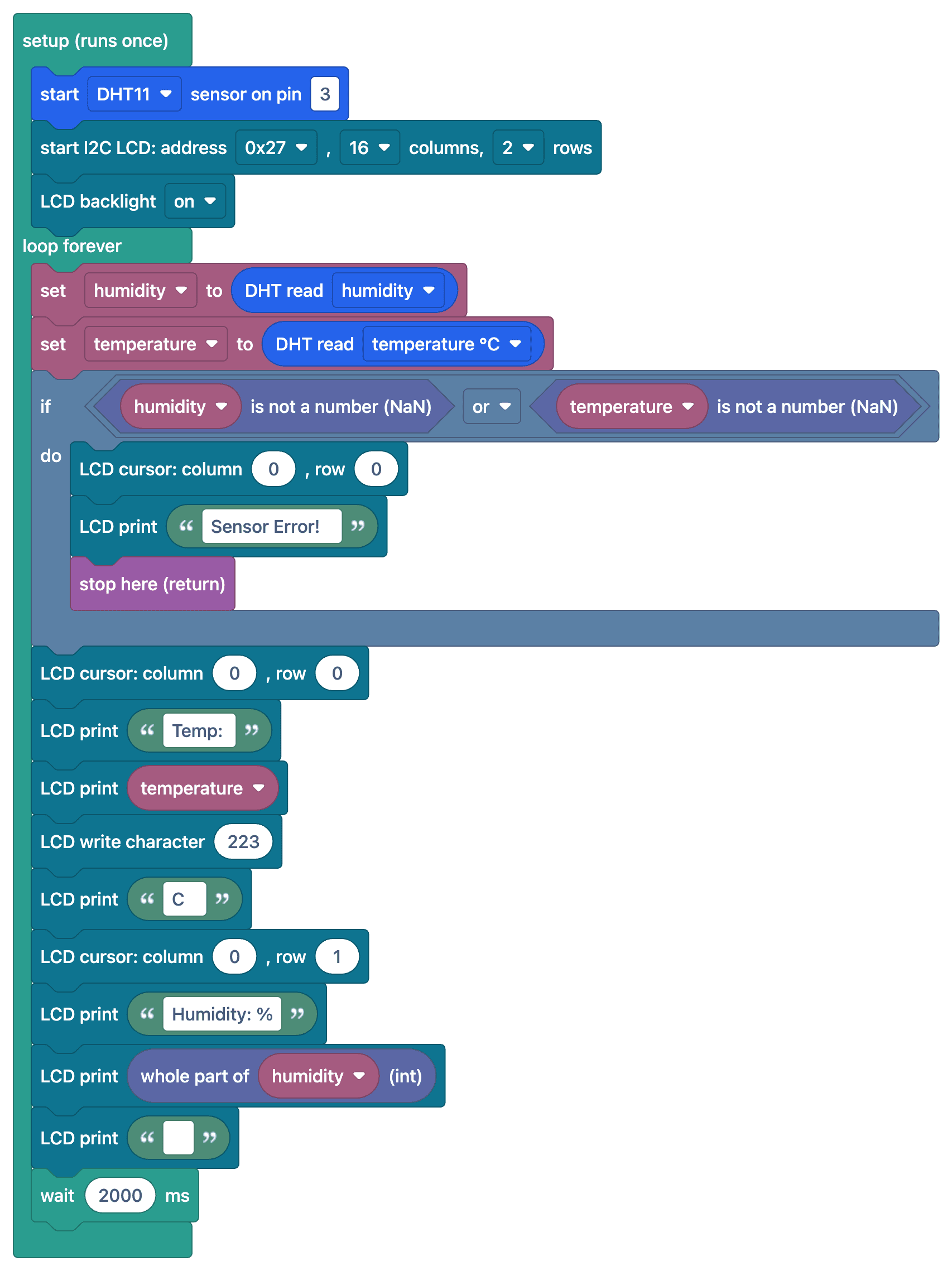
FAQ
DHT11 के माप कितने सटीक हैं?
DHT11 तापमान ±2 °C और नमी ±5% की सटीकता से मापता है और 0–50 °C रेंज में काम करता है। ज़्यादा सटीक माप के लिए DHT22 (±0.5 °C) या BME280 बेहतर है।
स्क्रीन पर "nan" या एरर मैसेज दिख रहा है, क्यों?
सेंसर पढ़ा नहीं जा सका। डेटा पिन पर 10 kΩ पुल-अप रेज़िस्टर, लाइब्रेरी सेटिंग में सेंसर टाइप (DHT11) जाँचें और पक्का करें कि दो रीडिंग के बीच कम से कम 1–2 सेकंड रुकते हैं।
रीडिंग धीरे-धीरे अपडेट क्यों होती है?
DHT11 सेकंड में ज़्यादा से ज़्यादा एक माप ले सकता है। इससे ज़्यादा बार पढ़ने की कोशिश करने पर गलत या पुरानी वैल्यू मिलती है; दो मापों के बीच 2 सेकंड रुकना बेहतर है।
क्या महसूस होने वाला तापमान निकाला जा सकता है?
हाँ, DHT लाइब्रेरी का computeHeatIndex() फ़ंक्शन तापमान और नमी के आधार पर महसूस होने वाला तापमान निकालता है।